Travel connectivity guide
Barquisimeto eSIM: Mobile Internet in Venezuela
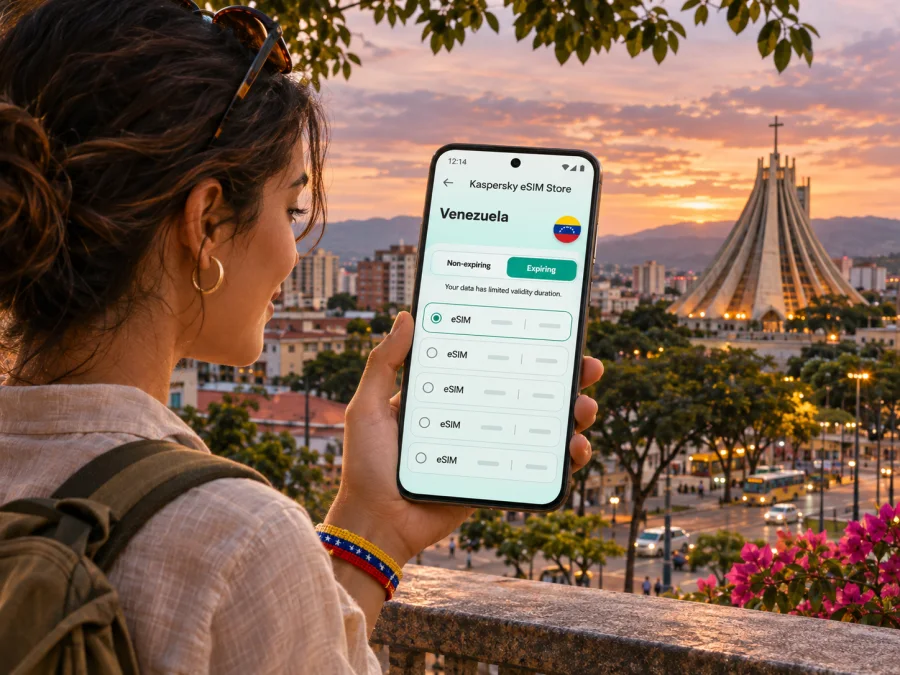
Barquisimeto eSIM: mobile connection and internet for your trip
Barquisimeto is the capital of Venezuela’s Lara state and a practical base for exploring the west-central part of the country. A phone connection can help at every stage: checking the latest flight details, arranging a ride from the airport, finding an address across the city, confirming a hotel booking, or keeping in touch with people at home. An eSIM can make mobile data easier to prepare before travel, provided your device and the selected plan support the trip.
This guide focuses on using mobile internet in Barquisimeto. It covers arrival at Jacinto Lara International Airport, city navigation, the Cathedral and Santa Rosa, common travel scenarios, device checks, and what to understand about a travel eSIM versus a local Venezuelan line. Network performance depends on the location, the underlying local network, the selected plan, and conditions at the time. No single connection method can be assumed to work equally well on every street or in every building.
Before you travel: plan for the city, not just the country
Barquisimeto is a substantial urban centre, and an address may be described by a parish, avenue, street, nearby landmark, or local point of reference. A map pin is useful, but it is not a complete arrival plan. Save your hotel’s full address in Spanish, its telephone or messaging contact, and a screenshot of the route from the airport. Ask your host or hotel which entrance or nearby landmark is easiest for a driver to identify.
Prepare the information you will need even if mobile data is temporarily unavailable:
- Save your accommodation address and booking details for offline access.
- Download an offline map of Barquisimeto and mark the airport, lodging, and first meeting point.
- Keep the names of destinations in Spanish, including accents where relevant.
- Agree on a pickup location and a way to recognize your driver before leaving the terminal.
- Store essential travel documents securely on your phone and keep a separate copy available.
- Tell a trusted contact your expected arrival time and how you will reach your accommodation.
These steps are useful whether you use an eSIM, a physical SIM, roaming, or Wi-Fi. They also reduce the pressure to troubleshoot a phone while standing in an unfamiliar arrivals area.
Arriving at Jacinto Lara International Airport
Jacinto Lara International Airport serves Barquisimeto and uses the IATA code BRM. It is on the Barquisimeto–Carora road; your journey time depends on the destination and current traffic. Confirm flight details, terminal information, and transport arrangements with your airline or accommodation close to departure, since services and schedules can change.
Airport Wi-Fi may help with a quick message, but do not make it your only connection plan: sign-in requirements, congestion, or limited reach can get in the way. If your eSIM is installed and ready, mobile data may be an alternative, subject to its local network arrangements and signal.
After landing, confirm your pickup and destination from saved notes. Turn on the travel line, select it for data, and enable data roaming only if the plan instructions require it. Check the map pin against your accommodation before setting off. Keep your home SIM active for calls or messages only if needed, and check its roaming charges.
If the map does not load, check that the eSIM is enabled and selected for data, then wait or move to an open area. Use Wi-Fi to consult plan instructions if available. Avoid deleting the eSIM profile as a troubleshooting shortcut; some profiles cannot be downloaded again.
Getting around Barquisimeto with mobile data
A navigation app helps you find a route, but traffic, road works, events, weather, and pickup access can change the journey. Confirm the exact entrance or meeting point with your host, particularly near a large avenue, public square, or shopping area. For an arranged ride, compare the vehicle and driver details with what you were given.
Data is useful for messaging a hotel about a delay, checking a destination, translating a short exchange, or sharing a location. Save the important details offline so a weak-signal stretch does not derail the day. For trips beyond the urban area, check the route and download navigation in advance; do not assume reception will continue along every road.
| Situation | Mobile-data use | Backup |
|---|---|---|
| Leaving the airport | Map, ride confirmation, host message | Saved address and pickup plan |
| Finding accommodation | Confirming a pin and sharing location | Spanish address and route screenshot |
| Moving between appointments | Checking routes and arrival times | Offline contact details |
| Short stopover | Confirming onward transport | Itinerary and ticket stored on device |
| Day trip | Route checks and messages | Downloaded map and return plan |
This table is a planning aid, not a coverage promise. Signal and speed vary by location. Confirm local arrangements before setting out.
Landmarks, neighbourhoods, and useful orientation
The Cathedral of Barquisimeto, the historic centre, and Santa Rosa are among the city references that often appear in visitor itineraries. The Monumento al Sol Naciente is another distinctive landmark. Use these names when saving map locations, then verify the exact destination and opening information shortly before you go. A landmark can be a helpful anchor for directions, but it may not identify the entrance to a particular building or event.
For a first day, group places by area instead of crossing the city repeatedly. Save the hotel and one or two planned stops, then ask a local host to confirm the order and transport method. When arranging a meeting, exchange a precise pin and a visible nearby reference. If your mobile map briefly loses its connection, the last downloaded map and saved place may still help you understand where you are, although live traffic or rerouting may be unavailable.
Barquisimeto is strongly associated with the annual procession of the Divina Pastora. The procession takes place on January 14 and follows a route from Santa Rosa toward the city’s Cathedral. If your visit coincides with the event, plan for unusually heavy pedestrian activity and possible changes to vehicle access. Check current local notices and instructions from event or church organizers before travelling. Save your lodging address and a meeting point in advance, keep your phone charged, and agree on a fallback if companions become separated. Do not assume that a usual driving route or pickup point remains accessible during a large gathering.
For other days, the same principles apply in a smaller way: verify current opening hours, avoid depending on a single map pin, and give yourself time to adjust if transport takes longer than expected. Mobile internet makes it easier to check details, but local confirmation remains valuable.
Choosing an eSIM for a Barquisimeto stay
A travel eSIM is a digital SIM profile installed on a compatible device. It can provide mobile data abroad under the terms of the selected plan. Before choosing one for Barquisimeto, check that Venezuela is included as a destination, review the data allowance and validity period, and read when the plan begins counting time or data. Look at the plan’s stated network and service conditions rather than assuming that a country-level listing means identical performance everywhere in the country.
If you are comparing options, start with the trip itself:
- Length of stay: choose a validity period that covers the dates you expect to use data, including arrival and departure days.
- Data habits: navigation, messaging, and email usually need less data than frequent video streaming or uploading large files.
- Route: if you plan to leave Barquisimeto, check whether the plan is intended for Venezuela only or also covers other destinations on your itinerary.
- Tethering: if you intend to share data with a laptop or another phone, confirm that the selected plan and device allow it.
- Activation details: check whether the validity clock starts on purchase, installation, or first network connection.
- Local conditions: read the plan’s network and roaming notes and keep offline backups for essential travel information.
You can review current Venezuela eSIM options for your trip and compare the displayed plan terms before choosing. Kaspersky eSIM Store is an app and website where travellers can select, arrange, and activate an eSIM with a suitable plan for mobile data abroad. The destination page is for Venezuela as a whole; it is not a Barquisimeto-specific tariff or a guarantee of local coverage.
Travel eSIM and a local Venezuelan line are different choices
A travel eSIM for data and a domestic mobile line are not automatically interchangeable. A local operator may offer its own eSIM subject to its eligibility, identity checks, compatible-device list, payment methods, and activation process. For example, Digitel publishes local requirements that include registering as the line holder, presenting valid identification, and verifying device compatibility through its own channels. Those terms apply to that operator’s local service, not to every travel eSIM plan.
If you need a Venezuelan telephone number for regular voice calls or SMS, confirm that need before choosing a data-only travel plan. A travel eSIM may provide mobile data without a conventional local number, unless its specific terms say otherwise. Your home SIM may continue to handle calls and SMS, but roaming rates and availability depend on your home operator. Messaging and internet calls may work over data when the relevant service and recipient are available.
Device compatibility also deserves a careful check. eSIM support can depend on the exact model number, hardware region, software version, and whether the phone is carrier-unlocked. A device name alone may not prove that a particular regional variant can install a profile or connect to a given network. Check the manufacturer’s specifications and the plan’s requirements, then check whether your device supports eSIM before purchase. If an operator publishes a country-specific device list, use it only for that operator’s own service; do not treat it as a universal list for all eSIM providers.
Install and activate before you need directions
When possible, install the eSIM while you still have a reliable internet connection and enough time to follow the instructions. Keep the QR code or manual activation details accessible on a second screen or printed copy if the installation method requires scanning. Follow the order and timing shown for your selected plan. Some profiles can be installed before travel but should not be switched on until the intended destination or activation point; the plan’s own terms determine this.
A simple setup checklist:
- Confirm the phone is compatible, unlocked, and connected to Wi-Fi.
- Review the destination, data amount, validity, supported network information, and activation conditions.
- Install the profile using the instructions for your device.
- Label the new line clearly, such as “Travel data,” so you can identify it later.
- Keep your home number available for calls and messages if you need it, and select the travel line for mobile data.
- On arrival, enable the eSIM and adjust data roaming only as directed by the plan instructions.
- Check that mobile data works with a simple page or map before relying on it for a long journey.
For step-by-step help, use the Android eSIM installation instructions or the iPhone eSIM installation instructions. Menu labels differ across manufacturers and software versions, so follow the instructions shown on your device. If you do not see the same menu, check the phone maker’s current support guidance rather than guessing at an unfamiliar setting.
Do not remove the eSIM profile just because data has not started immediately. First verify the selected data line, mobile data switch, roaming setting if required, and plan status. Check whether the plan starts at a particular time or only after connecting to a supported network. Restarting the phone may help in some cases, but if the issue remains, use the support channel listed with the plan and keep any error message or order details available.
Practical scenarios
Late arrival
Save the lodging address, map pin, and pickup instructions before departure. Confirm where the driver will meet you. After landing, use the eSIM or airport Wi-Fi to send an arrival message. If data is unavailable, follow your saved plan rather than searching for a new option under pressure.
Work appointments
Store meeting addresses and contacts in your calendar, including the building entrance. Download essential files in advance. Check the next route before leaving and message your contact if traffic delays you. Test the connection before an essential video call and keep a phone or rescheduling option available.
Divina Pastora procession
If visiting Santa Rosa on January 14, check the current route and organizer guidance, choose a meeting point outside the densest crowd, and agree on a fallback if your group separates. Keep the lodging address offline and your phone charged; do not depend on live maps loading throughout the event.
Another destination in Venezuela
Check that your plan covers the full route and dates. Download maps and save next-stop accommodation details while connected. Confirm departure arrangements and do not assume uniform signal along every road.
When mobile data is slow or unavailable
Weak service may reflect location, congestion, a temporary network issue, device settings, or plan restrictions. Check that airplane mode is off, the eSIM is enabled, and it is selected for mobile data. Confirm plan status and destination coverage; enable data roaming for the travel line only if the instructions require it. Wait or move to an open area, then test again. Use trusted Wi-Fi for urgent messages if available. Note any error and contact plan support if the issue continues. Do not delete the eSIM unless instructed. Keep accommodation details, transport contacts, and maps available offline.
A compact checklist for your Barquisimeto trip
Before leaving: Confirm the exact phone model and regional variant support eSIM and are unlocked. Compare Venezuela plan terms, validity, data allowance, and activation timing. Install the profile if permitted, save the airport pickup details and lodging address in Spanish, and download an offline map.
On arrival: Confirm the destination and transport, select the travel eSIM for data, and follow its roaming instructions. Test a map or web page and message your host. Keep offline contacts available.
In the city: Recheck opening times, meeting places, and event arrangements. For the January 14 Divina Pastora procession, verify current local guidance. Check plan validity before travelling beyond Barquisimeto.
Frequently asked questions
Does an eSIM guarantee mobile internet everywhere in Barquisimeto?
No. Reception and speed depend on plan network arrangements and local conditions, and can vary by building, neighbourhood, time, and route. Keep offline maps and key addresses.
Is Barquisimeto a separate eSIM destination?
The destination is Venezuela; Barquisimeto is in Lara state. A country plan is the relevant starting point unless its terms describe another region. It is not a city tariff or a guarantee of identical citywide service.
Can I keep my usual number active?
That depends on the exact phone model, region, and home operator. Check supported line combinations and roaming terms. A travel data eSIM does not necessarily include calls or SMS.
Will a travel eSIM give me a Venezuelan number?
Do not assume so. Many travel plans are for data. Read the chosen plan’s terms. If you need a local number, verify eligibility and current requirements with a Venezuelan operator.
Should I install before travelling?
You can prepare in advance if the plan permits it. Check when validity starts and do not activate earlier than intended. Keep activation details until setup is complete.
What if the phone supports eSIM in one country but not another?
Regional variants can differ. Check the exact model number, carrier lock, manufacturer information, and plan requirements. A Venezuelan operator’s device list applies to its own service.
What if navigation stops working?
Use your offline map and saved destination, pause somewhere safe, and check the eSIM data settings. If available, use trusted Wi-Fi to contact your host or driver. Do not continue in an unfamiliar direction using a map that is no longer updating.
Prepare your connection before the first ride
A smooth Barquisimeto arrival begins with a few practical details: a saved address, an agreed pickup plan, offline directions, and a data option that matches your dates and device. Review the current terms for Venezuela, confirm compatibility, and install the eSIM according to its instructions. When you are ready, choose an eSIM plan for your Venezuela trip through Kaspersky eSIM Store, the app and website for selecting, arranging, and activating an eSIM for mobile data abroad. Keep local conditions and the plan’s specific terms in mind, and carry offline backups for the parts of the journey that matter most.


