
Travel connectivity guide
Basel eSIM Guide for Mobile Internet
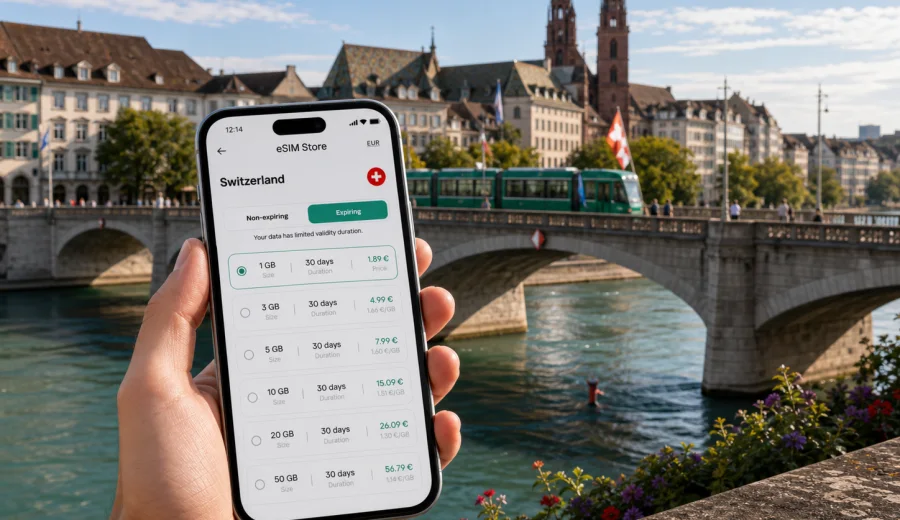
Basel eSIM guide: mobile connection and internet for your Switzerland trip
Basel is an easy city to enjoy when your phone is ready before you arrive. The old town is compact, the Rhine divides the city into clear areas, trams run frequently, and many trips begin or end at Basel SBB, Basel Badischer Bahnhof, or EuroAirport Basel Mulhouse Freiburg. But the same convenience can become awkward if you land with no mobile internet: ticket machines, hotel messages, business meeting updates, restaurant reservations, and cross-border navigation all depend on a reliable data connection.
An eSIM is useful for Basel because the city is both local and international at the same time. You may sleep in Switzerland, arrive through an airport located on French territory, attend a meeting near Messe Basel, cross the Rhine to Kleinbasel for dinner, and make a day trip toward Lucerne, Zurich, Colmar, or Freiburg. A prepared eSIM helps you keep maps, transport apps, messaging, and travel documents available without changing a physical SIM card.
This guide focuses on practical mobile connection planning for Basel: arrival, transport, hotels, districts, business travel, short stopovers, and trips from the city. It also explains when to install an eSIM, how to choose a data allowance, and what to check before you rely on your phone abroad.
Why mobile internet matters in Basel
Basel is organized, walkable, and well connected, but it is not a city where you should depend only on hotel Wi-Fi. Many useful moments happen between fixed Wi-Fi points: finding the right exit at Basel SBB, checking tram connections, opening a museum ticket, confirming a hotel check-in time, or changing plans after a meeting runs late.
Mobile internet is especially helpful in Basel for:
- navigation through the old town, where narrow streets can make directions less obvious;
- tram and bus route checks between Basel SBB, Marktplatz, Messeplatz, Kleinbasel, and the Rhine;
- arrival coordination at EuroAirport, where travelers may follow Swiss, French, or German exit routes;
- hotel self check-in messages and digital booking confirmations;
- messaging, ride coordination, and calendar updates during business trips;
- day trips from Basel into other Swiss cities or nearby border regions;
- translation and restaurant research when plans change during the day.
Basel also rewards precise movement. The distance between places may look short on a map, but the right tram line or bridge can save time, especially in rain, with luggage, or before a timed museum entry. A working data connection keeps these small decisions simple.
Basel arrival points and eSIM timing
The best time to install your eSIM depends on how you enter the city. Basel has several common arrival patterns, and each one creates a different mobile internet need.
| Arrival point | What usually matters | eSIM preparation tip |
|---|---|---|
| EuroAirport Basel Mulhouse Freiburg | Airport exits, hotel transfer, maps, messaging | Install the eSIM before departure or while still on airport Wi-Fi, then activate according to the tariff instructions. |
| Basel SBB | Tram connections, platform changes, hotel route | Have mobile data ready before leaving the station, especially if you arrive at night or with luggage. |
| Basel Badischer Bahnhof | Connections from Germany, tram into the center | Check whether your route continues within Switzerland and keep your Switzerland data plan ready. |
| Car arrival | Parking, hotel access, border roads | Prepare navigation and parking apps before you reach the city center. |
| River cruise stop | Short city time, walking route, meeting point | Use mobile data for compact route planning and quick changes. |
EuroAirport deserves special attention because it serves Basel, Mulhouse, and Freiburg. You can arrive for a Switzerland trip through an airport with cross-border logistics. If your final destination is Basel, choose the mobile internet option for Switzerland rather than treating the airport as the whole trip. For a city article, the relevant destination is where you will use the connection most: Basel and the wider Switzerland route.
Choosing a data allowance for Basel
Your data needs in Basel depend more on behavior than on distance. A traveler who mainly uses maps and messaging can use a modest allowance. A business traveler who joins video calls, shares documents, and uses hotspot mode will need more.
For a short Basel city break, mobile data often goes to maps, restaurant searches, museum tickets, messaging, and transport checks. For a trade fair or conference visit, the phone may become a working tool: calendar changes, email attachments, cloud documents, taxi coordination, and hotspot use for a laptop. For a multi-city Switzerland trip, you should think beyond Basel and include train days, hotel moves, and navigation in other cities.
| Travel style | Typical Basel use | Planning approach |
|---|---|---|
| Weekend visitor | Maps, messaging, tickets, light browsing | Choose a smaller package if you avoid video and large uploads. |
| Museum and old town trip | Directions, opening hours, digital tickets, photos backup on Wi-Fi | Keep mobile data for movement, save heavy uploads for Wi-Fi. |
| Business trip | Email, calendar, documents, messaging, possible hotspot | Choose more data and check whether hotspot use is allowed by the selected tariff. |
| Trade fair visitor | Messe Basel navigation, group coordination, hotel apps | Plan for busy days away from hotel Wi-Fi. |
| Switzerland route from Basel | Trains, maps, hotels, day trips | Choose a tariff duration that covers the full route, not only the Basel nights. |
Avoid choosing only by the lowest price. Look at the destination, data volume, validity period, and tariff conditions. eSIM data plans usually focus on mobile internet; ordinary voice calls and SMS are not included unless the terms of a specific tariff say otherwise. For calls, many travelers use messaging apps over mobile data.
When a Basel eSIM is more practical than public Wi-Fi
Public Wi-Fi can help in hotels, airports, museums, and cafes, but it is not a full travel plan. You may need internet before you reach a hotel, after you leave a cafe, or while standing outside a tram stop. A prepared eSIM gives you a direct mobile data option for those gaps.
Mobile data is particularly useful when you need to:
- open a map while walking from Barfuesserplatz to the Rhine;
- check a tram connection from Messeplatz to Basel SBB;
- message a hotel about late arrival;
- receive a changed meeting room number during a conference;
- find the correct bridge or ferry crossing;
- book a table in Kleinbasel after museum hours;
- navigate from the airport bus or station to your accommodation.
If you want to prepare before the trip, you can use Kaspersky eSIM Store to choose a suitable eSIM tariff for Switzerland and review the data volume, validity, destination, and price before you travel. This is most useful when you already know that Basel is your first stop and that you will rely on mobile maps and messages from arrival.
Districts and common Basel routes
Basel is compact, but its districts feel different. Mobile internet helps because the best route may change depending on whether you walk, take a tram, or cross the Rhine.
| Area | Why data helps |
|---|---|
| Altstadt Grossbasel | Narrow old-town streets around Marktplatz and Basel Minster are easier with live walking directions. |
| Kleinbasel | Restaurants, riverside walks, and evening routes often require tram checks or late hotel navigation. |
| Messe Basel | Conference plans, badges, meeting points, and colleague messages can change during the day. |
| Gundeldingen and Basel SBB | Train arrivals, hotel routes, and luggage-friendly transport options are simpler with maps ready. |
| St. Alban and the Rhine | Museum routes, ferries, bridges, and riverside walks benefit from live opening hours and directions. |
Transport in Basel: where mobile data helps most
Basel's public transport is efficient, but travelers still need real-time information. A tram stop may have several lines, the direction matters, and your route may change if you are going from a hotel to a museum, from Basel SBB to Messe Basel, or from the Rhine back to the old town.
Use mobile internet for:
1. Checking the correct tram direction before boarding.
2. Comparing walking and tram routes when the weather changes.
3. Finding a platform or station exit at Basel SBB.
4. Opening hotel or event addresses directly from messages.
5. Coordinating with other travelers after splitting up.
6. Keeping digital tickets and reservation confirmations accessible.
Save key transport details offline, but keep mobile data available for updates. Screenshots help, yet they cannot replace live rerouting or urgent messages.
Business trips, trade fairs, and short work visits
Basel is a serious business destination, especially for life sciences, conferences, exhibitions, and cross-border meetings. A business traveler may use more data in one day than a leisure traveler uses in a weekend because work tasks are less predictable.
For business travel, prepare your eSIM around the working schedule:
- choose a validity period that starts before your first meeting and covers departure day;
- allow extra data for email attachments, cloud files, and hotspot use;
- check whether the selected tariff allows tethering if you plan to connect a laptop;
- install the eSIM before the first working day, not in a rush outside the venue;
- save hotel and venue addresses offline as a fallback.
For Messe Basel, a practical data plan should cover venue navigation, colleague messages, calendar changes, restaurant booking, and transport after evening events. Venue Wi-Fi may be available, but mobile data gives you a separate option when you need to move quickly.
Stopovers and one-day visits
Basel is a common stopover because it sits near France and Germany and is connected well by rail. If you only have a few hours, mobile internet matters even more: there is less time to solve connection problems. A one-day plan might include Basel SBB, the old town, Basel Minster, the Rhine, a museum, and dinner in Kleinbasel. With mobile data, you can adapt the route, choose a tram, check opening hours, or find the quickest return to the station.
For stopovers, use this compact checklist:
- Install the eSIM before arrival or while you still have stable Wi-Fi.
- Save the station, airport, hotel, or cruise meeting point.
- Keep your return route visible in maps.
- Avoid large downloads and video streaming.
- Use mobile data for decisions, not background app updates.
- Keep a battery reserve for navigation at the end of the visit.
Trips from Basel into Switzerland
Many travelers use Basel as a starting point for Switzerland. Zurich, Lucerne, Bern, and smaller Rhine or Jura trips can all begin from the city. If your tariff is for Switzerland, think about the full route rather than only the Basel nights.
Before you leave Basel for another Swiss city, check that the validity period covers the last travel day, the data allowance is enough for train navigation and hotel moves, hotspot mode is allowed if you need it, and key addresses are saved offline.
How to install and activate an eSIM for Basel
The exact installation flow depends on your device and the selected tariff, but the basic logic is simple: check compatibility, choose the destination and data plan, install the eSIM profile, and activate it according to the instructions. Do not wait until you are standing outside the airport exit with luggage if you can prepare earlier.
General preparation steps:
1. Check whether your phone supports eSIM and is not locked to another carrier.
2. Choose Switzerland as the destination if Basel is your main city in the country.
3. Review data volume, validity period, price, and tariff conditions.
4. Install the eSIM profile while you have a stable internet connection.
5. Keep your primary SIM for calls or messages if you still need it.
6. Turn on the eSIM line and mobile data according to the setup instructions.
7. If required by the tariff instructions, enable data roaming for the eSIM line.
For device-specific setup, use the Android installation guide or the iOS installation guide. Follow the instructions for your operating system and keep the installation details available until the eSIM is working.
Device compatibility before you buy
Not every phone or tablet supports eSIM, and some devices may be locked by a mobile operator. Before choosing a tariff, check your device and confirm that it can install and use an eSIM profile. This step is important because eSIM support depends on the device model, region, and carrier settings.
Compatibility is also practical for Basel travel because you may want to install the eSIM before departure. If the device is not compatible, it is better to know before you arrive at EuroAirport, Basel SBB, or your hotel reception.
Practical data-saving tips in Basel
Basel does not require extreme data use if you plan well. Most travelers can reduce unnecessary consumption without making the trip less convenient.
Use these habits:
- Download offline map areas before departure if your map app supports it.
- Turn off automatic app updates on mobile data.
- Pause cloud photo backup until hotel Wi-Fi.
- Use lower quality for video calls if you must join one on mobile data.
- Save museum tickets, hotel confirmations, and meeting addresses offline.
- Close navigation after you reach the destination.
- Track data use during the first day to see whether your allowance matches your behavior.
For families or groups, decide whether one person will use hotspot mode. Hotspot can be useful, but it can also consume data quickly. If several people need independent navigation and messaging, separate eSIM setups may be easier than sharing one connection all day.
Basel eSIM planning by travel scenario
Different visitors need different mobile internet planning. Use the scenario closest to your trip.
| Scenario | Mobile internet priority | Suggested preparation |
|---|---|---|
| First visit to Basel | Maps, trams, hotel route, tickets | Install before arrival and keep data for navigation. |
| Conference or fair | Email, calendar, venue movement, messaging | Choose enough data for workdays and check hotspot rules. |
| Rhine weekend | Walking routes, restaurants, museum times | Use mobile data for movement, save media uploads for Wi-Fi. |
| Stopover | Fast orientation and return route | Activate before leaving the station or airport. |
| Switzerland route | Multi-city navigation and hotel moves | Match validity to the full trip length. |
| Cross-border plans | Route decisions near France and Germany | Check whether your selected tariff covers only Switzerland or a wider region. |
If your trip includes France or Germany in addition to Basel, read the tariff destination carefully. A Switzerland tariff is the right match for Basel use, but cross-border travel may require a different country or regional option depending on the route. The important point is to match the tariff conditions to where you will actually use mobile data.
Quick answers about eSIM in Basel
Do I need an eSIM if my hotel has Wi-Fi?
Hotel Wi-Fi is useful, but it does not help much between the airport, station, tram stops, restaurants, museums, and meeting venues. An eSIM gives you mobile data while you are moving around Basel.
Should I install the eSIM before I arrive?
In most cases, yes. Install it while you have stable Wi-Fi, then activate it according to the selected tariff instructions. This reduces stress on arrival and helps you use maps and messages immediately when the trip begins.
Is an eSIM enough for calls and SMS?
Usually, travel eSIM tariffs are focused on mobile internet. Ordinary voice calls and SMS are not included unless a specific tariff says otherwise. You can use internet-based calling and messaging apps over mobile data.
Can I use an eSIM for a laptop?
Some travelers use hotspot mode from a phone, but availability depends on the selected tariff and device settings. Check the conditions before relying on it for work.
What should I do if mobile data does not start?
Check that the eSIM line is enabled, the correct line is selected for mobile data, and data roaming is enabled if required by the instructions. Restarting the device can also help after installation. Keep installation details accessible until the connection is working.
Final checklist before your Basel trip
Before departure, make sure you have:
- confirmed that your device supports eSIM;
- chosen Switzerland as the destination for a Basel-focused trip;
- checked data volume, validity, price, and tariff conditions;
- installed the eSIM profile on a stable connection;
- saved hotel, station, airport, and meeting addresses;
- downloaded key documents and tickets;
- planned whether you need hotspot mode;
- kept your primary SIM settings clear if you still need calls or SMS.
Basel is a city where a good mobile connection quietly improves the whole trip. You can move from the airport or station to the hotel, cross the Rhine, reach a trade fair, adjust a museum route, and continue through Switzerland with fewer interruptions. To prepare before you travel, use Kaspersky eSIM Store to select an eSIM tariff for your Basel and Switzerland trip, install it on a compatible device, and keep mobile internet ready for the moments when Wi-Fi is not enough.