
Travel connectivity guide
Batam eSIM for mobile internet
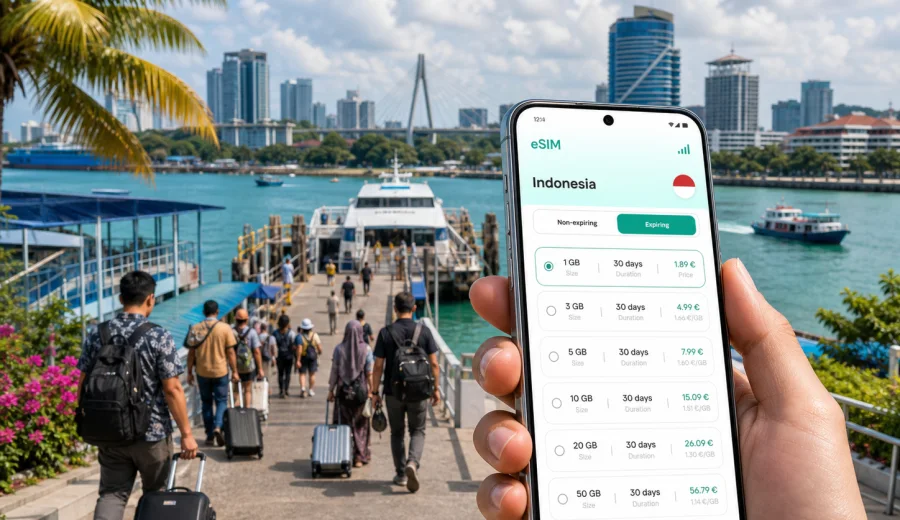
Batam eSIM: mobile connection and internet for a city trip
Batam is one of Indonesia's most practical arrival points for travelers who want a fast island break, a business visit, or a short stop between Singapore, Johor, and the Riau Islands. The city is spread across waterfront districts, ferry terminals, industrial zones, shopping areas, resorts, and bridges that lead toward quieter islands. That layout makes mobile connection and internet access more than a convenience: it affects how easily you book transport, find your hotel, confirm ferry details, translate messages, and move between parts of the city.
An eSIM can be a practical way to prepare mobile internet for Batam before you reach the ferry pier or airport. Instead of looking for a local SIM card after arrival, you can choose a data plan for Indonesia, install the eSIM on a compatible phone, and keep your main SIM for calls or banking messages if your device supports dual SIM use. This is especially useful in Batam because many trips are short. A traveler who lands at Hang Nadim International Airport, arrives by ferry at Batam Center, or checks in near Nagoya may not want to spend the first hour comparing counters and registration requirements.
This guide focuses on Batam, not Indonesia in general. It covers where mobile internet matters in the city, how to think about data usage, what to check before buying an eSIM, and how Kaspersky eSIM Store can help you choose, arrange, install, and activate an eSIM with a suitable tariff for a trip to Indonesia.
Why mobile internet matters in Batam
Batam is close to Singapore, but the travel rhythm changes as soon as you arrive. Visitors often move quickly from a ferry terminal to a hotel, office, mall, resort, marina, or onward road route. Wi-Fi can be available in hotels and cafes, but it is not the same as having mobile internet while you are between places.
Common Batam travel moments where data helps:
- checking ferry arrival and departure information after immigration;
- messaging a hotel or driver from Batam Center, Harbour Bay, Sekupang, or Nongsapura;
- navigating to Nagoya, Batam Kota, Bengkong, Nongsa, or the Barelang Bridge area;
- ordering a ride, checking pickup points, and sharing your live location;
- translating menus, signs, and service messages;
- using maps when walking between malls, cafes, waterfronts, and office buildings;
- joining video calls or reading documents during a business trip;
- checking travel updates before returning to Singapore or flying out.
Batam can feel simple on the map, but travel time changes with the terminal you use, traffic, weather, and the distance between districts. Mobile internet lets you adapt without waiting for the next reliable Wi-Fi network.
Arrival scenarios: ferry, airport, and hotel transfers
Many visitors arrive in Batam by ferry. The main terminals serve different travel patterns, so the first mobile task is often confirming where you are and where you need to go next.
| Arrival point | Typical use of mobile internet | Why it matters |
|---|---|---|
| Batam Center Ferry Terminal | Ride booking, hotel messaging, map checks | Convenient for Batam Kota, malls, offices, and central routes |
| Harbour Bay Ferry Terminal | Navigation to Nagoya and waterfront hotels | Useful for nightlife, shopping, short stays, and business meetings |
| Sekupang Ferry Terminal | Transfer coordination and route planning | Helpful for western Batam and onward routes |
| Nongsapura Ferry Terminal | Resort pickup, marina trips, Nongsa hotels | Important when transport is arranged by hotel or resort |
| Hang Nadim International Airport | Driver contact, maps, flight updates | Useful for late arrivals and trips across the island |
If you already have an eSIM installed, you can switch on mobile data after arrival according to the tariff conditions and your phone settings. This is helpful when the terminal is busy, your hotel transfer point is unclear, or you need to message someone before leaving the building.
Districts and routes where eSIM data is useful
Batam's most common visitor routes are practical rather than scenic. A typical itinerary may include a ferry terminal, a hotel in Nagoya or Batam Kota, meetings in industrial areas, a mall, a seafood dinner, and a short trip to the Barelang Bridge. Each part of that route uses mobile data differently.
Nagoya is one of the main hotel, shopping, food, and nightlife areas. Mobile internet helps with walking navigation, ride-hailing pickup points, restaurant searches, and messaging when meeting people in malls or hotel lobbies. It is also a common base for short weekend visits from Singapore.
Batam Kota and Batam Center are useful for ferries, offices, government buildings, malls, and practical city transfers. If you are in Batam for meetings, you may use mobile internet to confirm addresses, share documents, join calls, and coordinate several stops in one day.
Harbour Bay is compact but busy around ferry arrivals, hotels, restaurants, and waterfront routes. A data connection helps when you need to move quickly from pier to hotel, check return ferry timing, or meet a driver in a crowded pickup area.
Nongsa is more resort-focused. Mobile internet is useful for airport transfers, marina plans, resort communication, and day trips. Wi-Fi may be available inside resorts, but mobile data helps when you are on the road, at a beach club, or between hotel zones.
The Barelang Bridge route is one of Batam's best-known drives. If you plan to cross several bridges, stop for photos, or continue toward quieter islands, keep enough data for maps, messaging, and ride coordination. Coverage and speed can vary by area and operator, so download important addresses in advance when possible.
How much data you may need in Batam
The right eSIM tariff depends on how long you stay, how often you use maps and ride apps, and whether you rely on video calls or hotspot sharing. Batam trips are often short, but data usage can climb quickly if you stream video, upload photos, or work from your phone.
| Trip style | Typical duration | Practical data approach |
|---|---|---|
| Ferry day trip | 1 day | Light plan for maps, rides, messaging, translation, and ferry updates |
| Weekend break | 2-3 days | Moderate plan for navigation, social apps, restaurant searches, and photo sharing |
| Business visit | 2-5 days | Larger allowance if you join calls, send files, or use laptop tethering |
| Resort stay in Nongsa | 3-7 days | Moderate plan, with extra data if you will be away from hotel Wi-Fi |
| Multi-city Indonesia route | 1 week or more | Tariff with enough validity and data for Batam plus onward destinations |
As a practical baseline, maps, messaging, email, and browsing usually use far less data than video streaming, cloud backups, and hotspot use. Before traveling, disable automatic media downloads and large app updates on mobile data. If you need to use your phone as a hotspot, check the tariff conditions and your device settings before relying on it for work.
A Batam eSIM checklist before departure
Before you travel, do a few checks while you still have reliable home internet. This reduces the chance of troubleshooting in a ferry terminal or airport.
- Confirm that your phone supports eSIM and is not locked to one mobile operator.
- Check that the tariff covers Indonesia and has enough validity for your full stay.
- Decide whether you need data only or whether your main SIM will handle calls and SMS.
- Save your hotel address, ferry terminal name, and important booking screenshots offline.
- Install the eSIM while you have stable Wi-Fi, then activate it according to the instructions and tariff timing.
- Turn off automatic updates, cloud photo backups, and large downloads on mobile data.
- Keep your passport, ferry booking, hotel confirmation, and payment app accessible offline.
If you are not sure whether your device can use eSIM, check your device before choosing a tariff. Device compatibility is essential because an eSIM cannot be used on a phone that does not support eSIM profiles or is restricted by an operator lock.
Choosing an eSIM tariff for Batam
For Batam, the destination to look for is Indonesia. A city-specific eSIM is usually not needed because the mobile data tariff is selected by country or region, while Batam is the city where you will use it. The useful question is not "Which Batam tariff exists?" but "Which Indonesia tariff fits this Batam itinerary?"
Think through four points:
1. Duration: a day trip, weekend, business week, or longer Indonesia route.
2. Data volume: light navigation and messaging, or heavier work and media use.
3. Activation timing: whether the validity starts at installation, first network connection, or another condition stated in the tariff.
4. Device setup: whether your phone can use one SIM for calls and another for mobile data.
Kaspersky eSIM Store is an app and website where you can quickly choose, arrange, install, and activate an eSIM with a suitable tariff for mobile internet in an international trip. For a Batam visit, the practical route is to select Indonesia, compare the available data volume and validity, and prepare the eSIM before the ferry or flight when possible.
When you are ready to compare options, you can choose an eSIM tariff for your trip to Batam in Indonesia and review the conditions before installation. This is the main country page to use for a city trip to Batam because the city belongs to Indonesia and the article language is English.
How to install and activate an eSIM before Batam
The exact steps depend on your phone and the selected tariff, but the preparation logic is usually simple: choose a destination, install the eSIM profile on a compatible device, and set mobile data to use the eSIM when you want it to connect.
For setup details, use the relevant guide: Android installation instructions or iOS installation instructions. Follow the instructions on a stable Wi-Fi connection, especially if you are installing the eSIM shortly before leaving for the ferry terminal or airport.
A practical setup sequence for Batam:
1. Choose Indonesia as the destination and review the tariff validity, data allowance, and conditions.
2. Install the eSIM profile while you still have Wi-Fi.
3. Label the line clearly, for example "Indonesia data" or "Travel eSIM".
4. Keep your home SIM active if you need banking messages or calls, subject to your roaming settings.
5. On arrival in Batam, select the eSIM for mobile data when you are ready to use the tariff.
6. Check whether data roaming must be enabled for the eSIM line; this depends on the phone and profile conditions.
Do not delete an eSIM profile unless you are sure it is no longer needed. Some profiles cannot be moved to another device after activation, and reinstallation rules depend on the tariff conditions.
Business trips to Batam: keep the connection practical
Batam is a common destination for meetings, manufacturing visits, supplier checks, marine businesses, and regional work trips. Business travel often involves several addresses in one day, and Wi-Fi may only be reliable once you are inside an office or hotel.
For work trips, mobile internet helps with:
- confirming a driver's route and pickup point;
- opening maps between industrial estates, offices, hotels, and ferry terminals;
- joining short calls while in transit;
- sending documents or photos from a site visit;
- using authentication apps and email without relying on public Wi-Fi;
- checking the timing of a return ferry or flight after a meeting.
If you plan to use laptop tethering, choose a larger data allowance and confirm that hotspot use is allowed by the tariff and supported by your phone. Also keep a backup of essential documents offline. Mobile data is useful, but a business day should not depend on a single cloud file that is unavailable if the network is slow in a specific building or area.
Stopovers and short stays
Batam is often part of a wider regional itinerary. Some travelers visit for a few hours from Singapore, while others use the city as a stop before another Indonesian destination. For these trips, the value of an eSIM is speed and predictability.
For a same-day ferry visit, you may only need data for maps, messaging, ride bookings, payment confirmations, and ferry updates. A small data plan can be enough if you avoid streaming and large uploads.
For a one-night stay, mobile internet helps when moving between a terminal, hotel, dinner area, and return route. It also gives you a backup if hotel Wi-Fi is slow in your room or requires a local phone number for login.
For onward travel inside Indonesia, check whether the tariff has enough validity and data for the next city. If you continue to Jakarta, Bali, Surabaya, Lombok, or another destination, a country tariff for Indonesia may be more convenient than preparing separate connectivity plans for each stop.
Local movement: taxis, ride apps, walking, and hotel shuttles
Transport in Batam is easiest when you can communicate clearly and check your route. Pickup points at terminals and malls can be busy, and hotel shuttles may use specific meeting points. Mobile data supports these small but important details.
Use mobile internet to:
- pin the exact terminal exit or hotel lobby;
- send your location to a driver or colleague;
- compare travel time before choosing a route;
- save the name of your destination in Indonesian or English;
- check whether a restaurant, office, or spa is in Nagoya, Batam Kota, Nongsa, or another district;
- translate short messages when arranging pickup.
For walking, keep in mind that Batam is not always built like a compact pedestrian city. Many routes are more comfortable by car, especially in heat or rain. Mobile maps help you decide when a walk is reasonable and when it is better to book transport.
Common mistakes to avoid
The most common eSIM problems are not complicated, but they happen at inconvenient moments. Avoid these before you arrive in Batam.
- Buying a tariff without checking whether the phone supports eSIM.
- Installing the eSIM on the wrong device.
- Deleting the eSIM profile after installation.
- Forgetting to switch mobile data to the eSIM line on arrival.
- Expecting a data-only eSIM tariff to include a local phone number, voice calls, or SMS when those are not listed in the conditions.
- Letting cloud backup or video streaming use most of the allowance on the first day.
- Relying only on terminal or hotel Wi-Fi for transport coordination.
Read the tariff details carefully. Conditions such as validity, activation timing, available countries, data volume, and top-up options can vary by tariff.
Quick answers about eSIM in Batam
Do I need a Batam-specific eSIM?
Usually, no. For a city article about Batam, you should look for an Indonesia tariff because Batam is in Indonesia. The city matters for your travel scenario, while the tariff is selected by country or region.
Can I install an eSIM before taking the ferry to Batam?
In many cases, yes. Install the eSIM while you have stable Wi-Fi, then activate or start using it according to the selected tariff's instructions. Check the validity rules so you know when the data period begins.
Will an eSIM replace my normal phone number?
Not necessarily. Travel eSIM tariffs are often focused on mobile data. They may not include a regular phone number, voice calls, or SMS unless this is stated in the tariff conditions. Many travelers keep their main SIM active for calls or messages and use the eSIM for data.
Is public Wi-Fi enough for Batam?
Public or hotel Wi-Fi can help with heavy tasks, but it is less useful when you are moving between ferry terminals, hotels, restaurants, meetings, malls, and sightseeing stops. Mobile data is more practical for navigation and transport coordination.
Should I choose a larger data plan for business travel?
Choose a larger allowance if you expect video calls, file transfers, cloud tools, or hotspot use. For a light trip with maps and messaging, a smaller allowance may be enough.
Final preparation for mobile internet in Batam
A good Batam connectivity plan is simple: check device compatibility, choose Indonesia as the destination, install the eSIM before travel when possible, and keep enough data for arrival, maps, transport, messaging, and unexpected changes. The city is easy to enjoy when you are not searching for Wi-Fi at every step.
Kaspersky eSIM Store helps you prepare mobile internet for international travel through an app and website where you can choose, arrange, install, and activate an eSIM with a suitable tariff. Before your ferry, flight, meeting, or resort transfer, prepare an eSIM tariff for your Batam trip and review the tariff conditions so your mobile connection is ready when you need it.