Travel connectivity guide
Bath eSIM for Mobile Internet | United Kingdom
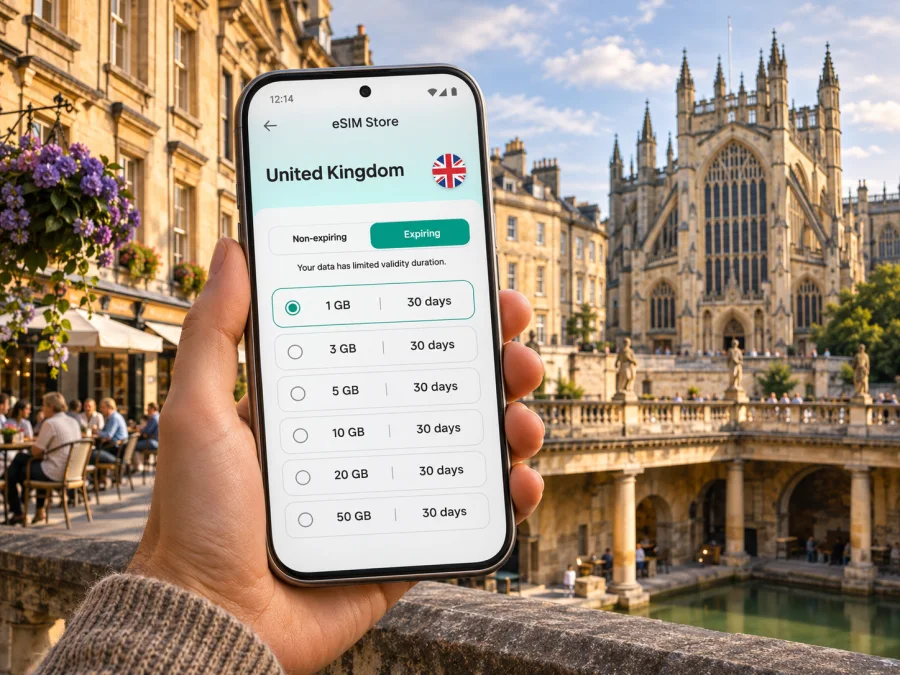
Bath eSIM: mobile connection and internet for your city break
Bath is a city for moving at a gentler pace: you may arrive by train, walk between Roman and Georgian landmarks, pause for lunch, then head uphill for a view across the rooftops. A reliable way to check maps, tickets, opening details and messages makes those small transitions easier. An eSIM can help you prepare mobile internet for the trip without changing the physical SIM in your phone.
Bath is in South West England, in the United Kingdom. Its historic centre is compact, and many well-known sights are close enough to link on foot. That does not mean every visitor’s day stays in the centre: accommodation, evening plans, a rail connection or a trip to a nearby town can all add journeys. This guide explains how to plan mobile data around the way you will actually use Bath, what to check before choosing an eSIM and how to avoid relying on a signal being available at every point.
What an eSIM can do during a Bath visit
An eSIM is a digital SIM profile that can be installed on a compatible device. For a trip abroad, an eSIM data plan can provide mobile internet for tasks such as opening a map, checking a train update, booking a taxi or messaging your accommodation. It does not automatically include a regular phone number, voice calls or SMS; check the terms of the selected plan. You can usually keep your usual SIM in place for calls and texts, subject to your device settings and home operator’s roaming terms.
Kaspersky eSIM Store is an app and website that helps you choose, arrange and activate an eSIM with a suitable plan for mobile internet during an international trip. It is not a mobile network operator. The plan’s destination, data allowance, validity period, price and activation conditions belong to the specific offer shown before purchase. Review those details rather than assuming one plan suits every visit to Bath.
A connection is useful in the ordinary gaps between attractions: the walk from Bath Spa station to your hotel, finding a side street after leaving the Abbey, checking a bus stop, or contacting someone when a meeting point changes. It can also be useful for work, though an eSIM data plan should not be treated as a guarantee of uninterrupted video calls or a substitute for checking your employer’s connectivity requirements.
Arriving in Bath and getting oriented
Bath Spa railway station and Bath Bus Station are both close to the city centre. If you arrive by train, you are already within walking distance of central hotels, shops and many major sights. The streets around the station are busy, and the centre has one-way roads, pedestrian areas and frequent changes in elevation. Before setting off, check your hotel’s exact entrance and the most suitable route; a map may suggest a short distance that still includes steps, a steep slope or a cobbled section.
If you arrive by coach, the bus station is also central. If you fly into Bristol Airport, check the current onward bus or rail arrangements before travel and allow time for the transfer. Services and timetables can change, so use live journey information on the day rather than relying on an old screenshot. Download the route or save your accommodation address while you have a dependable connection. A saved map or written address is useful if mobile data is temporarily unavailable.
For a first walk, it helps to orient yourself using a few landmarks rather than trying to remember every turning. Bath Abbey and the Roman Baths mark the historic core; SouthGate and the station sit to the south; the River Avon and Pulteney Bridge are east of the centre. The Royal Crescent and The Circus lie to the north-west, on higher ground. These reference points make it easier to understand a map and explain where you are if you are meeting a driver or a friend.
A simple arrival checklist
- Save your accommodation’s full address, including its postcode, before leaving the station or coach stop.
- Check whether your room is ready and where bags can be left; do not assume you can check in early.
- Keep the first route simple. A short walk may be easier than arranging a car in the busy centre.
- If you need step-free access, check the route and entrance with your accommodation instead of relying only on a map’s estimated walking time.
- Keep a little phone battery for navigation and transport updates. A power bank is helpful on a long sightseeing day.
Walking, buses and routes around the city
The historic centre is well suited to walking, and the main attractions sit within a relatively small area. Bath’s topography still matters: the centre lies in a valley, while places such as the Royal Crescent and viewpoints on the surrounding slopes require an uphill walk. Plan a route that groups nearby stops, and leave time to slow down on steep sections or in crowded streets. If you have mobility needs, check accessibility information for individual venues and routes in advance.
Local buses connect central Bath with residential areas and destinations beyond the centre. Bath Spa station and the bus station form useful reference points when comparing routes. Check a current timetable or journey planner before boarding, especially in the evening, on Sundays and on public holidays. A mobile map can help you identify the nearest stop, but verify the route number and direction on the stop display or with the operator: a pin on a map is not a substitute for checking the bus itself.
Bath also has rail connections to nearby places, which can turn a city stay into a wider South West itinerary. If you plan to visit another town, check the departure station, platform information and return options before setting out. Rail works, service changes and disruption can affect a particular journey; keep enough data available to check updates and have a backup plan if the return service changes.
For accommodation, compare the centre with nearby residential areas such as Bathwick, Widcombe and Oldfield Park. A central address can shorten walks to the Abbey and station; a stay farther out may mean a hill, bus ride or longer return after dinner. Save the property address and check the route at the time you expect to travel, especially if you will arrive late. For a short stay, compare the time and effort of walking with the time needed to wait for transport. A central hotel may make it practical to walk to dinner and return on foot; a room farther uphill or beyond the centre can make a bus or taxi more useful, particularly after dark or in poor weather. Save the route back to your accommodation before you leave a busy attraction.
Match your data plan to your Bath itinerary
The best way to estimate data is to list what you expect to do, not to guess from the length of the trip alone. A visitor who checks maps occasionally and uses hotel Wi-Fi may need less mobile data than a remote worker who joins calls, uploads files and streams media. The destination shown for the plan should cover the United Kingdom, and its validity period should include the days when you expect to use it. Check whether validity begins at purchase, installation or first network connection; this varies by plan.
| Your Bath day | Likely data use | Planning point |
|---|---|---|
| A central walking day | Maps, venue details, messaging and occasional searches | Save key locations before setting out; walking between central sights may reduce transport-app use. |
| A day with local buses | Journey planning, stop checks, tickets or payment apps | Check whether tickets can be bought in advance and keep a backup payment method. |
| A work visit | Email, documents, hotspot use or calls | Estimate data for calls and tethering carefully; confirm work policies and plan conditions. |
| A rail day trip | Timetables, platform updates, maps and messages | Check the plan’s destination and coverage terms for the whole route, not just Bath. |
| A weekend with Wi-Fi at your hotel | Navigation outside, messaging and occasional browsing | Hotel Wi-Fi can reduce mobile-data use, but do not count on it away from the property. |
When you are ready to review the current offer details, you can check eSIM options for a trip to the United Kingdom. Treat this as the country destination page, not as a Bath-specific network or city tariff. Compare the displayed data allowance, validity, price and activation terms with your itinerary before you choose.
A useful rule of thumb is to leave room for unplanned needs. You may need to reroute around roadworks, look up a different entrance, or contact your hotel after a change of plans. At the same time, there is no need to buy more data than you expect to use without checking whether the plan can be topped up or extended. Those options depend on the specific plan conditions.
Choose by use, duration and route
Before selecting a plan, answer four questions:
- Which destination does it cover? Check that the plan is listed for the United Kingdom. Bath is a city in England within the UK; it is not a separate country or a separate tariff destination by default.
- How much data do you expect to use? Include maps, messaging, work, uploads and hotspot use. Background app updates and video can consume more than occasional browsing.
- How long will you need it? Compare the plan’s validity with your full travel dates, including arrival and departure days. Confirm when the validity clock starts.
- What does the plan include? Review whether it is data-only, whether calls or SMS are included, whether tethering is allowed, and what the plan says about installation, activation, top-ups and refunds.
| Priority | What to check | Why it matters |
|---|---|---|
| A weekend in Bath | Short validity that covers arrival through departure | An allowance can expire before the return journey if activation timing is misunderstood. |
| A longer UK itinerary | Destination and validity across all planned stops | A plan for one destination may not cover every border crossing or onward route. |
| Remote work | Tethering rules and expected data use | Laptop use and video meetings can increase consumption significantly. |
| Keeping your usual number | Dual-SIM settings and home roaming costs | Your regular SIM may remain active for calls or texts and could incur roaming charges. |
| Limited device storage or access | Whether your phone supports eSIM and can install a new profile | A purchase does not make an incompatible or carrier-locked device compatible. |
No city-wide signal guarantee should be assumed. Coverage and performance depend on the plan’s underlying network, your location, the building, congestion, device settings and other conditions. Historic stone buildings, underground spaces, crowded events and rural sections of a day trip can behave differently from an open street. Keep a downloaded map, important booking details and key addresses available offline when possible.
Check your device before buying
Confirm that your exact phone or tablet variant supports eSIM and is not locked to a mobile operator. Models with similar names can differ by sales region, and some regional variants omit eSIM capability. The device maker’s specifications and your carrier’s unlock status are the best checks for your particular unit. Check whether your device is compatible before placing an order.
Also consider whether you can access the internet during installation. Many travellers install an eSIM before departure while connected to Wi-Fi, then enable the profile when they are ready to use it. Follow the selected plan’s instructions: some profiles begin their validity at installation, while others begin at first connection. Do not remove an installed eSIM unless the plan’s support instructions tell you to; some profiles cannot be installed a second time.
Install and activate the eSIM
The exact menu names vary across device versions. Use the platform-specific walkthrough and follow the steps shown for your phone:
A practical sequence is:
- Check compatibility, carrier lock status, plan destination, validity and installation conditions.
- Connect to reliable Wi-Fi and keep the order details or QR code accessible on another screen if required.
- Add the eSIM profile using your device settings or the supported installation flow.
- Label the profile clearly, for example “UK trip,” so you can distinguish it from your everyday SIM.
- Set your preferred line for mobile data. Keep your usual line configured for calls or messages only if that fits your needs and roaming terms.
- Enable data roaming for the travel profile only if the plan’s instructions require it. The setting is not the same as agreeing to your home operator’s roaming charges, but check which line is selected.
- Once in Bath, allow the phone time to register. If data does not work, check the selected data line, profile status, roaming setting and plan instructions before reinstalling anything.
Avoid deleting the profile as a first troubleshooting step. If a setting is unclear, consult the plan instructions or support channel before changing it. You can reduce unexpected data use by turning off automatic app updates, cloud photo uploads and video autoplay while travelling.
If mobile data is slow or unavailable
Start with simple checks rather than repeatedly switching settings at random:
- Confirm that the eSIM profile is enabled and selected for mobile data.
- Check that the plan is active, has remaining data and has not reached its validity end.
- Move to an open area or outside a thick-walled building and give the phone a moment to reconnect.
- Turn airplane mode on briefly, then off, or restart the phone if the plan’s guidance allows it.
- Check whether data roaming is required for the travel profile.
- Review any access-point or network-selection instructions provided for the specific plan.
- Use Wi-Fi, a saved map or a paper note for an urgent address while you troubleshoot.
A problem in one location does not by itself show that the eSIM is faulty. Network conditions may vary from street to street and indoors. If the issue continues, contact support with the device model and variant, operating-system version, location, time of the problem and the checks you have already completed. Do not post QR codes or eSIM activation details publicly.
Frequently asked questions
Is Bath in England or Scotland?
Bath is in South West England, within the United Kingdom. It is a city, not a separate country. For an eSIM, check the destination printed in the plan details rather than searching for a city-specific tariff.
Is Bath easy to explore without a car?
For many visitors, yes. The centre is compact, many prominent sights are walkable from Bath Spa station, and local buses connect central areas with other parts of the city. Hills, accessibility needs, weather and where you stay can affect whether walking is the best choice for a particular journey.
Will an eSIM work everywhere in Bath?
No provider or plan should be assumed to work everywhere. Coverage and performance depend on the underlying network, the exact location, the building and other conditions. Check the plan information and keep offline access to important travel details.
Does a travel eSIM include calls and texts?
Not necessarily. Many travel eSIM plans are data-only and do not include a regular phone number, standard calls or SMS. Check the specific plan terms. Internet-based calling and messaging apps can work over data, subject to their own requirements.
Can I keep my regular SIM active?
Many dual-SIM phones let you keep an existing SIM alongside an eSIM, but available functions vary by device. Decide which line handles mobile data and review your home operator’s roaming charges before travel.
How much data should I plan for a weekend?
There is no single allowance that suits everyone. Estimate how often you will use maps, messaging, ticket apps, social media, work tools and video. Hotel Wi-Fi may reduce mobile use, but it is sensible to leave some data for route changes and transport updates.
Should I install the eSIM before or after arriving?
Follow the plan’s instructions. Installing before departure over Wi-Fi can make setup easier, but validity may start at installation or at first network connection depending on the offer. Check the timing before adding the profile.
What if the eSIM does not connect after I arrive?
Verify that the profile is enabled and selected for mobile data, that the plan is active and that any required roaming setting is on for that eSIM. Move to a different spot and consult the plan’s instructions. If the issue persists, contact support with relevant device and location details.
Prepare your Bath connection before you go
Before travelling, check your device, select a plan whose United Kingdom destination and validity fit your full itinerary, and read the activation conditions. Save your accommodation address, essential bookings and a map for offline use. In Bath, combine mobile navigation with the city’s walkable centre, current bus and rail information, and a little extra time for the hills.
Kaspersky eSIM Store helps you choose, arrange and activate an eSIM plan for mobile internet on an international trip through its app and website. Review the current details and choose an eSIM option for your United Kingdom visit when you are ready. Check the selected plan’s data, duration and conditions before completing your purchase, then install it using the relevant device instructions.


