
Travel connectivity guide
Batumi eSIM: mobile internet for your trip
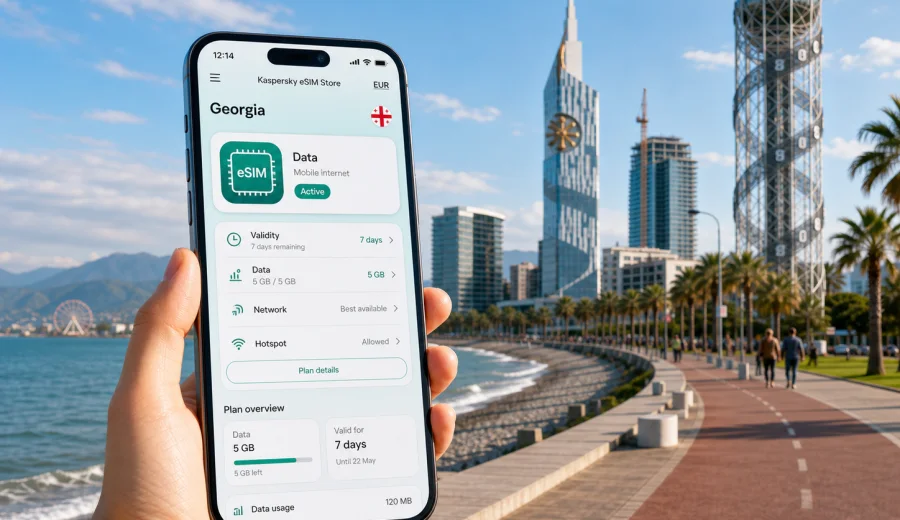
Batumi eSIM: mobile connection and internet for your trip
Batumi is a city where mobile internet becomes useful almost immediately: at the airport, on the road to your hotel, along the Black Sea promenade, in Old Batumi, near the Alphabet Tower, and during day trips across Adjara. If you are arriving in Georgia for a holiday, a business meeting, a short stopover, or a longer route through the Caucasus, an eSIM can help you prepare mobile data before you start looking for a local SIM card or relying on public Wi-Fi.
For a city trip, the main question is practical: will you be able to open maps, call a ride, check hotel messages, use translation apps, manage bookings, and stay in touch while moving around Batumi? A travel eSIM is a digital SIM profile for mobile internet. You install it on a compatible phone, choose it for mobile data, and use the selected data plan during your trip under the terms of that plan.
Kaspersky eSIM Store is an app and website where you can quickly choose, order, and activate an eSIM with a suitable mobile data plan for an international trip. It is not a mobile operator and does not provide its own network. Its role is to make the preparation step simpler: choose the destination, check plan conditions, install the eSIM on a compatible device, and use mobile data while you travel.
Why mobile internet matters in Batumi
Batumi is compact enough for walking, but your phone still works like a travel control panel. You may need maps for the boulevard, ride apps for moving between the airport and the city center, hotel messages for check-in, restaurant bookings, or translation when a sign, menu, or address is not immediately clear.
Mobile data is especially useful in these Batumi scenarios:
- arrival at Batumi International Airport and the first transfer to the city;
- checking the route from the railway station, bus terminal, or intercity minibus stop;
- walking between Old Batumi, Europe Square, the boulevard, the beach, and the port area;
- using maps in newer hotel districts near the seafront and high-rise towers;
- coordinating with colleagues during a business trip;
- checking weather, ferry or road information, and day-trip logistics;
- using messengers for calls and messages over the internet.
Public Wi-Fi can be helpful in hotels, cafes, and airports, but it is not always available at the exact moment you need it. Mobile data gives you more control when you are outside, moving between districts, or trying to solve a small travel problem quickly.
Batumi arrival scenarios where an eSIM helps
The first hour in Batumi often sets the tone for the whole trip. You may be tired, carrying luggage, and trying to confirm where to go next. Having mobile data ready can make this stage calmer.
| Travel moment | What you may need mobile data for | Why eSIM can be useful |
|---|---|---|
| Airport arrival | Maps, ride app, hotel address, messenger | You can start using data without searching for a SIM counter first |
| Hotel check-in | Booking confirmation, host messages, online payment alerts | You keep access to documents and communication while moving |
| First walk | Navigation, restaurant search, weather | You can explore without depending on Wi-Fi stops |
| Business meeting | Calendar, email, documents, video call backup | You have a separate mobile data option for work tasks |
| Stopover | Fast route planning and transport updates | You do not spend a short visit solving connectivity first |
If your itinerary includes Tbilisi, Kutaisi, mountain areas of Adjara, or border routes, check that the selected plan is for Georgia and that its duration covers the full trip. A city article should focus on Batumi, but your eSIM choice should match your real route, not only the first hotel address.
Where mobile data is most useful around the city
Batumi has several travel zones with different phone-use patterns. Along the boulevard and beach, you may use mobile data for maps, weather, photos backup, and finding cafes. In Old Batumi, you may need navigation through smaller streets and quick translation. Around high-rise hotels and apartment towers, you may rely on address pins and messenger coordination with hosts. Near the port, railway links, or intercity transport, mobile data helps with timing and route decisions.
For a short city break, you may use data mostly for navigation and messaging. For a week-long stay, data use can grow quickly because you may stream music, upload photos, join video calls, or use your phone as a hotspot if the selected plan and device settings allow it. Before choosing a plan, think about how you actually use your phone, not only how many days you will stay.
How to choose an eSIM plan for Batumi
Choose your eSIM plan by matching four things: country, duration, data volume, and device readiness. For Batumi, the country is Georgia. If you also travel outside Georgia, check whether you need a separate country plan, a regional plan, or another option that matches your route.
Use this quick checklist before choosing:
- Destination: the plan should cover Georgia for a Batumi trip.
- Duration: the validity period should cover arrival, full stay, and departure day.
- Data volume: allow more data for maps, photos, video calls, and hotspot use.
- Activation timing: check when the plan validity starts according to the selected terms.
- Device: confirm that your phone supports eSIM and is not locked by a carrier.
- Calls and SMS: remember that travel eSIM plans are usually for mobile data unless stated otherwise.
For a light city break, data may go mostly to maps, messengers, transport apps, and browsing. For remote work or a family trip, plan more carefully: laptops, cloud files, video calls, and shared hotspots can use data quickly.
Typical data needs for Batumi trips
The right amount of data depends on your habits, but the table below can help you estimate the pattern before you choose a plan.
| Trip type | Likely phone use | Planning note |
|---|---|---|
| Weekend by the sea | Maps, taxi, messengers, restaurant search | A smaller data package may be enough if hotel Wi-Fi covers heavier use |
| Five to seven days | Daily navigation, photos, social media, occasional calls | Choose a plan with enough buffer for outdoor days and transfers |
| Business trip | Email, maps, messenger calls, document access | Prioritize reliability of setup and data volume over minimal cost |
| Family travel | Several devices, bookings, child entertainment, hotspot use | Check hotspot rules and consider higher data usage |
| Regional route | Batumi plus Tbilisi, Kutaisi, or mountain trips | Make sure validity and destination coverage match the whole Georgian route |
An eSIM can be a practical alternative to depending only on standard roaming or buying a local physical SIM after arrival. Still, conditions vary by plan, device, and local network availability, so read the plan details before you order.
Installing an eSIM before or after arriving in Batumi
You can usually prepare the eSIM before departure while you have stable internet at home or at the hotel. Installation adds the eSIM profile to your phone. Activation and data use depend on the selected plan conditions and device settings.
Before installing, check your device to confirm eSIM support and make sure the phone is not carrier-locked. Some phone models differ by country of purchase, so do not rely only on the model name.
A simple setup flow looks like this:
1. Choose Georgia as your destination and select a plan that fits your Batumi trip.
2. Make sure your phone supports eSIM and has an internet connection for setup.
3. Install the eSIM profile using the instructions shown after purchase or the QR code if provided.
4. Set the eSIM as the mobile data line when you are ready to use it.
5. If required by the plan or device, enable data roaming for the eSIM profile.
6. Wait a few minutes for the device to connect to an available local network.
For device-specific steps, use the Android installation guide or the iOS installation guide. Follow the instructions carefully, because deleting an eSIM profile after activation can create issues depending on the plan conditions.
A practical Batumi itinerary and mobile data use
Imagine a three-day trip. On the first day, you land, open your hotel address, call a ride, and message the host. Later, you walk along the boulevard, save places near the beach, and check the weather before sunset. On the second day, you visit Old Batumi, the Piazza area, Europe Square, the port, and the Alphabet Tower. On the third day, you may take a trip toward the Botanical Garden, Gonio, or the mountains of Adjara.
In this kind of trip, mobile data is not just for browsing. It supports small decisions all day:
- which route is faster from your hotel to the boulevard;
- whether to walk, take a taxi, or use public transport;
- where to meet friends or colleagues;
- whether your booking time has changed;
- how to translate a menu, address, or short message;
- whether a day trip still makes sense with the weather forecast;
- how to share your live location with a travel companion.
If you want to prepare mobile data before the trip, you can choose an eSIM plan for travel in Georgia and install it on a compatible device before you arrive in Batumi. This is often easier than handling connectivity only after landing, especially when your first day is full of transfers or meetings.
eSIM for hotels, apartments, and long stays
Batumi has many hotels and apartment-style stays near the seafront. Hotel Wi-Fi may be enough for streaming or laptop work indoors, but mobile data remains useful when you leave the room, wait for check-in, move between buildings, or need a backup connection for urgent messages.
For apartment stays, mobile data helps during self check-in. Hosts may send entrance codes, floor details, parking information, or map pins through messengers. If your roaming is expensive or disabled, an eSIM can keep these messages accessible without needing to find Wi-Fi first.
For longer stays, pay attention to validity. A plan that fits a weekend may not fit three weeks. Check the duration, data volume, top-up options if available, and the moment when the validity period begins. It is better to choose based on realistic daily use than to run out of data during a transfer or work call.
eSIM for business trips to Batumi
Business travel creates a different mobile data pattern. You may need email at the airport, maps for a meeting address, messenger calls with colleagues, calendar updates, and document access. Even if the hotel and office have Wi-Fi, mobile data gives you a useful backup between locations.
For business trips, prepare before departure:
- install the eSIM profile while you have stable Wi-Fi;
- save the hotel and meeting addresses offline as a backup;
- keep the QR code or setup details available according to the product instructions;
- check whether your phone allows dual SIM use for your main number and travel data;
- confirm how your messengers and banking apps behave when mobile data is on a travel eSIM.
Travel eSIM plans usually focus on mobile internet. They may not include a regular phone number, voice calls, or SMS unless this is clearly stated in the selected plan terms. For calls, you can use messengers over data.
Short stopovers and fast city visits
Batumi can be a short stop on a wider route through Georgia or the Black Sea region. In a stopover, every minute matters. You may want to leave luggage, reach the boulevard, get lunch, take photos, and return to transport without spending time on mobile setup.
For short visits, install the eSIM before the trip if possible. Keep the setup simple: destination, data volume, validity, and device compatibility. If you only need a few hours of maps and messaging, you may not need a large plan, but you still need a plan that is active at the right time.
Useful stopover preparation:
- save your arrival and departure points;
- pin one or two places you definitely want to see;
- keep hotel or luggage-storage details available;
- check that your eSIM data line is selected before leaving Wi-Fi;
- avoid large downloads on mobile data unless you intentionally planned for them.
Trips from Batumi: what to check
Many travelers use Batumi as a base for nearby trips. The Botanical Garden, Gonio Fortress, mountain villages, waterfalls, and routes toward other Georgian cities can make mobile data even more useful. Outside dense city areas, signal conditions can vary depending on local networks and terrain, so avoid relying on one app or one live map view for everything.
Before leaving Batumi for a day trip:
- download offline map areas when you have Wi-Fi;
- charge your phone and carry a power bank;
- check the remaining data balance if your plan shows it;
- save key addresses and return transport details;
- keep your main SIM available for important SMS if you need them.
An eSIM is part of a practical travel setup, not a guarantee that every remote road or mountain area will have the same connection quality. The safest approach is to combine mobile data with offline backups.
What to check before ordering an eSIM for Batumi
Do not skip the technical checks. Most eSIM problems come from device compatibility, locked phones, incorrect data-line settings, or misunderstanding when the plan starts.
Before ordering, confirm:
1. Your phone supports eSIM.
2. Your phone is not locked to one carrier.
3. The selected plan covers Georgia.
4. The validity period matches your Batumi dates.
5. The data volume fits your expected use.
6. You understand whether calls and SMS are included.
7. You know whether data roaming must be enabled for the eSIM profile.
8. You have stable internet for installation.
If you use dual SIM, label the travel eSIM clearly in your phone settings. This helps you avoid using the wrong data line and makes it easier to switch back to your home SIM when you return.
Quick comparison: roaming, local SIM, and travel eSIM
Different connectivity options can work for different travelers. The point is not to choose one option for every trip, but to understand the trade-offs before you arrive.
| Option | When it may fit | What to consider |
|---|---|---|
| Standard roaming | Very short trip, low data needs, simple setup | Costs and included data depend on your home operator |
| Local physical SIM | Longer stay, need for local number, comfort with in-person purchase | Requires time, store access, and a compatible SIM slot |
| Travel eSIM | Need mobile data without a physical SIM, want to prepare before arrival | Requires eSIM-compatible unlocked device and correct setup |
For Batumi, a travel eSIM is especially convenient when your first day involves airport transfer, self check-in, meetings, or moving around the city before you have time to solve local connectivity.
FAQ: eSIM and mobile internet in Batumi
Can I use an eSIM in Batumi?
Yes, if your device supports eSIM, is not carrier-locked, and the selected plan covers Georgia. Check the plan conditions before ordering and follow the installation steps for your device.
Should I install the eSIM before arriving in Georgia?
Installing before departure is often easier because you can use stable Wi-Fi and avoid setup pressure at the airport. Check the selected plan terms so you understand when validity and data use begin.
Does an eSIM include a phone number for calls in Batumi?
Usually no. Travel eSIM plans are typically for mobile data unless the selected plan says otherwise. For calls and messages, use internet-based apps over mobile data.
Will eSIM replace hotel Wi-Fi?
Not necessarily. Hotel Wi-Fi can still be useful for large downloads, streaming, or laptop work. eSIM is most useful when you are moving around Batumi, arriving, navigating, or need a backup outside Wi-Fi coverage.
Can I use hotspot with my eSIM?
It depends on your device and the selected plan conditions. If hotspot is important for your laptop or family devices, check the plan details before relying on it.
What if the eSIM does not connect immediately?
Check that the eSIM profile is installed, selected for mobile data, and allowed to use data roaming if required. Restarting the phone or waiting a few minutes can help. If the issue continues, contact support and include your device model, destination, and the steps you already tried.
Final checklist for Batumi
Before you leave for Batumi, make sure your mobile setup is ready:
- your device supports eSIM and is unlocked;
- your Georgia plan covers all travel dates;
- the eSIM profile is installed or ready to install;
- the correct mobile data line is selected;
- installation instructions are saved or accessible;
- important addresses are saved offline;
- you know how much data your trip is likely to need.
With those checks done, mobile internet becomes one less thing to solve after arrival. You can focus on the city: the boulevard, the sea, the old streets, hotel check-in, meetings, and trips across Adjara.
Choose an eSIM plan for your Batumi trip
If Batumi is your next destination, prepare mobile data before the busy part of the trip begins. Kaspersky eSIM Store helps you choose, order, and activate an eSIM with a suitable data plan for travel in Georgia, then manage the setup from the app or website. Start by checking device compatibility, reviewing the plan terms, and choosing the data volume and duration that match your route.
You can choose an eSIM plan for your trip to Georgia and set it up on a compatible phone before you arrive in Batumi.