
Travel connectivity guide
Bayahibe eSIM: Mobile Internet for Your Trip
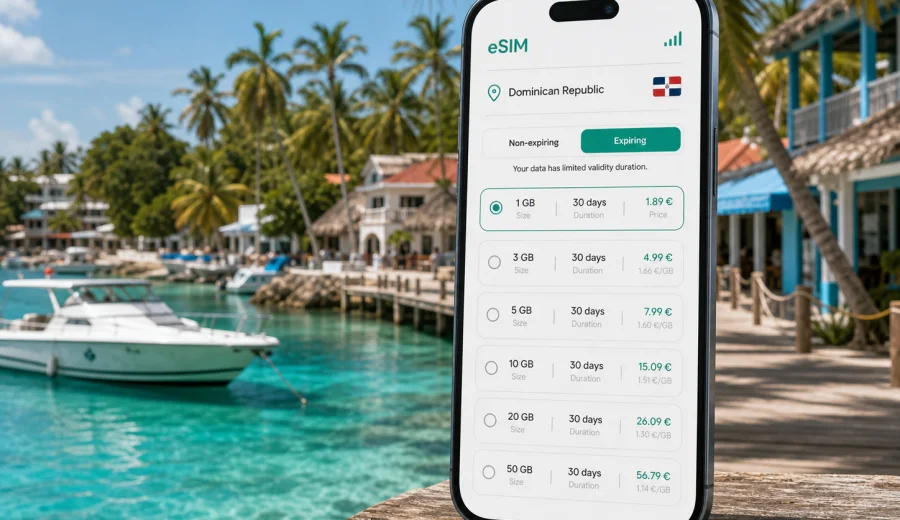
Bayahibe eSIM: mobile connection and internet for your trip
Bayahibe is a small Caribbean base with a very practical travel problem: many useful moments happen before you reach your hotel Wi-Fi. You may need to message a driver after landing, open a map on the road from La Romana or Punta Cana, confirm a boat trip to Saona Island, check the weather before a beach day, or send your resort location to friends who are arriving later. An eSIM can help you prepare mobile internet for these first steps without looking for a physical SIM card after arrival.
This guide is focused on Bayahibe, not on the Dominican Republic in general. The village, its resort areas, its marina, nearby Dominicus, and the routes toward La Romana, Punta Cana, Santo Domingo, Saona Island, and Altos de Chavon create a trip where navigation and messaging are often more useful than heavy browsing. The right eSIM setup gives you a calmer start: you can land, check your transfer details, keep maps available, and manage bookings while you move between airport, hotel, beach, pier, and day trips.
Kaspersky eSIM Store is an app and website where you can choose, arrange, and activate an eSIM with a suitable data plan for mobile internet during an international trip. It is not a mobile operator and does not own a network. The practical value is the preparation workflow: choose the destination, review data volume and validity, install the eSIM on a compatible device, and use mobile data in the country where the selected plan is valid.
Why mobile internet matters in Bayahibe
Bayahibe feels relaxed once you are settled, but the travel logistics around it are not always contained inside one resort. Many visitors arrive through Punta Cana International Airport, La Romana International Airport, or Santo Domingo, then continue by private transfer, rental car, shuttle, taxi, or arranged tour transport. Mobile data can be useful before you even see the sea.
Typical Bayahibe scenarios where mobile internet helps:
- checking transfer pickup messages after landing;
- following the route from the airport to Bayahibe or Dominicus;
- contacting a hotel, apartment host, dive center, or boat operator;
- opening offline and online maps when moving between Bayahibe village and Dominicus;
- confirming the time and pier for a Saona Island or Catalina Island excursion;
- using translation tools, restaurant reviews, banking apps, or ride coordination;
- sharing your location with travel companions;
- checking weather, sea conditions, and trip updates before a beach or boat day.
Bayahibe is compact, but your trip may not be. A beach holiday can include airport transfers, resort check-in, diving, catamaran tours, national park access, rental-car routes, and short stops in La Romana. If you rely only on hotel Wi-Fi, each movement outside the property can become a small coordination task. With an eSIM installed on your phone, mobile internet is ready for maps and messaging when Wi-Fi is not available or not convenient.
Bayahibe arrival: where an eSIM is useful first
Your first Bayahibe internet need usually appears during arrival. The exact airport depends on your itinerary. La Romana is the nearest major airport for many travelers, Punta Cana is common for international leisure flights, and Santo Domingo may suit longer routes or mixed city-and-beach trips. From any of these arrival points, you will likely need to coordinate the final leg to Bayahibe.
| Arrival point | Why mobile data helps | Bayahibe use case |
|---|---|---|
| La Romana airport | Short transfer, but pickup details still matter | Message the driver, confirm resort name, open the map |
| Punta Cana airport | Longer road transfer and many meeting points | Track pickup timing, share location, check route progress |
| Santo Domingo airport or city | Longer transfer with possible stops | Coordinate transport, hotel arrival, and onward plans |
| Cruise or marina route | Timing can change around excursions | Confirm meeting place and return arrangements |
An eSIM does not replace good trip planning, but it reduces the number of tasks that depend on finding Wi-Fi. If your flight lands late, your driver changes the meeting point, or your luggage takes longer than expected, mobile data lets you message and adjust without searching for an airport kiosk or asking for a hotspot.
Bayahibe, Dominicus, and local movement
Many visitors describe the whole area as Bayahibe, but daily movement often happens between Bayahibe village and Dominicus. Bayahibe village is closer to the public beach, marina, restaurants, small hotels, dive operators, and boat departure points. Dominicus is associated with larger resorts, beach hotels, and a more resort-oriented rhythm. The distance is short, but you may still want maps, messages, and booking confirmations when moving between them.
Useful mobile internet tasks around the area:
1. Open your saved hotel location before leaving the airport.
2. Keep a map ready for the Bayahibe to Dominicus route.
3. Confirm pickup points for boat tours and diving trips.
4. Send live location to companions if you split up between beach, restaurant, and hotel.
5. Check whether a restaurant, beach club, or dive center has updated opening hours.
6. Use messaging apps for calls instead of relying on standard voice minutes.
For a relaxed beach destination, this is often enough. You may not need constant video streaming or a large data allowance if your hotel Wi-Fi handles heavier use. But you do need reliable access to the small services that make the day run smoothly: maps, messengers, email, bookings, and payment verification.
How much data to plan for Bayahibe
Data use depends on your habits, hotel Wi-Fi, and route. A Bayahibe trip can be light on data if you mostly use maps, messages, and booking apps. It can become heavier if you use video calls, cloud photo backup, social media uploads, or tethering for a laptop. Before choosing an eSIM plan, estimate the type of trip rather than choosing only by trip length.
| Traveler profile | Typical data needs | Practical plan logic |
|---|---|---|
| Resort guest | Maps, messages, transfer coordination | Smaller data volume may be enough if hotel Wi-Fi is reliable |
| Beach and tour traveler | Maps, messaging, photos, boat-trip updates | Moderate data is safer for active days away from the hotel |
| Diver or excursion traveler | Early messages, marina location, weather checks | Choose enough data for several mornings away from Wi-Fi |
| Remote worker | Email, hotspot backup, calls, documents | Consider a larger allowance and check tethering conditions |
| Family or group organizer | Multiple chats, bookings, maps, payment checks | Keep extra data for coordination and unexpected changes |
As a simple rule, separate essential data from entertainment data. Essential data includes maps, messaging, ride coordination, airline apps, hotel messages, banking confirmations, and travel documents. Entertainment data includes streaming, large uploads, automatic cloud backup, and long video calls. If you keep entertainment on Wi-Fi, an eSIM plan can focus on the travel tasks that matter away from the hotel.
Choosing an eSIM plan for Bayahibe
For Bayahibe, you should choose a plan that is valid in the Dominican Republic, because the city article uses the country destination. Check three things before payment: the data allowance, the validity period, and whether the plan covers your full route. If you are staying only in Bayahibe and Dominicus, a Dominican Republic plan may be enough. If your route includes several countries in the Caribbean, compare whether a regional option is more practical.
Before you choose, write down:
- arrival airport and transfer time;
- number of days in Bayahibe;
- whether you will visit Saona Island, Catalina Island, La Romana, Punta Cana, or Santo Domingo;
- whether you need data for work or only for travel coordination;
- whether you plan to use your phone as a hotspot;
- whether your hotel Wi-Fi is expected to handle heavy browsing and uploads.
When you are ready to compare options, you can choose an eSIM plan for your Bayahibe trip through the Dominican Republic destination page. Review the conditions of the selected plan before arranging it, especially data volume, validity, and the moment from which the plan starts to count usage or time.
What to check before arranging an eSIM
The most important check is device compatibility. Not every phone supports eSIM, and some models differ by region of sale. A device can also be locked to a mobile operator, which may prevent adding another mobile profile. Before you arrange a plan, check your device and confirm that it supports eSIM and can use a travel data profile.
Use this checklist before departure:
- Your phone or tablet supports eSIM.
- The device is not locked to a mobile operator.
- The operating system is updated enough for eSIM setup.
- You have internet access to install the eSIM before the trip or on arrival.
- You understand whether the plan is data-only.
- You know whether data roaming must be enabled for the eSIM profile.
- You have saved the QR code or installation details in a place you can access.
Most travel eSIM plans are intended for mobile data. They may not include a standard phone number, regular voice calls, or SMS unless that is clearly stated in the plan conditions. For many Bayahibe travelers this is acceptable, because hotel, transfer, tour, and family communication usually happens through internet-based apps.
How to install an eSIM for a Bayahibe trip
It is often easiest to install the eSIM before you leave home, while you have stable Wi-Fi and time to read the instructions. Activation timing depends on the plan conditions, so follow the details shown during purchase and setup. If you prefer to wait until arrival, make sure you can access the installation information without relying on a connection you do not yet have.
Basic setup flow:
1. Choose the Dominican Republic or relevant regional destination.
2. Select a plan with suitable data volume and validity.
3. Arrange the plan and open the installation details.
4. Add the eSIM profile to your compatible phone.
5. Keep your primary SIM for calls if you need it.
6. Set the eSIM profile as the mobile data line when you want to use it.
7. Enable data roaming for the eSIM if the instructions for your device or plan require it.
8. Wait a few minutes after arrival if the phone needs time to register on a local network.
For setup details, use the official Kaspersky eSIM Store guides: Android installation guide and iOS installation guide. Follow the guide for your device type and keep the eSIM profile until your trip is complete, because some eSIM profiles cannot be transferred to another device after activation.
Bayahibe travel scenarios and data tips
Different Bayahibe trips use mobile internet differently. Resort guests may need only maps, transfer messages, and tour confirmations. Travelers staying near Bayahibe village often use data for restaurants, dive shops, marina locations, and short movement to Dominicus. Saona Island excursions usually need mobile data before departure and after return, while coverage can vary during boat and island portions. Divers and snorkelers should confirm meeting times, weather notes, and equipment details before boarding, then keep offline copies of the booking.
For business, wedding, photography, or remote-work trips, choose more data than a casual beach traveler would. Email, calendars, cloud documents, and backup hotspot use can consume data quickly. Check whether tethering is allowed under the selected plan conditions, and keep large file transfers for Wi-Fi when possible.
Transport, maps, and getting around
Bayahibe does not require complex urban navigation, but the wider route can. Transfers from Punta Cana, Santo Domingo, and La Romana may involve unfamiliar roads, hotel gates, multiple resorts, and tour pickup points. Online maps help you understand the route, but you should also save your destination in advance.
Good habits for local movement:
- Save the hotel and pier location before you travel.
- Download offline map areas for Bayahibe, Dominicus, La Romana, and the airport route.
- Keep the transfer company, hotel, and tour operator in your messaging app.
- Use mobile data for live changes, not as the only copy of essential information.
- Carry a power bank if you will use maps and camera all day.
- Turn off background app refresh for apps that do not matter during the trip.
If you rent a car, mobile data becomes more important. You may need live navigation, fuel stops, parking locations, and route checks between Bayahibe, La Romana, Casa de Campo, Altos de Chavon, Punta Cana, and Santo Domingo. Offline maps are useful, but live data can help when a road, pickup point, or hotel entrance is not obvious.
Using eSIM with hotel Wi-Fi
An eSIM and hotel Wi-Fi work best together. Use hotel Wi-Fi for streaming, app updates, large uploads, and long video calls when the network is stable. Use the eSIM for airport transfer messages, live maps, banking confirmations, travel apps, and movement away from the property. This split preserves mobile data for situations where it has the most value.
Practical preparation checklist
Use this checklist a few days before departure:
- Confirm your arrival airport and Bayahibe transfer details.
- Save your hotel address in Bayahibe or Dominicus.
- Check your device compatibility and operator lock status.
- Choose an eSIM plan with destination, data, and validity that match the trip.
- Install the eSIM while connected to stable Wi-Fi if the plan instructions allow it.
- Save installation details and booking confirmations offline.
- Download offline maps for Bayahibe, Dominicus, La Romana, and your arrival airport.
- Disable automatic app updates and cloud backup on mobile data.
- Decide which SIM will handle calls and which profile will handle mobile data.
- Pack a charger or power bank for tour days.
Short answers for Bayahibe eSIM planning
Is an eSIM useful for Bayahibe?
Yes, it can be useful for transfers, maps, messaging, excursion coordination, and movement between Bayahibe village, Dominicus, airports, and day-trip locations.
Do I need a Dominican Republic eSIM plan for Bayahibe?
For a Bayahibe-only trip, choose a plan that is valid in the Dominican Republic. If you also visit other Caribbean destinations, compare coverage before choosing.
Can I install the eSIM before I travel?
Often yes. It is usually more convenient to install it while you have stable Wi-Fi, but you should check the activation and validity conditions first.
Will an eSIM give me a local phone number?
Not necessarily. Travel eSIM plans are often data-only unless the plan conditions say otherwise.
What if I cannot connect immediately after arrival?
Check that the eSIM profile is installed, selected for mobile data, and allowed to use data roaming if required. Give the phone a few minutes to register, then review the device instructions or contact support if needed.
Choose mobile internet for Bayahibe before you arrive
Bayahibe is easiest when your phone is ready before the first transfer, first message, and first map search. An eSIM helps you prepare mobile internet for the Dominican Republic without searching for a physical SIM card after landing. It is especially useful if your trip includes Punta Cana or La Romana transfers, Dominicus resorts, boat trips to Saona Island, diving, remote work, or several short routes outside the hotel.
Before arranging a plan, check your device compatibility, review the plan conditions, and decide how much data you need for the way you actually travel. Then choose a suitable eSIM plan for the Dominican Republic in Kaspersky eSIM Store and keep your Bayahibe trip easier to manage from the moment you arrive.