Travel connectivity guide
Belgrade eSIM: Mobile Internet for Your Trip
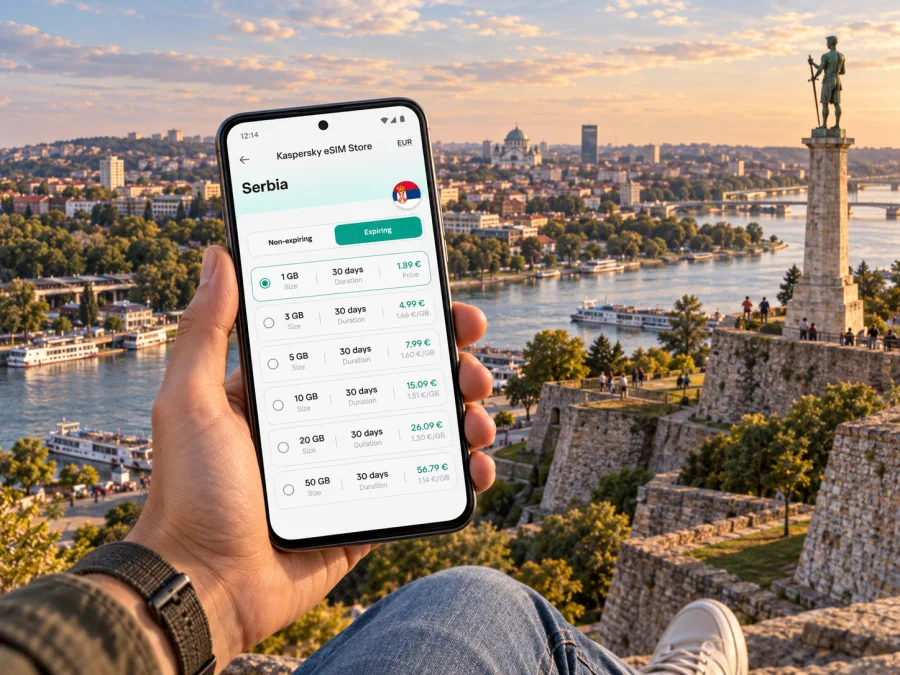
Belgrade eSIM: mobile connection and internet for your trip
Belgrade is a city of river crossings, hills, broad boulevards and neighbourhoods that can feel quite different from one another. A working mobile connection helps you turn an arrival into a manageable first evening: check your accommodation address, follow a route from the airport, message a driver or host, and keep a map available while you explore. An eSIM can provide mobile internet without replacing your physical SIM card.
Kaspersky eSIM Store is an app and website where you can choose, order and activate an eSIM with a suitable data plan for an international trip. Before travelling to Belgrade, you can review the plan’s destination, data allowance, validity period and other stated conditions, then decide whether it fits your itinerary.
The first hours in Belgrade
Belgrade Nikola Tesla Airport is west of the central city, across the Sava from many of the places visitors stay. After landing, you may need to check a hotel’s precise entrance, compare a transfer option, open a map, or let someone know when you are on your way. Having mobile data available can make those small decisions easier, especially if your arrival is late or you are travelling with luggage.
Save the address of your accommodation in both its written form and on an offline map before departure. A street name alone may not identify the correct entrance in a large building or courtyard. If you are using a taxi or a pre-arranged transfer, confirm the pickup point and destination in the service you chose; airport pickup areas and traffic arrangements can change.
The airport’s transport information lists public transport connections into Belgrade, including line 72 to Zeleni Venac. Check current airport and city information shortly before travel, because routes and operating arrangements can change. If you are comparing public transport with a car transfer, use your map to see where your hotel is relative to the final stop: a short ride on the map may still involve a steep walk, stairs or a river crossing.
A useful arrival checklist
- Keep your hotel or apartment address accessible offline.
- Check the airport pickup point before leaving the terminal.
- Share your expected arrival time with your host or travel companion.
- Open the route while connected, then keep a saved map as a backup.
- If you use an eSIM for data, leave your regular SIM available for any calls or messages you still need to receive.
Why mobile data matters in a city split by rivers
The Sava and Danube are part of Belgrade’s geography, not just a scenic backdrop. The historic centre, New Belgrade and Zemun sit across different parts of the urban area, and a route between them may involve a bridge or a longer loop than the straight-line distance suggests. Navigation is useful when you are deciding whether to walk, take public transport or book a ride, and when a plan changes after you set out.
Belgrade rewards a flexible plan. Stari Grad is a practical base for central sights and pedestrian streets; Vračar places you near residential cafés and the Temple of Saint Sava; New Belgrade has wide blocks, business districts and large venues; Zemun has a distinct riverside feel and its own centre. These are broad orientation points rather than strict visitor zones. Check the actual address of a hotel or meeting venue before choosing accommodation, since two places described as “central” can require very different daily routes.
Getting around: route planning by neighbourhood
Use a map to understand the shape of each day before leaving your accommodation. Belgrade has buses, trams and trolleybuses, but service details, diversions and schedules may vary. Confirm the route and ticket information close to the time you travel. A map app can help you compare public transport with walking or a car ride, but allow extra time for traffic, construction, weather and unfamiliar junctions.
| If your day includes… | Plan for… | How mobile internet helps |
|---|---|---|
| Stari Grad and the central pedestrian area | Walking between compact central stops, with slopes and busy streets in places | Following turn-by-turn directions and finding a specific entrance |
| New Belgrade meetings | Longer blocks and crossings between office, hotel and venue | Checking the exact building, meeting updates and return route |
| Zemun by the river | A separate neighbourhood outing and a journey back across the city | Comparing routes and keeping your return directions available |
| A riverside walk or a visit near the confluence | A route that may depend on which bank and access point you choose | Checking your location and adjusting the walk without retracing blindly |
| A short visit between trains, flights or meetings | A strict time window and a return journey that matters as much as the outward trip | Watching the time, confirming the next address and contacting your group |
Do not judge a cross-city journey by distance alone. Bridges, traffic and the location of a transit stop can affect the time needed. If you have a timed appointment, choose a route with a margin and keep the venue’s address in a message or note in case you need to show it to a driver.
Keep one route simple
Choose a data plan for your Belgrade itinerary
The right allowance depends on how you travel, not on a universal daily number. A traveller who mainly checks messages and maps may use less data than someone who uploads video, joins calls or works from a laptop hotspot. Wi-Fi at your hotel can reduce mobile use, but it is sensible to plan for the time spent outside, on transfers and between appointments.
When reviewing a plan for Serbia, check the listed destination and the exact terms shown at purchase. Compare the allowance with your trip length and likely usage, and note the validity period and when it begins. If your route continues beyond Belgrade, check that the plan covers every destination you intend to visit; a city name in your itinerary does not determine a plan’s geographic coverage.
A practical way to estimate your needs is to group your usual activities:
- Light use: maps, text messages, web searches and occasional booking checks.
- Regular use: frequent navigation, photos, social updates and short voice or video calls through internet apps.
- Work-heavy use: video meetings, large file transfers, cloud backups or tethering another device.
These are planning categories, not guaranteed data amounts. App settings matter: automatic photo backups and video playback can use more data than expected. Before travel, review which apps may sync in the background and set downloads or backups to Wi-Fi if that suits your needs.
If Serbia is one stop on a longer Balkan itinerary, compare the country plan with any regional option displayed for your trip. Read the destination list carefully rather than assuming a plan for one country covers neighbouring countries. The product page is the place to confirm the currently available plan conditions. You can review eSIM data plan options for Serbia and compare the stated allowance, duration and coverage with your dates.
Match the plan to the way you travel
| Travel style | Questions to answer before choosing |
|---|---|
| Weekend city break | Will you use maps and messaging most of the time, or upload media throughout the day? |
| Business visit | Do you need video calls, laptop tethering or a backup connection for work? Check plan terms and device settings. |
| Longer stay | Does the validity period cover the full visit, and is there a top-up option stated for that plan? |
| Multi-stop trip | Are all countries on your route included in the plan’s destination list? |
Prepare your eSIM before you leave
Set up the eSIM while you have stable internet access and time to read the on-screen instructions. Check that your phone supports eSIM and is not restricted by a carrier lock. Device support can vary by model and market, so check your device’s eSIM compatibility before choosing a plan.
A straightforward preparation sequence is:
- Review the plan. Confirm Serbia is included, then read the allowance, validity and activation conditions.
- Install the profile. Follow the steps for your device using the Android eSIM installation instructions or iOS eSIM installation instructions.
- Label the line. Give the new profile a clear name such as “Serbia data” so you can recognize it in settings.
- Choose the data line. Set the eSIM as the line for mobile data when you are ready to use it, while retaining your usual line for calls if needed.
- Check roaming settings. Follow the selected plan’s instructions about data roaming; requirements can differ by plan and device.
- Keep the details. Save the installation or support information somewhere you can reach without relying on mobile data.
Installation and first use are not always the same step. Read the plan terms to understand when its validity starts, and avoid switching settings at random if the profile does not connect. If activation does not complete, check the device instructions, the selected data line and the plan’s stated requirements before contacting support.
Use your connection thoughtfully around Belgrade
For work trips, test your meeting setup before the appointment. Confirm whether your eSIM plan supports the data use you expect, whether tethering is permitted, and whether your laptop can connect through your phone. If video calls are important, have a second option such as venue Wi-Fi or a dial-in method. These are sensible contingencies for any city visit, not a prediction about a particular network.
Short stopovers and day trips from the city
For a longer stay, Belgrade can also be a starting point for trips elsewhere in Serbia. Before leaving the city, check your transport departure location, the time needed to reach it and whether your data plan includes the places you are visiting. A route beyond the capital may have different connectivity conditions from a central city visit, so keep key tickets and addresses available offline. Do not assume that a plan’s coverage, transport timetable or service will remain unchanged; check current details for your travel date.
Common questions about eSIM in Belgrade
Will an eSIM help as soon as I land?
It can, if the profile is installed correctly, the selected plan is valid for Serbia and your device connects according to the plan instructions. Review when the plan starts and set up the profile before departure when possible.
Can I keep my regular number?
In many cases you can keep your physical SIM active for calls and messages while setting the eSIM as the mobile-data line. The exact options depend on your phone and carrier. Check settings and charges for your regular line before travelling.
Does an eSIM always include calls and SMS?
No. A data eSIM generally provides mobile internet, not a separate local number for ordinary calls and SMS, unless the selected plan explicitly says otherwise. Internet calling and messaging apps can work over data, subject to their own requirements.
Is an eSIM useful if my hotel has Wi-Fi?
Yes, if you need directions, messages or booking information while moving around Belgrade. Hotel Wi-Fi can cover time indoors, while a data connection is useful on transfers and walks. You can still use Wi-Fi where appropriate and manage background data to suit your plan.
What if I visit another country after Serbia?
Check the destination list of the exact plan you are considering. A plan for Serbia may not include neighbouring countries. If you select a regional plan, confirm that every country on your itinerary is named in its coverage information.
Do I need to install the eSIM at the airport?
No. You can usually prepare it before the trip, provided you have internet access and follow the device and plan instructions. Read the validity terms so you know when the plan begins, then select it for mobile data at the appropriate time.
A calmer start to your Belgrade trip
A little preparation makes Belgrade easier to navigate: keep your first address handy, know how you will leave the airport, and think about which districts you plan to visit on each day. Because the rivers and bridges shape cross-city journeys, check the route as well as the distance and leave room for changes.
Before departure, choose a plan that matches your route and expected data use, confirm device compatibility, and install the eSIM using the instructions for your phone. When you are ready, choose an eSIM data plan for your trip to Serbia through Kaspersky eSIM Store, the app and website for selecting, ordering and activating an eSIM for mobile internet abroad.


