
Travel connectivity guide
Bengaluru eSIM for mobile internet
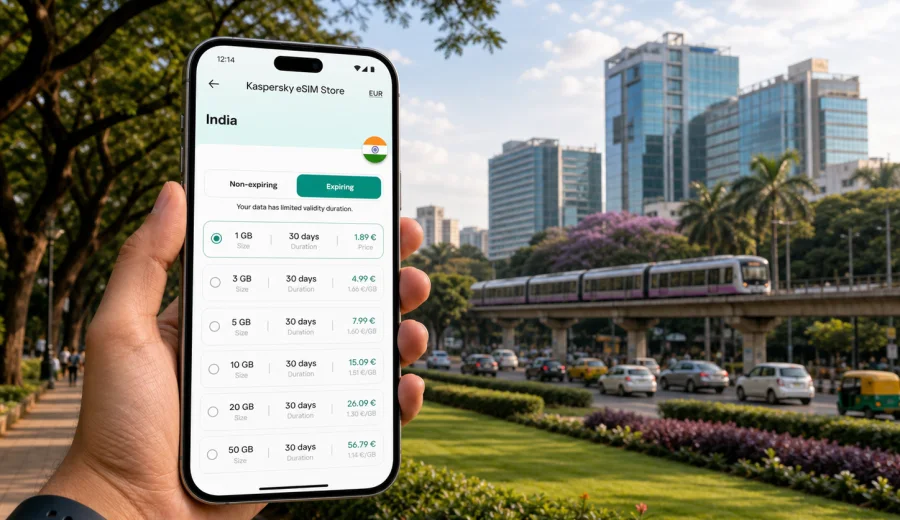
Bengaluru eSIM: mobile connection and internet for a smoother city trip
Bengaluru is a city where travel plans depend on your phone more than you may expect. The airport is far from many central districts, traffic can change quickly, and a single day can include a ride-hailing pickup, a metro transfer, hotel messages, restaurant bookings, and map checks between neighborhoods. Mobile internet is not just a convenience here. It helps you make practical decisions while the city keeps moving.
An eSIM is useful because it lets you prepare mobile data before arriving in India. Instead of looking for a physical SIM card after a long flight, you can add a digital SIM profile to a compatible phone and use it for data during the trip. Kaspersky eSIM Store is an app and site where you can choose, arrange, and activate an eSIM with a suitable tariff for mobile internet in an overseas trip.
This guide focuses on Bengaluru itself: Kempegowda International Airport, local transport, business districts, hotel areas, short stopovers, and routes from the city. India is the destination context because the eSIM tariff must match the country, but the real travel problem is local: staying online while moving between the airport, hotels, tech campuses, cafes, meeting rooms, and weekend routes.
Why mobile internet matters in Bengaluru
Bengaluru is large, spread out, and often slower to cross than it looks on a map. A hotel in Indiranagar may be convenient for restaurants, but a meeting in Whitefield or Electronic City can still require careful timing. A stay near the airport may help with an early flight, but it is far from many central neighborhoods. Mobile data keeps these decisions flexible.
Useful online tasks in Bengaluru include:
- checking airport transfer options after landing;
- comparing app-based rides, hotel cars, metro, airport buses, and walking routes;
- coordinating pickup points at office parks, malls, hotels, and apartment gates;
- opening hotel confirmations and digital check-in details;
- messaging colleagues, drivers, hosts, and restaurants;
- checking traffic before crossing to Whitefield, Manyata Tech Park, Outer Ring Road, or Electronic City;
- using maps around Cubbon Park, MG Road, Church Street, Koramangala, Indiranagar, and Lalbagh;
- keeping flight updates visible during rain, road delays, or late departures.
The main benefit of preparing an eSIM is control. You can choose a tariff for India before the trip, install it on a compatible device, and decide which SIM line handles mobile data. The exact data allowance, validity period, activation timing, and top-up options depend on the selected tariff, so check the conditions before purchase.
Arrival at Kempegowda International Airport
Kempegowda International Airport is north of the city, and the first transfer often shapes the rest of the day. After landing, you may need to confirm a pickup zone, message your hotel, open a ride app, check the route toward Hebbal, or decide whether an airport bus or taxi is the better option. Airport Wi-Fi can help inside the terminal, but you may still need mobile data once you move toward parking, pickup lanes, or the road into the city.
A prepared eSIM can make arrival simpler:
1. Install the eSIM profile before departure using a stable internet connection.
2. Keep the installation details available until setup is complete.
3. After landing, select the eSIM as the mobile data line when you are ready to use it.
4. Enable data roaming for the eSIM if the selected tariff instructions require it.
5. Test maps and messaging before leaving the terminal.
If you need your usual phone number for bank messages, airline alerts, or calls, keep your primary SIM available if your phone supports dual-SIM settings. Many travel eSIM tariffs are focused on mobile data and do not include a regular phone number, voice calls, or SMS unless those features are stated in the tariff conditions.
Bengaluru travel scenarios where eSIM helps
| Travel moment | Why data matters | Practical tip |
|---|---|---|
| Airport arrival | The transfer can be long, and pickup points may change. | Test maps and messaging before leaving the terminal area. |
| Ride-hailing | Drivers may wait near gates, service roads, malls, or office entrances. | Share your live location and keep the driver chat open. |
| Metro travel | Station access and last-mile routes still need planning. | Save the destination station and walking route before boarding. |
| Business meetings | Office parks can have multiple gates and buildings. | Confirm the exact tower, gate, floor, and reception process. |
| Hotel check-in | Booking details and payment confirmations may be online. | Save key details offline as a backup. |
| Cafe and coworking days | Remote work can use more data than sightseeing. | Use Wi-Fi for large downloads and reserve mobile data for movement. |
| Day trips | Nearby routes may involve early starts and changing pickup points. | Choose a tariff that fits the full India route, not only city transfers. |
Choosing data volume for Bengaluru
The right eSIM tariff depends on your travel style. Bengaluru can use more mobile data than expected because route checks, ride apps, messaging, and maps are repeated throughout the day. If you work from your phone, upload photos, use video calls, or connect a laptop through hotspot, a small package can disappear quickly.
Use this simple planning guide:
- Light use: maps, messaging, email, ride apps, restaurant searches, and occasional browsing.
- Medium use: regular navigation, social media, photo uploads, work chat, and several app-based rides per day.
- Heavy use: video calls, hotspot, cloud documents, large uploads, and long remote-work sessions.
Do not choose only by price. Review data amount, validity duration, country coverage, activation timing, top-up availability, and hotspot support where relevant. If your itinerary includes Bengaluru plus Mysuru, Chennai, Hyderabad, Mumbai, Delhi, Goa, or Kochi, choose the tariff based on the whole India trip rather than only the first city.
Bengaluru areas and local data needs
Bengaluru works best when you plan by area, not only by distance. Central Bengaluru, including MG Road, Brigade Road, Church Street, Cubbon Park, Vidhana Soudha surroundings, and nearby museums, is useful for first-time visitors and short city walks. Mobile data helps with walking routes, restaurant searches, ride pickups, and metro access.
Indiranagar is popular for restaurants, cafes, nightlife, boutiques, and apartments. App-based rides are common here, and exact pickup points matter because side streets and one-way routes can make a location less obvious than it looks.
Koramangala is useful for food, startup offices, coworking spaces, and longer stays. You may move between cafes, meetings, and hotels during the day, so data is useful for maps, messages, and quick route changes.
Whitefield, Marathahalli, Manyata Tech Park, and the Outer Ring Road corridor are important for business travelers. Office parks can be large, gates can be separate from mapped building names, and traffic timing can affect the whole schedule. Electronic City is another major business area. If your meeting is there, check the route early and allow enough margin, especially if you are coming from central Bengaluru or the airport.
Hebbal, Yelahanka, and the airport corridor are practical for early departures, conferences, and short stays. Lalbagh, Basavanagudi, Jayanagar, Malleshwaram, and Sadashivanagar are common for parks, shopping, restaurants, and quieter hotel stays. In all these areas, mobile maps help because useful places may sit away from main roads.
Before you buy: compatibility and setup checks
Before choosing a tariff, check your device compatibility. Your phone or tablet must support eSIM, and it should not be locked in a way that prevents adding another mobile profile. Device support can vary by model and region of sale, so check before you rely on eSIM as your only travel data option.
A quick pre-trip checklist:
- Your device supports eSIM.
- Your phone is not locked to one mobile operator.
- You have stable Wi-Fi for installation before departure or at the hotel.
- You know whether the selected tariff is data-only.
- You understand when the validity period starts.
- You know whether hotspot use is supported if you need it.
- Your primary SIM remains available if you need bank SMS, calls, or your usual number.
- Hotel address, meeting locations, and flight details are saved offline.
Kaspersky eSIM Store helps you choose, arrange, install, and activate an eSIM with a suitable mobile internet tariff for travel. It is not a mobile operator and does not own the network. The data allowance, validity period, destination coverage, and activation details depend on the option you select.
A practical Bengaluru data plan
For one day in Bengaluru, data is mostly about airport transfer, maps, transport apps, and messages. For three or four days, you will probably use it across neighborhoods. For a longer India route, Bengaluru may only be one stop, so the tariff should fit the full itinerary.
Use this method:
1. Count active travel days, including arrival and departure days.
2. Add business days if you need work chat, email, or document access.
3. Add extra data if you plan hotspot or video calls.
4. Add margin for airport delays, rain, traffic changes, and late plans.
5. Choose the tariff whose validity covers the entire period you need mobile data.
If you want to prepare mobile data before you fly, you can choose an eSIM tariff for your Bengaluru trip through Kaspersky eSIM Store. Select India as the destination, compare the available tariff conditions, and choose the data volume and validity period that match your route.
How to install and activate an eSIM for Bengaluru
Install the eSIM while you have a reliable internet connection, ideally before departure or at your hotel. Do not interrupt the installation process, and avoid deleting the eSIM profile after activation unless you are sure you no longer need it or support instructions tell you to. If you need device-specific guidance, use the Android eSIM installation guide or the iOS eSIM installation guide.
General setup flow:
1. Choose India as the destination and select a tariff that fits your Bengaluru itinerary.
2. Complete the purchase and open the eSIM details in your profile, app, or email.
3. Add the eSIM profile using the provided flow, QR code, or manual details if available.
4. Label the line clearly, for example "India travel data" or "Bengaluru data".
5. Keep your usual SIM for calls or SMS if you need it.
6. Select the eSIM as the mobile data line when you are ready to use it.
7. Follow the tariff instructions for activation timing and data roaming settings.
8. Test the connection after arrival before starting a long transfer.
An eSIM for travel is mainly a mobile data option. If you need ordinary voice calls or SMS, check whether the selected tariff includes them. Otherwise, plan to use internet-based calling and messaging apps over data, and keep your primary SIM available for your regular number where needed.
Transport, hotels, and business days
Bengaluru transport is a mix of app-based cars, auto-rickshaws, metro, airport buses, hotel cars, walking, and occasional private drivers. The best option can change by time of day, weather, neighborhood, and luggage. Mobile data lets you compare choices without guessing.
Common transport tasks include checking airport transfer time, comparing metro plus last-mile ride with a direct car journey, sharing a live location near a mall or office park, finding the correct gate at a campus or apartment complex, and keeping flight or train updates visible before departure. The metro can be useful for central areas and selected corridors, but it does not remove every last-mile challenge. For many travelers, the practical pattern is to use metro where it fits and a ride-hailing car or auto for the final segment.
Bengaluru is also one of India's major business and technology hubs. A business day may include a hotel near MG Road, meetings in Whitefield, a dinner in Indiranagar, and an early flight the next morning. For business travel, prioritize enough data for maps, secure messages, email, calendar updates, and possible hotspot use. Save meeting addresses, access instructions, hotel confirmations, and airport details offline.
Hotel Wi-Fi is useful, but it does not cover the airport pickup zone, taxi ride, office park gate, metro walk, or evening plans. For apartments and serviced stays, mobile data also helps with host messages, delivery apps, and entrances that may not be obvious from the street.
Stopovers and trips from Bengaluru
Bengaluru stopovers often involve timing decisions. If you have a long layover, you may stay near the airport, go to a hotel for a few hours, or make a short city visit if the schedule allows. Mobile internet helps you check road time, keep airline updates visible, and coordinate the return transfer without depending only on public Wi-Fi.
For a stopover, keep the data plan simple:
- install the eSIM before the trip if possible;
- save the airport terminal and hotel address offline;
- keep enough data for maps, ride apps, messages, and flight checks;
- avoid large downloads or streaming on mobile data;
- leave extra time for the airport return because the drive can vary.
For leisure days, mobile data helps you plan walks through Cubbon Park, check cafe options around Church Street, find dinner in Indiranagar, navigate to Lalbagh, or coordinate a ride after an evening in Koramangala. For trips from Bengaluru, data planning matters because the day can involve early starts, highway routes, and changing pickup points. Popular routes include Nandi Hills, Mysuru, Srirangapatna, Coorg, Chikmagalur, Hampi, and nearby resorts.
Data-saving habits in Bengaluru
You do not need to ration every megabyte, but a few habits help keep the selected tariff useful for the whole trip.
| Habit | Why it helps |
|---|---|
| Download offline map areas before leaving Wi-Fi | Reduces repeated map loading during transfers |
| Disable automatic cloud photo uploads on mobile data | Prevents background use from consuming the package |
| Update apps on Wi-Fi only | Keeps data for maps, messages, and transport |
| Use hotel or venue Wi-Fi for video streaming | Reserves mobile data for movement around the city |
| Turn off hotspot when finished | Avoids laptop background sync |
| Save hotel and meeting addresses in notes | Gives you a backup if signal is weak inside a building |
Dense buildings, underground areas, elevators, basements, and large office complexes can affect any mobile connection. If data slows down indoors, move closer to a window or step outside before assuming the eSIM profile has a problem.
FAQ: eSIM, mobile connection, and internet in Bengaluru
Is eSIM useful for a trip to Bengaluru?
Yes, if your phone supports eSIM and you want mobile data ready for airport arrival, maps, ride apps, hotel messages, business coordination, and trips around the city without looking for a physical SIM card after landing.
Should I install the eSIM before flying to India?
In most cases, yes. Install it while you have a stable connection, then follow the activation instructions for the selected tariff and check when validity starts.
Can I use an eSIM for calls in Bengaluru?
Travel eSIM tariffs are often focused on mobile data. Standard voice calls and SMS are not included unless the selected tariff says so. You can usually use messaging and calling apps over data.
Is airport Wi-Fi enough?
Airport Wi-Fi can help inside the terminal, but it will not cover the taxi ride, office park gate, hotel transfer, metro walk, or evening plans. A prepared eSIM reduces dependence on Wi-Fi during movement.
How much data do I need for Bengaluru?
For maps, messages, and ride apps, moderate data may be enough. For business calls, hotspot, uploads, or a multi-city India trip, choose more data and a validity period that covers the full itinerary.
Final checklist before you leave for Bengaluru
Before departure, make sure the essentials are ready:
- eSIM support checked on your phone;
- India tariff chosen for the full itinerary;
- eSIM installed or installation details saved;
- primary SIM settings reviewed to avoid unwanted roaming;
- hotel, airport, and meeting addresses saved offline;
- offline map area downloaded;
- charger or power bank packed;
- app updates and large downloads completed on Wi-Fi.
Bengaluru is easier when your mobile internet is ready before the first ride, the first map search, and the first change of plan. An eSIM will not remove traffic, rain, or long distances, but it can make the city more manageable by keeping maps, messages, bookings, and travel tools available when you need them.
Before you go, check device compatibility, review tariff conditions, install the eSIM carefully, and keep your primary SIM available for calls or SMS if needed. Then use Kaspersky eSIM Store to prepare an eSIM tariff for your trip to Bengaluru and choose the mobile internet package that fits your India itinerary.