
Travel connectivity guide
Berberati eSIM for mobile internet
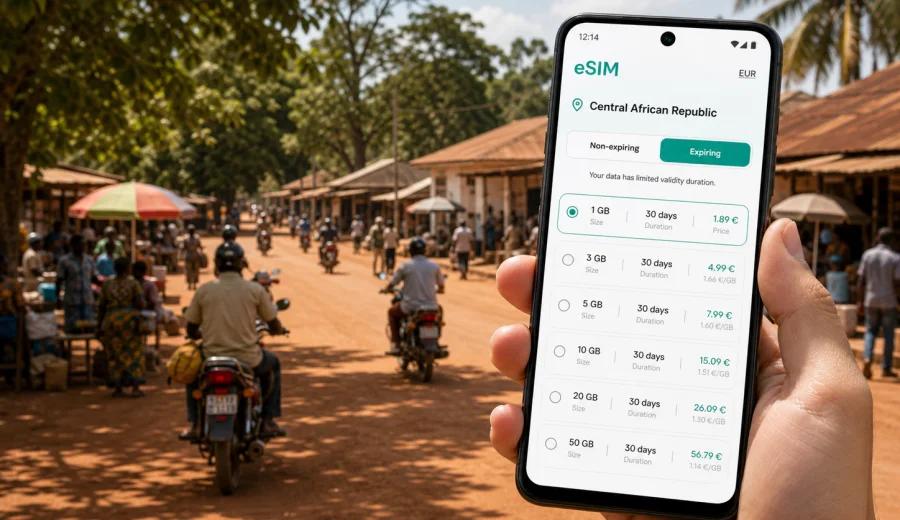
Berberati eSIM: mobile connection and internet for your trip
Berberati is a practical, ground-level travel destination. It is not a city where you can assume that every plan will run on autopilot. You may arrive after a long road transfer, move between hotels, offices, markets, mission compounds, project sites, and transport points, and then continue toward other parts of the Central African Republic. In that kind of trip, mobile internet is not only about browsing. It is how you confirm a pickup, open a map, message a local contact, share your location, check a document, and stay coordinated when schedules change.
An eSIM can make that preparation easier because it lets you set up a digital SIM profile on a compatible phone without looking for a physical SIM card after arrival. For Berberati, that matters most in the first hours: when you are tired from travel, carrying luggage, trying to reach accommodation, or meeting a driver who may be waiting somewhere without clear street signage. Having a data plan ready before you need it gives you more control over these small but important moments.
This guide focuses on using eSIM for mobile connection and internet in Berberati: arrival, local movement, transport, hotels, work trips, short stays, and onward routes inside the Central African Republic. It helps you choose a practical mobile data setup and understand what to check before buying.
Why mobile internet matters in Berberati
Berberati is one of the main cities in the western part of the Central African Republic, in Mambere-Kadei. Travelers may come for work, humanitarian projects, mining-related business, family visits, regional logistics, or overland travel. The city is smaller and less formalized than many capital-city destinations, so your phone often becomes the simplest coordination tool.
Mobile internet is useful in Berberati for:
- confirming airport, road, or hotel pickups;
- sharing your live location with a driver or colleague;
- checking maps before leaving a hotel or office;
- using messaging apps when voice calls are inconvenient;
- receiving changes to meeting times or transport plans;
- storing hotel addresses, contact names, and route notes;
- translating short messages when language support is needed;
- checking documents, booking confirmations, and payment details;
- arranging onward movement toward Bangui, Carnot, Nola, or border routes.
The practical issue is timing. If you wait until you urgently need internet, you may have to find a shop, understand local terms, handle payment, and test the connection while someone is waiting. With an eSIM, you can do much of the setup before that moment, provided your device supports eSIM and the selected plan fits your destination.
Where eSIM helps most in the city
Berberati does not need a complicated connectivity strategy, but it does reward simple preparation. Think about your trip as a chain of small connection points.
| Trip moment in Berberati | Why data helps | What to prepare |
|---|---|---|
| Arrival and pickup | Drivers and hosts may coordinate by messaging app | Install eSIM before travel and keep contact numbers offline |
| First hotel transfer | Street names and exact entrances can be unclear | Save the hotel location and a backup screenshot |
| Moving between meetings | Plans can change during the day | Keep enough data for maps and messages |
| Market or town errands | You may need translation, prices, or directions | Use lightweight apps and avoid large downloads |
| Field or project visits | Coverage and power access may vary | Charge devices and carry offline copies |
| Onward travel | Departure times and road plans can shift | Confirm routes before leaving the city |
For a short Berberati stay, a small data package may be enough if you mainly use maps, messaging, email, and hotel Wi-Fi where available. For a work trip, longer stay, or route that includes several towns, a larger package gives more breathing room. The right choice depends less on the city name and more on how much time you will spend away from reliable Wi-Fi.
Arrival planning: before you reach Berberati
Many international visitors to the Central African Republic first pass through Bangui before continuing to Berberati by road, project transport, or a regional arrangement. Others may arrive through work logistics or private travel coordination. However you enter the country, the key is to avoid making mobile internet your first unsolved task on the ground.
Before you leave for Berberati:
1. Confirm that your phone supports eSIM and is not locked to one mobile operator.
2. Choose a data plan that covers the Central African Republic and matches your trip length.
3. Install the eSIM while you still have stable Wi-Fi.
4. Save the QR code or installation details in a secure place.
5. Download offline maps for Berberati and your road route.
6. Save hotel, driver, office, and emergency contacts offline.
7. Charge your phone and carry a power bank for long transfers.
This preparation is useful even if you plan to use Wi-Fi at your hotel or workplace. Your first connection need may happen before you reach Wi-Fi: at a pickup point, in a vehicle, outside a compound gate, or while confirming an address. A prepared eSIM gives you a cleaner start to the trip.
How much mobile data do you need in Berberati?
The safest way to choose an eSIM plan is to match data volume to real behavior. A traveler who checks maps twice a day and sends messages needs far less than someone who uploads field photos, attends video calls, or uses cloud documents from a laptop.
Use this simple estimate:
| Traveler type | Typical use in Berberati | Practical data approach |
|---|---|---|
| Short stopover | Messaging, pickup coordination, maps, email checks | Smaller package for several days |
| Business visitor | Email, documents, route planning, regular messaging | Medium package with enough validity |
| Field team member | Maps, photos, reports, group chats, long days away from Wi-Fi | Larger package and careful data controls |
| Long-stay traveler | Daily mobile use plus occasional hotspot | Larger package or top-up option |
| Family or personal trip | Messaging, maps, social updates, light browsing | Medium package if Wi-Fi is not reliable |
To reduce data use, turn off automatic cloud backup, app updates, video autoplay, and background syncing before travel. Download maps, documents, language packs, and entertainment on Wi-Fi. If you use your phone as a hotspot, set limits for laptops and tablets because they can consume data quickly through background updates.
Choosing an eSIM plan for Berberati
For a Berberati trip, choose the destination as the Central African Republic rather than looking for a city-only product. City articles are useful for planning movement and use cases, but eSIM coverage and plan availability are normally organized by country or region. That is why your main question is: does the plan cover the Central African Republic for the full period of your travel?
When you compare plans, check:
- destination coverage: Central African Republic or a relevant regional plan;
- data amount: enough for maps, messages, email, and any work tasks;
- validity period: long enough for the full stay, including travel days;
- activation rules: when the plan starts and how it should be installed;
- device compatibility: eSIM support and no operator lock;
- top-up or additional plan options, if your trip may extend.
If you want to prepare before departure, Kaspersky eSIM Store helps you choose, arrange, and activate a suitable eSIM data plan through its app or website. For Berberati, use the Central African Republic destination page to choose an eSIM plan for your trip to Berberati and review the available data amounts, validity periods, and conditions before you travel.
Do not judge a plan only by the lowest price. A plan that expires too soon, has too little data, or does not fit your route can become inconvenient at the wrong time. In Berberati, the better choice is the plan that matches your stay length and the moments when you will be away from stable Wi-Fi.
Local movement: maps, drivers, hotels, and districts
In Berberati, many practical movements are short but still benefit from data. You may travel between a hotel, an office, a project site, a market area, a restaurant, a bank, or a meeting point. Not every place will be easy to identify by a formal address, so location sharing and saved map pins can be more useful than written directions.
For smoother local movement:
- save your hotel as a pinned location before leaving it;
- ask hosts to send a map pin, not only a street description;
- keep driver and reception contacts in both your phonebook and a messaging app;
- screenshot important addresses in case data is weak at the exact moment you need them;
- agree on visible pickup points such as a gate, courtyard, or known building;
- keep your phone charged before evening movement.
If you are moving for work, keep a small offline note with names, phone numbers, meeting places, and the day plan. Mobile data helps you adjust it; the offline copy protects you if signal, battery, or cloud access is temporarily unavailable.
Installation and activation: do it before the stressful moment
The best time to install an eSIM is when you have good Wi-Fi, enough battery, and no pressure from a waiting driver or meeting. Many travelers install the eSIM before departure and activate it according to the plan instructions when they are ready to use it.
General setup flow:
1. Check that your device supports eSIM and is unlocked.
2. Choose the destination and data plan.
3. Complete the order in the app or on the website.
4. Install the eSIM using the provided QR code or manual details.
5. Label the eSIM clearly, for example "CAR data" or "Travel data".
6. When ready, select the eSIM for mobile data.
7. Enable data roaming for the eSIM if the plan instructions require it.
8. Test light data use, such as opening a map or sending a message.
For device-specific steps, follow the Android installation guide or the iOS installation guide. The exact menu names can differ by phone model and operating system version, so it is worth reading the instructions before you are on the road.
Device compatibility: check before you buy
Not every phone that looks modern supports eSIM, and some devices are locked by a mobile operator. This is one of the easiest problems to avoid because you can check it before buying a plan. If your phone is not compatible, the eSIM will not solve your connection problem in Berberati.
Before ordering, check your device and confirm:
- the phone supports eSIM;
- the device is not locked to one operator;
- the operating system is up to date enough for eSIM setup;
- you know where the SIM or mobile network settings are;
- you can access Wi-Fi during installation;
- you have enough battery and time to complete setup.
If you travel with two devices, install the eSIM on the device you will actually carry during transfers and city movement. An eSIM profile may not be transferable after activation, depending on the profile and plan conditions. Treat the installation device as an important choice, not a casual detail.
Quick checklist for your phone before leaving the hotel
Use this checklist before a day of movement in Berberati:
- Battery is above 70 percent or you have a power bank.
- The travel eSIM is selected for mobile data.
- Important contacts are saved offline.
- Hotel location is pinned and screenshotted.
- Meeting locations are saved before departure.
- Automatic updates and backups are off on mobile data.
- Maps for the city or route are available offline.
- Messaging apps are open and signed in.
- You know which SIM line is used for calls and which one is used for data.
FAQ: eSIM and mobile internet in Berberati
Is eSIM useful for Berberati?
Yes, if your phone supports eSIM and the plan covers the Central African Republic. It is most useful for maps, messaging, email, pickup coordination, and local movement.
Do I need a Berberati-specific plan?
Usually no. For a city trip, choose a plan for the country that covers the city: Central African Republic. The city focus helps you plan usage; the plan is normally organized by country or region.
Can I keep my regular SIM active?
On many compatible phones, yes. You can often keep your regular SIM for your home number and select the eSIM for mobile data.
Does a travel eSIM include calls and SMS?
Many travel eSIM plans are data-only. If calls, SMS, or a phone number are important, read the plan conditions carefully before ordering.
When should I install the eSIM?
Install it when you have stable Wi-Fi and time to follow the steps carefully. For many travelers, that means before departure or before the final transfer to Berberati. Activate it according to the plan instructions.
Choose your eSIM setup before you travel to Berberati
Berberati is a city where mobile internet helps with practical travel moments: arrival, road transfers, hotel coordination, meetings, local errands, and onward movement. The best approach is simple: check device compatibility, choose a plan that covers the Central African Republic, install the eSIM while you have Wi-Fi, and keep offline backups for essential details.
Kaspersky eSIM Store is an app and website where you can choose, arrange, and activate an eSIM with a suitable data plan for mobile internet in an international trip. Before you travel, review the available options and prepare an eSIM plan for Berberati so your phone is ready for maps, messages, and everyday travel coordination when you arrive.