
Travel connectivity guide
Bermuda eSIM: mobile internet for travel
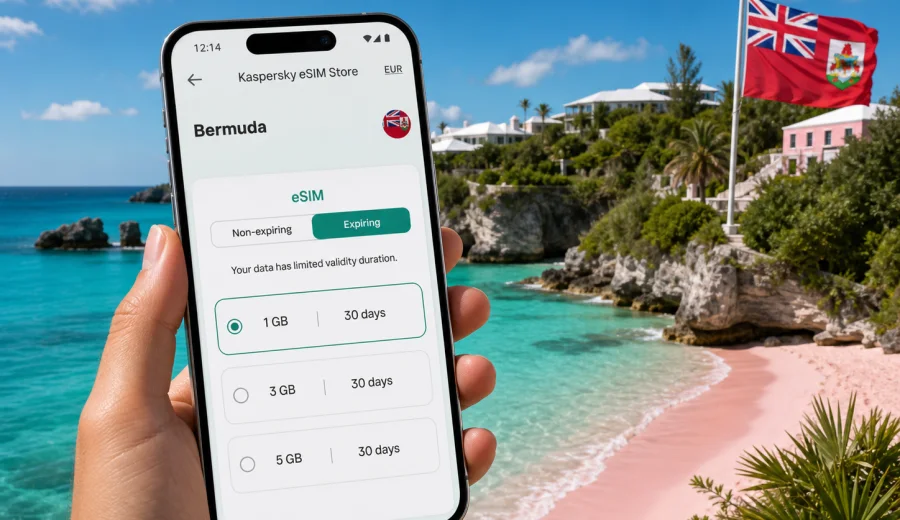
Bermuda eSIM: mobile connection and internet for your trip
Bermuda is compact on the map, but it is not a place where mobile internet is optional. You may need a map as soon as you leave L.F. Wade International Airport, a ride update on the way to Hamilton, a ferry timetable for the route to Dockyard, a restaurant booking in St. George's, or a weather check before heading to Horseshoe Bay. A Bermuda eSIM helps you prepare mobile data before the trip, so you can arrive with a clear plan instead of searching for a physical SIM card after landing.
For many travelers, the main value of eSIM is simple: you keep your primary SIM in the phone, add a digital SIM for mobile data, and use internet-based services while abroad. That is useful in Bermuda because trips often combine beaches, short taxi rides, buses, ferries, hotels, marinas, and walking routes through historic areas. Distances are short, but you may still switch between Wi-Fi, mobile data, and offline moments throughout the day.
This guide explains how to plan mobile connection and internet for Bermuda, when an eSIM is convenient, what to check before buying, and how to choose a data package that matches your route and habits.
Why mobile internet matters in Bermuda
Bermuda is easy to enjoy when you can quickly check practical details. You may not need to stream video on the beach, but you will likely need reliable access for everyday travel tasks:
- navigating between Hamilton, St. George's, Dockyard, South Shore beaches, and your accommodation;
- checking bus and ferry information during the day;
- using messengers for hotel, family, work, or tour communication;
- receiving booking confirmations, boarding passes, and verification codes;
- checking opening hours for museums, restaurants, beaches, and attractions;
- using ride, taxi, map, translation, banking, and weather apps;
- sharing photos without waiting for hotel Wi-Fi.
Public Wi-Fi can be useful, but it is not a full travel strategy. It may be available in hotels, cafes, airport areas, and some public spaces, yet it can be inconsistent between stops. Mobile data gives you more control when you are outside, moving between beaches, or trying to make a quick decision.
What an eSIM does for a Bermuda trip
An eSIM is a digital SIM profile that can be installed on a compatible phone or tablet. Instead of inserting a plastic SIM card, you add the profile through your device settings, usually by scanning a QR code or following an in-app installation flow. After activation, the eSIM can provide mobile data according to the selected tariff conditions.
For travel, eSIM is especially useful because you can arrange it before departure. You do not need to find a local shop immediately after arrival, replace your home SIM card, or wait until the hotel to set up basic internet. You can keep your regular number active for calls or SMS if you need it, while using the travel eSIM for mobile data.
Important limitations are worth understanding before purchase:
- a data eSIM usually does not include a regular phone number, voice calls, or SMS unless this is stated in the tariff conditions;
- calls and messages can usually be handled through internet-based apps;
- the device must support eSIM and must not be locked to a carrier that prevents other SIM profiles;
- some devices require data roaming to be enabled for the eSIM line;
- validity period, traffic volume, destination, and price depend on the selected tariff.
Quick answer
For Bermuda, an eSIM is a practical option if you want mobile internet ready for maps, messengers, bookings, ferry and bus information, weather, and travel apps. It is especially useful for short stays, beach-focused trips, cruises, business visits, and travelers who prefer to keep their main SIM card in the phone.
When eSIM is better than relying only on Wi-Fi
Wi-Fi works well when you are settled in one place. Travel does not. In Bermuda, a day can include breakfast in Hamilton, a ferry ride, a walk through Dockyard, a taxi to a beach, and dinner in a different parish. The moments when you need internet often happen between Wi-Fi zones.
| Situation | Wi-Fi only | eSIM for mobile data |
|---|---|---|
| Leaving the airport | May not be available after you move outside | Helps with maps, messages, and ride coordination |
| Beach day | Depends on nearby venues | Useful for weather, maps, and group communication |
| Ferry or bus planning | May require waiting for a hotspot | You can check routes while moving |
| Hotel check-in | Usually fine once you arrive | Helps before arrival and during transfers |
| Work messages | Works in stable locations | Easier to respond between meetings or activities |
| Cruise stop | Ship Wi-Fi may not be enough on land | Helps during limited shore time |
The main point is not that eSIM replaces every other connection. Hotel Wi-Fi is still useful for large downloads, video calls, and backups. An eSIM gives you a separate mobile data layer for the parts of the trip when Wi-Fi is unavailable, inconvenient, or not worth looking for.
Bermuda travel scenarios where mobile data helps
Short vacation
If you are in Bermuda for three to five days, you may want data mainly for maps, messaging, bookings, and light browsing. A smaller package may be enough if you use hotel Wi-Fi for video, app updates, and cloud backups. Make sure your maps and key documents are available offline too, because that reduces pressure on mobile data.
Beach and sightseeing route
Popular routes can include Horseshoe Bay, Warwick Long Bay, Elbow Beach, Hamilton, St. George's, Crystal Caves, Gibbs Hill Lighthouse, and Royal Naval Dockyard. You can move through several areas in a single day. Mobile data helps you check transport, opening times, walking routes, and weather changes without stopping to search for Wi-Fi.
Business trip
For a work trip, a larger or longer-validity data package may be more comfortable. You may need messaging, calendar updates, email, document access, authentication apps, and occasional tethering. If you plan to use mobile hotspot, check whether it is supported in the selected tariff and allowed by your device settings.
Cruise stop
For a cruise visit, time on land can be limited. An eSIM lets you set up mobile data before you disembark, then use maps and messaging during the stop. If you are visiting only for one day, choose a tariff based on practical use rather than maximum volume.
How much data to prepare for Bermuda
Your data use depends on habits more than destination. Bermuda is visually rich, so photo sharing and navigation can add up, but most travel tasks are modest if you avoid mobile video streaming.
| Use pattern | Typical tasks | Planning approach |
|---|---|---|
| Light | Maps, messengers, email, booking confirmations | Choose a smaller package and use Wi-Fi for heavy tasks |
| Standard | Maps, social media, browsing, photo sharing | Choose a mid-size package with enough validity for the full stay |
| Heavy | Work apps, cloud documents, frequent hotspot, video calls | Choose a larger package and monitor usage daily |
Practical tip: download offline maps, airline apps, hotel details, travel insurance documents, and key tickets before departure. This does not remove the need for mobile internet, but it makes your connection plan more resilient.
Before buying: check your device
Not every phone supports eSIM. Some models also vary by region, carrier, or configuration. Before choosing a tariff, confirm that your device supports eSIM and is not locked in a way that prevents adding another mobile profile. You can start with the device compatibility window: check your device.
Use this checklist:
- your phone or tablet supports eSIM;
- the device is unlocked for adding another SIM profile;
- you have stable internet during installation;
- you know which SIM line should handle mobile data;
- your primary SIM settings are clear, especially if you want to avoid roaming charges;
- you understand when the selected eSIM tariff validity begins.
If you are traveling with family or colleagues, check each device separately. One compatible phone does not guarantee that every phone in the group can use the same setup.
Choosing an eSIM tariff for Bermuda
The best eSIM tariff is the one that matches your trip length, your data habits, and your comfort level. Do not choose only by the largest data number. A package should fit the number of days you will be in Bermuda and the way you actually use mobile internet.
Before purchase, compare:
- data volume, for example smaller, medium, or larger packages;
- validity period, especially for short stays and longer holidays;
- destination coverage for Bermuda;
- whether hotspot use is important for your trip;
- activation rules and when validity starts;
- price and currency shown before payment;
- support options if installation questions appear.
If you want to prepare the connection in advance, you can use Kaspersky eSIM Store to choose an eSIM tariff for your trip to Bermuda and review the available options for the destination before you travel. This keeps the purchase focused on the country page and lets you compare package conditions in one place.
Kaspersky eSIM Store should be understood as an app and website that helps you choose, arrange, and activate an eSIM with a suitable mobile data tariff for an international trip. The mobile network experience itself depends on the selected tariff conditions, local network availability, device settings, and the place where you are using the phone.
Step-by-step setup before departure
A calm setup is better than trying to solve everything in the arrivals area. Use stable Wi-Fi at home or in the hotel before you need the eSIM line.
1. Check that your device supports eSIM and can add a new mobile plan.
2. Choose Bermuda as the destination and compare suitable data packages.
3. Complete the purchase and keep the installation details available.
4. Install the eSIM while connected to stable Wi-Fi.
5. Label the new line clearly, for example "Bermuda data".
6. Keep your primary SIM for calls or SMS if needed.
7. Set the eSIM as the mobile data line when you are ready to use it.
8. Check whether data roaming should be enabled for the eSIM line.
9. Turn off mobile data for your home SIM if you want to avoid accidental roaming use.
If you need platform-specific setup help, use the Android installation guide or the iOS installation guide. The exact menu names can vary by device model and operating system version, so follow the steps that match your phone.
Arrival checklist for Bermuda
When you land or arrive by sea, do a quick settings check before you start moving around:
- confirm that the eSIM line is installed;
- select the eSIM as the mobile data line;
- enable data roaming for the eSIM if the instructions or device settings require it;
- keep your home SIM roaming disabled if you do not want it to use data abroad;
- open a web page or map to confirm that mobile data is working;
- check your remaining data in the app or account area during the trip.
If mobile data does not start right away, avoid changing many settings at once. First check the selected data line, roaming switch for the eSIM, airplane mode, and signal. Restarting the phone can also help after a new mobile profile is installed.
Practical Bermuda use cases
From the airport to your hotel
After arriving at L.F. Wade International Airport, mobile data helps you message your accommodation, check the route, confirm pickup details, or look up ferry and bus options. This is one of the highest-value moments for having the eSIM ready.
Hamilton workday
In Hamilton, you may move between meetings, cafes, hotels, and waterfront areas. Mobile data supports calendar updates, business messengers, quick document checks, and two-factor authentication. Use Wi-Fi for large file transfers when possible, and keep mobile data for continuity.
South Shore beach route
South Shore beaches are a major reason to visit Bermuda. If you plan to move between Horseshoe Bay, Warwick Long Bay, and nearby stops, mobile data helps with route checks, weather, group coordination, and finding the next place to eat.
St. George's and historic areas
Historic streets are easy to explore on foot, but mobile maps are still useful. With an eSIM, you can check opening hours, walking routes, restaurant availability, and ferry or taxi timing without relying on a public hotspot.
Data-saving tips during the trip
Use your data package deliberately. Small habits can make a tariff last much longer:
- download offline maps before leaving Wi-Fi;
- pause automatic cloud photo backup on mobile data;
- update apps over Wi-Fi only;
- reduce video autoplay in social apps;
- send compressed photos in messengers when quality is not important;
- use hotel Wi-Fi for long video calls;
- monitor data usage daily if your package is small;
- keep your phone's low data mode available for busy days.
These settings are especially useful if your Bermuda trip includes long outdoor days. You do not need to avoid using mobile data; you simply reserve it for the moments where it matters most.
eSIM, roaming, or local SIM: what to choose?
There is no single perfect option for every traveler. The right choice depends on your phone, length of stay, budget, and how much control you want before arrival.
| Option | Strengths | Trade-offs |
|---|---|---|
| Travel eSIM | Can be prepared before arrival; no physical SIM swap; good for data-focused trips | Requires compatible unlocked device; conditions depend on selected tariff |
| Home carrier roaming | Uses your existing number and billing relationship | Costs and included data vary; check roaming terms carefully |
| Local physical SIM | May suit longer stays or specific local needs | Requires time to buy and install; may involve shop hours or availability |
| Wi-Fi only | Good for hotel work and heavy downloads | Less reliable while moving around Bermuda |
For many visitors, a travel eSIM and hotel Wi-Fi work well together: eSIM for movement and everyday travel tasks, Wi-Fi for heavier use.
Common mistakes to avoid
- Waiting until you urgently need internet before installing the eSIM.
- Forgetting to check device compatibility.
- Leaving mobile data active on the home SIM by accident.
- Choosing a tariff with a validity period shorter than the full trip.
- Using mobile data for large app updates or automatic photo backup.
- Assuming an eSIM includes voice calls or SMS without checking the tariff details.
- Deleting the eSIM profile too early, especially before confirming whether it can be reinstalled.
FAQ
Is eSIM useful for a short Bermuda trip?
Yes, especially if you want maps, messages, booking details, and transport information ready as soon as you arrive. For a short stay, choose a package based on practical tasks and expected daily use.
Can I keep my normal SIM card active?
In most dual-SIM phones, you can keep your regular SIM active and use the eSIM for mobile data. Check your device settings carefully so data uses the intended line.
Does a travel eSIM include a local phone number?
Usually, a data eSIM is for mobile internet and does not include a regular phone number, calls, or SMS unless those options are specified in the tariff conditions. You can use internet-based calling and messaging apps over mobile data.
Should I install the eSIM before flying?
It is often easier to install it before departure while you have stable Wi-Fi. Activation timing can depend on the selected tariff, so read the instructions and validity details before you switch the eSIM line on for mobile data.
Can I use mobile hotspot with eSIM?
It depends on the selected tariff, device, and settings. If hotspot is important for a laptop or another traveler, check this before purchase and monitor data use closely.
What if my phone does not support eSIM?
Use another connection option, such as your carrier's roaming, a compatible second device, or local SIM availability. Do not buy an eSIM until you have confirmed compatibility.
Final preparation checklist
Before you leave for Bermuda, make sure you have:
- checked eSIM support and carrier lock status;
- selected a data package that covers your trip length;
- saved installation details somewhere accessible;
- installed the eSIM over stable Wi-Fi;
- downloaded offline maps and travel documents;
- reviewed mobile data settings for both SIM lines;
- planned when to use Wi-Fi for heavy tasks.
Prepare your Bermuda mobile internet in advance
A Bermuda eSIM is not just a technical add-on. It is part of practical trip planning: maps when you leave the airport, messages during transfers, weather before the beach, bookings in Hamilton, and route checks around the island. If your device is compatible and your trip is data-focused, preparing eSIM before departure can make the first hours in Bermuda much easier.
When you are ready, use Kaspersky eSIM Store to view mobile internet options for Bermuda, compare the available tariff conditions, and choose the data package that fits your route, trip length, and expected use.