Travel connectivity guide
Bethlehem eSIM: Mobile Internet & Travel Guide
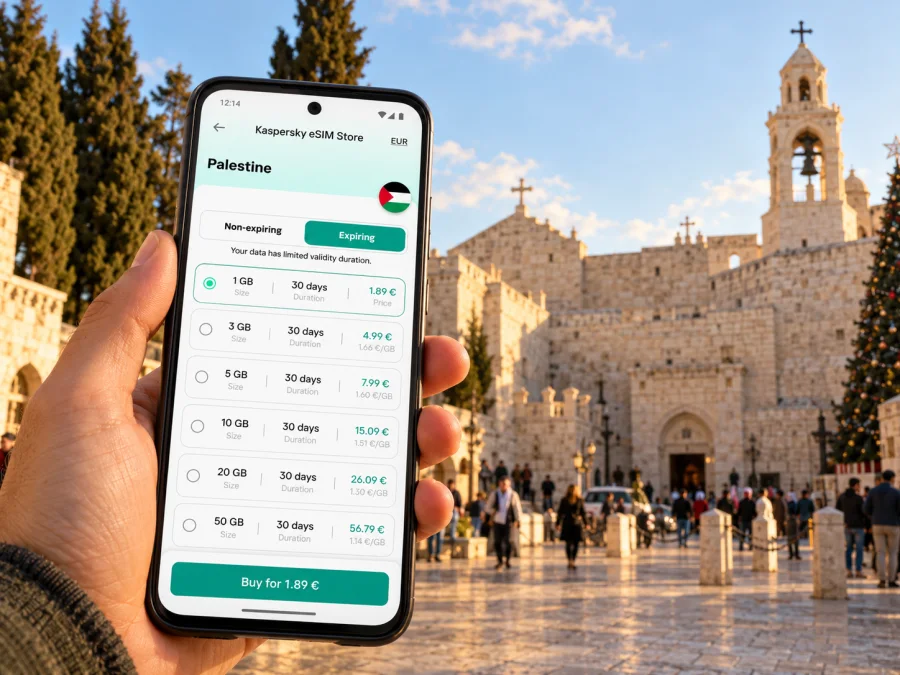
Bethlehem eSIM for Mobile Connection and Internet: A Practical Travel Guide
Bethlehem is a compact city with a world-famous historic centre, but a short distance on a map does not always mean a quick journey. The city is in the West Bank, Palestine, around 10 km south of Jerusalem. Routes, crossings and the network available to your phone can depend on where you are coming from and on conditions on the day. Planning mobile internet therefore means checking both the eSIM destination and the practical route, rather than assuming that a nearby Israel plan or a familiar roaming arrangement will work in Bethlehem.
A travel eSIM can keep maps, messages, hotel details and transport information available without changing the physical SIM in your phone. Kaspersky eSIM Store is an app and website where you can choose, purchase and activate an eSIM with a suitable data plan for an international trip. The eSIM is for mobile data; a regular phone number, voice calls and SMS are not included unless the terms of a particular plan explicitly say otherwise. Calls and messages through internet apps may work when data service is available.
Start with the destination, not just the map
Bethlehem is a Palestinian city in the West Bank. It is administered locally by Palestinian authorities, while movement to and from nearby areas may involve crossings and restrictions that are outside a traveler's control. For connectivity, that geographic distinction matters: a plan listed for Israel, a Middle East region or Palestine may have different coverage terms and partner networks. Do not infer that one includes the others from proximity or a map label.
Before paying, open the plan details and check that Palestine is explicitly included as a destination. If you are visiting Jerusalem as well, check whether the same plan covers both places and what its terms say about network selection and data roaming. A country or regional label alone is not enough to establish coverage at a specific address, on a particular route or during a crossing.
Palestine has its own mobile market, including local operators that offer services such as eSIM to eligible local customers. That is different from an international travel eSIM: a travel plan may connect through a roaming partner, and its available network, speed and coverage depend on that specific arrangement. The presence of local eSIM services does not prove that every travel eSIM uses the same network or has the same terms. If the provider does not identify a partner or explain coverage, ask support before relying on the plan for an essential connection.
Three checks before choosing a plan
| Check | What to confirm | Why it matters in Bethlehem |
|---|---|---|
| Destination | Palestine is named in the plan's included destinations | Israel or a broad regional label may not mean the same coverage |
| Route | The plan covers every place you expect to visit, including Jerusalem if relevant | Coverage and plan eligibility can change across a crossing |
| Network terms | Supported partner, data roaming requirement, validity start and any limits | These details determine how and when the profile can connect |
Treat a coverage map as a planning aid, not a promise of uninterrupted service. Dense stone buildings, indoor rooms, terrain, congestion, network maintenance and local restrictions can affect reception. Save important addresses and booking details offline, and keep another way to contact your accommodation or travel companion.
When mobile data helps around Bethlehem
The central sights are close enough to combine on foot, but visitors still use data for the practical steps around a day in the city: confirming a meeting point, checking a walking route, translating a message, looking up opening information, contacting a guide or sharing an updated arrival time. A working map is particularly useful when a route changes or a driver suggests a different drop-off point.
Manger Square and the Church of the Nativity form the most familiar starting point for many visitors. Nearby lanes lead toward shops, cafés, churches and historic streets. In the older centre, a map can help you orient yourself, but small lanes, stairs and uneven surfaces mean the shortest digital route is not always the easiest one. Check the route before setting off and ask locally if a turn or entrance is unclear.
Other visits may take you toward Beit Jala, Beit Sahour, the Shepherds’ Field area or sites farther from the central square. These are distinct places in the Bethlehem area, and a city-centre data connection should not be treated as proof of service everywhere on the wider itinerary. If you plan to visit more than one town, check the route and the plan's stated destination coverage before leaving your accommodation.
A data connection can also simplify coordination without replacing local guidance. If you have booked a driver or a guided visit, agree on the pickup point and a fallback contact method in advance. Keep the guide's name, accommodation address and any meeting instructions accessible offline in case the signal drops or a messaging app cannot connect.
Arrival and the Jerusalem–Bethlehem journey
Bethlehem has no commercial airport. Visitors commonly reach the area through a regional airport and continue by road, but the practical route depends on passport, entry permission, current crossing arrangements and the wider itinerary. Do not book a tight onward connection based only on the distance shown on a map.
Bethlehem is roughly 10 km south of Jerusalem, yet the journey can take substantially longer because traffic and checks may affect movement. A local visitor-information page cautions that a trip between the two cities can take over an hour, and that the time varies by transport and conditions. Treat even that as an illustration, not a timetable: queues and access arrangements can change quickly. If you are traveling from an airport, leave generous room for the journey and verify travel requirements with current official guidance for your nationality and route.
Transport options and crossing procedures can change. Confirm where a bus or driver will pick you up, which side of a crossing is involved, whether you must walk between vehicles, and what identification you should carry. A tour may coordinate transport and local guidance, while an independent trip requires you to verify each segment yourself. Do not assume an Israeli-registered rental car, a taxi, or a bus can take you through every crossing or onward to every destination; check with the rental company and transport provider before departure.
A practical data plan for different kinds of visit
Choose a plan based on what you will do, how long you will stay and where else you will go. There is no single data allowance that suits every visitor. Navigation and text messaging usually use less data than repeated video calls, uploading large photo libraries or streaming. Your phone's data-use screen can help estimate typical use before travel; background photo backups and app updates can consume data without an obvious action.
| Visit pattern | Likely data tasks | Useful preparation |
|---|---|---|
| Short visit from Jerusalem | Maps, messages, meeting coordination, opening details | Keep the return plan flexible; save pickup details offline |
| Overnight in Bethlehem | Navigation, bookings, messaging, occasional calls in apps | Confirm the accommodation address and Wi-Fi availability directly |
| Pilgrimage or guided itinerary | Group coordination, maps, translation, photos | Agree on a meeting point and offline contact plan with the guide |
| Work trip | Email, documents, messaging, video meetings | Check data limits and hotspot rules; keep large downloads on Wi-Fi |
| Multi-city West Bank route | Navigation and coordination between stops | Verify that every destination is included, not only Bethlehem |
Before selecting a plan, compare its data allowance, validity period, top-up options, hotspot rules and the moment the validity begins. Some plans start when installed, others when they first connect to a supported network; follow the exact plan conditions. If a trip includes several places, choose according to the full route rather than the first city. Avoid selecting solely by headline data volume: a plan with more data is not useful if its validity or geographic terms do not fit your itinerary.
Once you know your route and usage, review the current eSIM options for Palestine and read each plan's live destination, data and validity terms. The page is for Palestine as a destination; it should not be read as confirmation that a particular plan also covers Israel, Jordan or every nearby area.
Choose carefully if you will cross between destinations
A Bethlehem visit may be part of a wider itinerary including Jerusalem, Tel Aviv, Amman or other places. These destinations are not interchangeable for plan selection. A profile can remain installed while traveling, but whether it connects in each place depends on the plan's included countries, roaming partners, device settings and local conditions.
Use this sequence for a multi-destination trip:
- Write down every country or territory where you expect to use data.
- Compare that list with the plan's explicit coverage list, not just its marketing name.
- Check whether the plan is local, regional or global and whether the same data allowance applies across all included places.
- Confirm validity and activation rules before installing or enabling data.
- If one destination is not included, arrange a separate suitable option or use your regular SIM's roaming after checking its charges.
Device compatibility and regional variants
An eSIM plan is useful only if the phone supports eSIM and is not locked in a way that prevents another profile from being used. Support can vary by manufacturer, exact model number, country of sale and carrier configuration. Two phones with similar retail names may have different SIM hardware in different markets. Do not rely only on a general model-family list or on a friend's experience with a device that looks the same.
Before purchase:
- Check the exact model number in your phone settings or on the original packaging.
- Confirm eSIM support for that exact regional version using the device maker's current specifications.
- Check that the phone is unlocked and can use a travel profile alongside your primary SIM if needed.
- Make sure you can connect to Wi-Fi to download or add the profile.
- Review how many eSIM profiles the phone can store and which can be active together; this varies by device.
Check whether your device supports eSIM before choosing a plan. If you are unsure about a regional variant, ask the manufacturer or seller using the exact model number. Do not assume that local Palestinian operators' support for eSIM guarantees support on every imported phone, or that a device's domestic eSIM feature guarantees compatibility with a particular travel plan.
Install before departure, activate with care
Installing a profile and starting its data validity are not necessarily the same event. Read the plan instructions so you know whether validity begins at purchase, installation or first network connection. If the plan allows pre-installation, adding it at home over Wi-Fi can reduce setup work during arrival. Keep the QR code or activation details available only as instructed, and do not scan it repeatedly if installation fails.
Kaspersky eSIM Store offers step-by-step help for installing eSIM on Android and installing eSIM on iPhone. Menu names differ between operating-system versions and manufacturers, so follow the instructions displayed for your device and the plan. If your primary number must remain available for calls or verification codes, label each line clearly and select the travel eSIM for mobile data only when appropriate.
Staying useful when the signal is limited
Bethlehem's historic centre includes stone buildings and narrow streets; indoor reception can differ from what you experience outdoors. Network conditions may also vary by neighbourhood, time and operator partner. Prepare for short periods without mobile data instead of expecting one signal level throughout the day.
Before leaving Wi-Fi, make the following items available offline:
- accommodation name, street address and phone number;
- saved map area and directions to your next stop;
- booking confirmations, tickets and meeting instructions;
- emergency and travel-insurance details;
- a note with the names of your driver, guide or local contact.
Common questions
Does an Israel eSIM automatically work in Bethlehem?
No. Do not assume so. Bethlehem is in the West Bank, Palestine, and plan destinations and roaming arrangements vary. Check that Palestine appears in the specific plan's coverage terms; verify Israel separately if you will use data there too.
Is a Palestine eSIM guaranteed to connect everywhere in Bethlehem?
No plan should be treated as a guarantee of continuous service at every address. Reception can depend on the partner network, the building, terrain, congestion, device settings and local conditions. Review the provider's coverage information and keep offline details for essential parts of the trip.
Can I use the eSIM for ordinary calls and SMS?
A travel data eSIM generally provides mobile data only unless its plan terms explicitly include voice or messaging service. You can use internet-based calling and messaging apps when data is available. Keep your regular SIM if you need your existing number, and check its roaming charges.
Will my eSIM activate as soon as I install it?
Not necessarily. Installation, activation and the start of the plan's validity can be separate events. Check the exact terms for your plan, follow its setup steps and confirm when data starts being counted.
What if I have no service after crossing?
Confirm that you are in a place listed as covered, select the travel profile for mobile data and check the plan's roaming instructions. Allow time for network registration, then use the provider's troubleshooting guidance or contact support over Wi-Fi. Keep an offline map and meeting details in case the issue takes longer to resolve.
A compact preparation checklist
Before booking: confirm your route, current travel requirements and likely crossing arrangements. Check your exact phone variant for eSIM support and make sure it is unlocked.
Before purchase: confirm that Palestine is explicitly included, compare plan validity and data terms, and verify whether other stops on your itinerary are covered. Do not assume coverage or performance from a neighbouring destination.
Before departure: install the profile only when permitted by its terms, save the installation instructions, download maps and bookings, and note your accommodation and driver details offline.
After arrival: select the correct data line, enable roaming only as instructed, test service and keep your original SIM settings as intended. If service is unavailable, use Wi-Fi support and your offline backup rather than deleting the profile immediately.
Bethlehem rewards a flexible itinerary: build extra time into journeys, confirm pickup details directly and keep the information you need close at hand. For mobile internet, choose a plan by its stated Palestine coverage and the details of your own route. When you are ready, check the current eSIM options for your trip to Palestine in Kaspersky eSIM Store, compare the live terms, and install a suitable eSIM on your compatible, unlocked device.


