
Travel connectivity guide
Bhutan eSIM: mobile internet travel guide
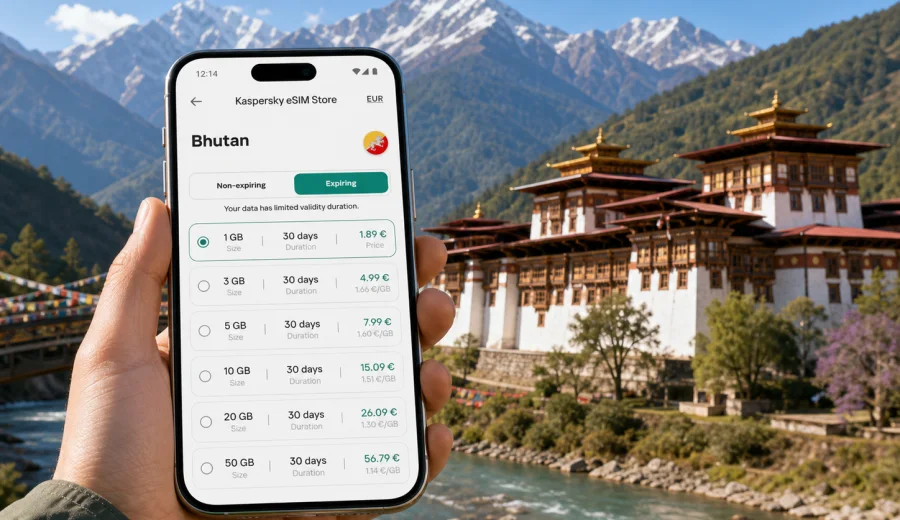
Bhutan eSIM: mobile connection and internet for your trip
Bhutan is a country where travel plans often depend on timing, geography and calm preparation. A short drive can move you from Paro Airport to mountain roads, from Thimphu streets to a quiet valley, or from a hotel Wi-Fi zone to a trailhead where you still need maps, messages and booking details. For many travelers, an eSIM is a practical way to prepare mobile connection and internet before the trip, without making a local SIM shop your first task after arrival.
This guide explains how to think about mobile internet in Bhutan, when an eSIM is useful, what to check before buying a tariff, and how to estimate the amount of data you may need. It is written for travelers who want a simple, controlled setup: choose a suitable data package, install it on a compatible device and know what to expect before landing.
Why mobile internet matters in Bhutan
Bhutan rewards slow travel, but it still creates very modern connectivity needs. You may need to show hotel confirmations, coordinate with a guide, message family, upload documents, check weather before a mountain drive, or navigate between places where English signage is limited. Public Wi-Fi can help in hotels and cafes, but it is not a full travel plan.
Mobile internet is especially useful in Bhutan for:
- arrival coordination at Paro International Airport;
- messaging with hotels, guides and drivers;
- online maps for Thimphu, Paro, Punakha, Phobjikha and Bumthang routes;
- checking weather before highland drives and hikes;
- translating short phrases and menu items;
- managing flight changes and travel documents;
- using ride, banking or authentication apps that require data;
- keeping a backup connection when hotel Wi-Fi is slow or unavailable.
An eSIM does not make the mountains less remote. It gives you a cleaner way to prepare a data connection on a compatible phone, so you are not relying only on roaming, a physical SIM counter or open Wi-Fi networks.
What an eSIM does for a Bhutan trip
An eSIM is a digital SIM profile that can be installed on many modern smartphones and tablets. In travel use, it is commonly chosen for mobile data. You keep your regular SIM in the device, add an eSIM profile for the trip and choose which line should use cellular data.
For Bhutan, that setup is useful because your arrival day can be busy. The airport is compact, transfer times can vary, and travel arrangements are often planned through hotels, tour operators or drivers. If your phone is ready before the trip, you can switch on mobile data when the eSIM conditions allow activation and start using maps, messages and booking apps more quickly.
The important limitation is simple: an eSIM tariff for travel is usually about internet access. It normally does not include a local phone number, standard voice calls or SMS unless those features are specifically stated in the tariff conditions. For calls and messages, most travelers use internet-based apps.
Before you buy: check your device
Not every phone supports eSIM, and some devices are locked by an operator. Before choosing any tariff, check that your smartphone supports eSIM and that it can use a mobile data profile while abroad. You can start with the internal compatibility check here: check your device.
Use this short checklist:
| What to check | Why it matters |
|---|---|
| eSIM support | The phone must be able to install a digital SIM profile. |
| Operator lock status | A locked device may reject another mobile profile. |
| Dual SIM settings | You may want your regular SIM active for calls while eSIM handles data. |
| Available Wi-Fi for installation | Installing the eSIM profile usually requires an internet connection. |
| Data roaming setting | Some eSIM profiles require data roaming to be enabled for the eSIM line. |
| Device storage and software version | Older software can make eSIM setup less reliable. |
If you are traveling with two phones, check both. Installing an eSIM on the wrong device can be inconvenient, and many eSIM profiles cannot simply be moved after activation.
How much data do you need in Bhutan?
There is no single correct amount. A light user who relies on hotel Wi-Fi may need only a modest package. A traveler who uploads photos, uses navigation every day and works remotely will need more. The goal is to match the tariff to your real behavior, not to buy the largest option by default.
| Trip style | Typical data use | Practical approach |
|---|---|---|
| Short stay, light messaging | Low | Choose a smaller package and use hotel Wi-Fi for backups. |
| 5-7 day cultural route | Medium | Plan for daily maps, messaging and moderate browsing. |
| Photo-heavy travel | Medium to high | Disable automatic cloud uploads on cellular data. |
| Remote work or frequent calls | High | Choose a larger package and keep Wi-Fi as the main work connection. |
| Family trip with shared planning | Medium | Each traveler should have their own data plan or a clear hotspot plan. |
As a practical rule, navigation, messaging and browsing are usually manageable. Video streaming, automatic photo backup, app updates and long video calls consume data quickly. If you want predictable usage, adjust your phone settings before departure.
Quick data-saving settings before departure
Prepare your phone while you are still on a stable home connection:
- download offline maps for Paro, Thimphu, Punakha and planned routes;
- save hotel addresses, guide contacts and booking confirmations offline;
- disable automatic app updates on cellular data;
- pause cloud photo and video uploads unless connected to Wi-Fi;
- set messaging apps to download media only on Wi-Fi;
- preload translation language packs if your app supports offline use;
- keep your airline and travel apps logged in before the flight.
These settings make any data package last longer and reduce the chance of running out of mobile internet during an important transfer.
Choosing an eSIM tariff for Bhutan
When comparing options, do not look only at the headline data amount. Read the full tariff card and match it to your dates, route and expected usage.
Check these points:
1. Destination: make sure the tariff is for Bhutan or includes Bhutan in a regional package.
2. Data amount: choose enough data for maps, messaging, browsing and planned media use.
3. Validity period: match the duration to your actual travel dates, with a small buffer.
4. Activation rules: understand when the validity period starts.
5. Top-up options: check whether you can add more data if your usage changes.
6. Hotspot support: if you plan to share data with a laptop or another phone, confirm whether tethering is allowed.
7. Device compatibility: verify eSIM support before payment.
At this stage, it is sensible to compare the available options and choose an eSIM tariff for your Bhutan trip in Kaspersky eSIM Store. The site and app help you select the destination, review package details and prepare an eSIM for mobile internet in your travel plan.
eSIM, roaming or local SIM: what makes sense?
Travelers usually compare three options: international roaming from their home operator, a local physical SIM, and a travel eSIM. Each has a different balance of convenience and control.
| Option | Strengths | Things to consider |
|---|---|---|
| Home roaming | Uses your existing SIM and number | Conditions can be expensive or unclear; check your operator before travel. |
| Local physical SIM | Can be useful for longer stays | Requires a shop visit, documents may be needed, and setup takes arrival time. |
| Travel eSIM | Can be prepared before or during the trip; no physical SIM swap | Requires a compatible unlocked device and careful setup. |
For a short or medium-length Bhutan trip, an eSIM is often attractive because it reduces arrival friction. You can review tariff details in advance, keep your physical SIM in the phone and manage the travel data line separately.
If you are staying for a long time, need a local phone number, or have special work requirements, compare all options carefully. A travel eSIM is a practical mobile data tool, not a replacement for every telecom need.
Installation: when and how to set it up
The best time to install an eSIM is usually before departure, while you have reliable Wi-Fi and time to read the instructions. Activation timing depends on the tariff conditions, so check the details before turning on the eSIM line for data.
General setup flow:
1. Check that your device supports eSIM and is not locked.
2. Choose the destination and tariff for Bhutan.
3. Complete the order.
4. Install the eSIM profile using the provided setup method.
5. Label the line clearly, for example "Bhutan data".
6. Keep your regular SIM for calls or messages if needed.
7. When the tariff conditions allow, set the eSIM as the cellular data line.
8. Test basic browsing and messaging.
For device-specific setup, use the official installation pages: Android installation guide and iOS installation guide.
Do not delete the eSIM profile after installation unless you are sure you no longer need it. Some profiles cannot be reinstalled after removal.
Recommended phone settings for Bhutan
The exact menu names vary by device, but the logic is similar on most modern phones.
| Setting | Recommended action |
|---|---|
| Cellular data line | Select the eSIM line for mobile data when you are ready to use it. |
| Default voice line | Keep your home SIM if you still need your regular number. |
| Data roaming for eSIM | Enable it if the eSIM instructions require it. |
| Low data mode | Turn it on if you want to reduce background usage. |
| Wi-Fi assist / adaptive data | Review carefully; it may use cellular data when Wi-Fi is weak. |
| Hotspot | Use only if your tariff allows tethering and you have enough data. |
After setup, open a browser, map app and messaging app to confirm that mobile data is working. If something fails, check whether the eSIM line is selected for data, whether data roaming is enabled for that line, and whether the APN or profile settings match the instructions.
Common mistakes to avoid
Some eSIM problems are not technical failures; they are planning mistakes. Avoid these before a Bhutan trip:
- buying a tariff before checking whether the phone supports eSIM;
- installing the eSIM on a secondary device that will not be used during the trip;
- deleting the eSIM profile after installation;
- turning on data-heavy cloud backup on cellular data;
- assuming a data eSIM includes a local phone number;
- forgetting to set the eSIM as the mobile data line;
- ignoring activation rules and validity dates;
- relying on continuous signal during mountain routes;
- waiting until airport arrival to read setup instructions for the first time.
A few minutes of preparation prevents most of these issues.
FAQ: eSIM and internet in Bhutan
Can I install an eSIM before arriving in Bhutan?
In most cases, you can install the eSIM profile before travel while you have Wi-Fi. Check the tariff details to understand when validity begins and when you should activate mobile data.
Does a travel eSIM give me a Bhutanese phone number?
Usually no. Travel eSIM tariffs for mobile internet are commonly data-only unless the tariff explicitly says otherwise. Use internet-based apps for calls and messages.
Can I keep my regular SIM active?
On many dual SIM phones, yes. You can keep your regular SIM for calls or authentication and use the eSIM for cellular data. Check your device settings before departure.
Will mobile internet be available on every road and trail?
No travel data option can guarantee continuous signal in mountainous terrain. Bhutan has valleys, passes and remote areas where conditions may vary. Download essential information offline and use mobile data when available.
Is eSIM better than public Wi-Fi?
It solves a different problem. Wi-Fi can be useful in hotels, but mobile internet is available when you are moving, coordinating transfers or checking maps away from a fixed connection. A good travel setup uses both.
What should I do if mobile data does not start?
Check that the eSIM line is installed, selected for cellular data, and allowed to use data roaming if required by the instructions. Restart the device if needed, then review the setup guide for your operating system.
Final checklist before your flight
Before leaving for Bhutan, confirm the essentials:
- your device supports eSIM and is unlocked;
- your eSIM tariff covers Bhutan and matches your travel dates;
- you understand when validity starts;
- the eSIM profile is installed or you have saved the installation details;
- offline maps and documents are downloaded;
- app updates and photo backups are limited on cellular data;
- your regular SIM settings are clear;
- you know where to find the Android or iOS installation guide if needed.
Prepare your Bhutan eSIM before you travel
Bhutan is easier to enjoy when basic travel tasks are already handled. Mobile internet helps with arrival coordination, route planning, messages, maps and unexpected changes, while offline preparation protects you in mountain areas where signal may vary.
Kaspersky eSIM Store is an app and site where you can choose a destination, review tariff details, install an eSIM on a compatible device and manage mobile internet for an international trip. Before departure, compare the available data options and prepare an eSIM tariff for Bhutan so your phone is ready for the parts of the journey where a reliable data setup matters most.