
Travel connectivity guide
Bilbao eSIM: mobile internet for your trip
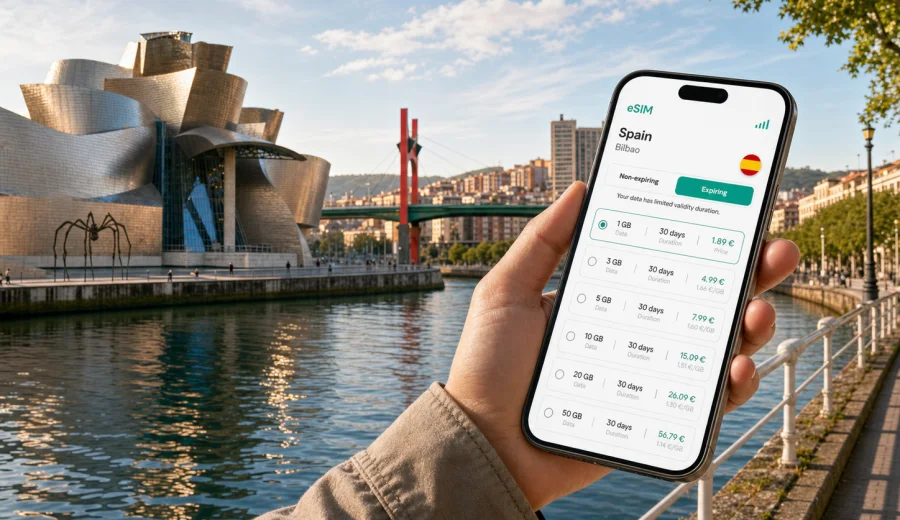
Bilbao eSIM: mobile connection and internet for your trip
Bilbao is a city where mobile internet becomes useful before you have even reached your hotel. You may land at Bilbao Airport, open a ride-hailing app, check the Bizkaibus schedule, message your host, or look up the best route toward Abando, Indautxu, Casco Viejo, Deusto, or the riverfront near the Guggenheim Museum. A Bilbao eSIM helps you prepare mobile connection and internet access for these first decisions without searching for a physical SIM card after arrival.
This guide focuses on practical travel scenarios in Bilbao: airport arrival, local transport, walking routes, hotels, business trips, short stopovers, and side trips across the Basque Country. The goal is not to turn the article into a general guide to Spain. The focus is how to choose, install, and use an eSIM plan for mobile internet during a trip to Bilbao.
An eSIM is a digital SIM profile that can be installed on a compatible phone or tablet. For travel, it is useful because you can choose a data plan before departure or shortly after landing, keep your primary SIM in the device, and use mobile data for maps, messaging, bookings, and everyday travel tasks. Standard voice calls and SMS are usually not included unless a specific plan says otherwise, so many travelers use internet-based calls and messengers.
Why an eSIM is useful in Bilbao
Bilbao is compact enough to explore on foot, but the practical parts of a trip still depend on data. Street names may appear in Spanish or Basque, metro entrances are not always obvious from a distance, and many visitors move between the airport, city center, riverside, museums, old town, conference venues, and nearby coastal towns. Mobile internet helps you keep these small transitions smooth.
Typical situations where an eSIM can help:
- checking the transfer from Bilbao Airport to the city center;
- opening maps while walking along the Nervion river;
- confirming hotel check-in details in Ensanche, Abando, Indautxu, Deusto, or Casco Viejo;
- using metro, tram, taxi, car-sharing, or ride-hailing apps;
- translating restaurant menus or short service messages;
- sending photos and messages without waiting for hotel Wi-Fi;
- joining a work call from a cafe or coworking space;
- changing plans quickly if rain affects a walking route.
Bilbao also rewards spontaneous movement. You might start near the Guggenheim Museum, walk toward Zubizuri Bridge, cross into the old town, and then decide to continue by metro toward Getxo. With prepared mobile internet, these choices are easier because you do not have to stop and search for a Wi-Fi network whenever the plan changes.
Arrival in Bilbao: the first hour online
Most international visitors arrive through Bilbao Airport, located north of the city. The ride into central Bilbao is usually straightforward, but the first hour can still be busy: you collect luggage, check transport options, confirm the hotel address, and decide whether to take a bus, taxi, private transfer, or rental car.
If your eSIM is already installed, you can switch mobile data to the travel profile after landing and use the connection for the first decisions of the trip. Activation details can vary by plan and device, so it is better to read the plan conditions before departure and keep installation instructions available offline.
Useful first-hour checklist:
- save your hotel address and booking confirmation before the flight;
- install the eSIM profile while you still have stable Wi-Fi;
- check whether your device supports eSIM and is not locked to one carrier;
- keep your main SIM active if you need banking texts or calls;
- know which SIM profile should handle mobile data after arrival;
- keep the QR code or in-app instructions accessible.
This preparation is especially helpful if you arrive late in the evening, travel with family, carry business equipment, or need to reach a meeting shortly after landing.
How much data you may need in Bilbao
The right amount of data depends on your habits, not only on the length of the trip. A visitor who mostly uses maps and messengers may need far less than someone who uploads videos, uses a laptop hotspot, or joins frequent video calls.
| Travel style in Bilbao | Typical data use | What to check before choosing |
|---|---|---|
| Weekend city break | Light to moderate | Maps, messaging, restaurant search, museum tickets |
| Business trip | Moderate to high | Email, calls, calendar, hotspot use, document sharing |
| Family trip | Moderate | Several devices, route changes, shared bookings |
| Remote work stay | High | Video meetings, cloud files, backup connection |
| Bilbao plus Basque Coast | Moderate to high | Navigation outside the city, train or car routes |
For a short city break, maps, messaging, ticket apps, and light browsing may be enough. For a business trip or a longer stay, choose a plan that leaves room for video calls, file transfers, and hotspot use if the plan allows it. Always check the data volume, validity period, destination, price, and any specific plan limitations before paying.
Choosing an eSIM plan for a Bilbao trip
Because Bilbao is in Spain, you should choose a plan that covers Spain. If your itinerary continues to several European countries, compare whether a Spain-focused plan or a regional Europe plan fits better. The practical question is simple: where will you actually use mobile data during the validity period?
Before choosing, answer five questions:
1. How many days will you stay in Bilbao?
2. Will you visit San Sebastian, Vitoria-Gasteiz, Santander, La Rioja, or other nearby places?
3. Will you use mobile data mostly on your phone, or also through hotspot?
4. Do you need data from the moment you land?
5. Is your device compatible with eSIM and unlocked for travel use?
Kaspersky eSIM Store is an app and website where you can choose, arrange, and activate an eSIM with a suitable mobile data plan for international travel. For Bilbao, use the Spain destination page to compare available options and prepare an eSIM plan for your trip to Bilbao when it makes sense for your itinerary.
The first plan you see is not automatically the right one. A smaller package may be enough for a weekend with hotel Wi-Fi, while a larger package may be more comfortable if you expect video calls, frequent navigation, or travel beyond Bilbao. The useful comparison points are data volume, validity duration, destination coverage, total cost, and whether the plan conditions match your device and travel dates.
Local movement: where mobile internet matters most
Bilbao is easy to navigate, but its layout follows the river and surrounding hills. A small mistake in direction can turn a short walk into an uphill detour, especially around districts such as Begoña, Santutxu, Deusto, and the streets above the old town. Mobile maps make these route decisions easier.
Common city scenarios:
- From the airport to Abando or Moyua: use data to check the next bus, taxi point, or walking route from the stop.
- From the Guggenheim Museum to Casco Viejo: compare walking along the river with tram or metro options.
- From a hotel in Indautxu to a meeting in Deusto: check metro entrances, walking time, and delays.
- From Bilbao to Getxo or Portugalete: confirm metro direction, station names, and the route back.
- From Bilbao to San Sebastian or Santander: check train or bus details before leaving the hotel.
Offline maps are useful, but they do not always show live transport changes, ride availability, or last-minute booking updates. An eSIM plan gives you a practical fallback when hotel Wi-Fi ends at the lobby door and public Wi-Fi is not available where you need it.
Districts and travel patterns in Bilbao
Different parts of Bilbao create different data needs. If you stay in the city center, you may use mobile internet mostly for walking routes and bookings. If you stay farther out or travel across the metro network, live navigation becomes more important.
Abando and Ensanche. These central areas are practical for hotels, shops, restaurants, and business meetings. Mobile data helps with quick walking routes, payment confirmations, and calendar changes.
Indautxu and San Mames. This area is useful for events, transport, and work trips. If you move between meetings, restaurants, and the stadium area, a reliable data plan helps you avoid depending on venue Wi-Fi.
Casco Viejo. The old town has narrow streets, small squares, and many food stops. Maps, translation, and messaging are the main use cases here.
Deusto and riverfront areas. These are common for university, business, and longer stays. You may use data for transport connections, coworking, or hotspot backup.
Getxo and Portugalete. These are not central Bilbao, but many visitors make the trip by metro. Mobile internet is useful for route planning, coastal walks, and returning to the city at the right time.
Business trips and remote work in Bilbao
Bilbao is a practical business city: compact, well connected, and close to industrial, technology, design, and conference venues across the region. If you are arriving for meetings, a trade event, or a short project, mobile internet is less about sightseeing and more about control.
For business travel, check these points before selecting a data plan:
- Will you need video calls away from hotel Wi-Fi?
- Can you use hotspot if your laptop needs a backup connection?
- How much data do your work apps normally use?
- Do you need access during airport transfers and train journeys?
- Will you travel to nearby offices outside central Bilbao?
Avoid relying only on public Wi-Fi for business-critical tasks. It may be unavailable, slow, require local registration, or be unsuitable for confidential work. A prepared eSIM plan gives you a separate mobile data option, while your company security rules and device settings remain your responsibility.
How to install and activate an eSIM
Install the eSIM profile when you have a stable connection, ideally before departure or at your hotel before a busy day. The exact steps depend on your device, operating system, and the selected plan. If you are preparing in advance, keep both the QR code and the account page available.
Basic setup flow:
1. Check your device to confirm eSIM support.
2. Choose the destination and a suitable data plan.
3. Complete the order in the app or on the website.
4. Install the eSIM profile using the on-screen instructions or QR code.
5. After arrival, select the eSIM profile for mobile data.
6. Enable data roaming for the eSIM profile if the plan instructions require it.
7. Keep your primary SIM active only for the services you still need, such as calls or banking messages.
For device-specific setup, use the Android setup guide or the iOS setup guide. Do not delete an installed eSIM profile unless you are sure the plan conditions allow reinstallation. Some eSIM profiles cannot be moved to another device after activation.
What to check before you pay
The most useful eSIM plan is the one that matches your device, trip length, and route. Spend a minute checking the details before you buy.
Pre-purchase checklist:
- your phone or tablet supports eSIM;
- the device is not locked to a single carrier;
- Spain is included in the plan destination;
- the validity period covers your Bilbao dates;
- the data volume fits your expected use;
- you understand when the validity period starts;
- hotspot use is allowed if you need it;
- the plan details match your travel device, not only your account;
- you know how to contact support if setup questions appear.
Also remember that travel eSIM data plans usually focus on mobile internet. They may not include a local phone number, standard calls, or SMS. If you need to receive bank verification texts, keep your primary SIM available and check roaming settings with your home carrier before travel.
Bilbao stopovers and short stays
For a stopover or one-night stay, your data needs are different. You may not need a large package, but you do need quick access at the right moments: airport transfer, hotel check-in, dinner reservation, next-day route, and boarding information.
A simple short-stay plan can work well if you:
- land in Bilbao and leave by bus or train the next day;
- attend one meeting and return to the airport;
- use Bilbao as a base before driving to the coast;
- want data mainly for maps, messaging, and tickets.
For a longer route across northern Spain, think beyond Bilbao. If you will continue to San Sebastian, Santander, Pamplona, Madrid, or Barcelona, choose coverage and validity based on the full route, not just the first night.
Practical data-saving tips in Bilbao
You can make a moderate data package last longer with a few simple habits:
- download offline maps for Bilbao before departure;
- save your hotel, airport, and key stations in your map app;
- update apps over Wi-Fi, not mobile data;
- disable automatic cloud photo backup on mobile data;
- lower video quality when using mobile data;
- use hotel Wi-Fi for large uploads when it is reliable;
- track data use in your phone settings and in the app if available.
These steps are useful even if you choose a larger package. They reduce accidental data use and help keep mobile internet available for navigation, transport, and urgent messages.
Quick comparison: roaming, public Wi-Fi, local SIM, and eSIM
| Option | Good for | Possible limitation |
|---|---|---|
| Home roaming | Keeping your usual number active | Costs and data limits depend on your home carrier |
| Public Wi-Fi | Light browsing at hotels, cafes, and venues | Availability, login steps, and security vary |
| Physical local SIM | Longer stays with local needs | Requires a store visit and a SIM slot |
| Travel eSIM | Mobile data without a physical SIM card | Requires a compatible, unlocked device |
An eSIM is not the only way to get online in Bilbao, but it is often the most convenient option when you want to prepare before travel, keep your primary SIM in place, and use mobile data for everyday city tasks.
Frequently asked questions
Can I install an eSIM before flying to Bilbao?
Usually yes, if your device is compatible and you follow the plan instructions. Many travelers install the profile before departure and switch mobile data to the eSIM after arrival.
Will an eSIM give me a Spanish phone number?
Most travel eSIM data plans are for mobile internet and do not include a regular phone number, calls, or SMS unless the plan details say otherwise.
Can I use messengers and internet calls?
Yes, internet-based messaging and calls can work over mobile data, subject to your apps, device settings, and the local network connection.
Is hotel Wi-Fi enough for Bilbao?
Hotel Wi-Fi is useful, but it will not help while you are walking, using transport, waiting for a taxi, or changing plans outside the hotel.
Can I share data with a laptop?
Hotspot availability depends on the plan and device settings. Check the plan terms before relying on tethering for work.
What if I visit other cities in Spain after Bilbao?
Choose a plan that covers Spain for the full validity period of your route. If you travel through several countries, compare a country plan with a regional option.
Choose mobile internet for Bilbao before you travel
Bilbao is easier to enjoy when transport, maps, tickets, messages, and bookings are available whenever you need them. An eSIM plan can help you prepare mobile internet without buying a physical SIM card after arrival, while still keeping your main SIM available for important calls or texts.
Before the trip, check device compatibility, choose the data volume and validity period that fit your Bilbao itinerary, and install the eSIM while you have stable Wi-Fi. When your route includes the airport, Guggenheim area, Casco Viejo, business districts, and side trips across the Basque Country, that preparation gives you more control over everyday travel tasks.
You can use Kaspersky eSIM Store to choose an eSIM plan for travel in Spain and prepare mobile internet for your Bilbao trip in advance.