Travel connectivity guide
Birgu eSIM: Mobile Internet in Malta
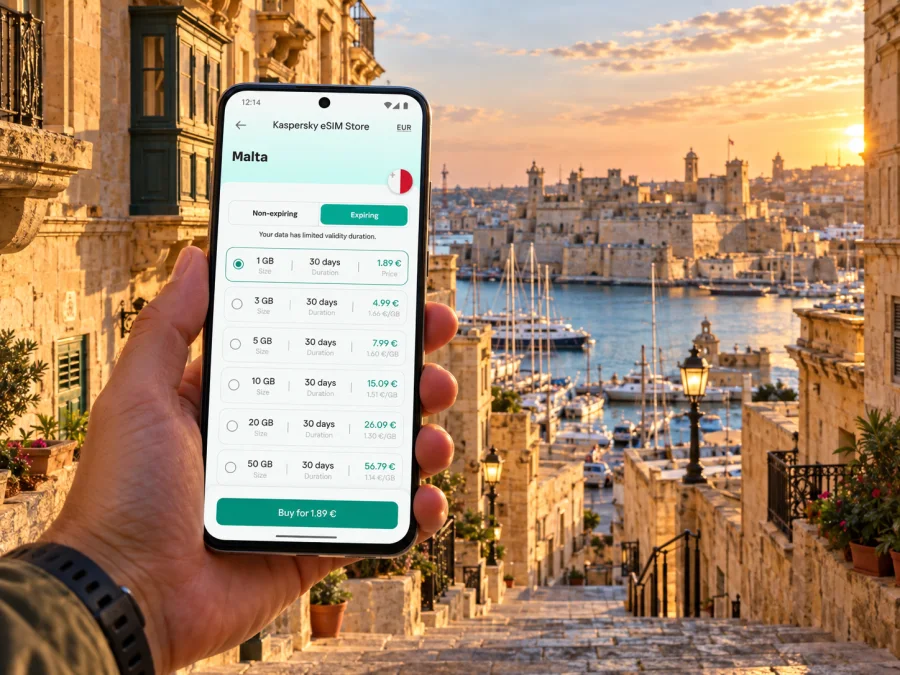
Birgu eSIM: mobile connection and internet for your Malta visit
Birgu rewards a slower kind of city break. You can arrive with a map open, walk from the harbour towards the old lanes, pause at a museum, then cross the water to Valletta or continue through the Three Cities. Mobile data is useful throughout that day: for directions, checking ferry and bus updates, messaging your host, translating a sign, or finding your next stop without returning to hotel Wi-Fi.
Birgu is also known as Vittoriosa and forms part of the Three Cities with Isla (Senglea) and Bormla (Cospicua). It is a compact historic town on the Grand Harbour, opposite Valletta. A trip here often combines a walk through Birgu itself with a ferry or bus journey, so a working connection is most valuable when you are between places rather than sitting in one spot.
This guide focuses on the practical details: what to prepare before you leave, how to navigate the harbour area, which transport checks to make, and how an eSIM can fit into a short stay or a longer Malta itinerary.
What mobile internet helps you do in Birgu
Birgu’s old streets are a pleasure to explore, but their closely spaced lanes and turns can make a screen map more useful than a simple address. Mobile data also helps when your day has several moving parts: the museum’s opening information, a meeting point at the waterfront, a bus departure, or a message that your accommodation is ready.
Common uses include:
- Loading a walking route from the ferry landing or bus stop to your accommodation.
- Checking a current transport timetable before setting off for Valletta or another locality.
- Sharing your location with a travel companion when you agree to meet near the marina or a square.
- Using a translation app or looking up local opening information while walking.
- Contacting a hotel, guesthouse, guide, or taxi service if plans change.
- Accessing tickets, booking details, maps and travel documents stored online.
An eSIM is a digital SIM profile installed on a compatible device. A travel data plan can give you mobile internet through a local partner network, according to the plan’s coverage, validity and other conditions. It is not automatically a replacement for your usual number: plans may be data-only, so ordinary calls and SMS may still use your home SIM or an internet-based messaging app. Read the details of the specific plan before purchase.
Arriving in Malta and continuing to Birgu
Malta International Airport is in Luqa, while Birgu lies across the island near the Grand Harbour. Your onward journey will therefore be a separate leg after landing. You may use a taxi, a pre-arranged transfer, or public transport; the best choice depends on arrival time, luggage, your accommodation address and the current service pattern.
If you plan to use a bus, check the route and destination in the official journey information on the day. Malta Public Transport lists routes serving the Three Cities, including routes 1, 2, 3 and 4. Route names and operating patterns matter: some services connect Birgu with Valletta, while others continue towards nearby localities. Confirm that the stop and direction match your destination rather than relying on a route number remembered from an earlier trip.
For the ferry, check the operator’s latest timetable and landing point before walking to the waterfront. Transport Malta publishes seasonal operating windows for the Three Cities–Valletta service and notes that the timetable may change. A ferry can make the harbour crossing a useful part of the trip, but do not assume that a sailing will line up with a late arrival or a particular appointment.
A simple arrival checklist:
- Save your accommodation address and phone number for offline access.
- Confirm whether your host recommends a particular entrance or drop-off point; some streets are narrow and the nearest vehicle stop may not be the front door.
- Check the current bus or ferry information before leaving the airport area.
- Keep enough battery for navigation and messages, especially if you expect to transfer between services.
- If you are using an eSIM, confirm which mobile line is selected for data after landing.
Do not rely on a single route screenshot for the whole journey. A service alert, a changed landing point, or a missed connection can turn the final part of the trip into a different walk. A live map is helpful, but have the address and a basic offline map available as a backup.
Finding your way around Birgu
The town centre is best explored on foot. A useful mental map is to think in three layers: the waterfront and marina, the central lanes and squares, and the outer edge marked by historic fortifications. Your phone can help you orient yourself between these points, but the actual walk may include steps, slopes, uneven paving or a route that differs from the line shown on a map.
Fort St Angelo stands at the tip of Vittoriosa and looks over the Grand Harbour. Heritage Malta’s access information describes a gradual approach, ramps and some mobility support on site, while noting that conditions and the route are specific to the fort. The walk from the town’s central area down towards the marina is not the same as a level, step-free route. If mobility access is important, check the venue’s current access details and ask about assistance before travelling.
The Inquisitor’s Palace is another major point of interest within Birgu. It is both a historic house museum and a museum of ethnography. The building’s visitor experience includes domestic rooms, official and private spaces, and areas associated with the former Holy Office. Heritage Malta notes uneven floors, low lighting and low doorways, so allow time and consider the access information when planning a visit.
For a relaxed walk, save a few landmarks before you set out rather than keeping the map open every minute. Try this sequence:
- Start near your accommodation or the town centre and orient yourself at a recognisable square.
- Walk towards the main historic sites, checking the final approach rather than assuming the entrance is on the side facing the map pin.
- Continue down to the marina for harbour views and a pause.
- If you have time, loop back through a different set of lanes, then decide whether to continue into Isla or Bormla.
A map pin marks a point, not always a visitor entrance. When you are close, check the venue name and street rather than walking to the first gate or waterfront access shown. Download or screenshot the route before entering a building where you expect to spend time; signal and battery availability can vary from one location to another.
Getting between the Three Cities and Valletta
Birgu is a practical base for exploring the adjoining Three Cities, but each locality has its own street pattern and waterfront. Isla, also called Senglea, extends along the harbour peninsula; Bormla, also called Cospicua, sits between the other two. Walking between them is possible, though the most convenient path depends on where you start and which point you want to reach.
The Valletta ferry offers a direct harbour crossing when it is operating. The current timetable has seasonal hours, and the service authority advises visitors to check the operator’s published timetable because schedules are subject to change. Bus services are another option. Malta Public Transport currently lists routes 1, 2, 3 and 4 in the Three Cities area, with different local destinations. Verify the live route and stop information before boarding, especially if construction or a service diversion affects the route.
| Your plan | Useful connection check | Why mobile data helps |
|---|---|---|
| Birgu to Valletta | Ferry landing, next sailing, or bus direction | You can compare the live option with your meeting time |
| Birgu to Isla or Bormla | Walking route and the exact destination | The waterfront and inner streets do not always lead to the same crossing |
| Birgu to another part of Malta | Bus route, stop and direction | A transfer may be easier to plan before leaving the Three Cities |
| Return after an evening visit | Last service and any current changes | It helps avoid assuming the daytime pattern still applies |
Treat the table as a planning prompt, not a promise of service. Departures and journey times depend on the date, time and operating conditions. If you have a fixed appointment, allow a buffer and check again before leaving Birgu.
Choosing a travel eSIM for Malta
An eSIM plan is selected for the destination and trip pattern, not simply for the name of the town. Birgu is in Malta, so look at plans intended for Malta and check the terms that matter to your itinerary. A separate city-specific plan is not required just because your first hotel is in Birgu.
Before you choose, compare:
- Validity period: It should cover the days you expect to use the plan. Check when validity begins; activation rules vary.
- Data allowance: Think about maps, messages, web searches, calls over data and media uploads. Video and cloud backups can use substantially more data than directions.
- Coverage description: Read the stated destination and network conditions. Service availability can differ by place and indoor environment.
- Tethering: If you intend to connect a laptop or another device, check whether personal hotspot use is included.
- Top-up or renewal options: These may be useful for a longer stay, but depend on the chosen plan.
- Voice and SMS: A data plan should not be assumed to include a local number or conventional calls and text messages.
Kaspersky eSIM Store is an app and website where you can choose, purchase and activate an eSIM plan for mobile internet during an international trip. You can review eSIM plan options for Malta and compare the plan’s destination, data allowance, validity and conditions before deciding. The actual service is subject to the selected plan and the local partner network; the destination page alone does not guarantee coverage in every building or situation.
For a quick city break, estimate how often you will use maps and messaging away from Wi-Fi, then choose an allowance with room for your normal habits. If you will work remotely, stream video or share a hotspot, include those uses in the estimate. Avoid choosing only by the largest number of gigabytes: a plan is useful when its validity and terms also fit the trip.
Check the phone and the regional variant
Before buying, verify that your exact phone model supports eSIM and is not locked to a carrier. Support can differ between product families, generations and regional variants with similar names. A device sold in one market may not have the same eSIM capability as a model with an almost identical retail name in another market. Check the precise model code in the device settings or manufacturer documentation, then confirm that the phone is eligible for a new eSIM profile.
You can check whether your device is compatible before choosing a plan. If your phone has two active SIM lines, review its data-line settings too: decide which line handles mobile data and whether your primary SIM should remain enabled for calls or verification messages. Menu names vary between Android versions and iOS releases.
A useful pre-trip checklist:
- The device supports eSIM in your particular regional variant.
- The device is carrier-unlocked, if the plan requires an unlocked phone.
- You can access your Kaspersky eSIM Store account and the installation details.
- You know whether the plan activates at installation, on first connection, or according to another stated rule.
- You have a reliable Wi-Fi connection for installation if required by the setup flow.
- Your usual SIM’s roaming settings are understood, so you can avoid unintended data use.
Do not delete an installed eSIM profile as a troubleshooting shortcut unless the plan’s instructions tell you to do so. Some profiles cannot be installed again after removal. Keep the setup instructions available and contact support through the stated channel if you encounter an activation issue.
Installing and activating an eSIM
If you have not used an eSIM before, complete the setup while you have time and a stable internet connection. The exact steps differ by device and installation method, so follow the on-screen directions for your plan. For step-by-step help, see the eSIM installation instructions for Android or the eSIM installation instructions for iPhone.
A sensible preparation sequence is:
- Choose Malta as the destination and review the plan terms.
- Complete the purchase in the app or website and open the installation instructions.
- Add the eSIM profile using the method offered for your device.
- Label the new line clearly, for example “Malta data,” so it is easy to recognise later.
- Check the plan’s activation instructions. If it starts only on arrival or first network connection, avoid triggering that step earlier than intended.
- After landing, select the travel eSIM for mobile data and follow any stated data-roaming instruction for that eSIM.
- Confirm that data works, then keep your home line’s settings as you need them for calls or messages.
Menu wording and activation behaviour can vary by handset, operating system and plan. Keep the installation QR code or manual details available until setup is complete, and do not share them with another person. If you need your regular number to receive a one-time code, check that your main SIM remains enabled and understand any home-operator roaming charges that may apply.
Plan data around your visit
A one-day visit and a two-week stay create different needs. Estimate by activity: directions, messages, bookings, photos, email, video meetings and hotspot use. Background photo backups and app updates can consume data without being obvious, so consider limiting them over mobile data. Keep maps and essential travel documents available offline where possible.
For remote work, check the plan’s data allowance and tethering rules, and confirm whether your hotel or meeting venue has Wi-Fi. An eSIM is useful travel access, but performance depends on the local network, handset, location and surroundings.
Frequently asked questions
Is Birgu a separate eSIM destination from Malta?
No special city plan is implied by the town name. Birgu is in Malta, so review plans whose destination and terms cover Malta. The plan’s actual coverage conditions still apply.
Is an eSIM enough for calls and text messages?
A travel data plan may not include a phone number, standard voice calls or SMS. Check its terms. Internet-based calling and messaging apps can work over data, while your normal SIM may remain available for conventional calls subject to your home plan.
Can I install the eSIM before arriving?
Often it is possible to prepare a profile before travel, but activation timing depends on the plan. Follow its instructions and check when validity begins so you do not start the period earlier than intended.
Will the eSIM work in every part of Birgu?
No mobile service can be guaranteed in every room or street. Reception depends on the local partner network, the selected plan, your device and the surrounding environment. Review the plan conditions and keep offline essentials available.
Should I use the ferry or the bus to Valletta?
Choose according to your location, timing and the current timetable. A ferry provides a harbour crossing when operating; buses connect the Three Cities with Valletta and other localities. Verify service details on the day and leave a time buffer.
What if my phone has a different regional version?
Check the exact model number and its eSIM support. Regional variants can differ even when the model names look alike, so a general product-family listing may not be enough to confirm compatibility.
A connected visit, planned around the town
Birgu is easiest to enjoy when you combine a simple route with room to pause. Save the address of your accommodation, check your transport before leaving, and keep key details available offline. Use mobile data for the live parts of the day: a changed departure, a fresh walking route, a message to your host or a last-minute change of plan.
Before travelling, check device compatibility and compare the plan’s destination, validity, data allowance and activation rules. You can choose an eSIM plan for your trip to Malta through Kaspersky eSIM Store, an app and website for selecting, purchasing and activating an eSIM plan for international travel. Install it according to the instructions, then enjoy Birgu with a practical connection plan that fits your itinerary.


