Travel connectivity guide
Birni-N'Konni eSIM: Mobile Internet in Niger
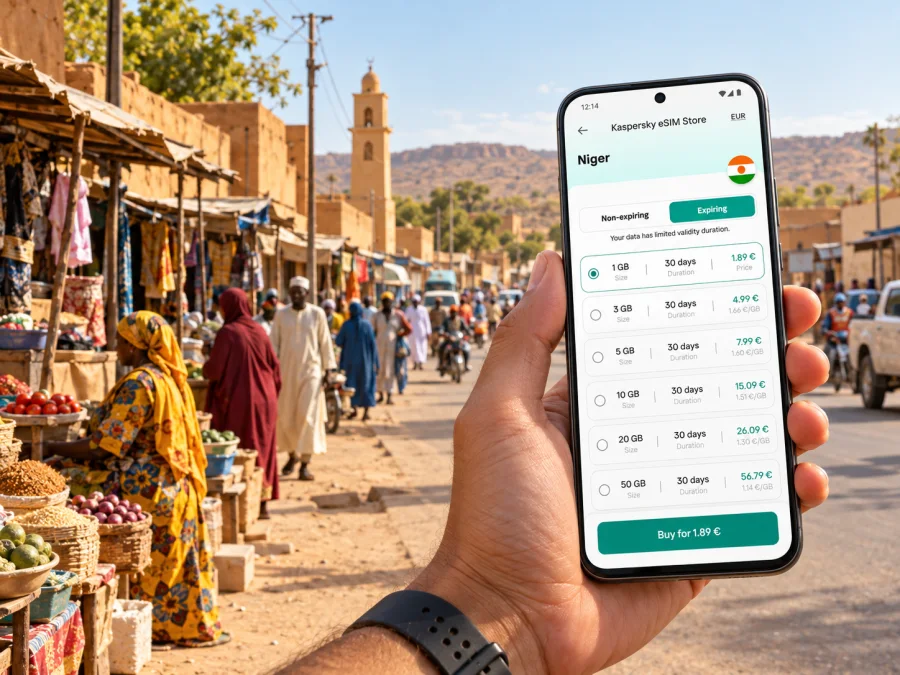
Birni-N'Konni eSIM: Mobile Connection and Internet for Your Visit
Birni-N'Konni is a practical stop in southern Niger, close to the Nigeria-facing road network and on the country's east–west RN1 corridor. A trip here may involve a long overland journey, a market visit, work with contacts in the Tahoua region, or onward travel towards another town. In each case, mobile data helps with maps, messages, lodging details and last-minute changes. An eSIM can give you a way to use a travel data plan without swapping out your physical SIM, provided your device supports eSIM and the selected plan covers Niger.
Build connectivity into the whole route rather than thinking only about the moment you arrive. You may need a connection before departure to check arrangements, during a road transfer to coordinate a pickup, and after arrival to find the right street or contact. Coverage and data performance depend on the local network and conditions at a particular place; keep essential information available offline as well.
Why mobile data is useful in Birni-N'Konni
Birni-N'Konni is in the Tahoua Region, south of Tahoua city. A World Bank project document describes the town as being on National Road 1 (RN1), with road connections towards Tahoua and Maradi and a link to the Niger–Nigeria road network. The same document places the town about 125 km south of Tahoua and 417 km east of Niamey. Those figures help explain why it can be part of a regional itinerary, but they are not live journey times: road conditions, stops, weather and checkpoints can affect travel significantly.
When you are navigating a place you have not visited before, an active data connection can support several small but important tasks:
- open a map, save a pin for your accommodation, and check the route from the drop-off point;
- message a driver, host or colleague if the meeting place changes;
- confirm a booking or retrieve a reservation number from email;
- translate a short message or check a local phrase;
- share your arrival time with someone expecting you;
- look up onward transport information while you still have time to adjust plans.
These uses matter most during transitions. A hotel name alone may not be enough for a driver to identify an entrance or neighborhood, and a map pin is more useful when you can send it before getting into a vehicle. Download offline maps for the town and the approach road in advance, then use mobile data for updates and communication when available.
A town stop is different from a capital-city visit
In a major capital, visitors may rely on airport Wi-Fi, a dense choice of transport services and many nearby shops. Birni-N'Konni is a smaller regional town, and your travel arrangements may be more personal: a prearranged pickup, a local contact, a specific market or office, or a road transfer continuing the same day. Do not assume that a service or business will have a complete online listing, that public Wi-Fi will be available, or that a driver will be able to call a foreign number.
Prepare a compact arrival note before setting out. Include the host's name, a phone number in international format, a map pin, a nearby meeting point described in words, and the time you expect to arrive. Keep a screenshot or offline copy of the information. If you are travelling with other people, agree which person will send updates and which person will keep the address and route details available offline.
| Travel moment | What mobile data can help you do | Useful backup |
|---|---|---|
| Before leaving for Birni-N'Konni | Confirm the pickup, lodging and route details | Save names, numbers and map pins offline |
| On the road | Share a delay or changed arrival time | Keep the driver’s contact and destination written down |
| In town | Navigate between a meeting, lodging and local stops | Ask your host to describe a nearby landmark in advance |
| Preparing to leave | Check the next leg and message your contact | Download the next area’s map before departure |
The table describes practical uses, not a guarantee of signal. Mobile service can vary between streets, buildings and stretches of road, and an eSIM plan only works where its partner network has service. For an important meeting, share your expected arrival time before you leave and agree on what to do if mobile data is temporarily unavailable.
Getting connected for the road and the town
Many visitors approach Birni-N'Konni by road, whether they are coming from Niamey, Tahoua, Maradi or another point on the RN1 network. The trip can include long intervals between larger settlements. Before setting off, charge your phone and a power bank, check the route and download maps for the full journey, not just the town centre. If you are using a driver or bus service, confirm the final drop-off point directly rather than relying on a map label alone.
For a trip that begins with an international flight, plan your data setup around your actual arrival airport and transfer. Do not assume that the airport where you land is close to Birni-N'Konni or that an onward road transfer will have continuous coverage. Download your itinerary, tickets, contact details and lodging confirmation before boarding. If you need to arrange the road leg after landing, make sure you have a reliable way to reach the provider, and confirm whether that provider can be contacted through a messaging app or only by phone.
The RN1 corridor makes Birni-N'Konni a useful point for journeys that continue east or west. A road connection towards Tahoua or Maradi may be part of a longer itinerary, while the road network towards Illéla connects with the Nigeria-facing route. Cross-border plans need a separate check: a Niger data plan should not be assumed to include service in Nigeria. If your route crosses a national border, verify the plan's country list and conditions before travel, or arrange a separate option for the next country.
For road navigation, use a simple rhythm: check the route before departure, keep the screen dim or navigation audio on to conserve battery, and stop safely before making a new route decision. Avoid depending on continuous live maps when the phone could lose signal. A saved destination, a screenshot of the route and a written description of the last turn can be more helpful than repeatedly refreshing a map.
Choosing a travel eSIM plan for Birni-N'Konni
The right plan depends on where you will use it and what you expect to do online. An eSIM is a digital SIM profile installed on a compatible device. A travel plan can provide mobile data in its listed destinations; it does not automatically add a conventional phone number, voice calls or SMS. Check the terms shown for the specific plan, especially if you need to receive calls on your usual number or send traditional text messages.
Kaspersky eSIM Store is an app and website where you can choose, arrange and activate an eSIM with a suitable plan for mobile internet during an international trip. When comparing options for Birni-N'Konni, check that Niger is included, then match the plan's validity and data allowance to your entire itinerary. The town is only one stop: include data you expect to use on the road, in other Niger destinations and, if applicable, in any country you visit next.
Use these questions before selecting a plan:
- Does the destination list include Niger? A plan for a neighboring country or a broader region may have different inclusions. Read the destination list itself; do not infer coverage from a map or from the plan name.
- How long will the plan need to last? Count travel days from the plan’s stated start condition, not only nights spent in town. Check whether validity begins at installation, activation or first network use, according to that plan’s terms.
- What will you do online? Maps, messaging and booking confirmations usually consume less data than frequent video calls, large uploads, cloud backups or streaming. Disable automatic photo and app updates over mobile data if you want to make an allowance last longer.
- Does the route extend beyond Niger? A country-specific plan may stop working when you cross into Nigeria or another destination. Confirm each country separately.
- Can your device install and use an eSIM? Check the exact model and sales region, and confirm the phone is not locked to a carrier. Check your device’s eSIM compatibility before arranging a plan.
You can review eSIM plan options for a trip to Niger once you know your travel dates and route. Compare the destination, data allowance, validity, price and activation conditions shown for each option. Availability and terms can change, so use the details presented at the time you select a plan rather than relying on a saved screenshot from an earlier visit.
Consider the local network context
Niger has several mobile operators. The national regulator ARCEP lists CELTEL Niger, Moov Africa Niger, Niger Telecoms and Zamani Com among mobile providers, as well as SHAP Mobile. The regulator’s published material also distinguishes geographic coverage from population coverage, an important reminder that a national figure cannot predict reception at one address or along one road.
That operator list describes Niger’s domestic mobile market; it does not identify which network a particular travel eSIM will use in Birni-N'Konni. A travel plan may connect through a roaming or partner arrangement, and the plan’s own terms determine the available network and service. Check those terms and do not assume that a provider’s presence in Niger means every plan uses that provider, supports the same network technology or works equally well indoors and outside town.
If your work depends on a stable connection, prepare a fallback. Download the documents you need, tell colleagues when you may be offline, and use a local contact or fixed connection where appropriate for critical tasks. Mobile data is helpful for routine coordination, but it should not be the only way to access a presentation, meeting address or emergency contact.
Setting up your eSIM before travel
Installing the profile before departure can reduce the number of tasks you need to handle during a transfer. Follow the instructions for your operating system and the activation conditions of the selected plan. The exact menu labels differ by device, so use the device maker’s current directions as well as the plan’s own setup steps.
A general preparation sequence is:
- Check eSIM support for the exact phone model and regional variant, and make sure the phone is unlocked.
- Choose a plan whose destination list includes Niger and whose validity covers your dates.
- Read when the plan begins and whether installation requires a stable internet connection.
- Install the eSIM while connected to Wi-Fi, if the plan allows installation in advance. Keep the QR code or activation details available until setup is complete.
- Label the new line clearly, for example “Niger data,” so it is easy to identify beside your home SIM.
- Before departure, review which line is selected for mobile data. Keep your regular line enabled only as needed and understand its roaming charges.
- After arrival, select the travel eSIM for mobile data and follow the plan’s instructions about data roaming. Some travel profiles require data roaming to be enabled for that eSIM.
- Open a simple page or messaging app to confirm data works, then save key maps and contacts for offline use.
For step-by-step help, see the Android eSIM installation guide or the iOS eSIM installation guide. Do not delete a profile just because it does not connect immediately; first check the selected data line, roaming setting, plan activation status and the provider’s troubleshooting steps. Some eSIM profiles cannot be transferred after installation, so avoid removing one unless the plan instructions or support team tell you to.
A practical arrival checklist
Use this short checklist on the day you travel to Birni-N'Konni:
- [ ] Save your accommodation address, host contact and meeting point offline.
- [ ] Share your travel plan with someone who is not on the same journey.
- [ ] Download maps for the route and the area around your destination.
- [ ] Charge your phone and bring a power bank and charging cable.
- [ ] Confirm Niger appears in the eSIM plan’s destination list.
- [ ] Check that your phone supports eSIM, is carrier-unlocked and has the correct regional variant.
- [ ] Keep your usual SIM available if you need its number for calls or SMS.
- [ ] Know which SIM is selected for mobile data and which one may incur roaming charges.
- [ ] Keep a screenshot of directions and reservation details in case you temporarily lose service.
If something does not work after arrival, pause before changing multiple settings. Check airplane mode, the selected data line, the plan’s activation status and the instructions for data roaming. Move to a safe place with a clear view of the surroundings before testing service again. If the profile still fails, connect to trusted Wi-Fi if available and contact the plan’s support using the details provided with your purchase.
Common travel scenarios
You are meeting a driver after a long road transfer
Send the driver your estimated arrival time before setting off and agree on a precise meeting point. A location pin is useful, but also write the name of a nearby building, shop or junction if your host can confirm one. Keep the driver’s number in your contacts and the route screenshot in your gallery. If data drops along the way, you will still know where to go and whom to contact once service returns.
You are continuing towards Nigeria
Birni-N'Konni’s road connections make cross-border planning relevant for some itineraries. Check border and travel arrangements separately, and treat connectivity as a separate question. A Niger plan may not include Nigeria. Verify the destination list and validity for each country before crossing, and keep maps and important contacts saved for the border area. When the plan changes, do not assume the phone will switch to another country’s service automatically.
Frequently asked questions
Is Birni-N'Konni in Niger or Nigeria?
Birni-N'Konni is a town in Niger’s Tahoua Region. It is connected to the Niger–Nigeria road network, which is why itineraries may include travel towards the border, but the town itself is on the Niger side.
Does one eSIM guarantee coverage everywhere in town and on the road?
No. Reception depends on the network used by the plan, local coverage, terrain, buildings and other conditions. Check plan details and prepare offline maps and contacts. Do not infer a guaranteed signal from a national coverage statistic or an operator list.
Will a Niger travel eSIM give me a local phone number?
Travel eSIM plans described for mobile data generally provide data rather than a conventional local number, calls or SMS. Check the individual plan’s terms if you need voice service. Messaging and internet calls may work through apps when data is available.
Can I use the same plan after crossing into Nigeria?
Only if Nigeria is included in that plan’s destination list and the plan remains valid there. Check the exact terms before travelling across a border; a plan for Niger alone should not be treated as a regional plan.
When should I install the eSIM?
If the plan permits it, installing before departure while you have stable Wi-Fi gives you time to resolve setup issues. Follow the stated activation rules carefully: installation and the start of validity are not necessarily the same event.
What if I need to make a regular phone call?
An internet data plan does not automatically include a phone number or conventional voice service. Keep your existing SIM if you need your usual number, check its roaming charges, and arrange an alternative way to reach local contacts if required.
Prepare for your stay
Birni-N'Konni is a road-connected regional town, so a little preparation can make the first hours and the next leg of your journey easier. Confirm the destination and validity of your plan, install the eSIM on a compatible unlocked phone, and keep directions and contacts available offline. For a mobile data option that fits your route, choose an eSIM plan for travel in Niger and review its current terms before you leave.


