Travel connectivity guide
Bitola eSIM: Mobile Internet for Your City Trip
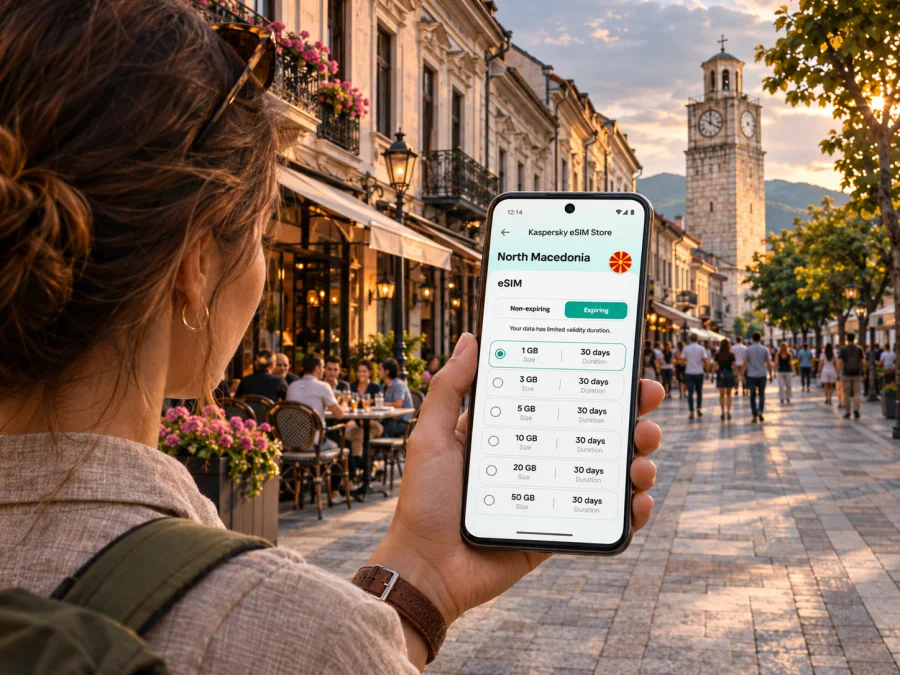
Bitola eSIM: mobile connection and internet for a city stay
Bitola invites a mix of central walks and excursions to Heraclea Lyncestis or Pelister National Park. Mobile internet helps with maps, messages, opening details and coordinating a ride after you arrive.
An eSIM is a digital SIM profile installed on a compatible device. For a trip to Bitola, it can be a practical way to prepare mobile data before departure or after arrival, while keeping your usual SIM available for calls and messages if your phone supports dual SIM use. The exact data allowance, validity, supported network and activation conditions depend on the selected tariff. Check them before you travel, especially if your plans extend beyond the city centre.
Why mobile internet is useful in Bitola
Many central visits are walkable, with Širok Sokak, the Old Bazaar and Bezisten, the Clock Tower, museums and archaeological remains south of the centre. Maps and messaging help you plan and adjust the route.
The city also makes a convenient base for visiting the foothills of Baba Mountain and Pelister. A mountain outing needs more preparation than a stroll through the centre: plan transport, check current park information and save key details in advance. Mobile service is not guaranteed in every street, building or outdoor area, and a signal is no substitute for navigation or safety planning.
| Trip moment | What a connection can help with |
|---|---|
| Arrival | Finding accommodation and confirming a transfer |
| City walk | Navigating between Širok Sokak, the Clock Tower and Old Bazaar |
| Excursion | Checking visitor details and coordinating a pickup |
| Workday | Finding a meeting address and joining a call |
Signal strength and speed vary by provider, local conditions, device and location. Download a map and essential reservations before leaving reliable Wi-Fi, and keep your accommodation address offline.
Getting oriented after you arrive
Bitola is in North Macedonia’s Pelagonia region, close to Baba Mountain, and distinct from Greece’s similarly named Macedonia region. Select North Macedonia as the tariff destination and verify that its terms include your route.
Your route into town depends on your airport or border crossing. North Macedonia’s airport operator lists Skopje International Airport and Ohrid St Paul the Apostle Airport; neither is in Bitola. Confirm your arrival airport, then check bus, rail, car or transfer options for your date. Services and timetables change, and a journey may require a connection.
When you reach Bitola, confirm your arrival point and accommodation address. If you are meeting a driver, share a map pin and agree on a recognizable meeting point. Save your accommodation details offline and check the route back to your station or terminal before heading out.
An eSIM can make the online parts of this sequence easier, but it does not book a transfer, replace a local transport timetable, or provide an ordinary telephone number unless a specific tariff says otherwise. Keep your existing number available for calls or SMS where needed, and check with your home operator about its roaming settings and charges.
Moving around central Bitola
The centre is easy to explore on foot. Širok Sokak connects key cultural sights; the municipal guide highlights the Clock Tower and Bezisten. Use a map for unfamiliar streets or specific entrances.
The Clock Tower is a useful landmark, while the Old Bazaar and Bezisten reflect the older commercial centre. Cafés offer a place to pause and plan. Keep a power bank for longer walks, and save addresses or meeting details offline rather than relying only on an online map.
For a first-day route, group nearby visits:
- Locate the Clock Tower and your accommodation on the map.
- Walk along Širok Sokak, then continue toward the Old Bazaar and Bezisten.
- Check opening details and leave time for onward transport.
Use live navigation as a guide: construction, events or changed plans can make a saved route outdated. Ask your host or a local business about the best entrance when needed.
Choose an eSIM tariff for the actual itinerary
Before comparing options, note how long you will be in North Macedonia and what you expect to do online. A visit focused on maps and messages differs from a work trip with video calls or a route beyond Bitola. Data needs vary by traveller.
Kaspersky eSIM Store is an app and website where you can choose, arrange and activate an eSIM with a suitable tariff for mobile internet on an international trip. To prepare for Bitola, select North Macedonia as the destination and review the displayed tariff terms. The country page is a starting point for checking the current options; it is not a promise of a specific local network, speed or coverage at a given address.
You can review eSIM tariff options for a trip to North Macedonia after you have a rough estimate of trip length and data use. Compare the destination, data amount, validity period, price, supported network information and any stated activation conditions. Details can change, so rely on the terms shown for the tariff you are considering rather than an older price or a general description of eSIM service.
A practical way to estimate data
Estimate your daily use and choose an allowance that fits your plans:
| Your use | Consider |
|---|---|
| Maps and messages | Occasional directions and searches |
| Photos and social apps | Uploads and video away from Wi-Fi |
| Work or excursions | Calls, cloud files, hotspot and longer navigation |
Video calls, streaming, photo backup and hotspot use consume data faster than text messages or occasional map checks. Pause automatic backup on mobile data if needed, use Wi-Fi for large downloads, and monitor your remaining allowance where available.
Before paying, verify these points:
- The tariff is for North Macedonia, and its listed network or coverage terms suit the route you intend to take.
- The validity period covers the days you need it. Check when validity begins; activation rules vary by tariff.
- The data allowance matches your habits, including hotspot use if you plan to share data.
- Your phone is compatible with eSIM and is not restricted by a carrier lock.
- You can access installation instructions and the profile details after purchase.
- Your regular SIM remains configured for the calls and SMS you need, with roaming settings understood.
If the tariff does not provide a conventional phone number, you can still use internet-based messaging and voice apps where supported, but these depend on data access and the other person’s app. Keep the distinction clear: an eSIM data tariff is not automatically a replacement for your usual line.
Device compatibility and regional variants
Check the specific device before choosing a tariff. eSIM support varies by model, market version, software and carrier restrictions. Similar product names can refer to devices with different SIM configurations, so do not infer support from a brand or release date.
Look in device settings for an option to add an eSIM, then confirm it against manufacturer information for your exact model and region. Check that the phone is unlocked. Verify a tablet or secondary phone separately. Check whether your device supports eSIM before purchase.
Do not delete an installed eSIM profile while troubleshooting unless instructed. Some profiles cannot be installed again after deletion, and transfer may be restricted. Keep your purchase details accessible.
Install before departure, activate at the right time
Install over a stable internet connection if convenient. Validity may begin at installation or first connection in the destination; read the tariff instructions before scanning a QR code or switching data to the new line.
- Confirm compatibility and that the phone is unlocked.
- Connect to Wi-Fi and follow the installation method provided with your purchase.
- Label the line so it is easy to distinguish from your home SIM.
- Check when validity starts before selecting the eSIM for mobile data.
- After arrival, follow the tariff instructions; data roaming may need to be enabled for that line.
Follow the installation steps for Android or installation steps for iOS, along with the current on-screen and plan-specific directions.
Once connected, open a webpage or messaging app to check data access. If it fails, confirm the correct data line and tariff instructions, then restart the phone if needed. Use Wi-Fi to contact support if the issue continues.
Where you may need extra preparation
Heraclea Lyncestis
Heraclea Lyncestis, close to Bitola, is a key excursion from the city. Municipal material describes an early Christian basilica, mosaics and a theatre. Check current visitor access and opening details before setting out.
Plan transport from your accommodation, save the destination and return route, and arrange a pickup in advance if needed. Download directions in case mobile service is unavailable along the way.
Pelister National Park and Baba Mountain
Pelister National Park rises above the Bitola area and offers a very different day from the city centre. The park’s official site describes marked hiking and mountain-biking activities and asks visitors to register a visit in advance. Check the park’s current rules, access details, trail conditions and weather before you leave. The higher mountain environment is not a place to improvise based only on a phone map.
Arrange how you will reach your chosen starting point and how you will return. Tell someone your plan, carry offline navigation and essential contact details, and take suitable clothing, water and equipment. Battery life can fall faster in cold conditions or during extended use; a power bank is useful, but it does not replace preparation. Signal can vary in mountainous terrain, so do not depend on continuous data for navigation or emergency communication.
For a drive beyond Bitola, download maps and save the destination name in Latin and local script where possible. Confirm remote routes with your host or guide.
A short stop or a business visit
For a short stop, prioritize the meeting point, transport back to your connection and a few central landmarks. Save tickets and addresses offline, and compare tariff validity with your stay length.
For work, save meeting details offline, test video calls from your accommodation and check whether the tariff allows hotspot use before connecting a laptop.
Common connection questions
Is service guaranteed everywhere in Bitola?
No. Availability and performance depend on the supported network, local conditions and your device. Check the tariff information and keep essentials offline.
Can I use the eSIM for ordinary calls and SMS?
Only if the tariff explicitly includes them. A data-focused eSIM generally has no standard number, calls or SMS. Keep your regular SIM for your usual number and check its roaming charges.
Should I install the profile at home or in Bitola?
Install before travel if permitted, after checking when validity starts. Use stable Wi-Fi and follow the tariff instructions.
What if maps or messages stop working?
Check that the travel eSIM is selected for data, the tariff is active and any required roaming setting is enabled. If the issue continues, use Wi-Fi to contact support. Keep directions offline.
Is one tariff enough for Bitola and trips elsewhere in North Macedonia?
It depends on the tariff’s stated coverage. Check that it applies to each destination, including any mountain excursion, and choose data for the full route.
A compact preparation checklist
Before you leave, make sure you can answer “yes” to these questions:
- Have I selected North Macedonia as the destination and checked the tariff’s current details?
- Does my exact phone variant support eSIM, and is it unlocked?
- Do I know whether validity starts on installation, activation or first network connection?
- Have I saved my accommodation, transport and meeting details offline?
- Have I checked how my regular SIM handles roaming, calls and SMS?
- For a visit to Heraclea or Pelister, have I checked current access information and arranged transport?
- Do I have enough battery capacity for maps and messages during the day?
Use data for directions and updates in town; for excursions, pair it with offline plans and local advice.
Prepare your Bitola connection
Choose a tariff for the full North Macedonia itinerary, check your device, and read the activation conditions before you travel. Kaspersky eSIM Store helps you select, arrange and activate an eSIM for mobile internet abroad through its app and website. Once you have reviewed the current destination options, choose an eSIM tariff for your North Macedonia trip that fits your data needs and dates. Install it according to the instructions, keep key details offline, and enjoy exploring Bitola with a practical connection plan in place.


