
Travel connectivity guide
Blowing Point eSIM: Internet Guide for Anguilla
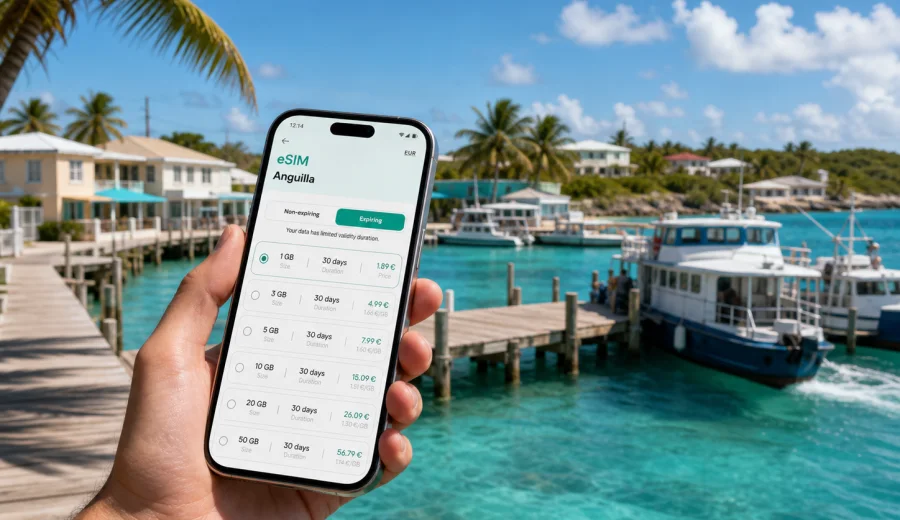
Blowing Point eSIM: mobile connection and internet guide for Anguilla trips
Blowing Point is often the first practical moment of an Anguilla trip. You step off the ferry, look for your transfer, confirm the hotel address, message the person meeting you, and check whether your next stop is in the west, The Valley, Shoal Bay, Sandy Ground, or another part of the island. A stable mobile connection matters from the first minutes because Blowing Point is not just a harbor area. It is the gateway where many visitors move from arrival mode into the real trip.
An eSIM can make that moment simpler. Instead of looking for a physical SIM card after landing or waiting until hotel Wi-Fi is available, you can prepare mobile internet before the journey and activate it on a compatible smartphone when you need data. For Blowing Point, this is especially useful because the city experience is closely tied to movement: ferry arrival, taxi pickup, short drives across the island, restaurant plans, beach transfers, work messages, and quick decisions made on the go.
This guide focuses on how to use eSIM for Blowing Point, how much data different travelers may need, what to check before buying a plan, and how to keep your connection practical while moving around Anguilla.
Why mobile internet matters in Blowing Point
Blowing Point is compact, but your online needs can start immediately. You may need maps before the taxi leaves the ferry area. You may need to tell your hotel that the boat arrived. You may want to compare route times to Rendezvous Bay, Meads Bay, Island Harbour, or The Valley. If you are on a business trip, you may also need to answer a message before you have time to sit down with a laptop.
Public Wi-Fi can help in some places, but it is not a complete travel plan. It may be available only inside a hotel, restaurant, or office, and it may not help during transfers. Standard roaming can be convenient, but the terms depend on your mobile operator and home plan. A prepared eSIM gives you another option for mobile data abroad without changing the physical SIM card in your phone.
For Blowing Point, the strongest use cases are practical rather than abstract:
- checking ferry arrival details and transfer messages;
- opening the hotel booking and address before leaving the harbor;
- using maps for short island drives;
- messaging a taxi driver, host, colleague, or family member;
- paying attention to weather updates before beach plans;
- using ride, restaurant, banking, airline, or email apps;
- sharing a hotspot with a laptop when your plan and device settings allow it.
The point is not to be online every second. The point is to avoid losing time at the exact moments when the trip depends on quick information.
Arrival scenarios: where eSIM helps first
Many Blowing Point visits begin with a ferry connection, and that shapes the mobile internet task. You are not arriving into a large airport terminal with long rows of shops and counters. You are moving from boat to island transfer, often with luggage, sun, and a clear destination in mind. That is why a data plan prepared in advance can feel more useful here than in a city where you expect to spend an hour inside an airport.
| Arrival moment | What you may need online | Why eSIM helps |
|---|---|---|
| Leaving the ferry area | Messages, maps, hotel address | You can start navigation without waiting for Wi-Fi |
| Meeting a driver | Messenger calls or chat | You can confirm exact pickup details |
| Changing plans | Weather, restaurant hours, contacts | You can adjust before crossing the island |
| Business arrival | Email, calendar, files | You can reply before reaching the hotel |
| Family trip | Group chat, shared location | Everyone knows where the transfer is going |
If you arrive tired, with children, or after a long travel chain, small connection problems become bigger than they should be. Preparing eSIM before the trip reduces one extra decision on arrival day.
Before buying: compatibility and phone settings
An eSIM works only on devices that support eSIM and are not restricted in a way that blocks installation or use. Before choosing a plan, check your device. This is especially important if you bought your phone through a carrier, use an older model, or are traveling with a tablet instead of a phone.
Also check these points before the trip:
- your phone supports eSIM installation;
- the device is not locked to a single operator;
- you have a stable internet connection available for installation;
- you know which SIM should handle calls and messages;
- you understand whether data roaming must be enabled for the eSIM profile;
- you have saved the installation details in case you need them later.
eSIM plans for travel mobile internet usually focus on data. They may not include a local phone number, voice calls, or SMS unless the plan terms say so. For many Blowing Point travelers, that is fine because hotel messages, maps, email, ride coordination, and family calls often run through internet apps.
How much data to prepare for Blowing Point
Data use depends less on the city size and more on habits. A traveler who only checks maps and messages may use little data. A remote worker who joins video calls from a hotel balcony can use much more. A family sharing photos, short videos, and map searches across several devices may need a larger package.
Use this practical guide as a starting point:
| Traveler type | Typical Blowing Point use | Plan logic |
|---|---|---|
| Short stopover | Messages, map checks, transfer updates | A small data package can be enough |
| Weekend visitor | Maps, restaurants, beach plans, photos | Choose enough data for daily use |
| Business traveler | Email, files, chat, hotspot when allowed | Prioritize a larger allowance and suitable validity |
| Family trip | Shared logistics, group chat, navigation | Estimate total use, not just one phone |
| Island-hopping traveler | Anguilla plus other destinations | Check whether country or regional coverage fits |
Avoid choosing only by the lowest data amount if you expect to rely on navigation and messaging every day. Also avoid buying much more than you need if your trip is short and your hotel Wi-Fi will handle heavy downloads. The best plan is the one that fits your actual route, device, and travel style.
Choosing an eSIM plan for Blowing Point
When you choose mobile internet for Blowing Point, look at four basic details: destination, data amount, validity period, and activation rules. The destination should match Anguilla if your main use is in Blowing Point and around the island. The data amount should match your expected app use. The validity period should cover the full stay, including arrival and departure days. Activation rules tell you when the plan starts and what you need to do after installation.
Kaspersky eSIM Store is an app and website where you can quickly choose, arrange, and activate an eSIM with a suitable data plan for mobile internet during an international trip. For this destination, you can prepare an eSIM plan for travel in Anguilla before you arrive in Blowing Point, then use the plan according to the conditions shown during purchase and installation.
This middle-step preparation is useful because Blowing Point trips often involve a chain of small tasks: confirm the pickup, open the address, send a message, check the route, and keep moving. Having mobile data ready means you are not depending only on the next Wi-Fi point.
Moving from Blowing Point around Anguilla
Blowing Point sits in a practical position for travelers moving across Anguilla. After arrival, you may go toward The Valley for administrative or business errands, toward Sandy Ground for restaurants and nightlife, toward Meads Bay or Rendezvous Bay for beach hotels, or toward Shoal Bay for a longer leisure route. In each case, mobile internet supports decisions that happen between fixed Wi-Fi points.
Maps are useful, but messaging may be even more important. A driver may ask where you are standing. A villa host may send gate instructions. A colleague may change a meeting time. A restaurant may confirm a booking. These small exchanges are easier when your phone is ready to use data as soon as you leave the ferry area.
For local movement, keep these details in mind:
- save your accommodation name and address in both maps and notes;
- keep a screenshot of important booking details in case the signal is weak;
- share your estimated arrival time only when needed;
- keep your primary SIM active for important bank or verification SMS if you rely on it;
- set the eSIM as the mobile data line when you are ready to use the travel plan.
If you travel with another person, decide whose phone will handle navigation. It is often simpler to have one main navigation phone and one backup phone with key details saved offline.
Installing eSIM before or during the trip
The calmest approach is to arrange and install your eSIM before travel, then activate it according to the plan instructions when you are ready to use it. Installation usually requires an internet connection, so doing it at home, at the hotel, or on trusted Wi-Fi is easier than doing it while standing with luggage.
The basic process is:
1. Check that your phone supports eSIM and is not locked in a way that prevents use.
2. Choose Anguilla or the relevant regional destination if your route needs it.
3. Select a data amount and validity period that cover Blowing Point and the rest of the stay.
4. Follow the installation steps for your device.
5. Set the eSIM as the mobile data line when you want the travel plan to handle data.
6. Keep your primary SIM settings clear, especially if you need calls or verification messages.
For device-specific steps, use the Android installation guide or the iOS installation guide. The exact screens can vary by phone model and operating system version, so follow the instructions shown for your device and plan.
Do not delete an installed eSIM profile unless you are sure it is no longer needed. Some profiles cannot simply be moved to another device after activation, and reinstalling may depend on the plan conditions.
A Blowing Point checklist for travel mobile internet
Use this checklist before leaving for Anguilla:
- Destination selected: Anguilla.
- Main arrival point: Blowing Point.
- Phone checked for eSIM support.
- Device lock status checked.
- Primary SIM and eSIM roles understood.
- Plan validity covers arrival and departure days.
- Data amount matches maps, messages, work, and sharing needs.
- Installation instructions saved.
- Hotel address saved offline.
- Ferry, taxi, and booking details saved.
- Battery pack packed for long travel days.
This checklist is intentionally practical. It is designed around the first hour after arrival and the small tasks that can become inconvenient without mobile internet.
Common mistakes to avoid
The most common mistake is waiting until arrival to think about data. Blowing Point is a transfer point, so your attention will likely be on luggage, transport, weather, and the next destination. Preparing eSIM earlier is usually easier.
Another mistake is choosing a plan without checking validity. A plan that is too short may not cover departure day, while a plan that is much longer than the trip may be unnecessary for a brief stay. Look at both data amount and duration.
Travelers also sometimes forget that eSIM travel plans are usually about mobile data. If you need a traditional phone number, voice calls, or SMS, check your primary SIM options and the exact terms of the chosen plan.
FAQ: eSIM for Blowing Point
Is Blowing Point a good place to use eSIM?
Yes, Blowing Point is a practical place to have eSIM ready because many travelers need mobile data immediately after ferry arrival. The main use cases are maps, transfer coordination, hotel messages, and quick travel updates.
Should I choose a city plan or a country plan?
For a city article like this, choose the plan based on the country where the city belongs. Blowing Point is in Anguilla, so an Anguilla destination plan is the relevant starting point unless your route requires a broader regional option.
Will an eSIM give me a local phone number?
Travel eSIM plans for mobile internet often focus on data and may not include a local phone number, calls, or SMS. Check the conditions of the selected plan before purchase.
What if I visit other parts of Anguilla from Blowing Point?
Choose data with the whole island route in mind. Even if the article focus is Blowing Point, your mobile internet may be used in The Valley, Sandy Ground, Shoal Bay, Meads Bay, and other areas during the same trip.
Final advice for Blowing Point travelers
Blowing Point rewards simple preparation. Save your ferry and hotel details, check eSIM compatibility before you buy, install the eSIM while you have a stable connection, and choose a data plan that fits the way you will move around Anguilla. Mobile internet is most valuable here when it removes friction from arrival, transport, navigation, and short decisions between Wi-Fi points.
Before your trip, you can choose an eSIM plan for Anguilla through Kaspersky eSIM Store and prepare mobile data for your arrival in Blowing Point. Check the plan terms, install it on a compatible device, and keep the connection ready for the moments when your trip needs maps, messages, and practical online access.