
Travel connectivity guide
Bolivia eSIM: mobile connection and internet
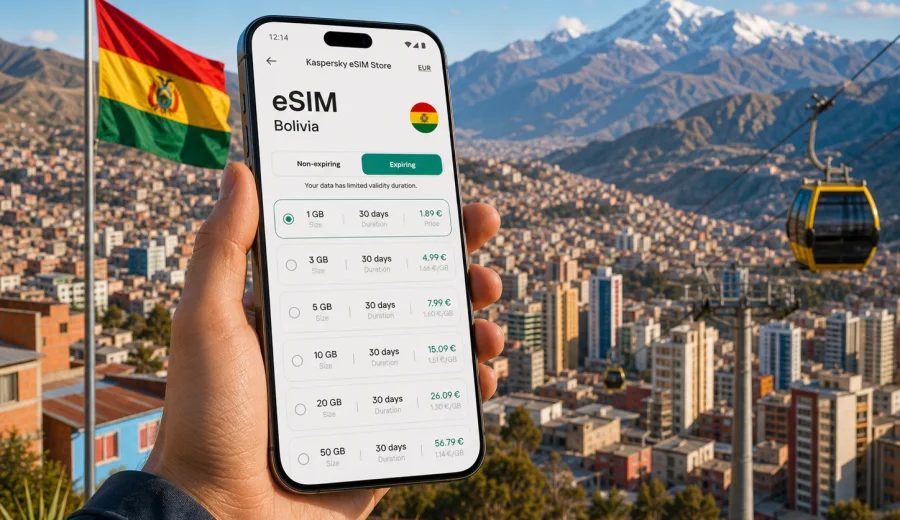
eSIM in Bolivia: mobile connection and internet for your trip
Bolivia is a country where mobile internet can shape the rhythm of a trip. You may land in Santa Cruz, continue to La Paz, cross the Altiplano, visit Lake Titicaca, or head toward the Uyuni salt flats. In each scenario, you need maps, driver messages, hotel details, translation, and travel documents available without depending only on hotel Wi-Fi.
An eSIM is a convenient way to prepare mobile internet before you travel. Instead of looking for a physical SIM card after arrival, you install a digital SIM profile on a compatible phone and choose a prepaid data plan for the destination.
This guide explains eSIM use in Bolivia, data planning, device checks, setup, and how Kaspersky eSIM Store can help you choose, arrange, and activate an eSIM with a suitable mobile internet plan for a trip abroad.
Why mobile internet matters in Bolivia
Bolivia rewards flexible travel. Distances can be long, terrain changes quickly, and many routes involve a mix of flights, buses, taxis, guided tours, and local transfers. A connection is not only useful for social media. It helps with ordinary travel tasks that can otherwise become stressful.
You may need mobile internet in Bolivia to:
- share your location with a driver or travel companion;
- check whether a bus terminal, tour office, museum, or restaurant is open;
- translate Spanish phrases in real time;
- keep maps available when moving between neighborhoods;
- confirm pickup times for tours to Salar de Uyuni or Lake Titicaca;
- access flight updates;
- manage online banking confirmations and travel insurance documents;
- use messengers for calls when your plan includes data but not standard voice service.
Public Wi-Fi can help in hotels, cafes, and airports, but it is not a full travel strategy. A prepared eSIM reduces that dependency and gives you a clearer plan for mobile data from the start of the trip.
What an eSIM gives you on a Bolivia trip
An eSIM, or embedded SIM, is a digital profile installed on a phone or tablet that supports eSIM. For travel, it is commonly used for mobile data while you keep your main SIM available for your regular number. The exact behavior depends on your device settings and the selected tariff conditions.
For Bolivia, the main advantages are practical:
- No physical SIM search after landing. You do not need to spend your first hour comparing unfamiliar local offers.
- Clear data limits. A prepaid plan shows the traffic amount and validity period before you arrange it.
- Simple separation from your home number. Your usual SIM can remain available while the eSIM handles travel data.
- Useful for multi-city routes. You can plan one data setup for Santa Cruz, La Paz, Sucre, Potosi, Uyuni, and Copacabana, subject to the selected plan conditions and local availability.
- Less dependence on roaming. A travel eSIM may be a more predictable alternative to standard roaming.
An eSIM is not a promise that every road, mountain pass, or remote village will have strong signal. Quality depends on local infrastructure, terrain, device settings, and the selected plan. The value is that you prepare your mobile internet method before the trip.
Bolivia travel scenarios where eSIM is especially useful
Different Bolivia itineraries create different data needs. Use the following scenarios to estimate your plan.
| Travel scenario | Typical route | Why mobile data helps |
|---|---|---|
| First arrival | Airport to hotel in Santa Cruz, La Paz, or Cochabamba | Maps, driver messages, hotel address, flight updates |
| City stay | La Paz, Sucre, Santa Cruz, Cochabamba | Navigation, restaurant searches, translation, online payments |
| Highland route | La Paz, El Alto, Lake Titicaca, Copacabana | Weather checks, transport coordination, route planning |
| Uyuni tour | Uyuni town, salt flats, lagoons, desert routes | Offline preparation plus limited online checks before and after remote sections |
| Work trip | Meetings, email, file access, video calls when Wi-Fi is poor | Stable data planning and backup connectivity |
| Long backpacking route | Bolivia combined with nearby countries | Data budgeting, messaging, accommodation changes |
For remote tours, download essential maps and booking details before departure. A good plan combines eSIM access with offline preparation.
How much data to choose for Bolivia
Data usage depends on habits, not only trip length. The largest differences usually come from video, cloud backups, navigation style, and whether you use the phone as a hotspot. If you mostly message and check maps, you need far less data than someone uploading video every day.
| Data amount | Best for | Practical notes |
|---|---|---|
| 1 GB | A short stopover or very light use | Messaging, occasional maps, a few web searches |
| 3 GB | Several days of basic travel use | Maps, translation, ride coordination, light browsing |
| 5 GB | A one-week trip with regular online use | Good for city travel and daily planning |
| 10 GB | Longer trips or heavier app use | Better if you use maps often, upload photos, or work on the go |
| 20 GB or more | Extended travel, work backup, hotspot use | Useful when Wi-Fi is unreliable or you share data with another device if allowed |
To keep data use under control, switch off automatic photo and video backups on mobile data, download offline maps, update apps before leaving home, and avoid long video streaming sessions unless your plan comfortably supports them.
Before you buy: device and trip checks
The most important step is compatibility. Not every phone supports eSIM, and some devices may be locked to a mobile carrier.
Use this checklist before your Bolivia trip:
- Check whether your device supports eSIM.
- Confirm that the device is not locked to one carrier.
- Make sure the phone operating system is up to date.
- Decide whether your main SIM or eSIM will handle mobile data.
- Turn off data roaming on your home SIM if you want to avoid accidental roaming charges.
- Read the selected plan conditions, including data amount, validity period, destination, and any hotspot limitations.
It is better to finish these checks before departure than to troubleshoot at an airport counter or in a taxi. If you need mobile internet immediately after landing, prepare the eSIM in advance and know which settings to enable when you arrive.
Choosing an eSIM plan for Bolivia
When you compare mobile data options, look beyond the largest number of gigabytes. A suitable plan is the one that fits your route, dates, and app habits. For example, a 30-day plan may be convenient for a slow trip, while a smaller short-term package may be enough for a conference or a transit stop.
Kaspersky eSIM Store is an app and website where you can choose a destination, review available plan conditions, arrange the selected option, and activate an eSIM for mobile internet in a trip abroad. For Bolivia, you can choose an eSIM plan for your trip to Bolivia before you leave or when you are ready to set up travel data.
When reviewing a plan, check:
- Destination. Confirm that the plan is for Bolivia or includes Bolivia in its listed coverage.
- Data amount. Match gigabytes to your expected use.
- Validity period. Make sure the plan covers the full travel window.
- Activation rules. Some plans start counting validity after installation or first connection; read the displayed conditions.
- Hotspot use. If you plan to share data with a laptop or another traveler, check whether tethering is allowed.
- Voice and SMS. Travel eSIM data plans often focus on mobile internet and may not include a standard phone number, voice calls, or SMS unless this is stated separately.
The goal is to avoid running out of data during a key part of the trip while keeping the plan aligned with real use.
Installation basics for Android and iOS
The exact installation flow depends on your device model and operating system, but the general logic is similar: you add the eSIM profile, name it clearly, choose it for mobile data, and enable the required settings when you arrive or when the plan should become active.
For detailed steps, use the official setup guides:
A simple installation workflow looks like this:
1. Connect to stable Wi-Fi before installing the eSIM.
2. Open the installation details from your order.
3. Add the eSIM profile using the QR code or manual details, depending on the device.
4. Label the profile clearly, for example "Bolivia data".
5. Keep your primary SIM for calls if you need your usual number.
6. Select the eSIM as the line for mobile data.
7. Enable data roaming for the eSIM if the plan instructions require it.
8. Test the connection after arrival or when the plan conditions say it can be activated.
Do not delete the eSIM profile unless you are sure it is no longer needed. Some profiles cannot be reinstalled after deletion or transfer, depending on the terms of the selected plan.
How to reduce data use without making the trip harder
A few settings can make a small or medium plan last much longer.
- Download offline maps for La Paz, Santa Cruz, Sucre, Uyuni, and your planned route.
- Save PDFs of bookings, insurance, tickets, and passport copies for offline access.
- Disable cloud photo sync on mobile data.
- Set messengers to download media only on Wi-Fi.
- Use lower video quality if you must stream.
- Update apps and operating systems before departure.
- Monitor data use daily in your device settings.
- Keep hotel and tour addresses in your notes app, not only in email.
If you use mobile data mainly for travel logistics, a moderate plan can last longer than expected. If you treat it like home Wi-Fi, it can disappear quickly.
eSIM, roaming, local SIM, and Wi-Fi: what to compare
There is no single option that fits every traveler. Compare based on effort, predictability, and the role of mobile internet in your trip.
| Option | Strength | Limitation |
|---|---|---|
| Travel eSIM | Prepared before arrival, no physical SIM swap, clear prepaid data amount | Requires compatible, unlocked device |
| Home operator roaming | Uses your existing number and account | Can be expensive or hard to predict, depending on your home tariff |
| Local physical SIM | May suit long stays or local calling needs | Requires store visit, registration steps may vary, physical SIM handling |
| Public Wi-Fi | Useful in hotels and cafes | Not always available, may be slow, less convenient while moving |
For many visitors, eSIM and Wi-Fi work well together: eSIM covers movement, maps, messages, and urgent tasks, while Wi-Fi handles large uploads, app updates, and long calls from the hotel.
Troubleshooting if mobile data does not start
If your eSIM is installed but mobile data does not work as expected, go through the basics first. Try this sequence:
1. Confirm that the eSIM profile is installed and switched on.
2. Check that the eSIM is selected for mobile data.
3. Enable data roaming for the eSIM if required by the plan instructions.
4. Turn airplane mode on and off.
5. Restart the phone.
6. Move to an area with better signal, especially if you are indoors or in mountainous terrain.
7. Check whether the validity period has started and whether the plan still has data.
8. Contact support through the app or website if the issue continues.
Avoid deleting the eSIM profile as a first troubleshooting step. Deletion can make recovery harder if the profile cannot be installed again.
Quick answers about eSIM in Bolivia
Can I use eSIM for calls and SMS in Bolivia?
Many travel eSIM plans are designed for mobile internet. They may not include a standard phone number, voice calls, or SMS unless the specific plan conditions say so. For calls, travelers often use messengers over data.
Should I install the eSIM before flying?
You can usually install the eSIM before travel while connected to stable Wi-Fi, then activate or use it according to the plan instructions. Read the plan conditions so you understand when the validity period begins.
Is eSIM enough for Salar de Uyuni?
It is useful before and after remote sections, especially in Uyuni town, but you should not rely on mobile data for every part of a desert or salt flat route. Download maps and save documents offline.
A concise preparation checklist
Before you leave for Bolivia, make sure you have:
- confirmed eSIM compatibility and carrier unlock status;
- chosen a data amount that fits your route and travel style;
- installed the eSIM using stable Wi-Fi;
- saved Android or iOS installation instructions for offline access;
- turned off unnecessary mobile data background use;
- checked whether the plan includes data only or additional services;
- decided which SIM handles mobile data after arrival;
- kept support and order details available.
This preparation takes only a few minutes, but it can prevent a common travel problem: arriving in a new country with no reliable way to get online.
Choose mobile internet for Bolivia before you travel
Bolivia is easier to navigate when your phone is ready for maps, messages, bookings, and translation from the first day. An eSIM gives you a practical way to prepare mobile internet without swapping a physical SIM card, while Kaspersky eSIM Store helps you choose, arrange, and activate a suitable eSIM plan for a trip abroad.
Before departure, check your device, compare data amounts, read the plan conditions, and prepare offline backups for remote areas. When you are ready, choose an eSIM plan for Bolivia and set up your travel data before the journey begins.