
Travel connectivity guide
Boma eSIM for Mobile Internet Travel
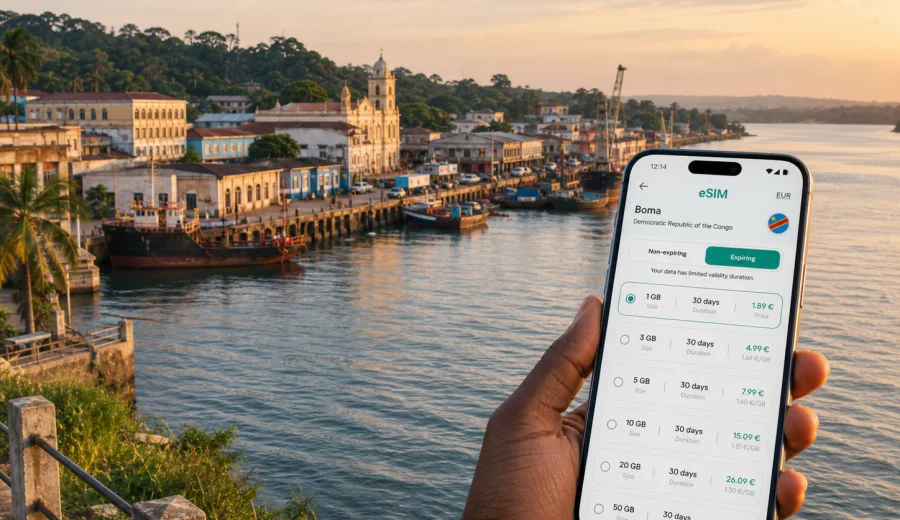
Boma eSIM: mobile connection and internet for a trip to the Congo River city
Boma is a compact river city with a long memory. Set in Kongo Central on the lower Congo River, it is often part of practical routes between Matadi, Muanda, the Atlantic coast, and the road corridor toward Kinshasa. For travelers, that means the city is not just a place to look around. It is a place where navigation, calls through messengers, hotel coordination, maps, translation, and route changes can all depend on stable mobile internet.
An eSIM can be useful before a trip to Boma because it lets you prepare mobile data without searching for a physical SIM card after arrival. You choose a destination and a suitable data plan, install the eSIM on a compatible device, and use it for internet access during the trip according to the plan conditions. Kaspersky eSIM Store is an app and website where you can choose, order, and activate an eSIM with a suitable data plan for mobile internet abroad.
This guide focuses on Boma itself: arrival, riverfront movement, local streets, hotels, work trips, short stopovers, and onward travel from the city. The country matters because the correct eSIM destination is the Democratic Republic of the Congo, but the practical questions are city questions: how much data you may need in Boma, when to install the eSIM, where connectivity is most useful, and how to avoid relying only on public Wi-Fi.
Why mobile internet matters in Boma
Boma is easier to manage when your phone is ready before the first local errand. The city has riverfront activity, markets, administrative buildings, churches, older colonial-era streets, transport points, and routes out toward other towns. You may need mobile internet for simple tasks that become more important in an unfamiliar place:
- checking the route between your hotel and a meeting point;
- sharing your live location with a driver or colleague;
- confirming arrival times on the road from Matadi or Muanda;
- using a messenger call when a regular mobile voice line is not part of your travel setup;
- translating short messages or addresses;
- checking banking, travel documents, or email when hotel Wi-Fi is slow;
- keeping maps open during walks near the riverfront or between neighborhoods.
For many visitors, Boma is not a classic airport-to-hotel city break. It can be a work visit, a field stop, a family trip, a port-related appointment, or a route segment. That makes mobile data planning more important, because you may move between city streets, rural approaches, riverside areas, and other towns in one trip.
What an eSIM does for a Boma trip
An eSIM is a digital SIM profile installed on a compatible phone or tablet. For a trip to Boma, it is mainly a way to prepare mobile internet in advance. Instead of looking for a shop, comparing physical SIM cards, or waiting until you understand local routines, you can set up the eSIM before you travel and activate it according to the instructions and plan terms.
In practice, an eSIM helps with three travel moments:
| Travel moment | What you need internet for | Why eSIM preparation helps |
|---|---|---|
| Before arrival | Maps, hotel messages, document access, route checks | You can install the eSIM while you still have stable Wi-Fi |
| First day in Boma | Navigation, driver coordination, messaging | You are not dependent only on hotel Wi-Fi or a physical SIM purchase |
| Onward travel | Road updates, maps, messenger calls, bookings | One prepared data setup can support several route segments if the plan covers them |
eSIM plans usually focus on mobile data. They do not normally include a local phone number, voice calls, or SMS unless the terms of a specific plan say so. For calls and messages, you can use internet-based apps. Before buying any plan, check the data amount, validity period, destination, price, activation rules, and whether your device supports eSIM.
Arrival scenarios: how travelers usually reach Boma
Your mobile internet needs depend on how you enter the city. Boma can be part of different routes across Kongo Central, and each route creates its own connectivity tasks.
If you arrive by road from Matadi, mobile data helps with navigation, updates to your hotel, and coordination if the road timing changes. Matadi is an important regional gateway, and the Boma segment may be planned around business, logistics, family travel, or local appointments.
If you arrive from Muanda or the coast, mobile internet is useful for checking the final approach into town, sharing arrival times, and keeping maps ready as the route moves from coastal areas toward the lower Congo River. Travelers who combine Boma with coastal stops should choose a data amount that covers the whole route, not just one day in the city.
If Boma is a stop on a longer road journey, prepare for uneven time estimates. You may need data for messaging, offline document access, and map checks during pauses. Downloading offline maps before the trip is still sensible, but live mobile data makes changes easier to handle.
City movement: where phone data becomes practical
Boma is manageable in scale, but a first-time visitor still benefits from a working data connection. Streets can be easier to understand once your map, hotel address, and contact names are available at the same time. Use mobile internet for practical movement rather than constant scrolling.
Typical city tasks include:
- finding a hotel, guesthouse, office, church, school, or administrative address;
- checking walking distance near the riverfront and older central streets;
- confirming pickup points with a local driver;
- sending a location pin instead of trying to describe a street verbally;
- checking whether a meeting moved to another building or neighborhood;
- comparing a route by car with a short walk;
- keeping a translation app available for short phrases.
For walking in Boma, a phone connection is useful but should not replace local judgment. Keep your battery charged, avoid displaying your phone unnecessarily in crowded places, and save key addresses offline. A small power bank is a practical accessory because city days can include long waits, transport changes, and meetings that run late.
Choosing data for Boma: light, standard, or heavy use
The right eSIM data amount depends on how you travel. A short Boma stopover does not need the same package as a work trip with video calls and cloud files.
| Traveler type | Likely data use | Practical planning tip |
|---|---|---|
| Short stopover | Low to moderate | Prioritize maps, messages, and hotel coordination |
| Business visitor | Moderate to high | Allow data for email, shared files, ride coordination, and messenger calls |
| Family traveler | Moderate | Plan for maps, photo sharing, messaging, and multiple route checks |
| Regional traveler | High | Choose for Boma plus Matadi, Muanda, Kinshasa, or other stops |
| Remote worker | High | Check whether your hotel Wi-Fi is reliable, but do not make it your only option |
As a rule, maps and messaging use less data than video calls, streaming, cloud backups, and social media uploads. If your phone automatically syncs photos and app updates, it may consume data in the background. Before you arrive, turn off automatic downloads on mobile data and set heavy backups to Wi-Fi only.
For a focused visit of one to three days, a smaller data package may be enough if you use it mainly for navigation and messages. For a week with meetings, route changes, and onward travel, choose more headroom. If you expect to use your phone as a hotspot for a laptop, check whether tethering is allowed by the selected plan and budget more data.
When to install and activate your eSIM
The easiest setup is usually before departure, while you still have a stable connection. Install the eSIM at home, at the office, or at a hotel with reliable Wi-Fi. Then activate it according to the plan instructions, either before travel or after arrival if the plan starts on first network connection or manual activation.
Before choosing a plan, check your device. Your phone or tablet must support eSIM, and it should not be locked to another mobile operator. This check is important because an eSIM cannot help if the device itself cannot install the profile.
For installation, follow the official device steps: use the Android installation guide or the iOS installation guide depending on your phone. Keep your primary SIM active if you still need your usual number for banking confirmations or incoming calls, and set the eSIM as the mobile data line when you are ready to use it.
The Boma travel checklist
Use this checklist before you leave for Boma:
- confirm that the eSIM destination is the Democratic Republic of the Congo;
- check device compatibility and operator lock status;
- choose a plan with enough data for Boma and any regional stops;
- install the eSIM while you have stable Wi-Fi;
- save the QR code or activation details where you can access them securely;
- download offline maps for Boma, Matadi, Muanda, and any onward route;
- save hotel addresses, meeting locations, and driver contacts;
- disable automatic app updates and cloud photo backups on mobile data;
- pack a charger and power bank;
- keep a fallback contact method in case your main messenger is unavailable.
This preparation is especially useful if Boma is part of a work itinerary. Business days often include changed meeting times, file requests, calls, and transport adjustments. A prepared data line gives you more control without turning connectivity into the main task of the trip.
Where Kaspersky eSIM Store fits into the plan
Kaspersky eSIM Store is designed for travelers who want a practical way to prepare mobile internet for an international trip. In the app or on the website, you can choose a destination, compare data amounts and validity periods, order the selected eSIM plan, install it on a compatible device, and activate it according to the plan instructions.
For Boma, the relevant destination is the Democratic Republic of the Congo. If you want to prepare before arrival, you can choose a mobile internet plan for the Democratic Republic of the Congo and match it to your city itinerary: a short stop, a business visit, a family stay, or a wider route through Kongo Central.
Kaspersky eSIM Store should not be treated as a mobile network operator. The app and website help you choose, order, install, and activate an eSIM with a suitable data plan for travel. Actual availability, speed, and network experience depend on the selected plan, local network conditions, device settings, and the places where you use mobile data.
Practical scenarios in Boma
One-day stopover
If Boma is a short stop, focus on essential data: maps, hotel or driver messages, and quick searches. Install the eSIM before the trip, turn on the data line when needed, and avoid high-data activities such as streaming. Save your next destination offline so you are not dependent on a live connection at every step.
Business visit
For a business trip, mobile data supports email, messenger calls, calendar updates, route changes, and document checks. Choose a plan with enough data for unexpected delays. If you need to join video calls, test hotel Wi-Fi first and keep eSIM data as a backup rather than using video over mobile data by default.
Riverfront and local walks
For walks around central Boma and the riverfront, use mobile internet to check routes before you start, then keep the phone secure. If you plan to take photos, wait to upload large files until you are on reliable Wi-Fi. Keep location sharing available for trusted contacts if you are moving between unfamiliar addresses.
Regional route through Kongo Central
Many trips connect Boma with Matadi, Muanda, or Kinshasa. In that case, plan data for the whole route. Road travel can create more phone use than expected: map checks, messaging, weather checks, hotel updates, and coordination with drivers or colleagues. A slightly larger data package can be more comfortable than trying to conserve every megabyte.
How to reduce data use without losing convenience
Mobile data is most useful when it is managed deliberately. Before your trip, adjust settings so your phone does not use data silently.
Do this before you arrive:
1. Download offline maps for Boma and your route.
2. Save hotel, meeting, and transport details in notes or screenshots.
3. Turn off automatic app updates on mobile data.
4. Disable cloud photo and video backup on mobile data.
5. Set messaging apps to download media only on Wi-Fi.
6. Keep low-data mode available if your phone supports it.
7. Use Wi-Fi for heavy files, but avoid sensitive logins on unknown public networks.
This approach lets you keep eSIM data for the moments that matter: navigation, communication, security checks, and travel changes. It also makes it easier to choose a plan because you are not paying for background activity you did not need.
What to know about calls, SMS, and your main number
Most travel eSIM data plans are for mobile internet. They may not include a local phone number, standard voice calls, or SMS. If you need to receive bank messages or calls on your usual number, keep your primary SIM active and check roaming settings with your home operator before the trip.
On a dual-SIM phone, you can usually set:
- your regular SIM for calls and SMS;
- the eSIM for mobile data;
- data roaming for the eSIM if the plan instructions require it;
- messaging apps to use internet data for calls and chats.
This setup is practical for Boma because you can keep your regular identity line while using a separate data line for maps, messages, and travel tasks. Before departure, test where these settings are located on your phone so you are not learning the menu during a road transfer or hotel check-in.
FAQ: Boma eSIM and mobile internet
Is an eSIM useful for Boma?
Yes, if your device supports eSIM and you want mobile data ready for navigation, messaging, hotel coordination, and regional travel. It is especially useful when you do not want to rely only on public Wi-Fi or a physical SIM purchase after arrival.
Which destination should I choose for Boma?
Choose the Democratic Republic of the Congo. Boma is in Kongo Central, so a city trip uses the country destination rather than a separate city-specific landing page.
Should I install the eSIM before I travel?
Usually yes. Install it while you have stable Wi-Fi, then activate it according to the plan instructions. Check whether the validity period starts at installation, activation, or first network connection.
Can I use my normal phone number at the same time?
On many dual-SIM devices, yes. You can keep your usual SIM for calls or SMS and set the eSIM as the data line. Device menus differ, so check your settings before departure.
How much data do I need?
For light maps and messaging, a smaller package may be enough. For business travel, video calls, file sharing, hotspot use, or a route beyond Boma, choose more data and check whether tethering is allowed by the selected plan.
Will the eSIM replace local travel planning?
No. It helps with mobile internet, but you should still save addresses offline, confirm transport locally, keep your battery charged, and check plan conditions before use.
Final preparation before Boma
A good Boma connectivity plan is simple: check your phone, choose the Democratic Republic of the Congo as the destination, install the eSIM before travel, save key information offline, and use mobile data for the moments when it matters most. That gives you a practical setup for riverfront walks, hotel coordination, business meetings, road transfers, and onward travel through Kongo Central.
Before you leave, review your route and choose a data amount that matches the whole trip rather than only the first stop. Then use Kaspersky eSIM Store to prepare an eSIM plan for your trip to Boma and keep your mobile internet setup ready before arrival.