
Travel connectivity guide
Bongor eSIM for Mobile Internet in Chad
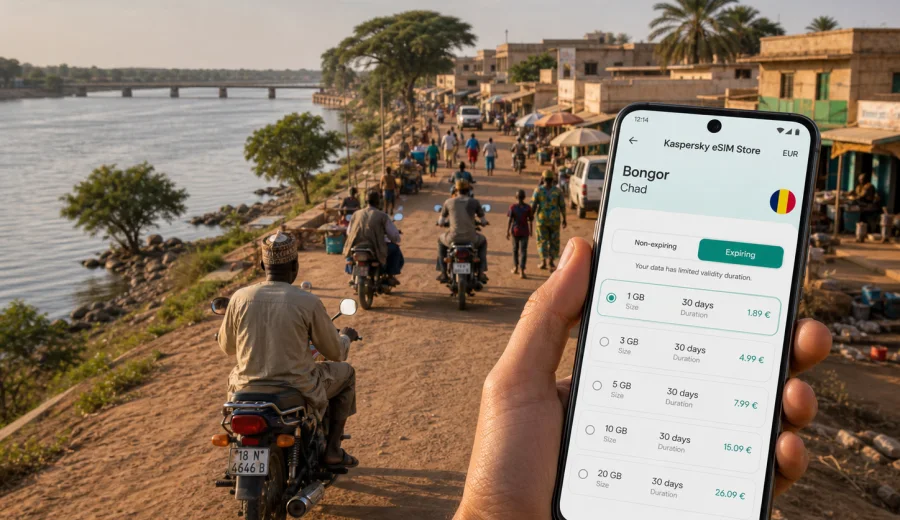
Bongor eSIM: mobile connection and internet for a trip to Bongor
Bongor is a practical travel base in southern Chad: a river city on the Logone, close to the Cameroon border, and a useful stop for road journeys between regional towns. For many visitors, the first challenge is not sightseeing but coordination: confirming a driver, opening a map, messaging a hotel, checking a meeting location, or letting family know that the road segment is going as planned. An eSIM can make that first hour easier because you can prepare mobile internet before you start moving around the city.
This guide focuses on using eSIM for a trip to Bongor, not on a general trip to Chad. The city has its own rhythm: riverbank movement, local markets, motorbike taxis, guesthouses, administrative visits, business errands, and overland routes that may continue toward N'Djamena, Moundou, Kelo, Pala, or the Cameroon side of the Logone area. In each of these situations, mobile data is useful for navigation, translation, messaging, bookings, and basic work tasks.
eSIM is a digital SIM profile installed on a compatible phone or tablet. It can help you use mobile internet abroad without buying a physical SIM card after arrival. In Kaspersky eSIM Store, you can choose a destination, review a prepaid data package, install the eSIM on a compatible device, and activate it for your trip. The exact connection experience depends on the selected tariff, your device, local network conditions, and the area where you are using mobile data.
Why mobile internet matters in Bongor
Bongor is not a city where you want to depend only on hotel Wi-Fi or a single offline plan. A short walk, a vehicle pickup, or a change in road timing can quickly require a message, a call through a messenger app, or a map check. If your visit is connected to field work, a meeting, a development project, a family visit, or a regional route, the value of mobile data is often practical rather than recreational.
Common situations where an eSIM can help in Bongor:
- confirming your arrival time with a guesthouse or host;
- sharing your live location with a driver or colleague;
- checking route options before crossing town or leaving for another city;
- using a translation app during local errands;
- opening booking details, travel documents, or email attachments;
- keeping messenger calls available when voice service is not included in an eSIM tariff;
- checking weather, road updates, or meeting changes before a longer drive.
The main benefit is control. You can prepare a data option before the trip and avoid spending your first minutes in Bongor looking for a shop, explaining your phone model, or relying on a public Wi-Fi network that may not be available when you need it.
Bongor travel scenarios where eSIM is useful
| Travel moment in Bongor | What you may need data for | Practical eSIM tip |
|---|---|---|
| Arrival by road | Messaging your host, opening maps, checking saved documents | Install the eSIM before the route, then activate according to the tariff instructions |
| First transfer in town | Sharing a pickup point, checking a hotel location, using a messenger | Save key addresses offline as a backup |
| Market or riverfront errands | Translation, mobile payments where available, quick calls via apps | Keep background app updates limited to save data |
| Business or NGO visit | Email, document sharing, video or audio calls | Choose data volume based on work needs, not only trip length |
| Stopover before another city | Booking changes, route coordination, family updates | Check validity period so the plan covers the next leg |
| Regional route from Bongor | Maps, fuel or rest-stop planning, driver communication | Download offline maps before leaving stronger coverage areas |
Bongor is especially relevant for travelers who do not stay in one hotel all day. If you move between offices, guesthouses, the riverfront, markets, and road departure points, mobile data becomes a working tool. It helps you keep small decisions under control when plans change.
How to choose an eSIM data package for Bongor
Start with your actual trip pattern. A visitor spending one night in Bongor before continuing by road needs a different data setup from a traveler working in the city for a week. Do not choose only by the smallest number of gigabytes or the longest validity period. Choose by what you will actually do on mobile data.
Use this simple planning method:
1. Count the number of days when you need mobile internet in Bongor and nearby routes.
2. Decide whether you will use maps lightly or navigate throughout the day.
3. Estimate messaging, email, and document use.
4. Add extra data if you expect hotspot use, video calls, cloud uploads, or work files.
5. Check whether the tariff applies to Chad and whether the validity period fits your full route.
Light users may mainly need messaging, maps, and occasional browsing. Business travelers often need more data for email attachments, shared documents, and calls through apps. Travelers continuing from Bongor to other towns should also consider data use outside the city, especially if they rely on maps or coordination during road travel.
A city-focused data estimate
| Usage pattern | Typical activity in Bongor | Data planning approach |
|---|---|---|
| Basic stopover | Messenger texts, map checks, hotel messages | A smaller package may be enough if you keep video and cloud sync off |
| Practical city stay | Maps, translation, browser searches, photo messages | Choose a mid-range package for more flexibility |
| Work visit | Email, files, voice calls through apps, shared locations | Allow more data and check the validity period carefully |
| Road route plus city stay | Navigation, coordination, hotel changes, updates to family | Plan for both Bongor and the next city, not just arrival day |
If you are unsure, look at the apps you usually use while traveling. Maps, short messages, and email headers use much less data than video, automatic photo backup, social media clips, and hotspot sharing. Before the trip, switch off automatic media downloads in messenger apps and pause cloud backups. That simple setup often makes a prepaid data package last longer.
Preparing before you arrive
The best time to prepare mobile internet for Bongor is before you depend on it. You can install an eSIM while you still have stable Wi-Fi at home, in a hotel, or at an airport before the final road segment. Activation timing can differ by tariff, so follow the instructions shown after purchase and avoid turning on the eSIM too early if the validity period starts at activation.
Before buying a data package, check whether your device supports eSIM. Your phone also needs to be free from operator restrictions that would block another mobile profile. This check matters because eSIM is installed on the device itself and usually cannot be moved casually from one phone to another after activation.
For a Bongor trip, prepare this checklist:
- save your hotel, host, or office address offline;
- download offline maps for Bongor and the road section you expect to use;
- keep passport, booking, and project documents available without internet;
- write down your driver's phone number in more than one place;
- check battery health and carry a power bank for long road days;
- install the eSIM while you have stable Wi-Fi;
- read the tariff conditions, including data volume, validity period, and destination.
This approach keeps eSIM as your main mobile internet option while still giving you backup if coverage is weak in a particular street, building, or road section.
When to place the eSIM in your travel flow
For many travelers, Bongor is reached after a longer journey through Chad rather than through a direct international arrival. That changes how you should think about mobile data. You may need internet before you reach the city, during the route, and after you enter Bongor. If your itinerary starts in N'Djamena or another entry point, prepare the eSIM before the overland segment so you are not setting it up while tired or moving.
A useful sequence is:
1. Choose the data package before departure.
2. Install the eSIM while connected to reliable Wi-Fi.
3. Keep your primary SIM active if you still need your regular number for banking or two-factor messages.
4. When ready, select the eSIM for mobile data.
5. Enable data roaming for the eSIM if the setup instructions or device settings require it.
6. Test basic browsing or messaging before leaving a place with reliable support.
If you want to prepare the data side of the trip before your Bongor route, you can review eSIM options for Chad and choose a package that fits your stay, route, and expected data use. This is the main country landing page for the city article because Bongor uses the Chad destination context.
Installing eSIM for Bongor
Installation is usually straightforward, but it is worth doing carefully. After you choose a suitable tariff in Kaspersky eSIM Store, the eSIM appears in your account or app flow with setup instructions. You may be asked to scan a QR code or follow an in-app installation path, depending on your device and the available setup method.
For device-specific steps, use the official setup guides: Android eSIM installation instructions and iOS eSIM installation instructions. Keep your phone connected to Wi-Fi during installation. If you are already traveling, do this at a hotel, office, airport lounge, or another place where the internet connection is stable enough to complete the setup.
After installation, name the profile clearly, for example "Chad data" or "Travel eSIM". This helps you avoid mixing it up with your main SIM. Then check which SIM is selected for mobile data, which SIM is used for calls and messages, and whether data roaming is enabled for the eSIM if required.
Arrival and first hours in Bongor
The first hours in Bongor are often about orientation. You may need to find a guesthouse, confirm a meeting location, coordinate with a driver, or tell someone that you have reached the city. Mobile data is useful because it lets you act immediately without waiting for Wi-Fi.
Keep your first-hour setup simple:
- turn on mobile data for the eSIM only when you are ready to use it;
- open your map and confirm that key places are saved;
- send one short message to your host or contact;
- check that messenger calls work if you plan to use them;
- avoid large downloads until you understand your data needs;
- keep a screenshot of your accommodation address and route notes.
If you use a rideshare-style app, a local taxi contact, or a driver arranged by a hotel or organization, mobile data helps with pickup coordination. In smaller cities, precise addresses can be less standardized than in major capitals, so shared location pins and photo references can be more useful than a long written address.
Moving around Bongor with mobile data
Bongor movement is often local and practical: guesthouse to office, office to market, riverfront to meeting point, or town center to road departure. You may not need constant navigation, but you do need quick access when plans change. A working data connection helps you verify where you are, send a pin, and avoid losing time.
For efficient data use:
- download the city area in your map app before you go out;
- use satellite view only when necessary because it can use more data;
- turn off automatic video playback in social apps;
- send compressed images when possible;
- use Wi-Fi for app updates and cloud backup;
- keep a local screenshot of the map section around your hotel or meeting point.
For travelers on official, humanitarian, academic, or business visits, the practical value is often continuity. You can answer a message while moving between stops, open a document before a meeting, or check a route without asking someone to share a connection.
Business trips and field work in Bongor
For work travel, mobile internet is part of your operating plan. Bongor trips may involve administrative meetings, site visits, field coordination, training sessions, or project monitoring. The important questions are not only "Do I have internet?" but "Can I open the file when someone asks for it?" and "Can I send a route update before the vehicle leaves?"
Prepare your phone for work before you arrive:
- download key documents for offline access;
- save contact groups in your messenger app;
- enable low-data mode for apps that support it;
- confirm whether you need hotspot use for a laptop;
- keep sensitive work accounts protected with your normal security practices;
- test email and document access before a full day of meetings.
Most travel eSIM data packages are focused on mobile internet. They usually do not include a local phone number, voice calls, or SMS unless the specific tariff conditions say otherwise. For calls, many travelers use internet-based messengers. If your bank, employer, or travel platform sends SMS codes to your regular number, keep your primary SIM available for those messages.
Trips from Bongor
Bongor can be part of a broader southern Chad itinerary. Travelers may continue toward other towns, return north toward N'Djamena, or coordinate near the Cameroon border area. A city eSIM article should still focus on Bongor, but your data plan should reflect the full movement around the city.
Before leaving Bongor for another road segment:
1. Download offline maps for the next section.
2. Send your planned departure and arrival window to a trusted contact.
3. Charge your phone and power bank.
4. Check remaining data in your account or app where available.
5. Save the destination address and driver contact offline.
6. Avoid starting large media uploads before a long drive.
Coverage and speed can vary outside city areas. Treat eSIM as a practical way to prepare mobile internet for the route, while keeping offline information ready for places where signal may be weaker.
What to check before buying
Before you choose an eSIM tariff for Bongor, review the details rather than relying on the destination name alone. A good match depends on your device, route, and expected data use.
Check these points:
- Destination: the package should cover Chad for a Bongor trip.
- Validity: the duration should cover your arrival, city stay, and onward route.
- Data volume: choose enough data for maps, messages, work, and calls through apps.
- Activation rules: understand when the validity period starts.
- Device support: confirm eSIM compatibility before purchase.
- SIM lock status: make sure your phone can use another mobile profile.
- Hotspot rules: check the tariff conditions if you plan to share data with a laptop.
- Support path: know where to find help if installation or activation needs attention.
This review takes only a few minutes, but it prevents the most common travel mistakes: buying too little data, activating too early, or discovering too late that the device does not support eSIM.
FAQ about eSIM and mobile internet in Bongor
Is eSIM useful for a short stopover in Bongor?
Yes, if you need maps, messaging, hotel coordination, or route updates. Even a short stopover can involve several moments when mobile data is more convenient than searching for Wi-Fi.
Can I use eSIM for normal calls and SMS in Bongor?
Most travel eSIM data packages are designed for mobile internet. They usually do not include a local phone number, voice calls, or SMS unless those features are clearly included in the tariff conditions. You can often use messenger apps for calls over data.
Should I install the eSIM before I reach Bongor?
In many cases, yes. Install it while you have reliable Wi-Fi, then activate it according to the instructions and tariff rules. This is especially useful if you are traveling to Bongor by road.
Do I still need offline maps?
Yes. Offline maps are a sensible backup for Bongor and nearby routes. Mobile data is useful, but coverage, battery, and app behavior can vary, especially during road travel.
What if my eSIM does not connect immediately?
Check that the eSIM is selected for mobile data, data roaming is enabled if required, and the device is in an area with signal. Restarting the phone can also help. If the issue continues, use the support path shown in Kaspersky eSIM Store.
Choose mobile internet for your Bongor trip
Before you travel to Bongor, prepare the basics: confirm that your device supports eSIM, choose a data package for Chad, install it while you have stable Wi-Fi, and keep offline maps as a backup. This gives you a calmer start in the city and helps you stay reachable during transfers, meetings, hotel check-ins, and road segments.
Kaspersky eSIM Store helps you choose, set up, and activate an eSIM with a suitable data package for mobile internet during an overseas trip. For Bongor, use the Chad destination page to choose an eSIM data package for your trip and review the tariff conditions before you activate it.