Travel connectivity guide
Bonn eSIM: Mobile Internet for Travel
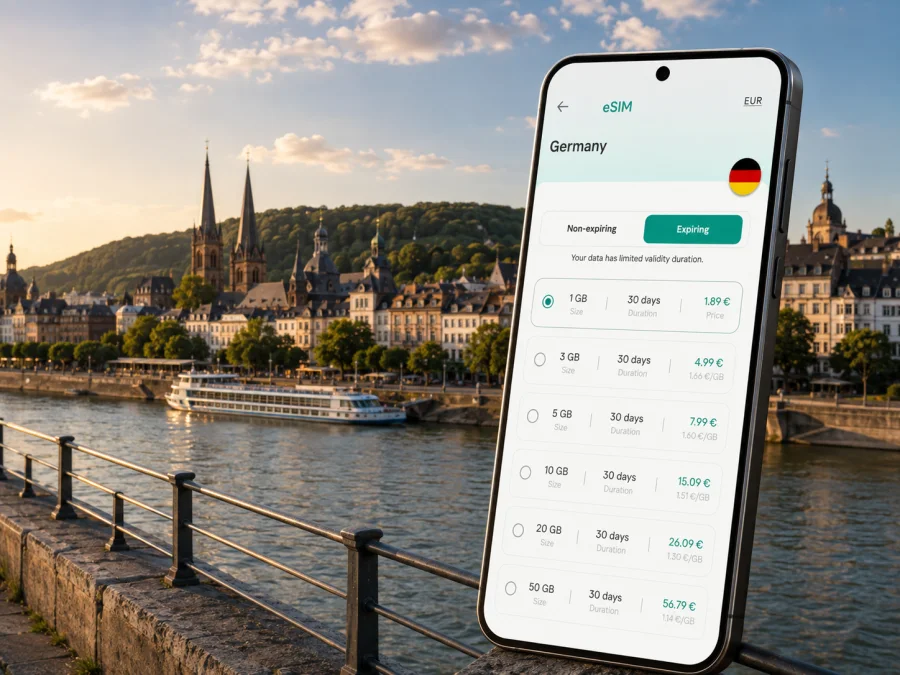
Bonn eSIM: Mobile Connection and Internet for Travel
Bonn is easy to enjoy when you can stay connected through each change of scene: arrival via Cologne Bonn Airport, the trip into the city, a walk along the Rhine, a museum visit, or a meeting in the former government district. Mobile internet helps you check a route, confirm a booking, message a host, call a taxi, translate a notice, and tell people at home that you have arrived.
An eSIM, or digital SIM card, can provide travel data without removing your everyday physical SIM. For Bonn, the useful question is how you will use data: lightly during a weekend, continuously during a business stay, or across a route that also includes Cologne, Königswinter, or other parts of Germany. Kaspersky eSIM Store is an app and website where you can choose, arrange, and activate an eSIM with a suitable plan for mobile internet during an international trip.
Why mobile internet matters in Bonn
Bonn’s central streets, university areas, Rhine-side museums, Bad Godesberg, and Beuel across the river create different travel patterns. A route that looks short on a map may include a walk to a stop, a tram or bus connection, and another walk to a hotel or venue. Live data helps you manage these small transitions without returning to a Wi-Fi network.
Useful travel tasks include:
- checking a departure time or platform;
- opening a map while walking from Bonn Central Station;
- finding the right stop when names are similar;
- receiving a hotel or meeting update;
- confirming a reservation or digital ticket;
- sharing a location with a colleague or family member;
Hotel, café, and station Wi-Fi can be convenient, but it should not be your only arrival plan. An eSIM gives you another way to get online between networks and lets you keep your regular SIM in the phone. The travel profile is primarily for data: ordinary calls, SMS, and a separate phone number are not included unless the conditions of the selected plan say otherwise. Internet-based messaging and calling apps can use the data connection.
The first hours: airport, station, and hotel
Many visitors reach Bonn through Cologne Bonn Airport and continue by public transport, taxi, or a pre-arranged transfer. Mobile data is useful before you leave the terminal: you may need to compare routes, locate a stop, show a digital ticket, or contact a driver. If the plan changes, a working map and messaging service are more helpful than trying to find a network while carrying luggage.
Save your accommodation’s exact address and contact details before departure. If you are staying outside the center, note the district as well—for example Bad Godesberg or Beuel—so that a similar street or place name does not lead you astray. At Bonn Central Station, check the final walk after confirming the exact hotel or venue entrance. In Bonn, the last part of a route can matter as much as the train or tram connection.
Arrival checklist
- Keep the eSIM details available before leaving home.
- Save the hotel address and a contact in your notes.
- Check the route from Cologne Bonn Airport or Bonn Central Station.
- Keep bookings and essential tickets accessible offline where possible.
- Use mobile data for the first route, then connect to trusted Wi-Fi when convenient.
Moving around Bonn
Walking works well for many central visits, including the historic center, shopping streets, the Rhine promenade, and nearby cultural stops. Local buses and trams connect the center with districts such as Bad Godesberg and Beuel. Departures, disruptions, and ticket rules can change, so check current information in your preferred transport tool before setting out.
Mobile data supports three parts of a city journey:
Planning. Search the full destination, including the street or venue, and compare walking with public transport. This helps avoid a stop with a similar name.
Transferring. Keep the route available while walking to a stop. A live map is useful when a street or entrance is not where you expected.
Finishing. Use the final walking view after leaving the bus or tram. Campuses, conference venues, and museum areas can have several entrances.
Cycling can suit a riverside day or a trip between nearby neighborhoods, depending on weather and luggage. If you rent a bike, data supports the rental flow, map navigation, and return instructions. For a taxi, use the full address you have checked rather than only a venue nickname.
Choosing a plan for a Bonn itinerary
Choose the destination first, then compare traffic allowance, validity, activation conditions, and top-up rules shown for the plan. Consider the full itinerary rather than only the city center. A trip from Bonn to Cologne, Königswinter, or another German destination calls for a plan that covers the whole route. If you cross a border, check whether a regional option applies.
This framework can help you estimate your needs; actual consumption depends on the device and habits:
| Bonn routine | Main online tasks | What to prioritize |
|---|---|---|
| Light weekend | Maps, messages, confirmations, occasional browsing | A modest allowance valid for the whole stay |
| Active city break | Frequent navigation, photos, reservations | More headroom and suitable validity |
| Business trip | Email, work platforms, internet-based calls | Work allowance and clear activation rules |
| Bonn plus regional travel | Repeated route checks and transport changes | Country or regional scope for the complete route |
| Remote work | Meetings, uploads, document access, hotspot use | Tethering rules, validity, and replenishment terms |
Do not choose by gigabytes alone. A plan that expires before your return may be less useful than a smaller option matching your dates. Check whether validity begins at installation, activation, or first use, because these can be different events under the plan conditions.
When the route is clear, you can choose an eSIM plan for a trip to Germany and review the available conditions before traveling to Bonn. Kaspersky eSIM Store helps you manage the selection and activation process; the mobile service is delivered under the conditions of the selected travel plan.
Bonn neighborhoods and useful travel patterns
Thinking in districts makes planning more accurate than treating Bonn as one generic destination. Where you stay affects walking distances, transit use, and the amount of live navigation you need.
| Area | Common reason to visit | Practical connection use |
|---|---|---|
| City center | Historic streets, shopping, restaurants, central hotels | Walking routes, reservations, and messages |
| Bonn Central Station area | Arrival, departures, transfers | Final walking route and service changes |
| Südstadt and university surroundings | Residential streets, cafés, university visits | Exact building entrances and local navigation |
| Poppelsdorf | Palace gardens and university surroundings | Combining a walk with the next bus or tram |
| Former government district | Museums, offices, conferences, UN Campus area | Routes between venues and meeting updates |
| Bad Godesberg | Hotels, offices, parks, southern appointments | Outbound and return route planning |
| Beuel | Riverside walks, restaurants, local accommodation | Crossing and final walking segment |
The Rhine is a useful orientation line, but a riverside walk and a business appointment can require different routes. Save separate pins for your hotel, daytime destination, and evening destination. Bonn’s museum landscape includes the House of History, the Bundeskunsthalle, and Museum Koenig; check current entry details for your visit.
Bonn for conferences and business travel
Bonn has a strong institutional and business travel profile, with international organizations, conference venues, public institutions, universities, and companies. A visitor may arrive through Cologne Bonn Airport, stay in Bad Godesberg, attend a session near the former government district, and leave the same day.
Prepare more than one route. Save the hotel, venue, station, and airport connection. Add the local time of the appointment and the name of the person you are meeting. If an invitation gives a building name but no entrance, request the precise access point while you still have time.
Mobile data supports several easy-to-overlook parts of a business day:
- receiving a changed room or meeting-time message;
- joining an internet-based call if the schedule moves;
- checking a document before entering the venue;
- arranging transport after an evening event.
If you intend to use your phone as a hotspot, check that the plan permits tethering. Video meetings, updates, and file transfers can use more data than maps or text messages, so include work sessions when selecting an allowance. Hotel Wi-Fi may help with large downloads, while mobile data remains useful outside the room.
Keep your home number on its usual line if you need it, and select the travel eSIM for mobile data. Disable automatic data switching if your phone might return to the home line and create roaming charges. Settings vary by device, so check them before leaving.
Trips from Bonn
Bonn is a practical base for a Rhine-region itinerary. A day may include Cologne, Königswinter, the Siebengebirge, or another destination reached by regional transport. Before leaving Bonn, check whether the same country or regional allowance applies to every stop.
For each day trip or short stopover, save the departure point, return station or stop, and accommodation address. Check the route before leaving and recheck it if timing changes. Use live data for transport changes and offline notes for fixed details.
If you combine Bonn with Cologne, decide whether you are changing hotels or returning to Bonn. A return plan needs attention to the final connection and the walk from the station. If you continue south along the Rhine, keep the next destination and the Bonn return plan separate so that an old map pin does not confuse the route.
A country-level plan may be convenient when Bonn is one stop among several German cities, but only the conditions displayed for the selected option can confirm that its destination, allowance, validity, and activation rules fit your itinerary.
How to install and activate an eSIM for Bonn
Install the eSIM while you have a stable internet connection, ideally before departure. You need a compatible, unlocked device and the details supplied after choosing the plan. Some phones use an in-app flow; others use a QR code. Follow the relevant Android installation instructions or iOS installation instructions.
Before purchase or installation, check whether your device supports eSIM. Support can vary by model and region of sale, and an operator-locked phone may not accept another profile.
Prepare
- Charge the phone and connect it to dependable Wi-Fi.
- Confirm eSIM support and the absence of an operator lock.
- Check destination, allowance, validity, and activation conditions.
- Keep the QR code or profile details available on another screen if needed.
- Decide which line handles calls and which line handles mobile data.
Install
- Open mobile-network settings.
- Choose the option to add a mobile plan or eSIM.
- Scan the QR code or follow the in-app flow.
- Label the new line, such as “Germany travel”.
- Select it as the mobile-data line when ready.
- Enable data roaming for the eSIM only if the instructions require it.
- Wait for registration and test mobile data.
Do not delete your primary line while setting up the travel profile. If you want the plan to start later, leave the travel line off or follow the stated activation conditions. If there is no connection, check the selected data line, profile status, device lock, and required roaming setting. Restarting can help registration; if the issue remains, contact support with your order and device details.
Frequently asked questions
Does an eSIM give me a German phone number?
No, not by default. Travel eSIM plans are generally intended for mobile internet and do not include a separate number, ordinary voice calls, or SMS unless the selected plan says otherwise. Internet-based apps can use the data connection.
What if I travel beyond Bonn?
Check the country or regional scope before leaving. A Germany plan may suit Cologne or other German destinations, while a cross-border route may require another option.
What if there is no connection after installation?
Check the selected data line, eSIM status, and required roaming setting. Confirm that the phone is unlocked, restart it, and wait a few minutes for registration. Contact support if the issue continues.
Final checklist before leaving
- [ ] The phone supports eSIM and is not operator-locked.
- [ ] The selected destination covers Bonn and any additional German stops.
- [ ] The allowance and validity period fit the dates and expected use.
- [ ] You know when validity begins under the plan conditions.
- [ ] Hotel, arrival, venue, and return addresses are saved.
- [ ] Android or iOS installation steps are available.
- [ ] Your regular line remains available for the tasks you need.
- [ ] The eSIM is selected for mobile data only when you intend to use it.
- [ ] Roaming for the travel eSIM is enabled only when required.
- [ ] The phone is charged and essential addresses have a backup note.
Prepare your mobile internet for Bonn
Review the available options, compare them with your route, and set up the profile on a compatible device. When ready, choose an eSIM plan for your trip to Germany through Kaspersky eSIM Store, then install and activate it for Bonn.


