
Travel connectivity guide
Bordeaux eSIM: mobile internet for your trip
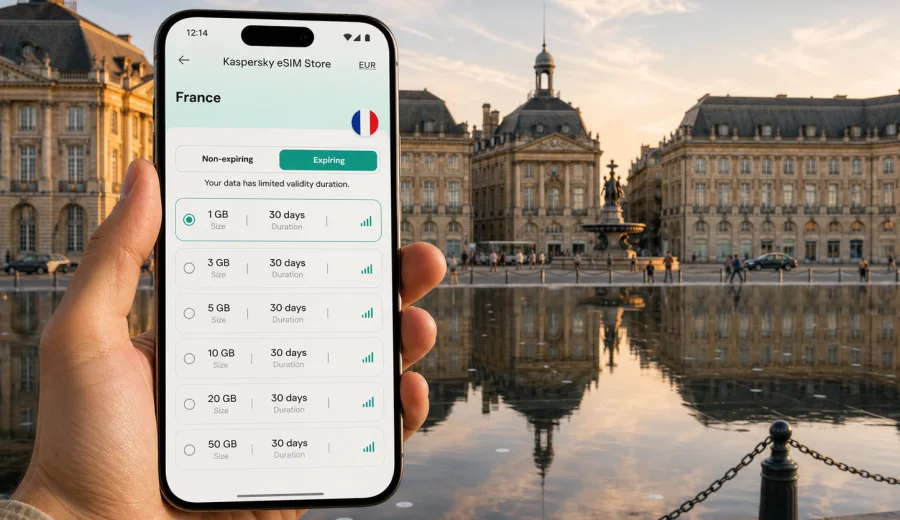
Bordeaux eSIM guide: mobile connection and internet for your trip
Bordeaux is an easy city to enjoy when your mobile connection is already sorted. The historic center is compact, the tram network is useful, and many of the best moments happen between neighborhoods: walking along the Garonne, checking a restaurant near Saint-Pierre, finding the right tram from Gare Saint-Jean, or booking a wine-region day trip while you are still at breakfast. An eSIM helps you keep mobile internet ready for these small decisions without looking for a physical SIM card after arrival.
This guide is for travelers who are visiting Bordeaux for a city break, business trip, stopover, study visit, conference, or a longer route through southwest France. It explains where mobile data matters most in the city, how to plan your data allowance, what to check before buying an eSIM, and how to use Kaspersky eSIM Store to choose, set up, and activate a suitable eSIM tariff for your trip.
Why mobile internet matters in Bordeaux
Bordeaux is walkable, but it is not a city where you want to rely only on hotel Wi-Fi. The useful parts of the trip are spread across several areas: the UNESCO-listed old town, the riverside quays, Chartrons, Bassins a Flot, the business zones around Meriadeck and Euratlantique, and nearby towns or vineyards. Mobile internet helps you move between them with less friction.
Typical situations where a stable data connection is useful:
- checking the best tram or bus route from Gare Saint-Jean to your hotel;
- opening a ride-hailing app late in the evening;
- navigating small streets around Saint-Pierre, Pey-Berland, and the Golden Triangle;
- translating menus, hotel messages, and transport notices;
- confirming restaurant reservations or wine tour pickup points;
- finding a pharmacy, coworking space, parking area, or luggage storage;
- sharing your location with colleagues or family;
- using maps outside the center, where walking routes are less obvious.
Bordeaux also rewards flexible planning. A sunny afternoon may turn into a riverside walk to Chartrons. A meeting near the station may finish early enough for the Cite du Vin or Darwin. If your phone is online, these changes are easy to handle in real time.
Arrival scenarios: airport, station, and road trips
Many travelers arrive through Bordeaux Airport, Gare Saint-Jean, or by car from other parts of France. Each arrival point has a different connectivity problem.
At Bordeaux Airport, you may need data immediately for transport, messaging, and hotel check-in. The airport is west of the center, so travelers often check public transport, shuttle options, taxis, or car rental details before leaving the terminal. If your eSIM is installed before the flight, you can switch it on after landing and start using mobile data once the tariff conditions allow it.
At Gare Saint-Jean, the priority is orientation. The station area is busy, and your next step may be a tram, bus, taxi, hotel walk, or meeting near Euratlantique. Mobile internet helps you confirm platforms, travel time, and the exact hotel entrance instead of guessing from a screenshot.
For road trips, Bordeaux is often a base rather than the final destination. Travelers continue to Saint-Emilion, Arcachon, Cap Ferret, the Medoc, or the Dordogne. A France eSIM tariff can be useful beyond the city if your route stays within the country. Always check the destination and validity conditions of the selected tariff before purchase.
Bordeaux neighborhoods where eSIM data helps most
The city center is beautiful, but Bordeaux is not just one square and one waterfront. Data needs change by neighborhood.
| Area | Why you may need mobile internet |
|---|---|
| Saint-Pierre and old town | Walking navigation, restaurant searches, menu translation, museum hours |
| Quinconces and Golden Triangle | Shopping, meeting points, taxi pickup, hotel directions |
| Chartrons | Cafes, galleries, riverside walks, tram planning |
| Bassins a Flot | Cite du Vin visits, evening venues, longer tram rides |
| Gare Saint-Jean | Train changes, hotel check-in, business arrivals, luggage storage |
| Meriadeck | Administrative visits, shopping, work meetings, practical errands |
| Darwin and right bank | Bike routes, event locations, maps across the river |
The most common mistake is assuming that offline maps are enough. They help with street direction, but they do not handle live transport, ride availability, changed opening hours, messenger calls, or last-minute hotel communication. eSIM mobile data gives you a more practical backup.
How much data to plan for Bordeaux
The right data allowance depends on your travel style. Bordeaux does not require unusually high data use, but maps, photos, video calls, and day trips can add up quickly.
| Trip style | Typical use | Practical data range |
|---|---|---|
| Short weekend | Maps, messaging, restaurant searches, tickets | 1-3 GB |
| Four to seven days | Daily navigation, photos, apps, moderate browsing | 3-10 GB |
| Business trip | Email, documents, calls, taxi apps, backup tethering | 5-20 GB |
| Bordeaux plus wine regions | City maps, regional routes, bookings, shared photos | 5-20 GB |
| Heavy media use | Cloud backup, video, hotspot, frequent calls | 20 GB or more |
Use these ranges as planning guidance, not a guarantee. Video streaming, cloud photo backup, software updates, and hotspot use can consume data faster than navigation or messaging. Before travel, turn off automatic updates and large cloud uploads on mobile data if you want the tariff to last longer.
Before you buy: device and trip checks
An eSIM works only on compatible devices. Before choosing a tariff, check your device and make sure it supports eSIM. Also check that your phone is not locked to one mobile operator. A locked device may not accept another eSIM profile.
Use this quick checklist before your Bordeaux trip:
- Your phone or tablet supports eSIM.
- The device is unlocked for travel eSIM use.
- You have a stable internet connection for installing the eSIM profile.
- You understand when the selected tariff starts counting validity.
- You know whether the tariff is data-only or includes other services.
- You have saved important booking details offline as a backup.
- Your regular SIM can remain active if you need calls or bank messages.
Most travel eSIM tariffs focus on mobile internet. They usually do not include a regular local phone number, voice calls, or SMS unless the specific tariff conditions say otherwise. For calls and messages in Bordeaux, many travelers use internet-based apps over mobile data.
Choosing an eSIM tariff for Bordeaux in Kaspersky eSIM Store
After you know your travel dates and likely data use, choose a tariff by destination, data volume, and validity period. Kaspersky eSIM Store is an app and website where you can quickly choose, arrange, and activate an eSIM with a suitable tariff for mobile internet during an international trip. It helps you prepare mobile data before you travel or shortly after arrival, while keeping the tariff conditions visible before you confirm.
For a Bordeaux city article, the relevant destination is France. If your route is Bordeaux only, a France tariff may be enough. If your route continues across several European countries, compare the destination coverage and validity conditions before choosing. The key is to match the tariff to the actual route, not just the first city.
When you are ready to plan mobile data for Bordeaux, you can choose an eSIM tariff for your trip to France and compare options by data amount and duration. This is especially useful if you want your mobile internet ready before landing at Bordeaux Airport or before arriving by train at Gare Saint-Jean.
Practical setup steps
Install the eSIM while you still have reliable Wi-Fi, such as at home, in the office, or at your hotel. The exact activation moment depends on the selected tariff, so read the conditions before turning it on for mobile data.
A simple setup flow:
1. Open Kaspersky eSIM Store on the site or in the app.
2. Select France as the destination for your Bordeaux trip.
3. Compare available tariffs by data volume, validity, and price.
4. Complete the order for the selected tariff.
5. Install the eSIM profile on your compatible device.
6. Set the eSIM as the line for mobile data when you are ready to use it.
7. Keep your primary SIM active only for the services you still need.
If you need detailed installation help, use the Android installation guide or the iOS installation guide. The steps may vary slightly by device model and operating system version, so follow the instructions shown on your phone.
Using eSIM data for transport in Bordeaux
Bordeaux has a useful tram and bus network, and visitors often combine it with walking. Mobile internet is helpful because the best route can change by time of day, hotel location, and weather.
For the city center, you may walk between Place de la Bourse, Pey-Berland, Sainte-Catherine, Quinconces, and the river. For longer routes, the tram is often easier than a taxi. Travelers commonly use mobile data to check:
- live route options from the airport or station;
- the nearest tram stop and correct direction;
- walking time between a stop and the hotel;
- disruptions or route changes;
- taxi or ride pickup zones;
- bike or scooter availability where supported.
If you are staying near Gare Saint-Jean, Chartrons, Bassins a Flot, or the right bank, mobile maps can save time every day. Bordeaux is not difficult to navigate, but small errors can turn into long walks, especially with luggage or in summer heat.
Business trips and conferences
Bordeaux is a practical business destination, with meetings around the station district, Meriadeck, the convention areas, hotels near the center, and venues along the river. For business travelers, eSIM data is less about sightseeing and more about continuity.
Useful business scenarios:
- opening calendar locations while moving between meetings;
- joining a call from a taxi or hotel lobby;
- checking train changes during a same-day return;
- using email when venue Wi-Fi is crowded;
- sharing documents with colleagues;
- keeping a backup connection for a laptop through hotspot, if the tariff and device settings allow it.
If you plan to use hotspot mode, choose data volume carefully and check whether your device and tariff conditions support it. Laptop traffic can be much heavier than phone traffic, especially with cloud documents and video meetings.
Hotels, apartments, and public Wi-Fi
Hotel Wi-Fi is useful, but it should not be your only connection plan. It may be slow in older buildings, weaker in rooms at the end of a corridor, or unavailable until check-in. Public Wi-Fi in cafes, stations, and venues can be convenient for light browsing, but it is not always reliable for maps, urgent messages, or payment confirmations.
An eSIM gives you a separate mobile data option for the moments when Wi-Fi is inconvenient:
- before hotel check-in;
- while walking between neighborhoods;
- in a taxi or tram;
- during a late arrival;
- when a cafe network requires registration;
- when you need a secure personal connection for practical travel tasks.
For sensitive actions, use your usual security precautions. Keep your phone updated, avoid entering important credentials on unfamiliar public networks, and prefer your own mobile data connection when possible.
Day trips from Bordeaux
Many Bordeaux trips include at least one day outside the city. Mobile internet becomes more important once you leave the dense center because you may depend on maps, train times, tour messages, and pickup points.
Popular directions include:
- Saint-Emilion for wine, stone streets, and vineyard visits;
- Arcachon and the Dune du Pilat area for coast and scenery;
- Cap Ferret for beaches and oyster villages;
- Medoc routes for wineries and chateaux;
- Libourne or Blaye for shorter regional excursions.
Before you leave, save your booking confirmation and the return route. If your eSIM tariff is for France, it can support city and regional movement within the destination covered by the tariff conditions. If your travel continues into Spain or another country, check whether you need a regional or separate destination tariff.
Data-saving tips for Bordeaux
You can make a smaller data tariff last longer with a few practical settings.
- Download offline maps for Bordeaux and the surrounding area before travel.
- Turn off automatic photo and video backup on mobile data.
- Disable app updates over mobile data.
- Use lower quality settings for streaming or avoid streaming on mobile data.
- Keep hotel Wi-Fi for large downloads.
- Close navigation apps when you no longer need live routing.
- Use messaging calls over Wi-Fi when you are at the hotel.
A good rule is to reserve mobile data for things that are hard to do offline: live navigation, transport changes, payments, urgent messages, tickets, translation, and communication with hotels or tour operators.
Quick city scenarios
Weekend couple trip: install the eSIM before departure, activate mobile data after arrival, use it for maps, restaurant bookings, translation, and shared photos. A moderate data allowance is usually enough if streaming is kept on Wi-Fi.
Solo arrival at night: keep data ready for the airport-to-hotel route, taxi pickup, door codes, and messaging. Save your hotel address offline too.
Conference visit: choose more data if you may use tethering. Keep the eSIM as a backup when venue Wi-Fi is overloaded.
Wine-region day tour: use mobile data for pickup points, train times, maps, and communication with the tour provider. Save the return route before leaving Bordeaux.
Train stopover: if you have only a few hours, mobile data helps you store luggage, navigate from Gare Saint-Jean to the center, check tram times, and return without rushing.
FAQ: eSIM and mobile internet in Bordeaux
Can I use an eSIM for Bordeaux only?
You choose the tariff by destination, so for Bordeaux the relevant destination is France. The tariff conditions define data volume, validity, and where it can be used.
Should I install the eSIM before leaving home?
It is usually more convenient to install it while you have stable Wi-Fi. Check the tariff conditions so you understand when validity starts.
Will an eSIM give me a French phone number?
Travel eSIM tariffs are often data-focused and may not include a regular phone number, voice calls, or SMS. Read the details of the selected tariff.
Can I keep my regular SIM active?
In many dual-SIM devices, you can keep your regular SIM for calls or messages and use the eSIM for mobile data. Device settings vary.
Is public Wi-Fi enough in Bordeaux?
Public and hotel Wi-Fi can help, but mobile data is more practical for transport, maps, late arrivals, hotel messages, and day trips.
Final checklist before you go
Before your Bordeaux trip, make sure your phone is ready, your documents are saved offline, and your data plan matches your real itinerary. A weekend in the center needs less data than a business trip with hotspot use or a route that includes Saint-Emilion, Arcachon, and several hotel changes.
Kaspersky eSIM Store can help you prepare mobile internet for the trip through a site or app where you choose the destination, review tariff conditions, install the eSIM on a compatible device, and activate it when appropriate for your journey. For Bordeaux, you can choose an eSIM tariff for France before you travel, so navigation, transport, hotel messages, and day-trip planning are ready when you arrive.