
Travel connectivity guide
Bossangoa eSIM: mobile internet guide
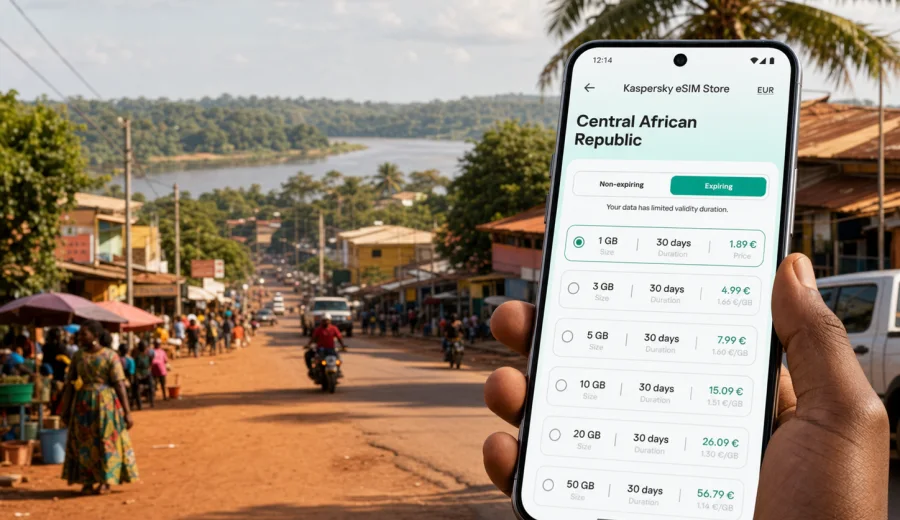
Bossangoa eSIM: mobile connection and internet for your trip
Bossangoa is not the kind of destination where you want to start your trip by searching for a SIM counter, asking for Wi-Fi passwords, or guessing whether your roaming package is already active. If you are travelling to this city in the Central African Republic for work, family reasons, field operations, a regional stopover, or a longer route through the north-west of the country, mobile internet quickly becomes part of the basic travel plan.
An eSIM helps you prepare that part before you arrive. Instead of carrying an extra plastic SIM card, you install a digital SIM profile on a compatible phone and use it for mobile data during the trip. For Bossangoa, that can be useful from the first practical moment: checking directions, coordinating with a driver, confirming accommodation, opening a booking message, sharing your arrival time, or keeping maps available when you move between districts.
This guide focuses on Bossangoa as a real city travel scenario. It covers arrival planning, local movement, hotels, business trips, stopovers, onward routes, and the checks you should make before choosing an eSIM plan for the Central African Republic.
Why mobile internet matters in Bossangoa
Bossangoa is a regional city, so travel routines can be more dependent on preparation than in a large international capital. You may not have the same density of airport services, tourist desks, mall kiosks, or familiar mobile shops that you expect in bigger cities. A working data connection can make ordinary tasks easier, especially if you are arriving after a long road journey or coordinating with local contacts.
Mobile internet is useful in Bossangoa for:
- navigating from your arrival point to a hotel, office, residence, or field base;
- staying in touch with a driver, host, colleague, or local partner;
- checking saved documents, reservation details, and travel messages;
- using translation tools during practical conversations;
- opening maps before moving between neighbourhoods or nearby villages;
- sharing a live location when you are meeting someone;
- managing a change in itinerary if roads, timing, or transport plans change.
The point is not to turn your phone into a complete travel solution. It is to remove one common friction point: being offline when you need to make a decision.
Bossangoa arrival scenarios where eSIM helps
Many trips to Bossangoa are planned through Bangui first, followed by onward road travel. Some visitors arrive for professional work, logistics, humanitarian projects, reporting, construction, agriculture, trade, or family visits. The city can also be part of a wider route in Ouham Prefecture or a stop before continuing to other communities.
In these scenarios, eSIM is most helpful when you need mobile internet before you have settled into a routine.
| Travel moment | Why data helps | Practical example |
|---|---|---|
| Before leaving Bangui | Confirm route details and contact people in Bossangoa | Message a host or driver before the road leg |
| On arrival in the city | Find accommodation or a meeting point | Open a saved map and send your location |
| First evening | Coordinate meals, transport, and next-day plans | Use messaging apps over mobile data |
| Workday in Bossangoa | Stay reachable while moving between locations | Check email, documents, and calls through apps |
| Departure day | Manage timing and onward route changes | Update contacts before leaving the city |
If you already know where you are staying and who will meet you, mobile data still gives you a backup. If the plan changes, you can respond without waiting for hotel Wi-Fi or a local SIM purchase.
City movement: maps, drivers, and local coordination
Bossangoa travel is often practical rather than tourist-oriented. You may move between a guesthouse, administrative offices, project locations, markets, residential areas, and road connections outside the city. A data connection supports the small steps between those points.
Useful mobile tasks include:
- saving the hotel or base location before you leave;
- sending a pin to a driver or colleague;
- checking whether a meeting point is on the main road or inside a side street;
- keeping a route open while moving through unfamiliar areas;
- messaging before you depart, not only after you arrive;
- taking notes and uploading them later if the connection is limited.
Do not depend on mobile data as your only navigation method. For Bossangoa, it is sensible to download offline maps, save addresses in advance, and keep key phone numbers written down. eSIM simply makes it easier to update those plans when you are within coverage and need current information.
How an eSIM differs from roaming or a local SIM
Roaming, a local plastic SIM, and eSIM can all be valid choices. The best option depends on your phone, your route, your data needs, and the terms of your home operator.
| Option | Strength | What to check |
|---|---|---|
| Home roaming | Uses your existing number and operator account | Daily fees, data limits, and whether the destination is included |
| Local SIM card | Can be useful for longer stays or local calls | Registration rules, shop availability, opening hours, and setup time |
| eSIM | Can be prepared before travel and used without a physical SIM swap | Device compatibility, data allowance, validity period, and country coverage |
For many travellers, the main advantage of eSIM is preparation. You can choose a plan before the trip, install it on a compatible phone, and keep your physical SIM slot free for your regular number if your device allows dual SIM use. That can be helpful if you need messaging apps, email, maps, and web access while your main SIM remains available for account verification or incoming messages.
How much data you may need in Bossangoa
Your data need depends less on the city name and more on your habits. A short working visit with messaging and maps may use much less data than a trip where you upload photos, use video calls, or keep cloud backups active.
Use this planning table as a practical starting point:
| Trip style | Likely mobile data use | Planning note |
|---|---|---|
| 1-2 day stopover | Low to moderate | Messaging, maps, booking checks, and essential browsing |
| 3-5 day work visit | Moderate | Email, shared files, maps, app calls, and coordination |
| One week or more | Moderate to high | Choose a plan with enough validity and leave room for route changes |
| Remote work or field reporting | High | Disable automatic backups and check whether tethering is allowed |
| Family or group coordination | Moderate | Messaging apps, photo sharing, and location updates can add up |
Video is usually the biggest data drain. If you need to preserve your allowance in Bossangoa, reduce video quality, pause cloud photo backup, download documents before travel, and use Wi-Fi for large updates when a trusted connection is available.
Choosing an eSIM plan for Bossangoa
For a city article, the important detail is that the plan should match the country where the city is located. Bossangoa is in the Central African Republic, so you should look for an eSIM option for the Central African Republic or, if your route crosses several destinations, a suitable regional or broader plan that includes the countries you will visit.
When comparing options, check:
1. Destination coverage: the plan must include the Central African Republic.
2. Data amount: choose enough GB for maps, messages, work tools, and route changes.
3. Validity period: match the plan duration to your stay, including arrival and departure days.
4. Activation rules: understand when the validity period starts.
5. Hotspot support: check the plan conditions if you need to share data with a laptop.
6. Top-up options: see whether you can add data if your route becomes longer.
For a simple way to prepare before your trip, you can choose an eSIM plan for travel to Bossangoa and the Central African Republic through Kaspersky eSIM Store. The site and app help you review available plan conditions, select a suitable data package, and set up eSIM mobile internet for your trip on a compatible device.
Practical data plan scenarios
The same city can create very different data needs. Use the following scenarios to avoid choosing only by the lowest data amount or the longest validity period.
Short stopover in Bossangoa
If Bossangoa is a short stop between Bangui and another location, focus on essentials: maps, messages, transport coordination, and a little browsing. A smaller data package may be enough if you avoid video and large file downloads. Install the eSIM before the route begins so you do not need to troubleshoot when you are tired or in transit.
Business or project visit
If you are in Bossangoa for meetings, field work, audits, training, or coordination with a local team, choose a plan that leaves extra data for email, messaging, document previews, and app calls. Also check whether your work requires a laptop connection. If you plan to use your phone as a hotspot, confirm that the selected plan allows it.
Family visit or longer stay
For a longer stay, validity matters as much as data volume. It is inconvenient to run out of days before you leave. Choose a plan that covers the full stay and consider whether you may extend your route to nearby towns or return through Bangui later.
Route across several destinations
If Bossangoa is only one stop in a multi-country or regional itinerary, do not assume a city-focused plan is enough. Check the full country list of the selected plan. A regional option can be useful when it clearly includes every destination on your route, but a country plan may be simpler if you will remain inside the Central African Republic.
Before you buy: compatibility and phone settings
Before choosing any eSIM plan, confirm that your phone supports eSIM and is not locked to one operator. This step matters more than the city itself: if the phone cannot use eSIM, the plan will not solve your mobile internet problem in Bossangoa.
Use this checklist:
- your smartphone or tablet supports eSIM;
- the device is unlocked for use with another mobile plan;
- the operating system is updated enough for eSIM setup;
- you have a stable internet connection for installation;
- you understand which SIM profile will be used for mobile data;
- you know whether data roaming must be enabled for the eSIM profile;
- you have saved the installation instructions before departure.
If you are unsure, check your device before buying. Compatibility checks are especially important if you use an older phone, a device bought through an operator contract, or a model that has different eSIM support depending on region.
Installing eSIM before the trip or after arrival
For Bossangoa, installing eSIM before the main travel leg is usually easier. You can use a stable connection at home, in a hotel, or before leaving Bangui, then activate mobile data for the eSIM when the plan conditions allow. Always read the selected plan details, because the start of validity can depend on the plan and activation flow.
A practical setup sequence:
1. Choose the Central African Republic or the route that includes it.
2. Select the data amount and validity period that match your trip.
3. Complete the order in Kaspersky eSIM Store.
4. Open the eSIM details in your profile, app, or confirmation email.
5. Install the eSIM on your compatible device.
6. Before using data, select the eSIM profile for mobile data.
7. Check whether data roaming must be enabled for that eSIM profile.
For device-specific steps, use the Android installation guide or the iOS installation guide. Keep the guide available offline or bookmarked before you leave a strong Wi-Fi connection.
Hotels, transport, and onward movement
Accommodation Wi-Fi can help, but it is not a complete city plan. You may need internet before check-in, outside the guesthouse, on the way to a meeting, or when you are leaving Bossangoa for another destination. A prepared eSIM gives you mobile data for those gaps, while offline maps and saved contacts protect you if signal is weak outside town.
Before moving around Bossangoa or leaving the city, check:
- hotel, office, driver, and host contacts are saved offline;
- your next destination is saved in the map app;
- mobile data is assigned to the eSIM profile;
- automatic app updates and cloud backups are paused on mobile data;
- your remaining data allowance is enough for the next route;
- your phone and power bank are charged.
For work trips, download heavy files before travel and use mobile data mainly for messages, document previews, authentication apps, maps, and urgent coordination. If you need standard phone calls or SMS, check your regular SIM or another local arrangement, because many travel eSIM plans focus on mobile data unless the plan conditions say otherwise.
Quick checklist before travelling to Bossangoa
Use this checklist a day or two before departure:
- Confirm that Bossangoa is in your route and that the eSIM plan covers the Central African Republic.
- Check that your phone supports eSIM and is unlocked.
- Install the eSIM while you have a stable internet connection.
- Save the Android or iOS instructions in case you need them later.
- Download offline maps for Bossangoa and your road route.
- Save accommodation, driver, office, and emergency contacts.
- Disable automatic backups and app updates on mobile data.
- Pack a charger and power bank.
- Keep your regular SIM active if you need bank, work, or account verification messages.
- Read the selected plan conditions before activating data.
This preparation is especially useful if you arrive outside normal business hours, move directly to a meeting, or depend on someone else for transport from your arrival point.
FAQ about eSIM in Bossangoa
Is eSIM useful for a trip to Bossangoa?
Yes, if your device supports eSIM and you need mobile internet for maps, messaging, work tools, and travel coordination. It is most useful when prepared before arrival, so you are not dependent on finding a local SIM option immediately.
Should I choose a Bossangoa plan or a Central African Republic plan?
For a city trip, choose a plan that covers the country where the city is located. Bossangoa is in the Central African Republic, so the plan should include the Central African Republic. If your route includes other countries, compare broader regional options carefully.
Can I install eSIM after arriving in Bossangoa?
You may be able to install it after arrival if you have a stable internet connection, but installing before travel is usually simpler. You need internet to download and add the eSIM profile to your device.
Will eSIM include calls and SMS?
Many travel eSIM plans focus on mobile data. Standard voice calls and SMS are not included unless the selected plan conditions say otherwise. You can often use messaging and calling apps over mobile data.
What if mobile signal is weak outside Bossangoa?
Prepare offline maps, saved contacts, and downloaded documents. Mobile coverage and speed can vary, especially outside urban areas, so do not keep important travel details only in cloud apps.
Can I use eSIM for a laptop hotspot?
It depends on the selected plan and device settings. Check the plan conditions before relying on hotspot use for work, presentations, or large file transfers.
Choose mobile internet for your Bossangoa trip
Bossangoa is easier to manage when your phone is ready before the first local decision. With an eSIM, you can prepare mobile data for maps, messages, hotel coordination, work updates, and onward travel without swapping a physical SIM card.
Before you go, check device compatibility, compare data amount and validity, read the activation rules, and install the eSIM while you have a stable connection. When you are ready, prepare an eSIM plan for Bossangoa in the Central African Republic through Kaspersky eSIM Store and keep your travel internet setup clear before arrival.