
Travel connectivity guide
Bouar eSIM: Mobile Internet for Your Trip
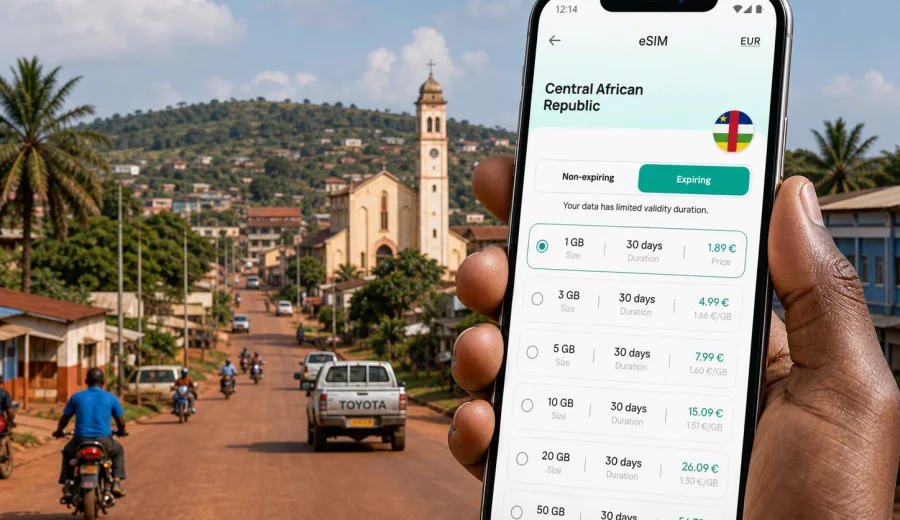
Bouar eSIM: mobile connection and internet for your trip
Bouar is a practical stop in western Central African Republic: a city for road arrivals, regional work trips, family visits, NGO movement, hotel stays, and journeys that continue toward other towns or the Cameroon border. It is not a city where you want to spend your first hour searching for a SIM counter, asking about data bundles, or waiting for hotel Wi-Fi before you can confirm a driver, open a map, or message a colleague. A prepared eSIM gives you a simpler way to organize mobile internet for the trip before the day becomes busy.
This guide focuses on Bouar itself. It covers arrival planning, local movement, navigation, accommodation, business routines, stopovers, and side trips from the city. The goal is not to turn Bouar into a generic country page, but to show where mobile data matters in the actual rhythm of a visit.
Why mobile internet matters in Bouar
Bouar is often part of a wider overland itinerary. Travelers may arrive from Bangui by road, move between administrative offices and hotels, visit local markets, or use Bouar as a base before continuing west. In that kind of trip, mobile internet is useful less for entertainment and more for coordination.
You may need it to:
- confirm the next pickup point with a driver;
- share your location when street addresses are informal;
- check messages from a host organization or hotel;
- use maps when roads, junctions, and landmarks are more reliable than formal addresses;
- keep copies of bookings and travel documents accessible;
- translate short phrases when arranging transport or purchases;
- stay reachable during a stopover or field day outside the city center.
An eSIM is especially convenient if your device supports it and you prefer to prepare before arrival. You can keep your physical SIM in place for your usual number and add a separate data plan for travel. That can reduce friction when you need mobile internet soon after reaching Bouar or during the road segment into the city.
Bouar travel scenarios where eSIM helps
Different Bouar trips create different data needs. A short stopover may need only light navigation and messaging, while a work visit can require frequent email, document access, and video calls from the hotel.
| Scenario in Bouar | Main mobile data tasks | Practical eSIM approach |
|---|---|---|
| One-night stopover | Driver coordination, maps, messaging, hotel check-in | Choose a modest data allowance with enough validity for arrival and departure days |
| Field or NGO visit | Daily messaging, shared locations, file access, team coordination | Choose more data and monitor usage during hotspot sessions |
| Family or personal trip | Calls through messengers, photos, navigation, local plans | Balance data volume with the length of the stay |
| Business travel | Email, calendar changes, documents, ride coordination | Prepare eSIM before the trip and keep hotel Wi-Fi as backup |
| Overland route through Bouar | Maps, route updates, messages during breaks | Pick a plan that covers the country and the full travel window |
The best choice is not always the largest package. If you mainly use messaging and maps, a smaller plan may be enough. If you expect hotspot use, cloud documents, or long calls through apps, choose more data and check whether tethering is allowed in the terms of the selected plan.
Arrival planning before you reach the city
Bouar trips often reward preparation. Even if you expect Wi-Fi at your hotel or workplace, you may need connectivity before you get there. Save the hotel name, local contact numbers, meeting points, and route notes offline. Then set up mobile data so you can update those plans when something changes.
Before travel, prepare this checklist:
- confirm that your smartphone supports eSIM;
- check that the device is not locked to one mobile operator;
- install the eSIM while you still have a stable connection;
- save the QR code or installation details in a place you can access offline;
- download offline maps for Bouar and the route into the city;
- keep important addresses written in plain text, not only inside email attachments;
- decide which apps may use mobile data and which should wait for Wi-Fi.
This is particularly useful if you arrive late, have several bags, or need to meet someone at a landmark rather than a formal street address. Mobile internet helps you turn those loose instructions into a workable route.
Local movement in Bouar
Movement around Bouar can involve cars, motorcycle taxis, walking between nearby points, and arranged transport for work visits. Mobile data helps most when you combine it with local knowledge. A map can show direction and distance, but a local contact can tell you which road is practical at that moment, where to wait, or how long a journey usually takes.
Use mobile internet in Bouar for:
1. Sending a live location pin to a driver or host.
2. Checking whether your destination is close enough to walk in daylight.
3. Confirming pickup times when plans change.
4. Translating short destination notes.
5. Keeping route screenshots if coverage becomes less stable outside the center.
For practical safety, do not rely on the phone alone. Keep your hotel card, contact names, and destination notes available offline. If you will move outside the city, tell a contact your expected return time and carry a power bank.
How much data to plan for
There is no single correct amount of data for Bouar, because travel style changes everything. Messaging and maps are light. Video calls, cloud backups, app updates, and hotspot use can consume data quickly.
Use this simple estimate:
| Use pattern | Typical tasks | Data planning tip |
|---|---|---|
| Light | Messaging, maps, email headers, basic browsing | Keep background app refresh off and download maps in advance |
| Moderate | Messaging, maps, email, photos, occasional calls through apps | Choose a plan with enough room for daily use |
| Heavy | Hotspot, video calls, large files, cloud sync | Use Wi-Fi for large files and reserve mobile data for movement |
If your Bouar trip includes several road days, count those days too. Data may be needed before you enter the city and after you leave, especially if you continue toward other locations in Central African Republic.
Choosing an eSIM for Bouar
For a city trip, the country matters because the eSIM plan should match the destination where the mobile data will be used. Bouar belongs to Central African Republic, so a traveler should look at options for that country rather than searching for a separate city-only page.
When you compare tariff options, pay attention to:
- destination coverage listed in the plan;
- data volume in GB;
- validity period;
- price and currency shown at checkout;
- activation conditions;
- whether data roaming must be enabled for the eSIM profile;
- whether hotspot use is allowed under the selected plan terms.
Kaspersky eSIM Store is an app and website where you can choose, arrange, and activate an eSIM with a suitable mobile internet plan for an international trip. For Bouar, you can prepare an eSIM plan for Central African Republic before your journey and then use the plan details to decide whether the data volume and validity fit your route.
Do not choose by price alone. A very small allowance can be inconvenient if your hotel Wi-Fi is weak or if your schedule changes. A plan with too much data may be unnecessary for a short stopover. The practical target is enough mobile internet for arrival, movement, communication, and essential tasks without forcing every action onto public Wi-Fi.
Device compatibility and setup
Before buying any eSIM plan, confirm that your phone or tablet supports eSIM and is not restricted by an operator lock. If you are unsure, use the compatibility check before you make a decision: Check your device.
The setup flow is usually straightforward:
1. Choose the destination and plan.
2. Complete the order.
3. Add the eSIM profile to your compatible device.
4. Set the eSIM as the line for mobile data.
5. Turn on data roaming for that eSIM if the plan instructions require it.
6. Keep your primary SIM available for calls or SMS if you still need your usual number.
If you need platform-specific steps, follow the official installation guides for Android or iOS. Install the eSIM while you have a stable connection, ideally before a road transfer or a long travel day.
Practical Bouar itinerary: where data is useful
Mobile internet is most valuable in the small moments between planned stops. In Bouar, those moments can include confirming a pickup after breakfast, finding a meeting point near a market, checking whether a document arrived, or sending a photo of a landmark to a driver.
Arrival day
On arrival day, keep your tasks simple:
- turn on the travel eSIM only when you are ready to use it;
- confirm your hotel or host location;
- message your arrival time;
- download any final route notes;
- avoid large app updates on mobile data.
If you are arriving by road, save route notes and contacts before departure. Mobile service conditions can vary along roads, so offline preparation is still useful even when you have an eSIM ready.
Hotel and guesthouse routine
Hotel Wi-Fi can be useful for large downloads, but mobile data keeps you flexible when the connection is slow, shared, or unavailable in your room. Use Wi-Fi for updates, backups, and heavy files. Keep the eSIM for navigation, messaging, urgent email, and moving around the city.
If you are in Bouar for work, ask the hotel where the connection is strongest before scheduling calls. Keep a short backup plan: phone charged, eSIM active, and key documents available offline.
Meetings and business travel
Bouar business travel often depends on coordination: who will pick you up, where the meeting is, and when the route changes. Mobile internet can support calendar updates, messenger calls, email, and shared documents.
A practical business setup:
- use your primary SIM for your usual number if needed;
- use the eSIM for data;
- keep documents in offline mode;
- reduce automatic media downloads in messenger apps;
- confirm meeting locations with both a map pin and a written landmark.
This approach avoids making every task dependent on one hotel connection or one office network.
Short stopovers
For a short Bouar stopover, the main value is speed. You may only need a hotel confirmation, a few messages, route checks, and the next departure plan. A prepared eSIM means you do not have to solve connectivity as a separate errand.
Keep a stopover data routine:
1. Activate only what you need.
2. Send arrival and departure updates.
3. Save the next route offline.
4. Use Wi-Fi for heavy files.
5. Check remaining data before leaving Bouar.
Trips from Bouar and regional movement
Bouar can be a base for travel around western Central African Republic. When you leave the city, mobile internet becomes more about resilience than constant speed. Download what you need in advance: maps, contacts, documents, and reference notes. Then use mobile data for updates, messages, and route confirmation when available.
For road segments, plan around these habits:
- keep the phone charged before departure;
- carry a cable and power bank;
- store important contacts outside messaging apps;
- take screenshots of key map points;
- avoid using all data on entertainment during the first part of the trip;
- check plan validity if your route lasts longer than expected.
If you will cross borders later, review whether your current plan is only for Central African Republic or whether your wider trip needs another country or regional option. Do this before you are on the road, not at the moment you need to change plans.
eSIM, roaming, and Wi-Fi in Bouar: what to compare
Travelers usually combine several connectivity options. Each has a role.
| Option | Strength | Limitation |
|---|---|---|
| Travel eSIM | Prepared before the trip, no physical SIM swap, useful for mobile data | Requires a compatible unlocked device and a suitable plan |
| Standard roaming | Keeps your existing line active | Costs and terms depend on your home operator |
| Hotel Wi-Fi | Useful for heavy downloads and calls from one place | May not help during local movement |
| Public Wi-Fi | Can save mobile data in some places | Availability and reliability can vary |
| Local SIM | May suit longer stays | Requires time, local purchase steps, and a physical SIM slot |
An eSIM does not replace every option. It gives you a practical data line for travel, especially when you want to prepare before arrival and reduce dependence on Wi-Fi during movement around Bouar.
Data-saving settings for Bouar
Before you start using mobile data in Bouar, check your phone settings. Small changes can make a modest plan last longer.
Recommended settings:
- turn off automatic app updates on mobile data;
- disable cloud photo backup until Wi-Fi is available;
- download offline maps in advance;
- limit background data for streaming and social apps;
- send compressed photos when possible;
- use audio calls instead of video when the connection is limited;
- check data usage daily if your plan is small.
For messaging apps, review automatic media downloads. Group chats can use unexpected data if videos and images download without asking.
Common mistakes to avoid
Bouar is easier to manage when connectivity is prepared calmly. Avoid these mistakes:
- waiting until arrival to check whether your device supports eSIM;
- installing the eSIM during a rushed transfer;
- assuming hotel Wi-Fi will cover every work task;
- using mobile data for app updates on the first day;
- forgetting that an eSIM data plan may not include a local phone number;
- deleting the eSIM profile before the trip is finished;
- choosing a validity period that ends before your return route.
The safest habit is to check the device, read the plan terms, install the profile with stable internet, and keep offline backups for key travel information.
Quick answers about Bouar eSIM use
Can I use an eSIM for ordinary calls in Bouar?
Many travel eSIM plans are designed for mobile internet. Voice calls and SMS are not included unless the selected plan says so. You can usually use messenger calls over data.
Should I activate the eSIM before arriving in Bouar?
Install it before travel if possible. Activation timing depends on the plan terms, so read the instructions carefully and avoid starting validity earlier than needed.
Is eSIM enough for a work trip to Bouar?
It can be a strong part of your setup for messaging, maps, email, and coordination. For heavy files or long video calls, use trusted Wi-Fi when available and keep mobile data as backup.
Do I need a separate Bouar plan?
Usually you choose a country plan for Central African Republic, because Bouar is a city within that destination. Check the plan details before purchase.
What should I do if mobile data does not start immediately?
Check that the eSIM is selected for mobile data, data roaming is enabled if required, and the device has not blocked the line. Restarting the phone can also help after setup.
Final checklist before your Bouar trip
Use this checklist the day before travel:
- device supports eSIM and is unlocked;
- eSIM installation details are saved;
- Central African Republic plan is selected for the Bouar trip;
- offline maps and contacts are available;
- hotel or host details are saved outside email;
- background data settings are adjusted;
- power bank and charging cable are packed;
- important documents are available offline;
- primary SIM remains available if you need your usual number.
Bouar rewards practical preparation. With an eSIM set up before the trip, you can focus on arrival, local movement, meetings, and onward travel instead of turning mobile internet into a last-minute task.
To prepare your trip, open Kaspersky eSIM Store and choose a suitable eSIM plan for Central African Republic. Check the data amount, validity period, activation notes, and device compatibility, then install the eSIM on your compatible phone before you need it in Bouar.