
Travel connectivity guide
Brasilia eSIM for mobile internet
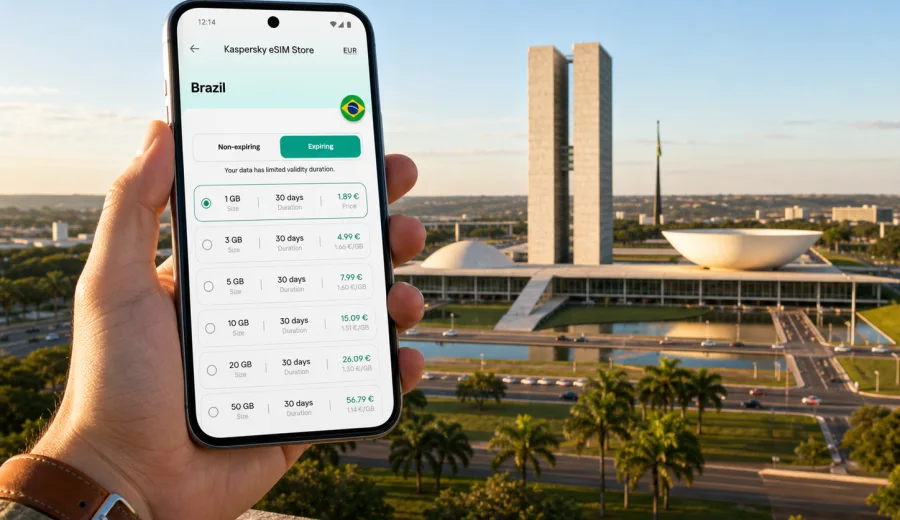
Brasilia eSIM: mobile connection and internet for a city trip
Brasilia is a city where mobile internet matters from the first minute. The airport is outside the central hotel sectors, the main sights are spread along the Monumental Axis, and many useful addresses sit in areas that look close on a map but require a car, bus, metro connection, or ride-hailing route. If you arrive with an eSIM already prepared, you can open navigation, message your hotel, check an office address, and move through the city without looking for a physical SIM card after landing.
This guide explains how to use eSIM in Brasilia as part of a practical travel plan: arrival at Brasilia International Airport, business days in the government district, hotel stays in Asa Norte or Asa Sul, transfers around Lago Paranoa, short stopovers, and trips from the capital to other parts of Brazil. The focus is mobile connection and internet in the city, not a general country overview.
Why eSIM is useful in Brasilia
Brasilia was designed around wide avenues, sectors, and separated zones. That makes it impressive to visit, but it also means that "nearby" does not always mean walkable. You may need mobile data for route checks several times a day: from the airport to Setor Hoteleiro Norte, from a meeting near the ministries to lunch in Asa Sul, or from the Cathedral area to Lago Sul in the evening.
An eSIM can help you keep mobile internet ready without swapping your physical SIM. With Kaspersky eSIM Store, you can choose, arrange, and activate an eSIM with a suitable data plan for an international trip. It is especially useful when you want to see the data allowance, validity period, destination, and price before you start moving around the city.
Useful Brasilia scenarios include:
- opening maps as soon as you leave the arrivals area;
- checking ride-hailing pickup points at the airport;
- sharing a live location with colleagues or family;
- translating restaurant menus and hotel messages;
- using messengers when ordinary voice calls are not included in the selected eSIM plan;
- checking opening hours before crossing the city.
eSIM is mainly about mobile internet. It usually does not include a regular phone number, standard voice calls, or SMS unless the selected plan says otherwise. For many city trips, that is enough: maps, email, messengers, boarding passes, taxis, banking apps, and travel documents all depend on data.
Arrival at Brasilia International Airport
Brasilia International Airport, Presidente Juscelino Kubitschek, is the usual entry point for international and domestic visitors. The airport is south of Plano Piloto, so your first route often involves a transfer to the hotel sectors, the embassy area, Asa Sul, Asa Norte, or a meeting location near the Monumental Axis.
Mobile internet helps during arrival because you may need to:
- confirm the exact hotel name and address;
- choose between taxi, ride-hailing, bus, or private transfer;
- check traffic toward Eixo Monumental or the hotel sectors;
- contact a driver or host;
- open a digital reservation or business itinerary;
- message colleagues if your flight lands early or late.
If you prepare an eSIM before departure, install it while you still have reliable Wi-Fi. You can then activate it according to the plan instructions when you need data for Brazil. Connection can take a few minutes, so avoid leaving every setup step until you are standing in the arrivals hall with luggage.
Where mobile data helps most in the city
Brasilia is easier when you treat mobile internet as part of the route, not just a convenience. The city center is not a compact old town. Many attractions, offices, and hotels are separated by broad roads and planned sectors.
| Situation in Brasilia | Why mobile internet helps |
|---|---|
| Airport transfer | Find the pickup point, track the car, and confirm the hotel address |
| Government district meetings | Check entrances, security instructions, and route timing |
| Sightseeing on the Monumental Axis | Move between the Cathedral, National Congress, museums, and TV Tower |
| Hotel stays in Asa Norte or Asa Sul | Compare route options, restaurants, pharmacies, and supermarkets |
| Lago Paranoa evenings | Book transport back and share your location after dinner |
| Short stopovers | Decide whether there is enough time to leave the airport safely |
| Trips beyond the city | Keep maps and messages available on the way to Pirenopolis, Goiania, or Chapada dos Veadeiros |
The most common mistake is assuming that public Wi-Fi will cover every moment. It may be available at hotels, offices, cafes, or the airport, but you still need a connection between those places. That is exactly when maps, ride apps, and messengers become most important.
City layout: Plano Piloto and practical movement
Brasilia's core is often described through Plano Piloto, the planned airplane-shaped urban design. For visitors, the key areas are more practical than symbolic:
- Setor Hoteleiro Norte and Setor Hoteleiro Sul are common hotel zones for central sights and business addresses.
- Asa Norte and Asa Sul have restaurants, cafes, shops, and everyday services.
- Eixo Monumental links government buildings, museums, the Cathedral, the National Congress, and the TV Tower area.
- Lago Sul and Lago Norte sit around Lake Paranoa and often require car-based movement.
- Airport area suits early flights and tight connections, but it is not the same as staying near the main sights.
Because the city is organized by sectors, addresses can look unusual if you are used to street names and compact neighborhoods. Mobile internet helps you copy, verify, and share full addresses instead of relying on memory.
How much data to choose for Brasilia
The right eSIM plan depends on trip length, hotel Wi-Fi quality, work habits, and how often you use maps, video, and cloud tools.
| Trip profile | Typical use | What to consider |
|---|---|---|
| 1-2 day stopover | Maps, messengers, ride apps, boarding passes | A small data plan may be enough if you avoid video |
| 3-5 day city trip | Navigation, restaurants, tickets, photo backup on Wi-Fi | Choose more data if you move around all day |
| Business week | Email, calendars, calls in messengers, document checks | Pick a plan with enough validity and a comfortable data buffer |
| Remote work add-on | Hotspot, cloud documents, video meetings | Check whether tethering is allowed in the plan conditions |
| Multi-city Brazil route | Brasilia plus Goiania, Rio de Janeiro, Sao Paulo, or national parks | Make sure the selected plan covers Brazil for the full route |
Video streaming, large file sync, and long hotspot sessions use data quickly. Navigation, messaging, email, and light browsing usually use much less.
Prepare eSIM before your flight
The simplest setup is to arrange the eSIM before departure, while your main SIM and home Wi-Fi are still available. This reduces pressure after landing.
Before you travel to Brasilia:
1. Check that your smartphone or tablet supports eSIM and is not locked by a carrier.
2. Confirm that the selected plan is valid for Brazil.
3. Compare the data allowance and validity period with your itinerary.
4. Install the eSIM while connected to stable Wi-Fi.
5. Keep your primary SIM active if you need your usual number for banking or two-factor authentication.
6. Decide when you want to activate mobile data for the eSIM.
Before buying or activating any eSIM, check your device. Device support can vary by model, region, and carrier lock status.
A practical setup for a first day in Brasilia
For a smooth first day, treat phone settings as part of the itinerary. The goal is simple: your usual number remains available if you need it, and the travel eSIM handles mobile data in Brazil.
After the eSIM is installed, review these settings:
- label the eSIM clearly, for example "Brazil data";
- set the eSIM as the mobile data line when you are ready to use it;
- keep your home line for calls or SMS only if you need it and understand roaming charges;
- turn off background updates for data-heavy apps;
- download offline maps as a backup;
- check whether data roaming must be enabled for the eSIM.
If your trip includes meetings soon after arrival, do this before boarding or during a calm moment at your hotel.
Choosing a data plan for Brazil from Brasilia
For a city article, the relevant destination link is the country page for Brazil, because the eSIM plan must match the country where Brasilia is located. When you compare options, look at validity, data allowance, and whether the plan suits only the capital stay or a wider Brazil route. You can choose an eSIM plan for a trip to Brasilia through the Brazil page and check the conditions before arranging the plan.
This is useful if your Brasilia stay connects to other destinations. A visitor may spend two days in the capital, then continue to Goiania, Sao Paulo, Rio de Janeiro, or a nature route toward Chapada dos Veadeiros. In that case, the city is the starting point, but the plan should fit the whole Brazil segment of the trip.
Installation links for Android and iOS
The exact installation flow depends on your device. In most cases, you receive an eSIM profile or QR-code based instruction and add it in the mobile network settings. Use stable Wi-Fi during installation and keep the QR code or profile details available.
For detailed setup, use the official instructions:
After installation, the eSIM may appear as a separate line in your device settings. Give it a clear name so you do not confuse it with your home SIM. If mobile data does not start immediately, wait a few minutes and check that the travel eSIM is selected for data.
Business trips to Brasilia
Brasilia is a common destination for government, legal, diplomatic, NGO, and corporate work. Meetings may happen near Esplanada dos Ministerios, in embassy areas, at hotels, or in office buildings outside the main tourist routes. A stable data setup helps when schedules, entrances, and transport plans change.
For business travelers, eSIM is useful for:
- calendar updates while moving between meetings;
- messaging a local contact when a car is delayed;
- opening cloud documents before entering a building;
- checking addresses in Portuguese without copying errors;
- using a hotspot for a laptop if the plan conditions and device settings allow it.
If you travel with sensitive work material, avoid making public Wi-Fi your only connection option. Mobile data can reduce dependence on cafe, lobby, or event networks.
Hotels, districts, and evening movement
Many visitors stay in the hotel sectors because they are practical for central sights and workdays. From there, you may go to the TV Tower area, shopping centers, government buildings, or restaurants in Asa Sul and Asa Norte. In the evening, Lago Paranoa is popular for views and dining, but it usually requires transport planning.
Mobile internet helps with small city decisions:
- Is it better to leave now or wait for traffic to ease?
- Which entrance should the driver use?
- Is the restaurant in Asa Sul or Lago Sul?
- Is walking realistic, or is a car better?
- Did the hotel send a different pickup location?
Brasilia's wide roads and sector layout make live navigation more useful than a static screenshot. Save key addresses, but keep data for route changes.
Short stopovers in Brasilia
If you have a long domestic connection, you may consider leaving the airport. Mobile data helps you check travel time to the central area, traffic back to the airport, baggage rules, and your boarding schedule.
For a stopover, mobile internet is most useful for:
- monitoring the return route to the airport;
- keeping your boarding pass accessible;
- using ride-hailing both ways;
- checking whether a short visit to the Cathedral, National Congress area, or TV Tower viewpoint is realistic.
Do not plan a tight sightseeing route only because a map shows short distances. Airport procedures, traffic, and pickup delays can reduce your available time.
Trips from Brasilia
Brasilia is also a base for regional trips. Travelers may continue to Pirenopolis, Goiania, or Chapada dos Veadeiros. These trips make data planning more important because you may spend longer periods between hotel Wi-Fi networks.
Before leaving the city, check:
- whether your plan validity covers the full trip;
- whether you have enough data for maps and messages on travel days;
- whether offline maps are downloaded for remote stretches;
- whether your accommodation has reliable Wi-Fi.
For remote or nature-focused routes, avoid assuming that mobile signal will be consistent at every point. Keep offline backups for maps, reservations, addresses, and emergency contacts.
Data-saving checklist for Brasilia
A few settings can make a moderate data plan last longer:
- download offline maps for Brasilia before you leave the hotel;
- restrict automatic photo and video backup to Wi-Fi;
- turn off app auto-updates on mobile data;
- use lower quality for video calls when possible;
- close navigation after the route is complete;
- avoid streaming video on mobile data unless your plan has enough allowance;
- save hotel, airport, and meeting addresses in notes;
- keep PDFs of reservations available offline.
This approach keeps mobile internet available for the moments when it matters most: navigation, messages, payment confirmations, transport, and changes to your itinerary.
FAQ: eSIM and mobile internet in Brasilia
Is eSIM useful for a short trip to Brasilia?
Yes. Even on a short trip, mobile data helps with airport transfers, maps, ride apps, hotel messages, and boarding passes.
Can I use eSIM for regular phone calls in Brazil?
Usually no, unless calls and SMS are listed in the selected plan conditions. Travel eSIM plans are commonly focused on mobile internet.
Should I install eSIM before arriving in Brasilia?
It is usually more convenient to install it before departure while you have stable Wi-Fi. Then activate mobile data according to the plan instructions.
Will eSIM replace hotel Wi-Fi?
Not completely. Hotel Wi-Fi is useful for large downloads and long video calls. eSIM is most valuable between Wi-Fi networks.
What should I check before buying?
Check device compatibility, carrier lock status, Brazil coverage, data allowance, validity period, price, activation rules, and hotspot conditions.
Final preparation before you fly
For Brasilia, mobile internet supports practical movement through a planned capital where hotels, ministries, restaurants, the airport, and lakeside areas can sit far apart. Prepare your eSIM, save key addresses, and keep enough data for navigation and messages on transfer days.
Before your trip, review device compatibility, install the eSIM on stable Wi-Fi, and choose a plan that fits your stay in Brazil. When you are ready to prepare mobile internet for the city, select an eSIM plan for your Brasilia trip through Kaspersky eSIM Store and check the data allowance, validity period, and activation details.