
Travel connectivity guide
Brazil eSIM: mobile connection and internet guide
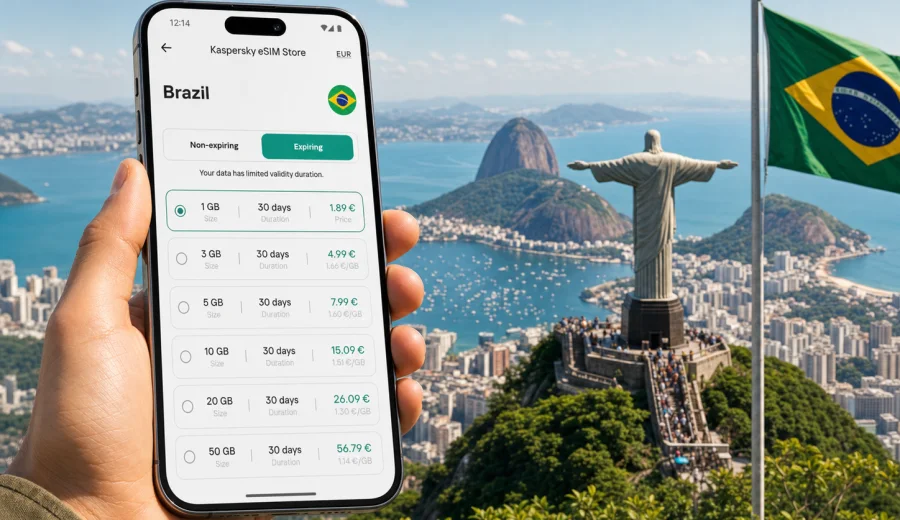
Brazil eSIM guide: mobile connection and internet for your trip
Brazil is the kind of destination where mobile internet quickly becomes part of the travel plan, not just a convenience. You may need maps in Rio de Janeiro, a ride app in Sao Paulo, translation at a bus station, weather updates before a beach day, or messaging on a long route between regions. A Brazil eSIM can help you prepare mobile connection before you start moving around the country, especially if your phone supports digital SIM profiles and you want to avoid looking for a physical SIM card after landing.
This guide explains how to think about eSIM for Brazil in practical travel terms: when it makes sense, what to check before buying a plan, how much data you may need, how installation works, and how to avoid common surprises. It focuses on mobile internet for travel, not on replacing a local mobile contract.
Why mobile internet matters in Brazil
Brazil is large, diverse, and travel patterns vary a lot. A short city break in Rio de Janeiro is different from a business week in Sao Paulo, a family trip to Salvador, a route through Florianopolis and Curitiba, or a nature-focused itinerary near Foz do Iguacu. In each case, mobile internet helps with a different set of tasks.
Typical travel uses include:
- airport transfers and ride-hailing apps;
- hotel check-in messages and booking confirmations;
- maps for walking, metro, taxi, bus, and intercity routes;
- restaurant reservations and delivery apps;
- translation in shops, transport hubs, and local services;
- banking notifications and payment confirmation;
- messaging with family, colleagues, or travel partners;
- checking opening hours, weather, and local travel changes.
Public Wi-Fi can be useful in hotels, airports, cafes, and shopping centers, but it is not something to build the whole trip around. It may require local registration, work only in one place, become slow at busy times, or be unavailable exactly when you need to order a car or open a map. A travel eSIM gives you another option: mobile data on a compatible device, with the plan conditions visible before you use it.
What an eSIM for Brazil is
An eSIM is a digital SIM profile installed on a compatible smartphone or tablet. Instead of inserting a plastic SIM card, you add a mobile data plan through your device settings, usually with a QR code or app-based installation flow. For a trip to Brazil, the main benefit is preparation: you can choose a data plan before departure or soon after arrival, then activate it according to the plan instructions.
For travel, eSIM is mainly about internet access. It usually does not include a regular local phone number, voice calls, or SMS unless those features are clearly listed in the selected plan. For most travelers, that is enough because messaging apps, email, maps, ride apps, and browser searches all work through mobile data.
Key point: an eSIM plan for Brazil is a mobile data option for a foreign trip. It is not the same thing as a long-term local mobile subscription, and its exact conditions depend on the selected plan.
Before you choose a Brazil eSIM plan
Check these points before you pay for any travel eSIM plan:
| What to check | Why it matters |
|---|---|
| Device compatibility | Not every phone supports eSIM, and some phones are locked by an operator. |
| Destination | Make sure the plan covers Brazil, not only another country or region. |
| Data amount | A light user and a remote worker need very different data volumes. |
| Validity period | A 7-day stopover and a 30-day route need different plan lengths. |
| Activation rules | Some plans start when installed, others when they first connect to a network. |
| Hotspot support | If you plan to share data with a laptop or another phone, check whether tethering is allowed. |
| Refund and support rules | Conditions can depend on whether the eSIM has been installed, activated, or used. |
Before choosing a plan, check your device. This is especially important if your phone was bought through a mobile operator, if you use a dual-SIM setup, or if you are traveling with an older device. eSIM support can vary by model, region, and carrier lock status.
How much data you may need in Brazil
There is no single correct data package for Brazil because travel habits differ. The safest way to estimate is to list what you will do without Wi-Fi and how often.
| Travel style | Common usage | Practical data approach |
|---|---|---|
| Light city traveler | Maps, messaging, occasional browsing, booking apps | A smaller plan can work if hotel Wi-Fi covers heavier use. |
| Active tourist | Maps, ride apps, social posts, translation, frequent searches | Choose more data so you are not rationing every day. |
| Business traveler | Email, chat, calendar, documents, video calls when needed | Pick a plan with enough buffer and use Wi-Fi for long calls. |
| Multi-city route | Navigation, transport apps, ticket checks, daily planning | Prioritize validity period and data volume together. |
| Family trip | Shared logistics, photos, maps, restaurant searches | Consider separate plans or a plan that allows hotspot if needed. |
Video is usually the biggest data consumer. Downloading offline maps, playlists, boarding passes, and entertainment before leaving your hotel can reduce mobile data use. If you need video meetings, large file transfers, or constant hotspot use, choose a plan with a larger allowance and check the conditions carefully.
Brazil travel scenarios where eSIM helps
In Rio de Janeiro, mobile data is useful for ride apps, beach weather, restaurant searches, and routes between Copacabana, Ipanema, the historic center, and viewpoints. In Sao Paulo, it helps with metro routes, traffic, business meetings, delivery apps, and navigating large districts. In Salvador, Recife, Fortaleza, Belo Horizonte, Brasilia, Curitiba, and Porto Alegre, it helps you manage local transport and keep bookings accessible.
For domestic routes, mobile internet is also practical. Brazil has long distances, and even a simple transfer can involve airport changes, bus tickets, ride apps, or schedule checks. If you travel to Foz do Iguacu, Florianopolis, Manaus, or coastal towns, prepare for moments when Wi-Fi is not available or not convenient.
Short summary: eSIM is most useful when you need mobile data before you can rely on a hotel, office, or cafe connection.
When to install and activate your eSIM
The best timing depends on the plan rules. Many travelers install the eSIM profile before departure while they still have stable home Wi-Fi, then activate mobile data for that eSIM after arriving in Brazil. This avoids trying to scan a QR code or download a profile in a busy airport.
A practical sequence looks like this:
1. Check whether your phone supports eSIM and is not locked by a carrier.
2. Choose Brazil as your destination and compare data amount, validity, and conditions.
3. Install the eSIM profile while you have a stable connection.
4. Keep your primary SIM active if you need banking SMS or calls from your home number.
5. On arrival, select the eSIM for mobile data.
6. Turn on data roaming for the eSIM if the installation instructions require it.
7. Test maps or a browser page before leaving the airport or hotel.
If your trip includes several countries in South America, compare single-country and regional options. For a Brazil-only itinerary, a country plan is usually easier to understand because the destination and validity are clear.
Choosing a Brazil eSIM plan through Kaspersky eSIM Store
Kaspersky eSIM Store is an app and website where you can quickly choose, arrange, and activate an eSIM with a suitable mobile internet plan for international travel. It helps you compare the essentials that matter before a trip: destination, data amount, validity period, and price. The service should be understood as a convenient way to prepare a travel eSIM, not as a mobile operator or network owner.
For Brazil, compare your expected data usage with the length of your stay. A weekend in Rio may need less data than two weeks moving between Sao Paulo, Bahia, and the south. If you want to prepare before departure, you can choose an eSIM plan for Brazil and keep the installation instructions ready before your flight.
When reviewing options, do not look only at the data number. A plan with more days than you need may still be useful if your schedule is flexible. A plan with more data may be more comfortable if you use maps all day or expect to share a connection. A smaller plan can be enough if your hotel, office, or apartment Wi-Fi is reliable and most mobile use happens outdoors.
Setup links for Android and iOS
Installation is usually straightforward, but it is worth following the correct flow for your device. If you are setting up eSIM before your trip, keep your phone charged and connected to reliable Wi-Fi.
Use the relevant setup guide:
After installation, label the eSIM clearly, for example "Brazil data" or "Travel eSIM". This helps you avoid selecting the wrong line for mobile data. If you keep your home SIM active for calls or SMS, check which SIM handles mobile data, calls, and messages. On some devices, data roaming must be enabled for the travel eSIM for mobile internet to work.
Practical settings checklist
Before departure:
- confirm that your device supports eSIM;
- save installation instructions and QR code access if provided;
- install the eSIM profile on stable Wi-Fi if the plan allows pre-installation;
- download offline maps for key areas;
- save hotel address, airport transfer details, and booking confirmations;
- check whether your bank needs SMS from your home SIM;
- make sure your phone is updated and has enough battery.
After arrival in Brazil:
- select the travel eSIM as the mobile data line;
- enable data roaming for that eSIM if required;
- keep your primary SIM active only if you need it;
- open a map or browser page to test data;
- monitor data usage during the first day;
- use hotel Wi-Fi for large downloads and video calls.
If mobile data does not work immediately, do not change every setting at once. Check the eSIM line status, mobile data selection, roaming setting, and APN instructions if they are included. Restarting the device can also help after first activation.
eSIM, roaming, local SIM, and public Wi-Fi
Different connection options suit different trips. eSIM is not always the only answer, but it is often the cleanest option for short stays, multi-city routes, and travelers who prefer to prepare in advance.
| Option | Strengths | Limits |
|---|---|---|
| Travel eSIM | Can be arranged before or during the trip, no physical SIM swap, clear data and validity | Needs compatible unlocked device; usually data-focused |
| Standard roaming | Uses your existing SIM and number, simple to keep active | Costs and data limits depend on your home operator |
| Local physical SIM | May suit long stays or users who need local services | Requires purchase on arrival, registration process may vary |
| Public Wi-Fi | Useful for heavy downloads in hotels and cafes | Not always available, can be slow, may not help during transfers |
For many travelers, the best setup is mixed: use eSIM for mobile internet when moving around Brazil, keep hotel Wi-Fi for heavier tasks, and leave the home SIM available only for essential calls or verification messages.
Common mistakes to avoid
The most common eSIM problems are not technical failures. They usually come from choosing the wrong plan, installing too late, or overlooking device settings.
Avoid these mistakes:
- buying a plan before confirming eSIM support;
- assuming every eSIM includes calls and SMS;
- waiting until you have no Wi-Fi to install the profile;
- choosing a short validity period for a flexible itinerary;
- using mobile data for video streaming on the first day without checking consumption;
- deleting the eSIM profile while troubleshooting;
- forgetting to select the eSIM as the mobile data line;
- disabling the home SIM when you still need SMS verification.
If you are traveling for work, test your essential apps early: email, chat, VPN if your company requires it, cloud documents, and calendar. If you are traveling with family, agree on a simple backup plan in case one phone loses battery or has no signal in a specific area.
Data-saving tips for Brazil
A few habits can make a travel data plan last longer:
- download Google Maps or another map app for offline use before long days out;
- set cloud photos and videos to upload only on Wi-Fi;
- disable automatic app updates on mobile data;
- use lower video quality when mobile data is active;
- save Portuguese translation packs offline if your app supports it;
- keep boarding passes, hotel confirmations, and tickets available offline;
- check which apps are using background data.
Mobile data is most valuable when you are moving: navigation, messages, booking changes, transport, and urgent searches. Save entertainment downloads, system updates, and long video calls for stable Wi-Fi whenever possible.
FAQ about eSIM and mobile internet in Brazil
Does a Brazil eSIM give me a Brazilian phone number?
Usually no. Travel eSIM plans are normally designed for mobile internet. Voice calls, SMS, and a local phone number are not included unless the plan conditions clearly say so. You can use messaging and calling apps over data.
Can I install eSIM before I fly?
In many cases, yes. Installing before departure is convenient because you can use reliable Wi-Fi and avoid setup pressure at the airport. Check the activation rules of your selected plan, because validity may start at different moments depending on the plan.
Can I keep my regular SIM active?
Yes, on many dual-SIM phones you can keep your home SIM for calls or SMS and use the travel eSIM for mobile data. Check your device settings carefully so data goes through the eSIM line, not your home roaming line.
Is eSIM useful outside major Brazilian cities?
It can be useful, but the actual mobile experience depends on available local network coverage in the area. For remote routes, parks, beaches, and long road trips, download key information offline and do not rely on any single connection method for critical details.
What should I do if I run out of data?
Check whether top-up or another plan is available for your trip. If your remaining travel time is short, you may also reduce mobile data use and rely more on Wi-Fi for heavy tasks.
Final preparation for your trip
For a smoother arrival in Brazil, prepare mobile internet before you need it. Check your phone, choose a plan that matches your route and data habits, install the eSIM on stable Wi-Fi, and keep the setup instructions available offline. This gives you more control during the first hours of the trip, when you may need maps, transport, hotel messages, and payment confirmations.
If Brazil is your next destination, you can prepare an eSIM plan for your Brazil trip through Kaspersky eSIM Store and set up mobile internet on a compatible device before you start exploring the country.