Travel connectivity guide
Bremen eSIM: Mobile Internet for Your City Trip
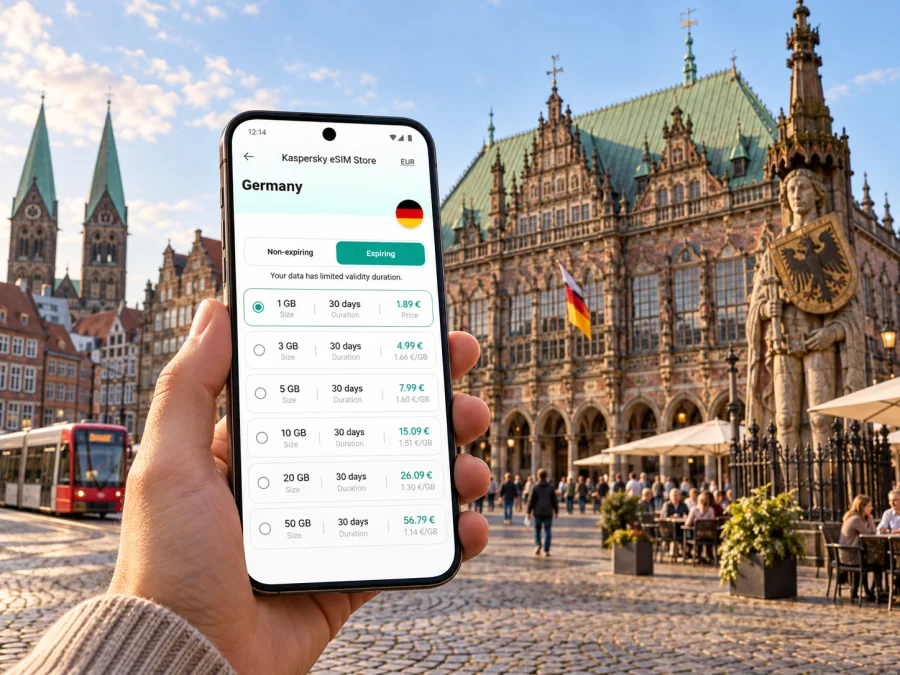
Bremen eSIM: mobile connection and internet for your city trip
Bremen is a city best explored in layers: the historic center around the Market Square, the lanes of Schnoor, the Weser waterfront, and neighborhoods with a very different pace, such as the Viertel and Überseestadt. A working mobile connection helps you move between those places, check a route, confirm a hotel detail, or share a meeting location without having to plan every stop in advance.
An eSIM can make mobile internet easier to prepare for a trip to Bremen. You choose a suitable travel data plan in Kaspersky eSIM Store, install and activate the eSIM on a compatible device, then use it for online maps, messages, bookings, and other data services while away. It is useful to plan the setup before departure, while you still have a reliable internet connection and time to read the plan conditions.
Why mobile internet helps in Bremen
Bremen’s center is compact, but visitors often move between the Market Square, Schnoor, the Weser waterfront, the Viertel, and business areas farther out. Mobile internet helps you compare walking and public transport routes, confirm an address, check a connection, retrieve a ticket, or update a meeting point while you are on the move.
A travel eSIM offers another way to get online, subject to plan coverage, device support, and activation conditions. It is most useful when you need maps or messages away from hotel Wi-Fi; larger downloads can wait until you are back on a trusted connection.
Arriving in Bremen: airport, station, and first route
Bremen Airport is close to the city, and a tram provides a public transport connection toward the center. Bremen Hauptbahnhof is a useful orientation point for onward journeys and city routes. Your best route depends on arrival time, destination, service changes, and luggage, so check current information before setting off.
At the airport, mobile maps can help locate the stop and confirm direction. At the main station, they can guide you from the correct exit to a hotel or meeting. Before departure, save your first address and check how the plan’s activation timing works.
- Save the full address of your hotel or first destination.
- Install the eSIM while you have reliable internet, following its activation instructions.
- After arrival, select the travel eSIM for mobile data and check that the line is enabled.
- Confirm the route, stop, direction, and any transfer on the day.
- Use accommodation Wi-Fi for updates; keep mobile data for navigation and travel tasks.
Avoid relying on an old timetable screenshot for a specific departure. Service patterns can change. Online information is useful, while a saved address or offline route is a helpful backup if the battery is low or data is temporarily unavailable.
Getting around: walking, tram, bus, and rail
In the historic core, walking is often the easiest way between nearby sights. Trams and buses help with longer journeys, and the main station is the starting point for rail travel beyond the center. Compare options with a route app, then account for luggage, weather, mobility, and the time you have.
| Situation | Planning approach | What data helps you check |
|---|---|---|
| Market Square and old town | Walk between nearby sights | Landmark names and the next turn |
| Station to hotel | Compare walking with transit | Exit, stop, and final walking segment |
| Center to the Weser | Choose a route for the specific riverfront destination | Which bridge or waterfront section fits |
| Business appointment | Check the full route shortly before leaving | Transfers and a changed address |
| Evening return | Confirm the route and nearest stop | Current service details and location sharing |
Use navigation alongside street signs. Confirm the destination shown on a vehicle and save full street addresses, since similar names can be hard to distinguish on a small screen. A short list of your hotel, station, and a few planned stops is enough to regain your bearings if plans change.
Neighborhoods and routes worth preparing
Around Bremen’s Market Square, the Town Hall and the Bremen Town Musicians statue are recognizable reference points. Nearby streets lead toward the cathedral, Schnoor, and the Weser. Schnoor’s narrow lanes are enjoyable to explore, but a map helps when you are looking for a particular café, shop, or entrance.
The Schlachte promenade follows the Weser and fits naturally into a central walk. The river and bridges help orient you; check the exact destination before crossing, because the bridge you choose affects the route.
The Viertel, east of the historic center, offers cafés, restaurants, shops, and cultural venues. Save the exact address of an evening venue rather than relying on a broad neighborhood name, especially if you have a reservation or are meeting someone.
Überseestadt has a more contemporary mix of offices, homes, and places to eat by the port and river. Distances between stops and destinations can feel longer than in the compact center. Check the final walking segment and building entrance before a business appointment.
For a first visit, plan in clusters: the historic core and riverfront; an evening in the Viertel; a work visit in Überseestadt; or a green break in Bürgerpark. This keeps the phone useful for the next leg without turning the day into a sequence of map checks.
Choose an eSIM plan around your Bremen itinerary
Choose a data allowance based on what you will do, not just the number of days. A visitor who checks maps and messages occasionally may need less than someone working on the move, uploading photos, making video calls, or sharing a hotspot. Consider how long you will be away from Wi-Fi and use trusted Wi-Fi for updates and large downloads.
Kaspersky eSIM Store is an app and website where you can choose, order, and activate an eSIM with a suitable plan for mobile internet during an international trip. To compare options for Germany before travelling to Bremen, review the available mobile data plans for Germany. Check the allowance, validity, coverage, and activation conditions against your itinerary.
| Travel pattern | Consider before choosing |
|---|---|
| Short city break | How often will you use maps and messages away from Wi-Fi? |
| Several days of sightseeing | Will you upload photos or use navigation throughout the day? |
| Business trip | Do you need email, document access, or video calls on mobile data? |
| Bremen plus onward travel | Does coverage and validity fit every destination and date? |
Treat these as prompts rather than fixed data estimates. Apps vary in their data use; check your phone’s data settings during the trip if needed. A data plan may not include an ordinary phone number, voice calls, or SMS unless its terms say so. If you need your regular number, check your home operator’s roaming terms and your device’s SIM settings.
Set up before you leave
Confirm that your exact phone model supports eSIM and is not restricted by a carrier lock. Check eSIM compatibility for your device before choosing a plan. Support can depend on the model and its configuration, not only the brand.
Review the plan conditions and install the profile while you have reliable internet. Installation and activation can be separate steps, and validity may begin at a particular activation event. Follow the instructions and avoid deleting the profile after setup unless directed.
Installation checklist
- Charge your phone and connect to reliable Wi-Fi.
- Keep the order details and instructions accessible.
- Follow the directions for Android or iOS.
- Label the line “Travel data” and select it for mobile data when appropriate.
- Check whether the plan requires data roaming to be enabled for the eSIM.
- Keep your regular SIM settings as intended and review possible roaming charges with your usual provider.
If a setting is unclear, pause and consult the plan instructions rather than changing several options at once.
Using maps and data thoughtfully
Save your hotel, appointment addresses, and any large venue entrance before the day begins. Load a route while you have a connection, and keep a nearby street or stop in mind as a fallback. When plans change, share a precise meeting point—such as a named station exit or venue entrance—instead of “near the center.”
Use trusted Wi-Fi for app updates, cloud photo backups, and large downloads. Reserve mobile data for tasks that need to work as you move: navigation, messages, tickets, or a booking change. Your phone’s data-use screen can help identify apps using more than expected.
Bremen for business travel
For a work visit, save the appointment time, full address, building entrance, and a colleague’s contact details before leaving your hotel. Check the complete route from the station or center, including the final walk: a large office or event venue may have more than one entrance.
An eSIM data plan does not automatically replace your usual number. Internet meeting apps use data, while ordinary calls and SMS may remain on your regular SIM. Check your phone’s dual-SIM settings and the plan allowance before a video meeting; use Wi-Fi where practical for data-heavy calls.
Short stopover or weekend visit
With only a few hours, choose a compact route rather than crossing town repeatedly. Check the route into the center and the return journey first. Depending on your arrival and departure times, the Market Square, Schnoor, and a walk by the Weser can make a satisfying central loop.
On a weekend, give the historic center one block of time and a neighborhood or park another. Leave room for weather, a longer meal, or an unexpected discovery. Before heading out, check the route back to your accommodation or station.
| Visit | Connectivity priority |
|---|---|
| Stopover | Save the route back; use data for live checks and messages |
| Weekend | Use maps on the move; do updates over accommodation Wi-Fi |
| Longer stay | Check data use and plan validity during the visit |
| Work and leisure | Account for calls and uploads as well as sightseeing |
These are planning prompts, not coverage or data guarantees. Confirm the plan’s coverage and validity and leave enough time for your return.
Day trips from Bremen
If Bremen is your base for another destination in Germany, check departure and return details before setting out. Save the destination address and station information, and consider what you will do if a connection is delayed. Data planning should cover the whole itinerary, not just the city: consider navigation away from Bremen, messages, and work while travelling.
Download entertainment and large files in advance; use mobile data for changing travel details and coordination. Confirm that the selected plan covers every destination and remains valid for your travel dates. Check the exact route and travel time for the day of your trip.
Common questions
Is mobile internet useful if my hotel has Wi-Fi?
Yes, if you want maps and messages while travelling between the airport, station, accommodation, and city sights. Use Wi-Fi for larger downloads and updates.
Can an eSIM be used for calls?
A data-only plan may not include a regular phone number, calls, or SMS. Check the exact terms. Internet calling apps may use data, subject to the app and connection.
Should I install it before arriving?
Installing over reliable Wi-Fi before departure is convenient, but follow the plan’s activation conditions. Validity can begin at a specified event, so check those details first.
What if a route app stops loading?
Confirm the eSIM is enabled and selected for data, and check whether data roaming is required. If possible, move to a stronger signal. A saved address or offline map is a useful backup.
How much data should I choose?
Consider trip length, time away from Wi-Fi, navigation, photo uploads, work calls, and hotspot use. Compare those habits with the allowance and validity of the plan.
Will the plan cover my full Germany itinerary?
Check the plan’s coverage details for every destination. Coverage and conditions depend on the selected plan.
A simple pre-trip checklist
Before travelling to Bremen, check that:
- your exact phone supports eSIM and can accept another profile;
- the plan’s allowance, coverage, validity, and activation conditions fit your trip;
- you know which SIM handles data and which number receives ordinary calls or messages;
- the airport, station, hotel, and first appointment addresses are saved;
- installation instructions are available and your phone is charged;
- essential details are saved in case you temporarily lose a connection.
These checks make it easier to tell a plan issue from a device setting, a map problem, or a transport change.
Prepare your connection for Bremen
A useful city trip depends on small details: knowing how to get from Bremen Airport or Hauptbahnhof to your first stop, finding a restaurant in the Viertel, crossing the center toward the Weser, and having the right address ready when a meeting or plan changes. Mobile data supports those moments while leaving room to explore at your own pace.
Before departure, compare the plan conditions with the way you expect to use your phone, check device compatibility, and install the eSIM according to its instructions. Then choose a suitable eSIM plan for your trip to Germany through Kaspersky eSIM Store and keep the installation details close at hand. With the basics prepared, you can spend less time sorting out connectivity and more time experiencing Bremen.


