
Travel connectivity guide
Brest eSIM for mobile internet in Belarus
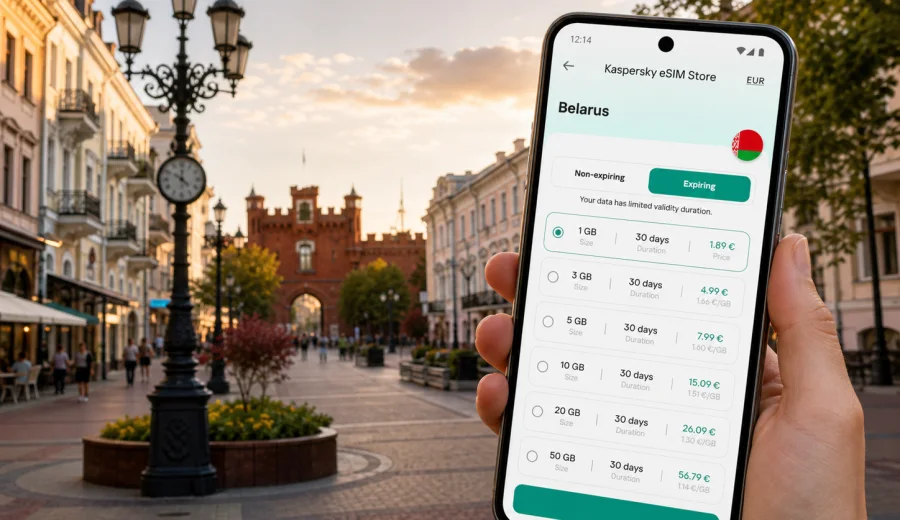
Brest eSIM: mobile connection and internet for a city trip in Belarus
Brest is a practical city for a connected traveler: compact enough for walking, important enough for business trips, and close enough to the western border for regional itineraries. A trip here can require maps, taxi apps, translation, messaging, and route planning for Brest Fortress, Sovetskaya Street, or a day trip toward Belovezhskaya Pushcha.
An eSIM helps prepare mobile internet before you depend on hotel Wi-Fi. Instead of looking for a physical SIM card after arrival, you can set up a digital SIM on a compatible phone and use a prepaid data plan for the trip. That is useful in Brest because many journeys start with movement: from the station to the center, from a hotel to a meeting, or from the fortress area to restaurants.
This guide focuses on mobile connection and internet in Brest itself: where you need data, typical traffic use, and what to check before the trip.
Why mobile internet matters in Brest
Brest rewards travelers who can move independently. The main visitor areas are not difficult to understand, but the value of mobile internet appears in small, repeated moments:
- opening maps when you arrive at Brest Central railway station;
- checking the route to Brest Fortress and the Hero-Fortress memorial complex;
- ordering a taxi or confirming a hotel address;
- translating menus, signs, and service messages;
- finding opening hours before crossing the city;
- sharing a live location with family, colleagues, or a driver;
- checking onward routes to Minsk, Grodno, Warsaw, or Belovezhskaya Pushcha;
- using messengers for calls when your eSIM plan is data-only.
Public Wi-Fi can be useful in hotels and cafes, but it is rarely enough for the whole trip. You may need internet while walking between districts, sitting in a taxi, or waiting at the station.
Brest travel scenarios where eSIM is useful
| Brest scenario | Why you need data | Practical tip |
|---|---|---|
| Arrival by train | Maps, hotel address, taxi, messaging | Save your hotel address offline, then use mobile data to confirm the live route. |
| Brest Fortress visit | Navigation, photos, meeting points | Keep data for maps and messages rather than streaming long videos on site. |
| Sovetskaya Street walk | Restaurant search, translation, payments where supported | Use mobile internet for quick checks, then switch to hotel Wi-Fi for large uploads. |
| Business day | Calendar, email, file access, ride hailing | Choose more data if you expect video calls or cloud documents. |
| Stopover | Fast route decisions and ticket checks | Install the eSIM before arrival so you do not spend the stopover solving setup issues. |
| Day trip from Brest | Maps, transport updates, communication | Make sure the plan is valid for Belarus, not only for another country on your route. |
Brest is not a city where you need to be online every second, but connection gaps can make simple tasks slower. If you land or arrive tired, mobile data becomes a practical backup: you can confirm directions, contact your accommodation, and move without waiting for a trusted Wi-Fi network.
Arriving in Brest: what to set up first
Many trips to Brest begin at the railway station or by road from another Belarusian city. After arrival, the first hour usually involves orientation rather than sightseeing. Before leaving the station or bus stop area, it helps to have these items ready:
1. The hotel address saved in your map app.
2. A screenshot or offline copy of your booking.
3. Messaging apps signed in and working.
4. A payment method available for taxis or transport apps if you use them.
5. The eSIM profile installed on your phone, with mobile data assigned to that line.
If your phone supports dual SIM, you can keep your primary SIM for calls or bank messages and use the eSIM for data. Check your phone settings carefully: mobile data should use the eSIM line, while your main number can remain available for regular calls or SMS if your home plan allows it.
How much data to plan for Brest
The right amount of data depends less on the city and more on your habits. A short sightseeing trip can use little data with offline maps and hotel Wi-Fi. A business trip with hotspot use and video calls needs a larger buffer.
| Trip style | Typical data needs | What affects usage |
|---|---|---|
| One-day stopover | Low | Maps, taxi, messenger, ticket checks |
| Weekend in Brest | Low to medium | Navigation, restaurant search, photo sharing |
| Business trip | Medium to high | Email, cloud files, calls, hotspot use |
| Brest plus day trips | Medium | Maps outside the center, route changes, messaging |
| Heavy media use | High | Video streaming, reels, large photo backups |
Hidden data users include cloud photo backup, app updates, video autoplay and hotspot sharing. Before you leave for Brest, turn off automatic updates and set photo backup to Wi-Fi only.
eSIM, regular SIM, roaming, and Wi-Fi in Brest
There is no single best option for every traveler. The practical choice depends on trip length, phone compatibility, home operator roaming prices, and how much time you want to spend solving connectivity after arrival.
| Option | Good for | Limits to consider |
|---|---|---|
| eSIM | Travelers who want to prepare data before or right after arrival | Requires a compatible, unlocked device and a valid plan for Belarus |
| Home roaming | People who prefer to keep everything on their existing SIM | Costs and data limits depend on your home operator |
| Local physical SIM | Longer stays or users who need local services | Requires time, a store visit, and local purchase conditions |
| Public Wi-Fi | Hotels, cafes, and large downloads | Not available everywhere and not ideal as your only connection |
An eSIM is especially convenient if Brest is one stop in a wider route. You can prepare your data plan before the train, keep your main SIM in the phone, and avoid searching for a shop immediately after arrival. Read the plan conditions carefully: data volume, validity period, destination, activation rules, and whether tethering is supported.
Choosing an eSIM plan for Belarus before Brest
When you choose an eSIM plan for Brest, think about the real shape of your trip rather than only the city name. One night near Sovetskaya Street is different from five workdays or a family trip using one phone as a navigation hub.
Use this simple decision path:
1. Choose Belarus as the destination for the plan.
2. Match validity to the full trip, including arrival and departure days.
3. Choose data volume based on maps, messaging, calls, work, and media.
4. Check whether your phone supports eSIM and is not locked to one operator.
5. Install the eSIM while you still have a stable internet connection.
6. Keep the QR code or installation instructions available until the profile is active.
Kaspersky eSIM Store is an app and website where you can quickly choose, arrange, and activate an eSIM with a suitable mobile data plan for an international trip. For Brest, use the Belarus destination page to review available options and prepare an eSIM plan for your trip to Brest before you need mobile data in the city.
Districts and places in Brest where data helps
Brest Fortress
Brest Fortress is the most important visitor site in the city. Mobile internet is useful for navigation to the entrance area, coordinating with companions, checking transport back to the center, and reading extra context while walking between memorial areas. Download a map before the visit so your phone does not need to reload every detail.
Sovetskaya Street and the center
The pedestrian center is convenient for restaurants, cafes, shops, and evening walks. Here, data is about quick decisions: where to eat, whether a place is open, how to call a taxi after dinner, and how to share a meeting point.
Railway station area
Stations are where mobile connection matters most. You may need to check a platform, send your arrival time, open a ticket, or follow a hotel route while carrying luggage.
Hotels and business locations
Hotel Wi-Fi is helpful, but business travelers often need a backup. Mobile data can support urgent email, authentication messages, cloud document access, and messaging when hotel Wi-Fi is overloaded or inconvenient. If you plan to use a hotspot, choose data volume carefully and check whether tethering is allowed.
Installation and compatibility checklist
Before buying any eSIM plan, check that your phone or tablet supports eSIM and is not restricted by a carrier lock. If you are unsure, use Check your device before you choose a plan.
Basic preparation checklist:
- Update your phone operating system before the trip if an update is already pending.
- Keep Wi-Fi available during installation.
- Do not delete an installed eSIM profile unless you are sure you no longer need it.
- Keep your primary SIM active if you need calls, SMS, or bank verification messages.
- Set the eSIM as the mobile data line after installation.
- Turn on data roaming for the eSIM if the installation instructions or plan conditions require it.
If you need installation guidance, follow the official step-by-step pages for your device: Android installation instructions or iOS installation instructions. Screens can vary by phone model and operating system version.
A practical mobile internet setup for Brest
For a smooth city trip, prepare your phone in layers:
1. Install offline maps for Brest and the surrounding area.
2. Add your hotel, station, Brest Fortress, and planned restaurants to saved places.
3. Install and activate your eSIM according to the plan rules.
4. Set mobile data to the eSIM line.
5. Disable automatic app updates and cloud backups on mobile data.
6. Test a small webpage or map search before leaving your hotel or station Wi-Fi.
This setup gives you a fallback if one connection option is inconvenient.
Business trips to Brest
Brest can be a destination for logistics, manufacturing, trade, regional meetings, and cross-border business routes. For business travelers, the cost of a connection problem is usually time.
For work, consider more data than you would choose for a leisure weekend. Email attachments, cloud documents, maps, and messenger calls add up. Use hotel or office Wi-Fi for video calls where possible and keep eSIM data for movement and backup. If your employer requires a corporate security tool, configure it separately; an eSIM is for mobile data, not a replacement for company security.
Short stopovers and transit through Brest
A stopover is where preparation matters most. You may have only a few hours between trains, meetings, or onward travel. The goal is to reduce friction.
For a Brest stopover, keep your setup simple:
- install the eSIM before arrival;
- save the station and your next departure point;
- keep your ticket, hotel details, or meeting address available offline;
- avoid large downloads until you are on Wi-Fi;
- keep enough battery for maps and messaging.
If you are crossing between countries on the same trip, do not assume one data plan covers every stop. For Brest itself, the plan should include Belarus.
Day trips from Brest
Brest is often used as a base for nearby attractions and regional movement: Belovezhskaya Pushcha, smaller towns, countryside guesthouses, or onward rail routes. Before a day trip, download maps, keep important addresses available offline, and bring a power bank. Mobile internet is only useful while your phone has enough battery to navigate and receive messages.
Data-saving tips for Brest
Small settings can make a modest data plan last longer:
- Use offline maps for the city and region.
- Download tickets, booking confirmations, and museum information on Wi-Fi.
- Turn off automatic app updates on mobile data.
- Disable cloud photo backup until you return to Wi-Fi.
- Reduce video quality in social apps.
- Use messenger voice calls instead of video calls when mobile data is limited.
- Monitor data usage in your phone settings each day.
FAQ: eSIM and mobile internet in Brest
Is eSIM useful for a short trip to Brest?
Yes, if you want mobile data for maps, taxis, messaging, and quick route changes without looking for a physical SIM card after arrival. For a stopover, install the eSIM before you reach the city.
Does an eSIM give me a Belarusian phone number?
Not necessarily. Many travel eSIM plans focus on mobile data and do not include a regular phone number, calls, or SMS unless those features are stated in the plan conditions. Use messaging apps for internet-based calls and messages.
Can I keep my regular SIM active?
On many dual-SIM phones, yes. Keep your primary SIM for calls or SMS and use the eSIM for mobile data. Check that data is assigned to the eSIM line.
Should I activate the eSIM before arriving in Brest?
Install it before travel if possible, while you have stable Wi-Fi. Activation timing depends on the selected plan rules, so read the conditions carefully.
Final preparation before you go
For Brest, the best mobile internet plan is the one that matches your real itinerary: arrival route, hotel location, walking plans, business needs, and possible trips outside the city. Prepare offline maps, check device compatibility, install the eSIM while you have Wi-Fi, and keep your primary SIM available if you need regular calls or SMS.
Kaspersky eSIM Store helps you choose, arrange, and activate an eSIM with a suitable mobile data plan for an international trip. Before your train, flight, or road journey, choose an eSIM plan for Belarus so your Brest arrival, navigation, messages, and city movement are easier to manage.