
Travel connectivity guide
British Virgin Islands eSIM: mobile internet guide
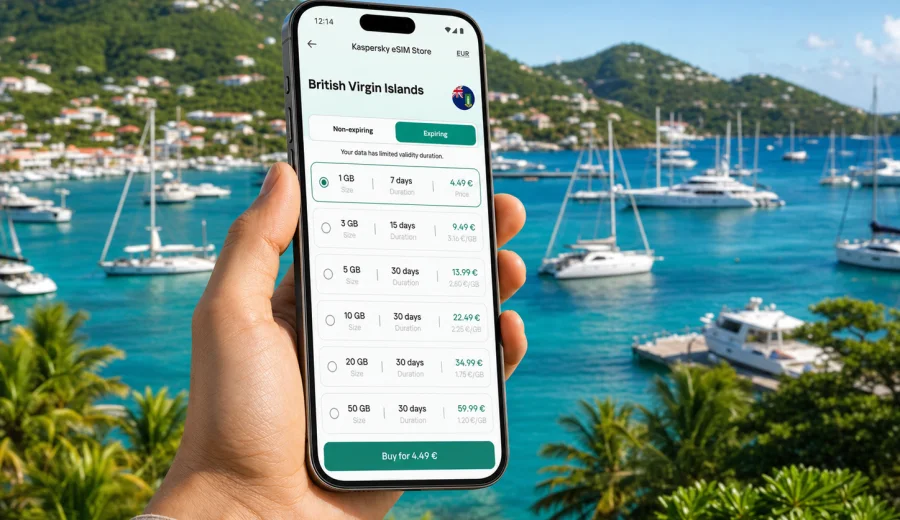
eSIM in the British Virgin Islands: mobile connection and internet for your trip
The British Virgin Islands are a place where a trip often moves between beaches, marinas, ferries, small roads, restaurants, charter boats, and quiet bays. That rhythm makes mobile internet especially useful. You may need maps in Road Town, taxi coordination near the ferry terminal, weather updates before a sailing day, or messages from your hotel on Tortola. An eSIM can help you prepare mobile data before the trip without looking for a physical SIM card after arrival.
For many travelers, the main question is simple: how do you stay online in the British Virgin Islands without turning the first day into a telecom errand? A travel eSIM is a practical answer if your device supports it. You choose a plan, install the eSIM profile, and use mobile data according to the selected plan's conditions.
This guide explains how eSIM works for the British Virgin Islands, how to estimate data needs, and what to check before buying. The focus is the country, not one island or town.
Why mobile internet matters in the British Virgin Islands
The British Virgin Islands are spread across multiple islands, including Tortola, Virgin Gorda, Jost Van Dyke, Anegada, and several smaller islands. Travel plans can change quickly because of ferry schedules, weather, boat transfers, restaurant hours, or marina arrangements. A stable way to access mobile internet makes those changes easier to manage.
Typical online tasks during a trip include:
- checking ferry times between Tortola, Virgin Gorda, Jost Van Dyke, and Anegada;
- using maps around Road Town, Cane Garden Bay, Spanish Town, and marinas;
- messaging hotels, charter companies, drivers, and restaurants;
- checking weather, wind, and sea conditions before boat trips;
- confirming arrival details after landing at Terrance B. Lettsome International Airport;
- using banking apps, airline apps, and travel documents;
- sharing photos and short videos without waiting for hotel Wi-Fi.
Public Wi-Fi can help in hotels, cafes, airports, and marinas, but it is not always available exactly when you need it. A prepaid eSIM plan gives you a separate mobile data option for the trip, while your regular SIM can remain in the phone for calls or messages if you choose to keep it active.
What an eSIM is
An eSIM is a digital SIM profile built into many modern smartphones and tablets. Instead of inserting a plastic SIM card, you add a mobile data profile through the device settings. After installation and activation, the phone can use that eSIM for internet access in the destination covered by the selected plan.
For travel, eSIM is useful because it separates preparation from arrival. You can set up the profile before departure, read the plan terms calmly, and avoid depending on a store, kiosk, or local opening hours. Depending on the plan, the validity period may begin after activation or when the eSIM first connects to a supported network. Always check the exact terms before use.
An eSIM for travel usually focuses on mobile data. It may not include a local phone number, voice calls, or SMS unless those options are clearly stated in the selected plan. For everyday communication, many travelers use internet-based messaging and calling apps over mobile data.
Quick summary
| Travel need | Why eSIM helps |
|---|---|
| Arrival day logistics | You can message drivers, hotels, and charter companies after landing or ferry arrival. |
| Island hopping | Mobile data helps with ferry updates, maps, and schedule changes between islands. |
| Sailing and marina stays | You can check weather, route notes, bookings, and dock information. |
| Short visits | A small data package can be enough for maps, messages, and confirmations. |
| Longer trips | A larger package reduces the need to monitor every megabyte. |
Before you choose a plan: check your phone
Before buying any travel eSIM, confirm that your device supports eSIM and is not locked to one mobile operator. A compatible phone is essential. If the device cannot add an eSIM profile, the plan will not solve the connectivity problem.
Use this short checklist:
- The phone supports eSIM.
- The phone is unlocked for mobile service use abroad.
- The operating system is up to date enough to manage eSIM profiles.
- You know where the mobile data and SIM settings are on your device.
- You have a stable internet connection for installation, such as home Wi-Fi before departure.
- You understand which SIM will handle mobile data during the trip.
If you are not sure, check your device before choosing a plan. This is a small step, but it prevents one of the most common travel eSIM problems: buying a plan for a phone that cannot use it.
British Virgin Islands travel scenarios where eSIM is useful
Different trips create different data habits. A resort stay on Tortola may need less mobile data than a sailing route with several overnight stops. A family organizer may need maps, booking apps, and messages more often than a traveler who mostly goes online at the hotel.
| Scenario | Useful mobile data tasks |
|---|---|
| Arrival through Tortola | Ride coordination, hotel messages, ferry updates, map checks. |
| Virgin Gorda day trip | Directions to The Baths, taxi messages, restaurant searches. |
| Jost Van Dyke or Anegada | Ferry timing, beach plans, group chat, weather checks. |
| Sailing itinerary | Marina communication, route notes, weather, shared locations. |
| Light remote work | Email, document approvals, short calls, cloud access. |
How much data you may need
Data use depends on apps, habits, and trip length. The figures below are planning ranges, not guarantees, because apps can behave differently and background updates can change usage.
| Trip style | Typical use | Planning approach |
|---|---|---|
| Light use | Maps, messaging, emails, booking confirmations | Choose a smaller package and keep video use on Wi-Fi. |
| Standard travel | Maps, chats, social media, restaurant searches, weather | Choose a medium package with room for daily browsing. |
| Heavy use | Video calls, cloud files, frequent photo and video sharing | Choose a larger package and monitor data in settings. |
| Group organizer | Maps, coordination, bookings, shared documents | Add extra data because other people may depend on your phone. |
For a short long-weekend trip, light mobile data may be enough if your hotel has reliable Wi-Fi. For a week of island hopping, a medium plan is often more comfortable. For sailing, remote work, or frequent video sharing, choose more data than you think you need.
Simple ways to reduce data use:
- download offline maps before leaving home;
- turn off automatic app updates on mobile data;
- disable cloud photo backup until you are on Wi-Fi;
- use lower quality for video streaming;
- check which apps consume data in the phone settings;
- keep hotel or marina Wi-Fi for large uploads.
How Kaspersky eSIM Store fits into trip planning
Kaspersky eSIM Store is an app and website where you can quickly choose, arrange, and activate an eSIM with a suitable data plan for mobile internet during an international trip. The practical value is that you can prepare before departure, compare plan duration and data volume, and keep the setup process in one place.
For the British Virgin Islands, this is useful because arrival can involve flights, taxis, ferries, marina check-ins, or hotel transfers. You may not want to spend that moment searching for a local SIM option. Once you know your route and likely data use, you can choose an eSIM plan for the British Virgin Islands and prepare your mobile internet before the trip.
The exact conditions, price, data volume, validity period, and activation rules depend on the selected plan. Read the plan details before purchase, especially if your itinerary includes several islands or if you expect heavy data use.
eSIM compared with other options
An eSIM is not the only way to get online. It is one of several options, and the best choice depends on your trip.
| Option | Strengths | Trade-offs |
|---|---|---|
| Travel eSIM | Can be prepared before arrival, no physical SIM swap, convenient for data | Requires eSIM-compatible unlocked device; plan terms vary |
| Standard roaming | Keeps your usual number and carrier relationship | May be expensive or limited depending on your home plan |
| Public Wi-Fi | Useful in hotels, cafes, marinas, and airports | Not always available when moving; quality varies |
| Local physical SIM | Can be suitable for longer stays | Requires store access, registration steps, and a SIM slot |
For many travelers, eSIM works best as a practical middle path. It can reduce dependence on public Wi-Fi and avoid physical SIM handling, while still letting you keep your main SIM active if your phone supports dual SIM behavior.
When to install and activate
Install the eSIM profile when you have stable internet, ideally before the trip or while connected to trusted Wi-Fi. Activation timing depends on the plan conditions and device behavior. Some plans start counting validity after installation, some after activation, and some after first connection to a supported network. Check the details before you act.
A common approach is:
1. Choose the destination and plan.
2. Confirm device compatibility.
3. Install the eSIM profile using stable Wi-Fi.
4. Keep your primary SIM for calls or messages if needed.
5. On arrival, select the eSIM for mobile data.
6. Turn on data roaming for the eSIM if the instructions or device require it.
7. Test maps, messaging, and browser access before leaving the airport, marina, or hotel.
For setup details, use the Android eSIM installation guide or the iOS eSIM installation guide. The exact screen names may vary by phone model and operating system version, so follow the device prompts carefully.
Settings and data-saving checks
Most eSIM setup problems come from one wrong setting. Before you depend on mobile data in the British Virgin Islands, confirm that the eSIM profile is visible, mobile data is assigned to the travel eSIM, data roaming is enabled for that eSIM if required, and your primary SIM is not accidentally selected for mobile data. If the connection does not appear, restart the phone and review the plan instructions before deleting any profile.
Use this short travel checklist:
- save hotel addresses, marina names, ferry details, and booking references offline;
- download map areas for Tortola and any other islands on your route;
- set cloud photo backup and app updates to Wi-Fi only;
- turn off automatic video playback in social apps;
- check the plan validity period against your arrival and departure dates;
- keep important contacts available outside one messaging app.
If your itinerary includes several islands, do not choose data based only on your first hotel night. Think about the days when you will be moving between Tortola, Virgin Gorda, Jost Van Dyke, Anegada, or smaller stops, because those are the moments when mobile internet can matter most.
FAQ
Can I use eSIM throughout the British Virgin Islands?
You can use the eSIM according to the coverage and conditions of the selected plan. Connection quality can vary by island, terrain, buildings, weather, and network conditions, so keep offline backups for essential travel details.
Does a travel eSIM give me a local phone number?
Many travel eSIM plans are data-only and do not include a regular phone number, voice calls, or SMS. If those features matter, review the selected plan carefully.
Should I install the eSIM before departure or after arrival?
Install it when you have stable internet and enough time to follow the instructions. Many travelers prefer installing before departure, then using the eSIM according to the plan terms.
Can I keep my usual SIM active?
On many dual SIM phones, yes. You can often keep your regular SIM for calls or messages and use the travel eSIM for mobile data.
Is eSIM always cheaper than roaming?
Not always. It depends on your home operator, trip length, and data use. An eSIM can be predictable because you see the selected plan's data amount, duration, and price before use.
What if I visit nearby destinations too?
If your route includes another country or territory, check whether you need a separate destination plan or a regional plan. Do not assume one country plan covers every nearby island.
Final preparation before you fly
Before leaving for the British Virgin Islands, give yourself ten minutes to prepare:
1. Confirm that your phone supports eSIM and is unlocked.
2. Choose a plan that matches your trip length and expected data use.
3. Install the eSIM while you have stable Wi-Fi.
4. Save the installation instructions and plan details.
5. Download offline maps and important confirmations.
6. Decide which SIM will use mobile data on arrival.
7. Check roaming settings for the eSIM if required.
This preparation is especially useful if your first day includes a flight arrival, ferry transfer, marina check-in, or a drive to accommodation.
Choose an eSIM plan for the British Virgin Islands
Kaspersky eSIM Store helps you prepare mobile internet for an international trip through an app or website where you can choose, arrange, install, and activate an eSIM with a suitable data plan. For the British Virgin Islands, review the available data volumes, validity periods, and plan terms before departure so your phone is ready for maps, messages, bookings, and everyday travel tasks.
When your route and data needs are clear, prepare an eSIM plan for the British Virgin Islands and keep the setup details available before you travel.