
Travel connectivity guide
Brunei Darussalam eSIM: mobile internet guide
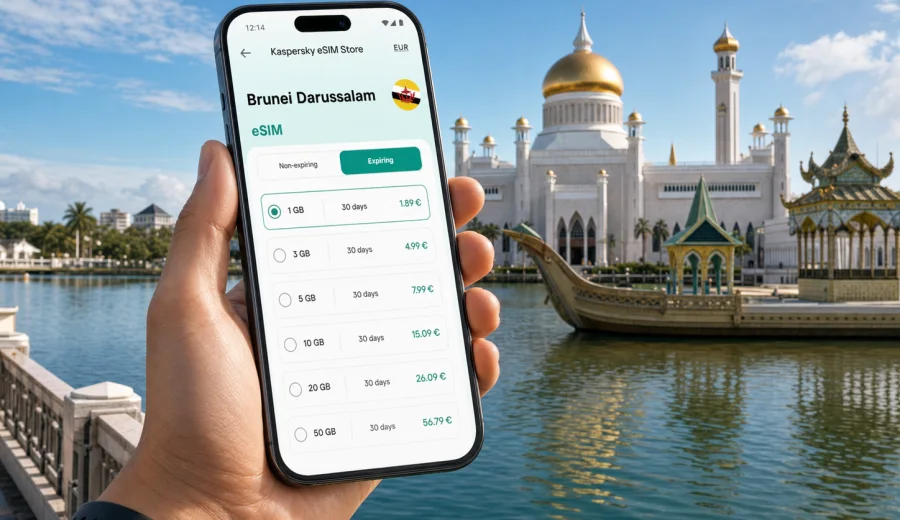
eSIM for Brunei Darussalam: mobile connection and internet for your trip
Brunei Darussalam is a compact destination, but a trip there still creates many moments when mobile internet matters. You may need a route from Brunei International Airport to Bandar Seri Begawan, a message to your hotel, a translation app at dinner, a ride update near the waterfront, or a boarding pass before the return flight. Waiting for hotel Wi-Fi can work for some tasks, but it is not a complete connection strategy.
An eSIM helps solve this practical travel problem if your phone supports it. Instead of inserting a physical SIM card, you install a digital SIM profile and use it as a separate mobile data line. For a short holiday, business visit, family trip, or regional route through Southeast Asia, that can make arrival and daily movement easier.
This guide explains how to use eSIM for Brunei Darussalam, how to estimate data needs, when to install and activate the profile, and what to check before choosing a tariff. The focus is simple: keeping maps, messengers, booking apps, email, translation, and everyday travel tools available when you need them.
Why mobile internet matters in Brunei Darussalam
Many travelers spend most of their time around Bandar Seri Begawan, Kampong Ayer, the mosque area, museums, hotels, shopping centers, restaurants, and airport transfers. Distances may be manageable, but online access is still useful throughout the day.
Mobile internet can help you:
- open maps and route options after arrival;
- coordinate airport pickup, taxi, or ride-hailing details;
- message family, colleagues, guides, or hotel staff;
- check booking confirmations and opening hours;
- translate short phrases, signs, and menus;
- use airline, banking, insurance, and email apps;
- share location with travel companions;
- upload photos when you choose, not only when Wi-Fi is available.
Public Wi-Fi can be useful in hotels and cafes, but it may not be available while walking, waiting for transport, or moving between places. It can also require registration or slow down at busy times. A prepared eSIM tariff gives you a mobile data option that is ready in the phone, so connectivity does not depend only on finding the next Wi-Fi network.
What an eSIM does and does not do
An eSIM is a digital SIM profile installed on a compatible device. In travel use, it is mainly a way to access mobile data in the destination. You select a tariff with a defined data volume, validity period, and destination, then use that profile as the data line during the trip.
It is important to separate mobile data from ordinary phone service. Many travel eSIM tariffs are data-only. That means they usually do not include a local phone number, traditional voice calls, or SMS unless the tariff conditions clearly say so. You can still use internet-based calling and messaging apps through mobile data, and you can often keep your regular SIM active for bank alerts, calls, or texts.
| Feature | What to expect with a travel eSIM |
|---|---|
| Mobile data | The main purpose: internet access through a selected tariff. |
| Phone number | Usually not included unless stated in the conditions. |
| Calls and SMS | Usually handled by your regular SIM or internet apps. |
| Physical SIM card | Not required for the eSIM profile. |
| Validity | Depends on the selected tariff and activation rules. |
| Device support | Required before installation and use. |
This setup is useful for dual-SIM phones. You can keep your home SIM for calls and verification messages, while the eSIM handles mobile data in Brunei Darussalam. To avoid mistakes, label the lines clearly in your phone settings.
Check device compatibility before choosing a tariff
Before you arrange an eSIM, confirm that your exact phone or tablet supports eSIM and is not locked to one carrier. Device support varies by model, region, and sometimes by where the phone was purchased. Some phones have eSIM in one market but not in another.
Use the compatibility window before you pay: check your device. Then look in your phone settings. On iPhone, eSIM options are usually under Cellular or Mobile Service. On Android, they may appear under Network and Internet, SIMs, Mobile Network, or Connections, depending on the brand.
Pre-trip checks:
- confirm your exact model supports eSIM;
- make sure the device is not carrier-locked;
- update the operating system if an update is pending;
- install the eSIM while connected to stable Wi-Fi;
- keep the QR code or installation details available;
- do not delete the profile unless you are sure you no longer need it;
- read the tariff validity and activation conditions.
If you travel with more than one phone, decide which device will hold the eSIM before installation. In many cases an activated eSIM profile cannot simply be moved to another device.
How much data do you need?
The right data volume depends on your habits, not only on the destination. A traveler who uses maps, messages, email, and occasional search will use far less data than someone who streams video, backs up photos, joins video calls, or shares a hotspot with a laptop.
Use this table as a planning guide:
| Travel style | Typical activity | Data approach |
|---|---|---|
| Transit or one-night stop | Maps, messages, boarding pass, quick search | A small package may be enough. |
| Weekend in Bandar Seri Begawan | Navigation, rides, photos, restaurant searches | Choose a moderate package that covers the full stay. |
| One-week visit | Daily maps, social media, bookings, email | Pick more data or a tariff you can top up. |
| Business trip | Email, cloud tools, calls, document access | Choose more data and control background sync. |
| Family travel | Navigation, messaging, shared photos, hotspot use | Consider separate profiles or a larger package for the main phone. |
To make data last longer, separate essential and optional use. Essential data includes maps, messages, booking confirmations, translation, banking checks, and transport coordination. Optional use includes automatic photo backup, app updates, high-resolution video, and long social media sessions. If you keep optional tasks on Wi-Fi, a travel eSIM tariff is easier to manage.
When to install and activate the eSIM
The safest approach is to install the eSIM before departure while you have reliable Wi-Fi and time to check settings. Activation timing depends on the tariff. Some profiles start the validity period during installation; others start when the phone first connects to a supported network in the destination. Always review the selected conditions before you begin.
A practical setup sequence looks like this:
1. Choose Brunei Darussalam as the destination.
2. Select a tariff by data volume and validity period.
3. Complete the order and save the installation details.
4. Install the eSIM profile over Wi-Fi.
5. Keep your regular SIM available for calls or SMS if needed.
6. On arrival, set the eSIM as the mobile data line.
7. Enable data roaming for the eSIM line if the instructions or device settings require it.
8. Test maps or messaging before leaving the airport or hotel.
Kaspersky eSIM Store is an app and website where you can choose, arrange, install, and activate an eSIM tariff for mobile internet in an international trip. For this destination, you can choose an eSIM tariff for Brunei Darussalam and review available data volumes and validity periods before you travel.
Arrival at Brunei International Airport
The airport is often the first place where internet access becomes useful. You may need to message a driver, open a pickup instruction, check a hotel address, or confirm a payment. If your eSIM is already installed, you only need to switch the data line and wait for the phone to register on a network.
Before leaving the airport, check:
- the eSIM line is turned on;
- the eSIM is selected for mobile data;
- data roaming is enabled for the eSIM if required;
- your home SIM is not accidentally using roaming data;
- maps, messaging, or a browser page loads normally;
- the tariff validity period has started as expected.
If the phone does not connect immediately, do not delete the eSIM profile first. Wait a few minutes, restart the device if needed, check the selected data line, and confirm the roaming setting for the eSIM line. Deleting the profile can make troubleshooting harder.
Everyday travel scenarios
Mobile internet in Brunei Darussalam supports many small decisions. In Bandar Seri Begawan, it helps with routes between the mosque area, Kampong Ayer, museums, restaurants, hotels, and shopping centers. Outside the capital, it helps with weather checks, pickup points, directions, and communication.
Useful scenarios include:
- saving your hotel address and using live navigation when needed;
- sending your location to a driver or travel companion;
- checking opening hours before you cross town;
- translating short food descriptions;
- confirming transfer or tour details;
- accessing travel documents in cloud storage as a backup;
- using mobile banking if a transaction requires confirmation.
For a calmer trip, download key documents before departure: hotel booking, travel insurance, airline tickets, passport copies stored securely, and any tour vouchers. The eSIM then becomes a working connection, not the only place where important information exists.
eSIM, roaming, local SIM, and Wi-Fi compared
There is no single best option for every traveler. The right choice depends on trip length, device support, budget, language comfort, and how often you need internet away from the hotel.
| Option | Strengths | Trade-offs |
|---|---|---|
| Travel eSIM | Can be prepared before arrival; no physical SIM swap; separate data line. | Requires a compatible unlocked device; terms vary by tariff. |
| Standard roaming | Uses your existing SIM and number. | Pricing and included data depend on your home operator. |
| Local physical SIM | May suit longer stays or users who need a local number. | Requires purchase on arrival and uses a physical SIM slot. |
| Public Wi-Fi | Useful for heavy tasks in hotels and cafes. | Not always available while moving and may require registration. |
For many short holidays and business visits, eSIM is attractive because most preparation happens before arrival. You can land with the setup mostly complete instead of searching for a SIM counter while carrying luggage or heading to a meeting.
How to install an eSIM on iPhone or Android
Installation steps depend on the device. In general, you receive installation details after choosing a tariff, then add the eSIM profile through phone settings or an app flow. Use Wi-Fi during installation and keep the QR code or setup details available on another screen if your phone needs to scan them.
For detailed setup steps, use the relevant guide: Android eSIM installation guide or iOS eSIM installation guide. The exact labels on your device may differ, but the main logic is the same: add the eSIM, name the line clearly, choose it for mobile data, and confirm whether data roaming should be enabled for that eSIM line.
Good line names are simple: "Brunei data" for the eSIM and "Home SIM" for your regular line. Clear labels reduce the risk of using roaming data on the wrong SIM.
Settings that help control data use
Even a generous package can run down quickly if background apps are active. Review mobile data settings before the trip, especially for cloud backup, app updates, video autoplay, podcasts, and hotspot use.
Data-saving checklist:
- disable automatic app updates on mobile data;
- pause cloud photo and video backup until Wi-Fi is available;
- download offline map areas before departure;
- reduce video quality in streaming apps;
- disable autoplay in social media apps;
- use hotspot only when necessary;
- check data usage once a day;
- close navigation after the route is complete.
If you travel for work, check cloud drive settings too. A laptop or sync folder can use much more data than a phone. For calls, use audio when video is not necessary. For documents, download only the files you need for the day.
Choosing a tariff for your route
When choosing an eSIM tariff for Brunei Darussalam, focus on destination, data volume, and validity period. The destination should match where you will actually use mobile data. The volume should fit your habits. The validity period should cover the final day of the trip, not only the first part.
Ask yourself:
- How many days will I be in Brunei Darussalam?
- Will I stay mainly in Bandar Seri Begawan or travel around the country?
- Do I need data for one phone or several devices?
- Will I use video calls or cloud tools?
- Does my hotel Wi-Fi cover heavier tasks?
- Does the tariff start on installation or first network connection?
- Can I add more data if plans change?
Do not choose only by the lowest price. A tariff that is too small can become inconvenient during a busy travel day. A tariff that is too large may be unnecessary if hotel Wi-Fi covers heavy use. The practical goal is enough data for the whole trip with conditions you understand before departure.
FAQ about eSIM and internet in Brunei Darussalam
Can I install an eSIM before I travel?
Often yes. It is usually more convenient to install it before departure over stable Wi-Fi. Check when the validity period starts for the selected tariff.
Will an eSIM give me a local phone number?
Usually not. Travel eSIM tariffs are commonly designed for mobile data. Use your regular SIM for ordinary calls and SMS if you need them, or use internet calling apps over data.
Should I turn off my home SIM?
Not always. Many travelers keep the home SIM on for calls or bank messages but disable data roaming on it. Then they select the eSIM as the mobile data line.
Can I use the eSIM for hotspot?
It depends on the device and tariff conditions. If hotspot matters, check the selected terms and remember that laptops and shared devices can use data quickly.
What if the eSIM does not connect right away?
Check the selected data line, data roaming setting for the eSIM, signal, and device restart before deleting anything. Keep installation details available until the connection works.
Is eSIM better than hotel Wi-Fi?
It is different. Hotel Wi-Fi is useful for large downloads and streaming. eSIM is useful when you are moving, navigating, coordinating transport, or need internet before reaching the hotel.
Final preparation checklist
Before you leave for Brunei Darussalam, confirm that:
- your phone supports eSIM and is not carrier-locked;
- the tariff destination and validity match your trip;
- installation details are saved somewhere accessible;
- your regular SIM and eSIM lines are clearly named;
- mobile data is assigned to the eSIM line on arrival;
- data roaming is disabled on the home SIM if you want to avoid roaming data;
- key travel documents are downloaded;
- maps, translation, banking, airline, and hotel apps are ready;
- you understand whether the tariff includes data only or other services too.
This preparation takes a few minutes, but it reduces the decisions you need to make after a flight. You can focus on arrival, transport, meetings, or sightseeing instead of solving connectivity at the last moment.
Choose mobile internet for Brunei Darussalam before you go
An eSIM is most useful when it is planned before you need it. For Brunei Darussalam, it can help keep maps, messaging, bookings, email, translation, and travel coordination available from arrival through the end of the stay. Check your device, choose a suitable data volume and validity period, install the eSIM over Wi-Fi, and keep your phone settings clear.
Kaspersky eSIM Store helps you choose, arrange, install, and activate an eSIM tariff for mobile internet in an international trip. To prepare your connection for this destination, select an eSIM tariff for Brunei Darussalam before departure and review the conditions that match your route, device, and data habits.