
Travel connectivity guide
Brussels eSIM for Mobile Internet
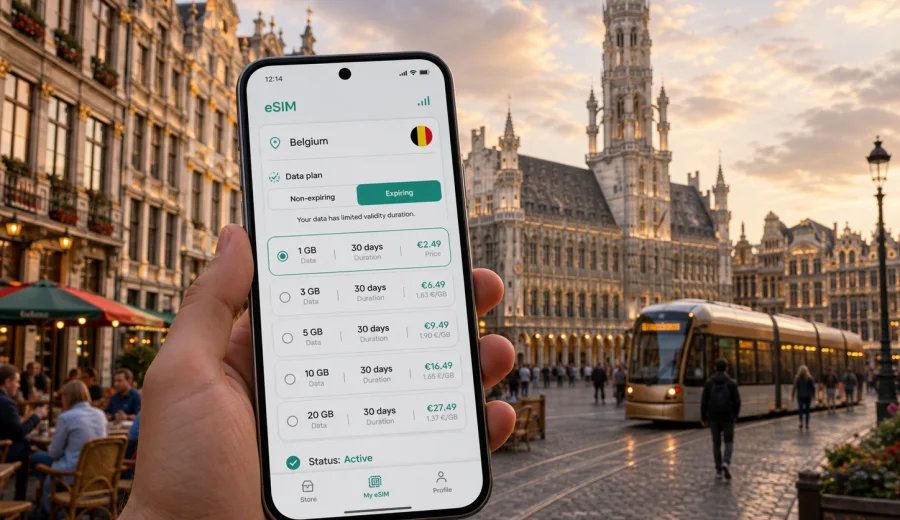
Brussels eSIM: mobile connection and internet for a smoother city trip
Brussels is compact, but it becomes a city where mobile internet matters. You may land at Brussels Airport, follow train signs into the center, switch between metro and tram, open a hotel booking, check a meeting address in the European Quarter, or plan an evening around Grand Place. In each moment, a data connection is more useful than a tourist brochure.
An eSIM can help you prepare mobile internet for Brussels without looking for a physical SIM card after arrival. It is especially practical if you want maps, transport apps, ride-hailing, messaging, email, reservations, and translation tools to work as soon as your compatible phone connects to a local mobile network. You still need to choose the right tariff, check the conditions, and make sure your device supports eSIM, but you can handle most of the preparation before the trip.
This guide focuses on Brussels, not Belgium in general. It covers arrival, city transport, business travel, hotel Wi-Fi gaps, weekend routes, stopovers, and side trips from Brussels. The goal is simple: help you use an eSIM for mobile connection and internet in Brussels with fewer surprises.
Why mobile internet matters in Brussels
Brussels is easy to explore when your phone is ready. The challenge is not distance; it is timing. Train platforms, tram connections, museum tickets, restaurant bookings, and meeting addresses often require quick checks. Public Wi-Fi exists, but it is not something you should rely on for every practical task.
Mobile internet is useful in Brussels for:
- finding the correct train from Brussels Airport to Brussels-Central, Brussels-North, Brussels-Midi, or the European Quarter;
- checking tram, metro, and bus routes when construction or delays change your route;
- opening digital hotel confirmations at reception;
- using maps in hilly areas around Mont des Arts, Sablon, Marolles, and Ixelles;
- coordinating with colleagues around Schuman, Luxembourg, and Rogier;
- translating menus, signs, and messages in French, Dutch, or English;
- confirming opening hours for museums, restaurants, galleries, and chocolate shops;
- using messaging apps instead of relying on standard voice calls or SMS.
An eSIM is not a guarantee that every indoor corner will have perfect signal. Local network conditions, building materials, device settings, and the selected tariff all matter. Still, having a prepared data option can reduce the need to search for Wi-Fi before you can solve basic travel tasks.
Arrival in Brussels: the first online moments
Most international visitors arrive through Brussels Airport in Zaventem, Brussels South Charleroi Airport, or by train at Brussels-Midi. Each arrival point has a different rhythm, and all of them are easier when your phone already has mobile data prepared.
At Brussels Airport, you may need to check train departures, compare taxi and rideshare options, message your hotel about late arrival, or follow walking directions inside the terminal. If your eSIM is installed in advance, you can usually switch mobile data to the eSIM profile after landing and continue with the route. Activation details depend on the selected tariff and device, so read the plan conditions before travel.
At Brussels-Midi, mobile data is useful for a different reason: the station is busy and connects international trains, metro lines, trams, local trains, and taxis. If you are arriving from Paris, Amsterdam, London, Cologne, or Luxembourg, a working data plan helps you move from rail arrival to city movement without solving connectivity first.
For Charleroi arrivals, the transfer into Brussels is longer. A data connection helps with shuttle times, route tracking, delay messages, and pickup coordination before you reach Grand Place.
Getting around the city with an eSIM
Brussels has metro, tram, bus, local train, taxi, bike, and walking routes. Many trips are simple once you know the line, but small changes can cause confusion. A prepared eSIM helps you check the route as the city changes around you.
Common Brussels movement scenarios:
| Scenario | Why data helps | Practical tip |
|---|---|---|
| Airport to hotel | Train platforms, taxi pickup points, hotel messages | Save the hotel address offline, then use live navigation for the last part |
| Grand Place to Atomium | Metro transfer and walking directions | Check the return route before evening crowds build |
| EU Quarter meetings | Calendar links, maps, email, security instructions | Keep enough data for attachments and video call backups |
| Ixelles or Saint-Gilles evenings | Trams, ride-hailing, restaurant bookings | Confirm the last route back before leaving the venue |
| Day trip from Brussels | Train times to Bruges, Ghent, Antwerp, or Leuven | Choose a plan that covers Belgium, not only a city label |
Walking is one of the best ways to see central Brussels, but it is not always linear. The route from Grand Place to the Royal Palace, Sablon, Marolles, and the Justice Palace includes slopes and side streets. Mobile maps help you decide whether to walk, use a tram, or take the metro.
If you plan to use mobile tickets, QR codes, or transport apps, keep battery use in mind. Navigation, camera, translation, and messaging can drain a phone faster than expected. A power bank is often as important as the eSIM itself on a full Brussels day.
How much data might you need for Brussels?
There is no single correct data amount for every Brussels trip. The best eSIM tariff depends on your length of stay, whether your hotel and workplace have reliable Wi-Fi, and how often you use maps, video, social media, calls over internet, and cloud files.
Use this simple planning frame:
| Trip style | Typical mobile data behavior | What to consider |
|---|---|---|
| Short stopover | Maps, messages, train updates, a few searches | A small short-validity plan may be enough |
| Weekend city break | Navigation, bookings, photos, restaurant searches, messaging | Choose enough data for two or three active days |
| Business trip | Email, documents, calendar, messaging, backup tethering | Allow extra data for work apps and hotspot use |
| Family trip | Multiple routes, tickets, translation, entertainment for children | Consider a larger allowance or separate device needs |
| Belgium route | Brussels plus Bruges, Ghent, Antwerp, Leuven, or Mechelen | Pick a Belgium or regional plan that matches the full route |
For basic use, maps and messaging are usually modest. Video, cloud backup, social media uploads, and laptop tethering use data much faster, so disable automatic cloud backup on mobile data unless you intentionally choose a larger plan.
Choosing an eSIM tariff for Brussels
For a Brussels city article, the relevant destination is Belgium. Even if most of your time is inside Brussels, your arrival airport, station transfers, business meetings, and day trips all sit inside the country context. When you compare tariffs, check that the destination, data volume, validity period, and activation rules fit the full trip.
Kaspersky eSIM Store is an app and website where you can choose, set up, and activate an eSIM with a suitable tariff for mobile internet during an international trip. Before you travel, you can prepare an eSIM plan for your Brussels trip and review the available Belgium options, including data amount and validity. The conditions depend on the selected tariff, so read them before payment and installation.
When comparing options, ask whether the plan covers your full route, whether you need data only for maps and messaging or also for work files and hotspot use, whether the validity period covers arrival and departure days, and whether your phone supports eSIM without carrier lock restrictions.
Installing and activating an eSIM for Brussels
The setup flow is usually simple, but it is worth doing carefully. You need a compatible phone, internet access for installation, and attention to which SIM profile is used for mobile data.
Basic steps:
1. Check that your smartphone supports eSIM and is not locked to a carrier.
2. Choose a tariff for Belgium or a relevant regional route.
3. Follow the installation instructions from the site or app.
4. Add the eSIM profile to your phone before departure or while connected to Wi-Fi after arrival.
5. Select the eSIM profile for mobile data when you are ready to use it.
6. Keep your primary SIM settings as needed for calls, banking messages, or personal number access.
If you need step-by-step setup details, use the Android setup guide or the iOS setup guide. The exact screens may differ by device model and operating system version, so follow the instructions shown on your phone.
Before choosing a tariff, check your device for eSIM support. This matters because eSIM availability can vary by phone model, region, carrier lock status, and device configuration. A quick check before purchase is easier than trying to solve a compatibility issue at the airport.
Brussels travel scenarios and eSIM use
Different trips create different internet needs. The same Brussels eSIM plan may feel generous on a quiet weekend and too small during a work-heavy week with laptop tethering.
For a leisure weekend, your main needs are maps, restaurant bookings, museum tickets, messages, and photo sharing. For a business trip, mobile data becomes a backup work tool for email, calendar updates, cloud documents, and occasional hotspot use. For a stopover, the value is quick access to live departures and maps rather than heavy data use. For a family trip, decide whether each device needs its own eSIM or whether one compatible phone with tethering is enough under the selected tariff conditions.
What to check before you rely on mobile data
An eSIM is a useful travel tool, but it still depends on settings and conditions. Check the basics while you still have time to fix them.
Pre-trip checklist:
- Your phone supports eSIM and is not carrier-locked.
- The selected tariff covers Belgium and the dates of your Brussels stay.
- You understand when the validity period starts.
- You know whether data roaming must be enabled for the eSIM profile.
- Your primary number remains available if you need banking codes or calls.
- You have saved the eSIM installation details in a place you can access offline.
- You have tested that the eSIM profile is installed before leaving home, if the instructions allow installation before travel.
- You have a charger or power bank for long city days.
Also check how your apps behave on mobile data. Cloud photo backup, automatic updates, streaming, and maps with satellite layers can use more data than expected. If your plan is limited, keep heavy tasks for trusted Wi-Fi and use mobile data for travel-critical tasks.
Day trips from Brussels
Brussels is a strong base for short trips. Many visitors use trains to visit Bruges, Ghent, Antwerp, Leuven, Mechelen, or Waterloo. A Belgium eSIM plan is practical because your mobile internet needs continue beyond the Brussels city boundary.
For day trips, data helps with station platforms, live departures, walking routes from the station, restaurant bookings, attraction tickets, and return planning. If your day trip crosses into another country, check whether your selected tariff covers that route or whether a regional option is more appropriate.
Common mistakes to avoid
The most common eSIM mistakes are simple and preventable. Avoid buying a plan before checking device compatibility, choosing too little data for a business trip with hotspot use, forgetting to switch mobile data to the eSIM profile, leaving cloud backup active on mobile data, or assuming that a travel eSIM includes a local phone number, voice calls, or SMS when the tariff does not say so.
FAQ: Brussels eSIM and mobile internet
Is an eSIM useful for a short Brussels trip?
Yes. It can be useful even for a short stay if you need maps, train updates, hotel confirmations, messaging, and digital tickets. For a stopover, choose data amount and validity period carefully.
Can I use the eSIM outside Brussels?
If your selected tariff covers Belgium, it can be relevant for Bruges, Ghent, Antwerp, Leuven, Mechelen, and other domestic routes. Check the destination and conditions before relying on it.
Does an eSIM replace my regular SIM?
Not necessarily. Many travelers keep their regular SIM for their home number and use the eSIM profile for mobile data abroad. Your phone settings determine which profile handles mobile data, calls, and messages.
Will I get a Belgian phone number?
Do not assume that a travel eSIM includes a local phone number, voice calls, or SMS. Many eSIM tariffs focus on mobile internet. Check the tariff details if calls or SMS are important for your trip.
Prepare mobile internet before your Brussels trip
Brussels rewards a phone that is ready before you step into the station, hotel lobby, tram stop, or meeting room. With a compatible device and a suitable tariff, an eSIM can help you manage navigation, bookings, messages, work tasks, and day trips without depending only on Wi-Fi.
Before you travel, compare the data amount, validity period, destination, and activation rules. Install the eSIM carefully, keep your primary SIM settings under control, and save key trip details offline. For a Brussels itinerary, the most practical choice is usually a Belgium tariff that covers the full city stay and possible trips beyond it.
Use Kaspersky eSIM Store to choose a mobile internet option for Belgium before your Brussels trip, then install and activate the eSIM on a compatible device when the selected tariff instructions say to do so.