
Travel connectivity guide
Bukavu eSIM: Mobile Internet for Your Trip
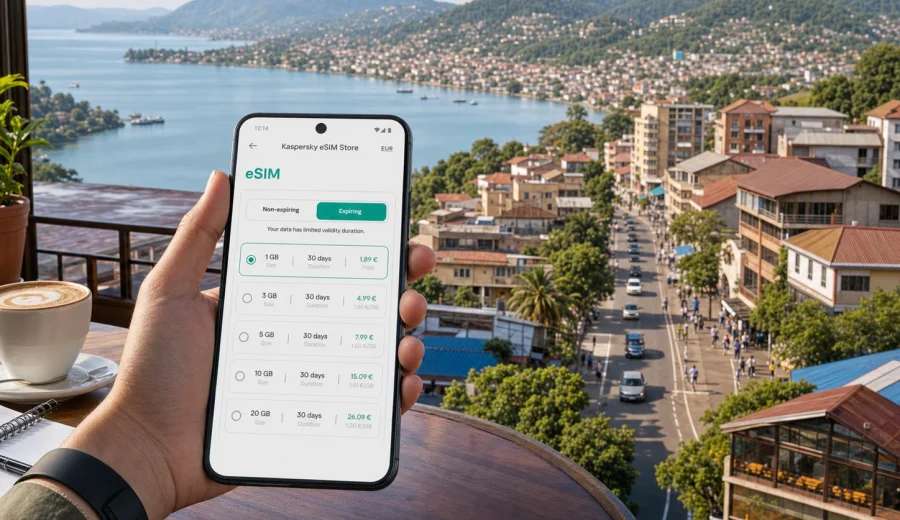
Bukavu eSIM Guide: Mobile Connection and Internet for Your Trip
Bukavu is a city where mobile internet can shape the whole rhythm of a trip. The city sits on the southern shore of Lake Kivu, close to the Ruzizi border area with Rwanda, and many visits include several moving parts: an airport transfer from Kavumu, a lakeside hotel, meetings in Ibanda or Muhumba, errands in Kadutu, a weekend plan near the water, or an onward route toward Goma, Idjwi, or the Rwandan side of the lake.
For this kind of journey, an eSIM is useful because it helps you prepare mobile data before the first taxi ride, hotel check-in, map search, or message to a local contact. It does not replace every travel habit, and it does not remove the need to plan carefully. But it can make your arrival calmer by giving you a practical way to get online without looking for a physical SIM card as soon as you reach the city.
This guide focuses on Bukavu itself: arrival points, movement around the city, lakefront areas, hotels, work trips, short stays, and day plans from the city. The goal is simple: help you understand how to prepare mobile connection and internet access for a trip where navigation, messaging, transport, and changing plans matter.
Why mobile internet matters in Bukavu
Bukavu is not a city where you want to depend only on hotel Wi-Fi or last-minute connectivity. Streets climb and curve around hills above the lake. Neighborhood names can be more useful than a simple street address. Routes may depend on traffic, local conditions, weather, and what your driver or host recommends on the day.
Mobile data is helpful for:
- confirming your arrival time with a hotel, office, host, or driver;
- checking a map before leaving the airport area or border area;
- sharing your live location with colleagues or family;
- using messaging apps for calls when regular voice service is not part of your data plan;
- keeping documents, bookings, and payment confirmations available;
- translating short messages or directions when needed;
- adjusting plans if a meeting moves to another district.
An eSIM is especially practical if your phone supports it and you prefer to set up data before travel. You can keep your main physical SIM card in the device, use the eSIM for mobile data abroad, and switch data lines in your phone settings when you arrive. Conditions depend on the selected tariff and local network availability, so check the details before purchase and avoid assuming that one plan will suit every route outside the city.
Arrival: airport, border, and first transfer
Many travelers reach Bukavu through a combination of air and road travel. Kavumu Airport serves the area north of the city, while some regional itineraries also involve crossing near Rwanda and continuing into Bukavu by road. The exact arrival route depends on your trip, but the connectivity needs are similar: you need to reach your contact, confirm transport, and understand where you are going before you start moving through the city.
Before arrival, save these offline:
- your hotel address and neighborhood;
- the name and phone number of your driver or host;
- the booking confirmation for your hotel or guesthouse;
- a copy of your travel documents;
- the address of your first meeting point;
- a simple offline map area for Bukavu and the roads you expect to use.
Mobile internet adds flexibility to that offline preparation. If your driver changes the meeting point, your hotel sends a gate instruction, or your host shares a new pin, you can respond quickly. After a long journey, the first 30 minutes in a new city often decide whether the rest of the day feels organized or rushed.
Choosing an eSIM data plan for Bukavu
The right data amount depends on how you use your phone. Bukavu trips can be light on data if you mainly message and check maps, or heavy on data if you work from a laptop hotspot, send field photos, join video calls, or upload documents from a hotel.
Use this simple planning table before choosing a tariff:
| Trip scenario in Bukavu | Typical mobile data use | What to check before choosing |
|---|---|---|
| Short stopover or one night | Light maps, messages, hotel contact | Small package, short validity, easy activation |
| Weekend by Lake Kivu | Maps, messaging, photos, restaurant searches | Enough data for navigation and media sharing |
| Business visit | Email, documents, calls through apps | Larger package, validity that covers the full trip |
| Field work from Bukavu | Maps, file uploads, messaging with teams | More data, hotspot rules, backup Wi-Fi plan |
| Route from Bukavu to another city | Navigation, updates, communication on the road | Country or regional coverage in the tariff details |
Do not choose by data size alone. Look at validity period, destination coverage, activation rules, and whether tethering is allowed under the selected tariff. If your trip includes work outside Bukavu, check that the chosen plan matches the country or region you will actually use.
City movement: districts, hills, and lakefront routes
Bukavu is compact on a map, but movement can feel slower than the distance suggests. The city is shaped by Lake Kivu, hills, peninsulas, and dense urban areas. A route from one hotel to another office may involve climbs, turns, traffic, and local navigation details that are easier to manage when you can message, check maps, and call through internet apps.
Common city references include Ibanda, Kadutu, Bagira, Muhumba, Nyawera, Panzi, and the lakeside areas that visitors often use for hotels, offices, or short breaks. You do not need to memorize every neighborhood before you arrive, but it helps to know the name of the district where you are staying. In Bukavu, the district name can be the quickest way to explain a destination.
Practical movement tips:
1. Save your hotel or guesthouse as a favorite in your map app before leaving the building.
2. Ask hosts to send a pin or nearby landmark, not only a street address.
3. Keep your phone charged before longer cross-city rides.
4. Confirm whether your meeting point is in the same district as the address you were given.
5. Use mobile data for messaging, but keep important contact numbers saved offline as well.
If you plan several meetings in one day, group them by area. A morning in Muhumba and an afternoon in Panzi may need more time between appointments than a visitor expects from the map distance. Mobile internet helps you adjust, but it cannot replace realistic scheduling.
Hotels, guesthouses, and Wi-Fi expectations
Bukavu has lakeside hotels, guesthouses, and work-oriented accommodation options. Many travelers still rely on hotel Wi-Fi for large uploads or evening calls, but it is better to treat Wi-Fi as a useful supplement rather than your only connection. Speeds and reliability can vary by property, room location, power situation, and time of day.
An eSIM can help in hotel scenarios such as:
- checking in when your booking confirmation is in email;
- contacting reception or a driver from the road;
- using a map to return after dinner or meetings;
- keeping messaging apps online if the hotel network is busy;
- using a short hotspot session when you need to send a file.
Before you travel, check whether your phone supports eSIM and whether it is unlocked for mobile use abroad. You can use the internal compatibility check before choosing a tariff: check your device. eSIM support can differ by device model and region of sale.
When to prepare your eSIM for Bukavu
Prepare the eSIM before departure if you want the calmest arrival. You can choose the destination, review the tariff conditions, install the eSIM profile on a compatible device, and keep the data line ready for use when you reach the Democratic Republic of the Congo. Some travelers prefer to activate mobile data only after arrival so the validity period is used for the trip itself. Follow the instructions for the selected tariff and your device.
This is the point in planning where it is useful to open Kaspersky eSIM Store and choose an eSIM tariff for your trip to Bukavu. The service helps you select, arrange, and activate an eSIM with a suitable data tariff for mobile internet in a foreign trip. Review the data amount, validity period, destination, price, and activation details before you confirm.
Keep your expectations precise. An eSIM gives mobile data according to the conditions of the selected tariff. It usually does not include a regular local phone number, standard voice calls, or SMS unless the tariff says otherwise. For calls and messages, plan to use internet-based apps.
How to install and activate an eSIM before the trip
Installation is usually easiest when you still have stable Wi-Fi at home, at the office, or in your hotel before moving around. After purchase, follow the instructions shown in your profile or email. The exact menu names can differ by phone model, but the overall flow is similar.
Basic preparation checklist:
1. Check that your phone supports eSIM and is not locked to one carrier.
2. Choose a tariff for the Democratic Republic of the Congo or the route you need.
3. Install the eSIM profile while you have a stable internet connection.
4. Name the line clearly, for example "Travel data".
5. Keep your usual SIM for calls if you need it.
6. Set the eSIM as the mobile data line when you are ready to use it.
7. Enable data roaming for the eSIM if the instructions for your device or tariff require it.
Use the official setup guides if you want step-by-step device help: Android installation instructions and iOS installation instructions. Read the relevant guide before departure if you have not installed an eSIM before.
Do not delete the eSIM profile after installation unless the instructions or support team tell you to do so. In many cases, an activated eSIM profile cannot simply be moved to another phone. Change devices before setting up the eSIM.
Practical data use in Bukavu
A city trip can consume data in small but constant ways. Maps refresh, messaging apps sync, photos upload, and laptops sometimes connect to a phone hotspot in the background. If you want your eSIM tariff to last for the whole visit, manage data deliberately.
Good habits for a Bukavu trip:
- download offline maps before arrival;
- turn off automatic cloud photo backup on mobile data;
- limit video streaming unless you have a large data package;
- use hotel Wi-Fi for system updates and big file transfers;
- check which apps are allowed to use mobile data in the background;
- monitor data use after the first day and adjust habits if needed.
For business travelers, one extra step is useful: test your essential apps before the first meeting. Open email, messaging, cloud storage, calendar, and the video-call app you expect to use. If something needs a password, authentication code, or device approval, solve it while you still have time.
Short stays and stopovers
A short stay in Bukavu can be busy: arrival, hotel transfer, one meeting, dinner near the lake, and departure the next morning. In this scenario, mobile data is less about heavy use and more about reducing friction.
For a short visit, prioritize:
- quick activation before or soon after arrival;
- enough data for maps and messaging;
- a validity period that does not greatly exceed the trip unless it still makes sense for your route;
- saved contact details for transport and accommodation;
- battery management, because navigation and messaging can drain a phone quickly.
If you are crossing borders as part of the same trip, check the tariff destination carefully. A plan for one country may not cover a nearby country unless the tariff conditions say so. Do not rely on the lake or border proximity as a sign that one mobile data plan covers every side of the route.
Longer stays and work trips
For a longer stay, your phone becomes part of your daily routine. You may use it for morning map checks, driver coordination, messages with colleagues, payments where available, family calls through apps, and evening planning. A larger data package may be more practical than trying to stretch a very small one across a week.
For work trips, build a simple connection plan:
| Need | Recommended preparation |
|---|---|
| Daily email and messaging | Choose a data package that covers every workday |
| Calls through apps | Use Wi-Fi when possible, keep mobile data as backup |
| Field photos or reports | Compress files or upload from Wi-Fi |
| Laptop hotspot | Confirm tethering rules and track data closely |
| Travel outside Bukavu | Check destination coverage before leaving the city |
If your organization has security or device rules, follow them. Kaspersky eSIM Store helps with the practical eSIM selection and activation flow, but your workplace may still have requirements for device management, approved apps, or remote access.
Routes from Bukavu
Bukavu is often part of a wider itinerary around Lake Kivu or eastern Democratic Republic of the Congo. Some trips include Goma, Idjwi Island, lakeside communities, field sites, or cross-border travel. These routes can change your data needs.
Before leaving the city, ask three questions:
1. Will the selected tariff cover the next destination?
2. Will you need navigation for a long transfer?
3. Will you have Wi-Fi at the next hotel or office?
If you are moving through areas where connectivity may vary, do not make your phone the only place where critical information lives. Keep addresses, meeting notes, emergency contacts, and travel documents available offline. Mobile internet is valuable, but travel planning should still include a backup.
eSIM versus local SIM card in Bukavu
Both options can work, depending on your trip and preferences. The practical difference is the setup experience.
| Option | Best for | Tradeoff |
|---|---|---|
| eSIM prepared before travel | Visitors who want data ready without finding a SIM shop first | Requires a compatible, unlocked device |
| Local physical SIM | Longer stays or travelers who specifically need a local mobile setup | Requires time, local purchase steps, and device SIM slot access |
| Standard roaming | Travelers who prefer using their home operator settings | Conditions and costs depend on the home operator |
| Hotel Wi-Fi only | Very light phone use in one location | Not enough for transport, maps, and city movement |
For many visitors, eSIM is attractive because it keeps the first day simpler. You can arrive, open a map, message your contact, and continue with the plan. For longer stays, you may still compare options after arrival, but an eSIM can cover the critical first phase of the trip.
Common mistakes to avoid
Avoid these planning errors before a Bukavu trip:
- buying a tariff without checking the destination and validity period;
- assuming your phone supports eSIM because it is recent;
- installing the eSIM only after you urgently need data;
- deleting the eSIM profile after setup;
- using mobile data for large automatic backups;
- relying on a hotel address without a district name or landmark;
- expecting a data-only eSIM to include ordinary calls and SMS.
The safest approach is simple: check compatibility, install early, save offline details, and keep data use under control. That gives you room to handle changes in transport, meetings, and city routes without turning connectivity into the main problem of the trip.
FAQ: eSIM and mobile internet in Bukavu
Is an eSIM useful for a trip to Bukavu?
Yes, if your device supports eSIM and you need mobile data for maps, messaging, hotel coordination, work apps, or transport. It is especially useful on arrival and during cross-city movement.
Does an eSIM give me a local phone number in the Democratic Republic of the Congo?
Usually no. In this context, eSIM tariffs are mainly for mobile internet. Ordinary voice calls and SMS are not included unless the selected tariff clearly says so. Use internet-based apps for calls and messages when appropriate.
Can I install the eSIM after arriving in Bukavu?
You can, but it is usually easier to install it before travel while you have stable Wi-Fi. If you wait until arrival, make sure you still have another way to get online for setup.
Should I use eSIM data for laptop work?
You can use a hotspot if your device and tariff conditions allow it, but laptop work can consume data quickly. Use Wi-Fi for large files when possible and keep the eSIM for essential mobility.
What should I check before buying?
Check device compatibility, destination coverage, data amount, validity period, activation rules, price, and whether the tariff fits your actual route. If your trip includes another country, check that separately.
Prepare mobile internet before you travel
Bukavu rewards travelers who plan the practical details. Know your arrival point, save your hotel and meeting locations, keep documents offline, and prepare mobile internet before the first transfer. With an eSIM on a compatible phone, you can reduce the time spent searching for connectivity and focus on moving through the city calmly.
Before your trip, open Kaspersky eSIM Store to prepare an eSIM tariff for the Democratic Republic of the Congo. Choose a data amount and validity period that match your stay in Bukavu, review the conditions, install the eSIM on a compatible device, and keep your travel line ready for the moments when maps, messages, and updates matter most.