Travel connectivity guide
Bukhara eSIM: Mobile Internet for Your Trip
Bukhara eSIM: Mobile Connection and Internet for Your Visit
Bukhara rewards unhurried wandering: a shaded courtyard can open onto a busy square, and a short walk may take you from a historic trading dome to a quiet lane. A reliable mobile data plan can make those transitions easier. You can check a map, confirm a hotel address, message a driver, translate a sign, or look up a train departure without planning every stop around Wi-Fi.
This guide focuses on the practical details of using mobile internet in Bukhara: arriving at the airport or railway station, moving between the historic centre and newer parts of town, choosing data for your own itinerary, and preparing an eSIM before travel. Coverage, speed and service quality depend on the local network, your exact location, the device and the plan.
Why mobile data is useful in Bukhara
Bukhara’s historic centre is a destination in its own right. UNESCO describes it as a Silk Roads city more than two thousand years old, with an urban fabric that preserves important features of medieval Central Asian town planning. Poi-Kalyan, the Ark, Lyabi-Hauz, the trading domes and the lanes between them are close enough to combine on foot, but the route you choose can change as you stop for a museum, meal or craft shop.
A map is useful for orientation, but it is only one reason to stay connected. You may need to contact accommodation about arrival time, arrange a pickup, read a booking confirmation, check a translation, or send a location pin when a street name is difficult to explain. On a day trip, data can also help you coordinate the return to Bukhara or check the latest transport information before leaving.
Arriving in Bukhara: airport, station and first transfer
Bukhara is served by Bukhara International Airport, and trains also connect the city with destinations elsewhere in Uzbekistan. Which arrival point you use depends on your route and current schedule. Flight and rail timetables change, so confirm your own journey close to departure rather than relying on a remembered timetable or an old screenshot.
After landing, the first tasks are often simple: identify the pickup point, reach your accommodation, and let someone know that you have arrived. If you expect to use a ride-hailing or local transport app, install it and sign in before travelling; check whether it accepts your payment method and whether it requires an SMS verification code. An eSIM data plan does not necessarily include a local telephone number, voice calls or SMS. Keep access to the number used for bookings and account verification if you will need it.
At the railway station, check the exact station name shown on your ticket and allow time for the transfer into town. “Bukhara” may appear as the destination while the ticket identifies a specific station, so use the booking details rather than assuming that every service arrives at the same place. Save the station and hotel addresses in both text and map form. If your phone battery is low, a saved address is easier to show than a route that depends on a live connection.
A calm arrival checklist
- Before leaving the airport or station, confirm the accommodation address and check-in instructions.
- Share your expected arrival time with the host or reception.
- Choose transport after checking the pickup location and payment terms.
- Keep your passport, ticket and payment card accessible without leaving them loose in an open bag.
- If mobile data does not connect immediately, use the saved address and contact details while you troubleshoot.
Do not assume that an airport, station, café or hotel Wi-Fi network will be available or suitable when you need it. A pre-arranged data option gives you another way to reach directions and messages, while offline copies remain useful if reception is weak or your battery runs down.
Getting around: the old town and the wider city
The historic core is best approached as a walkable cluster rather than a sequence of isolated pins. Poi-Kalyan, the Ark, Lyabi-Hauz and the covered trading domes provide useful reference points, while smaller lanes and courtyards reward slower exploration. Maps can help you return to a landmark, but GPS positioning may drift among narrow streets or dense buildings. Confirm the final few metres visually, and ask your accommodation for a locally familiar description when a map pin seems imprecise.
For longer journeys, such as the airport, railway station, a hotel outside the old centre or a suburban attraction, use a car or another suitable local transport option. Agree the destination clearly before starting. Names may be transliterated in different ways, so showing the address in writing can prevent confusion. If you are coordinating a pickup, send a location pin and a nearby recognizable landmark, then confirm that both parties mean the same meeting point.
A live route is helpful, but avoid treating map estimates as a promise. Road conditions, waiting time, pickup rules and walking access can differ from what an app predicts. Leave a margin if you have a timed train, guided visit or meeting.
Choosing an eSIM or another way to connect
Visitors have several possible approaches: keep their home SIM and use its roaming service, buy a local SIM or eSIM from a local mobile operator, or prepare a travel eSIM for mobile data. The suitable choice depends on your phone, trip length, data habits, need for calls and SMS, and the terms available for your destination. Check the exact plan details before paying; prices, validity periods, data allowances and network arrangements can change.
A travel eSIM is a digital SIM profile installed on a compatible, unlocked device. It can be convenient if you want to set up data before arrival and avoid changing the physical SIM in your phone. It does not automatically replace your home number or provide conventional calls and texts. Keep your primary line active if you need bank codes or calls, and review the device settings so that mobile data uses the intended line.
Local operator eSIM is a separate option. For example, Ucell’s current public information describes eSIM activation through its app and at its offices or dealer locations. The terms, eligibility, identification process and available plans are set by the operator and may differ from the travel eSIM you choose online. Check directly with the local operator if you need a local number, local voice service or a specific domestic package.
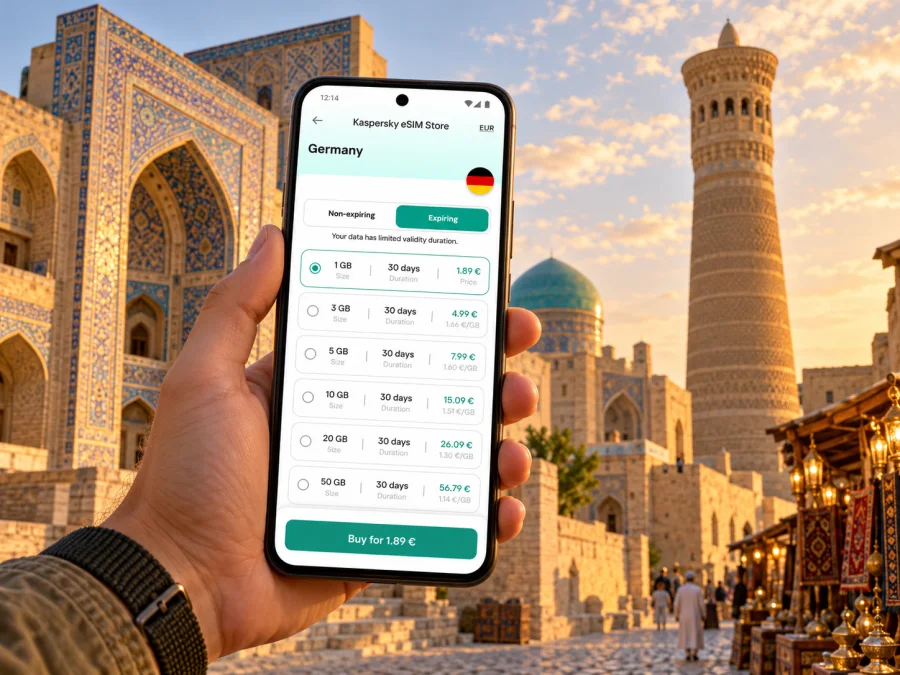
Kaspersky eSIM Store is an app and website where you can choose, arrange and activate an eSIM with a suitable plan for mobile internet on an international trip. It does not operate a mobile network. For an Uzbekistan trip, review the currently listed destination and plan conditions before purchase; a country landing page is a starting point for checking available options, not a promise of a particular local tariff or coverage in every Bukhara street. You can review current eSIM options for Uzbekistan and compare the stated data allowance and validity with your itinerary.
Check your phone before you travel
Support for eSIM depends on the exact device model and regional variant. Two phones with the same product family name may have different capabilities depending on where they were sold. The phone also needs to be carrier-unlocked if it is restricted to a particular mobile provider. Confirm the model number and the manufacturer’s guidance, and check the settings menu for an option to add an eSIM. For a quick first check, see whether your device supports eSIM, then verify the exact regional variant before purchase.
Also consider how many eSIM profiles your phone can store and which profiles can be active at once. These details vary by device. Keep access to stable Wi-Fi during installation, because some devices need an internet connection to download the profile. Do not remove a working profile or reset your phone as a troubleshooting shortcut unless the plan instructions specifically advise it; a QR code may not be reusable after installation.
Before you buy
- Confirm that the exact phone or tablet model supports eSIM in its sales region.
- Check that the device is not carrier-locked.
- Confirm that the plan covers Uzbekistan and that its data and validity fit your dates.
- Read when validity starts and whether activation is automatic or manual.
- Check whether hotspot use, top-ups and tethering are allowed.
- Keep a copy of the order details and installation instructions somewhere you can access.
Install and activate without rushing
If you buy a travel eSIM before departure, you can usually install it at home while you have dependable Wi-Fi, then leave the line switched off until you are ready to use it. Follow the plan’s instructions carefully: installation and activation are not always the same step, and the moment validity starts depends on the particular plan. If the instructions say to activate only after arrival, follow that timing.
- Connect to reliable Wi-Fi and open the eSIM installation instructions for your device.
- Add the eSIM profile using the method provided, such as a QR code or the app’s guided setup.
- Label the new line clearly, for example “Uzbekistan data,” so it is easy to recognize.
- Keep your usual number available for calls or verification if you need it.
- When ready to use the travel plan, select it for mobile data and follow the plan’s activation steps.
- If instructed, enable data roaming for that eSIM line; do not change roaming settings on other lines without checking your home operator’s charges.
- Test a simple webpage or message, then check that the phone is using the intended line.
For device-specific steps, use the Android eSIM installation guide or the iOS eSIM installation guide. Menu names can differ between software versions. If the profile fails to install, check the instructions and connection first, and contact the relevant service’s support before deleting the profile.
Short stays, work trips and onward journeys
For a one- or two-day visit, the easiest plan is often the one that needs the least attention: save maps, confirm transport and choose a data allowance that matches your essential tasks. If you are in Bukhara only between trains or flights, prioritize the station or airport transfer, the location of your luggage storage or accommodation, and the return journey. Leave time for delays and do not make a tight connection depend on continuous mobile coverage.
For a longer stay, consider how often you will leave the old town, whether you expect to work online, and whether you need a local number. A local operator plan may be a better fit when domestic voice service or a local number matters. A travel eSIM can be suitable for data when its terms match your destination and device. Some travellers use both: the home SIM remains available for calls and codes, while the eSIM is selected for data. Check dual-SIM behaviour on your own phone and review roaming costs before departure.
Bukhara can also be part of a multi-city itinerary. Current official tourism information describes rail links connecting Bukhara with Khiva and Tashkent, with services and timetables subject to change. If your route continues elsewhere in Uzbekistan, check whether your chosen data plan applies across the whole country and whether any regional or multi-country plan is relevant. Confirm the actual train, departure time and station from the railway’s current ticket information.
A compact daily checklist
- Phone charged; power bank ready if you will be out for hours.
- Hotel address, ticket and emergency contact saved offline.
- Map downloaded for the old town and any planned stop outside it.
- Correct SIM selected for mobile data; data roaming set only as required.
- Data allowance checked before a call, upload or hotspot session.
- Return transport plan saved before leaving the hotel.
Frequently asked questions
Is eSIM available for a trip to Bukhara?
Travel eSIM options depend on the destination plans currently listed by the service and the device you use. Uzbekistan-based mobile operators also offer their own eSIM services under their own conditions. Check the provider’s current information for country coverage, eligibility and activation before buying.
Will an eSIM work on every phone?
No. eSIM support varies by model and regional version, and a carrier lock can prevent activation. Check the exact model and unlock status before paying. Do not rely on a general device-family name alone.
What if my phone shows signal but apps cannot connect?
Check which line is selected for mobile data, confirm the plan is active and within its validity period, and review any required roaming setting for that eSIM. Then test again and contact the service provider if the issue continues. Save essential details offline in case troubleshooting takes time.
Make the connection part of your travel plan
Bukhara is easier to explore when you can move between the historic centre, your accommodation and the transport hubs without having to find Wi-Fi for every small task. Choose a connection method that fits your phone and itinerary, keep tickets and addresses offline, and leave room for local conditions to change.
Before departure, confirm your device’s eSIM support, review the destination and plan terms, and install the profile according to its instructions. Kaspersky eSIM Store helps you choose, arrange and activate an eSIM plan for mobile internet on an international trip. Check the current Uzbekistan options and choose a plan for your Bukhara visit, then save the setup steps and key travel details before you leave.


