Travel connectivity guide
Busan eSIM: Mobile Internet and City Travel Guide
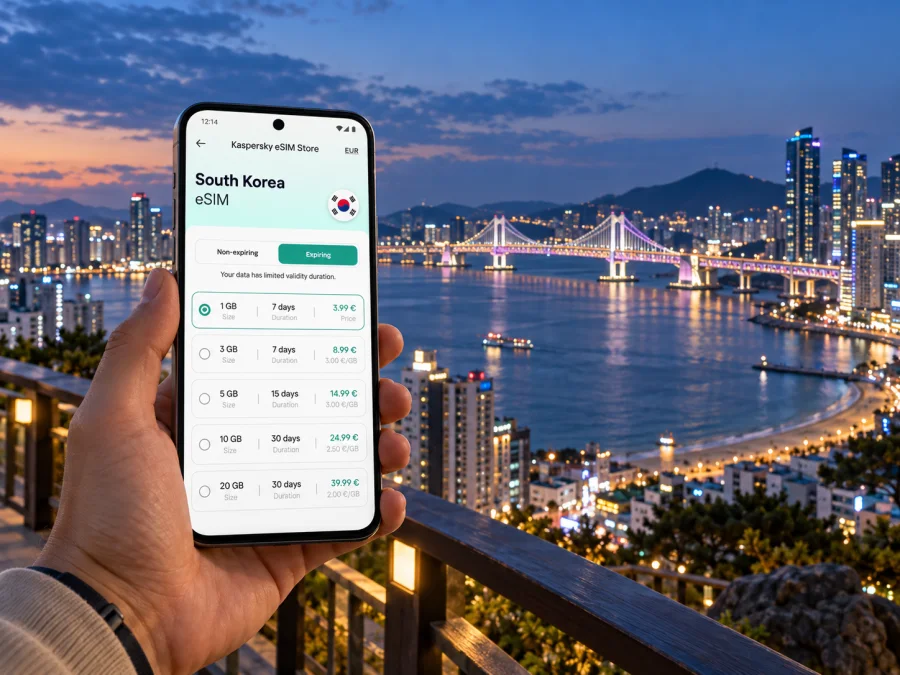
Busan eSIM for mobile connection and internet: a practical city guide
Busan is a coastal city of distinct neighbourhoods: a day might begin near Busan Station, continue through the markets around Nampo, and end beside the water in Gwangalli or Haeundae. For a visitor, getting between those places is part of the trip. A mobile connection helps you check directions, confirm a hotel address, follow a metro route and message your host when plans shift.
An eSIM can make mobile internet easier to prepare for South Korea before departure. It is a digital SIM profile installed on a compatible, unlocked phone, so you do not need to handle a separate plastic SIM for the data plan. The useful choice depends on your stay: which districts you will visit, how long you will be in Busan, and whether the city is one stop on a wider South Korea itinerary.
This guide focuses on using mobile data around Busan: arriving through Gimhae International Airport, choosing a base, moving between the coast and central districts, and planning a short stopover or onward journey.
Before you arrive: make the first connection useful
The first few hours are when small pieces of information matter most. Save your accommodation address in both English and Korean if you have it, keep the booking confirmation available offline, and note the nearest station or landmark. A map can help you understand whether a hotel described as “near the beach” is close to the place you actually want to reach.
At Gimhae International Airport, public transport includes the Busan–Gimhae light rail. The airport’s transport information lists connections toward Sasang and Daejeo, where travellers can transfer to Busan Metro lines. Buses and taxis are also options; routes and service details can change, so check the airport’s current information and your arrival time before choosing. Mobile data is useful for comparing the route to your actual destination instead of assuming that every journey starts from the city centre.
A simple arrival sequence:
- Check the airport terminal and your onward transport before landing.
- Confirm the accommodation pin and the nearest entrance or station.
- Compare public transport with a taxi if you have bulky luggage, arrive late, or need to reach a less central address.
- Keep the destination visible on your phone for the final walk; station exits can lead to different sides of a large road or block.
- Once checked in, save the route back to the airport and the time you need to leave.
If your phone supports dual SIM, you may be able to keep your usual number available for calls or messages while using the eSIM for data. The exact options depend on your device and existing SIM. Before travel, check that the handset is unlocked, supports eSIM, and can use the settings required by the selected tariff.
Busan is a city of separate travel zones
Busan’s shape matters more than a simple list of attractions. The coastline stretches across the east of the city, while central and western neighbourhoods hold markets, stations and hillside streets. A route that looks short on a small map can involve a transfer, a walk, or a change in elevation. Check the full trip from door to door, not just the distance between two place names.
| Area | Useful as a base for | What to check on the map |
|---|---|---|
| Seomyeon | A central stay with connections in several directions, shopping and dining nearby | The walk from your accommodation to the station and which exit suits your destination |
| Nampo and Jagalchi | Markets, harbour-side walks and central-western sights | Whether your hotel is uphill from the main street and how you will return after an evening out |
| Busan Station | Rail arrivals, departures and a practical overnight stop | The address on the correct side of the station and the route with luggage |
| Gwangalli | A coastal stay with the beach and views of Gwangan Bridge | The distance from your room to the waterfront and the best route back at night |
| Haeundae | Beach time, eastern Busan and nearby visitor attractions | How far your accommodation is from the beach, a metro station and your next stop |
| Yeongdo | A quieter-feeling island district and harbour views | Bus connections, walking gradients and the return journey after sightseeing |
These are orientation points rather than promises about travel time or convenience. A “central” hotel may still be a long walk from the station, and two locations in Haeundae can have different onward routes. Use the exact property pin, check the walking segment, and allow extra time when you have luggage or a fixed appointment.
A live map is especially valuable when you are changing between transport modes. It can show whether you should walk to another entrance, wait for a different bus, or revise the route after a delay. In Busan, keep the destination name and its Korean spelling handy where possible; this helps when asking for directions or checking a place pin against a sign.
Choosing where to stay around your itinerary
Choose accommodation around the pattern of your days rather than the most famous neighbourhood alone. If you arrive by train and have early rail departures, staying near Busan Station may reduce transfers on those days. If you plan a mix of city errands and evening dining, compare Seomyeon with the locations you will visit most. For a beach-focused trip, decide whether you prefer Gwangalli or Haeundae, then check the route from the actual hotel to the shoreline and metro.
Business travellers can use the same method. Search the conference venue, client office or exhibition site first, then compare hotels by the morning route, not only by their distance from a station. Save the building name, street address and meeting room information before leaving the hotel. If a colleague is meeting you, send a specific entrance or map pin rather than a broad district name.
Staying online while moving between districts
Busan sightseeing often alternates between a planned route and spontaneous choices: following a lane of shops, stopping at a viewpoint, changing dinner plans, or taking a different route when the weather changes. Mobile data supports the transitions. You can check the next station, share a revised meeting point, translate a short message, or look up the opening information for a place before crossing town.
For a week with several districts, think about the activities that consume data. Turn-by-turn maps, photo uploads, video calls and streaming use more than occasional text messages. Download offline map areas and important tickets or confirmations before leaving Wi-Fi, and use mobile data for updates and route changes. If you expect to share many photos or use your phone as a hotspot, allow for that when comparing data allowances.
The best tariff is the one whose destination, validity period and data amount match your actual journey. Check whether it applies in South Korea, when its validity begins, and what happens when the included data is used. If Busan is followed by Seoul, Jeju or another country, read the destination terms for the complete route rather than choosing solely for the first stop.
You can compare eSIM options for a trip to South Korea and review each tariff’s stated data allowance and validity before deciding. Kaspersky eSIM Store is an app and website that helps travellers choose, arrange and activate an eSIM with a suitable tariff for mobile internet abroad. The service does not replace the need to check the selected tariff’s own terms.
A practical setup plan for Busan
Set up the essentials while you still have a reliable internet connection. That gives you time to read the tariff details, complete installation steps and find the right device settings without balancing bags at the airport.
Before the trip
- Check your phone. Confirm that the exact model and regional version support eSIM and that the device is not carrier-locked. Use the device compatibility check if you need to verify support.
- Match the destination. Choose a tariff whose coverage terms include South Korea and whose validity suits the dates when you need data.
- Estimate use. Consider maps, messaging, work calls, uploads and hotspot use. Choose an allowance based on those needs, not on an assumption that every traveller uses the same amount.
- Read the activation conditions. Check when the validity period starts and whether the instructions say to install before departure or at a particular time.
- Install carefully. Follow the steps for Android or iOS according to your phone. Avoid deleting an installed eSIM profile unless the support instructions tell you to do so.
- Prepare offline backups. Save hotel details, key addresses, tickets and the route from the airport somewhere accessible without a data connection.
After landing
Open the phone’s mobile settings and check that the travel eSIM is selected for mobile data. Follow the tariff instructions for data roaming or any other required setting; menus vary by phone and operating-system version. Keep your primary line’s roaming settings in mind if you want to avoid using its data allowance. If the eSIM does not connect, check the selected data line, the installation status and the instructions for the tariff before changing multiple settings at random.
An eSIM data plan is not automatically a replacement for a regular phone number. Unless the individual tariff says otherwise, plan around mobile data rather than standard voice calls or SMS. Internet-based messaging and calling apps can work over data, but you will need the relevant app and account access.
Short stopover: choose a compact plan
For a short stop, choose one core area and a nearby activity rather than crossing the city several times. From Nampo, keep the outing around market streets and the waterfront; from Haeundae, focus on the eastern coast. Opening hours, weather and personal pace will shape what fits.
For a stopover that includes an airport transfer, make the outbound leg the anchor. Check how long it may take to reach your chosen area, how much time you need at the airport, and which transport options are running at your departure hour. Keep your flight details and terminal information offline. A plan that leaves no allowance for a missed connection or a slow transfer is fragile, even if the map suggests it is possible.
Work trips and meetings
For a work visit, connectivity is useful before the first meeting: it can help you locate an office, message a host if your arrival changes, and check the next appointment location. Put the venue address in your calendar notes, along with a Korean-language version if supplied by the host. If a site has multiple towers or entrances, request the building and reception details in advance.
Day trips from Busan
Busan can also be a base for travel elsewhere in South Korea. Intercity rail and bus journeys are possible, but the right departure point and schedule depend on the destination. Check the current station, terminal, booking and boarding details for your specific trip. The city’s mobile data remains useful for locating the correct entrance, checking a platform or bay, and updating a companion if a departure changes.
Before leaving Busan, confirm that the eSIM tariff’s destination terms still fit the rest of your itinerary. A plan selected for South Korea may suit a domestic route according to its conditions; an onward international leg requires checking the next destination separately. Keep the confirmation and tariff validity information available offline so you can refer to them while travelling.
Common questions about eSIM and Busan
Does a Busan city eSIM have to be a separate city plan?
Usually, the relevant choice is based on the tariff’s stated destination or region, not a special Busan-only label. Read the conditions and confirm that South Korea is included. If your route continues elsewhere, check the terms for each destination.
Can I install the eSIM before travelling?
That depends on the selected tariff’s instructions and validity rules. Read when the plan becomes active and follow the relevant Android or iOS installation steps. If you install before departure, keep the profile on your phone and follow the instructions for when to select it for data.
Will an eSIM give me a local phone number?
A data-focused eSIM tariff generally provides mobile data rather than a standard local number. Check the individual tariff details if voice calls or SMS are important. Internet calling and messaging apps can use a data connection, subject to their own account requirements.
What should I do if maps stop updating?
Check that mobile data is assigned to the travel eSIM, that the eSIM is enabled, and that any settings required by its instructions are in place. Switch to a saved offline map or address while you troubleshoot. Avoid deleting the eSIM profile unless the relevant support guidance tells you to.
Get ready to explore Busan
Save the addresses that matter, check routes around your hotel and leave room for changes in timing. Choose an eSIM tariff according to your South Korea itinerary, data allowance and validity conditions.
When you are ready, choose an eSIM tariff for your South Korea trip in Kaspersky eSIM Store, and follow the tariff instructions to install and activate it for your journey.


