
Travel connectivity guide
Cairns eSIM guide for mobile internet
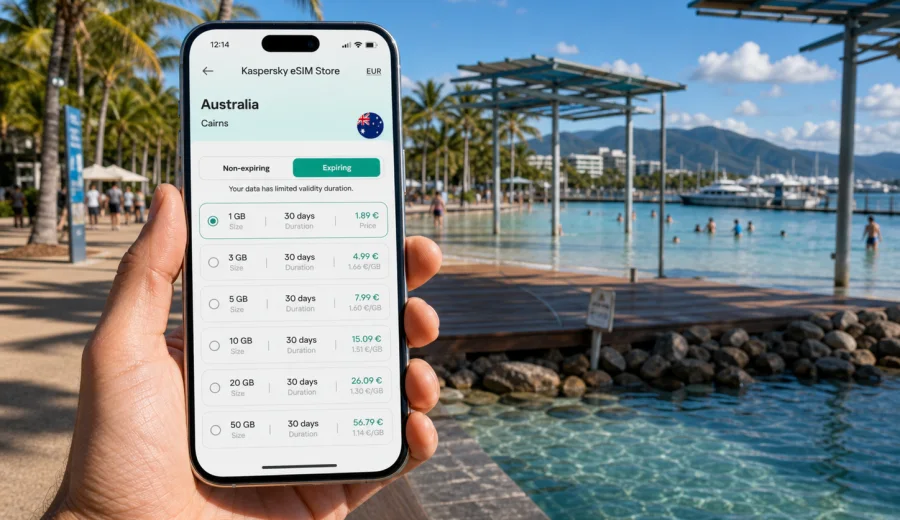
Cairns eSIM: mobile connection and internet for your trip
Cairns is a compact city with a large travel footprint. You may land at Cairns Airport in the morning, check in near the Esplanade, board a reef boat before sunrise the next day, and then drive toward Kuranda, Palm Cove, Port Douglas, or the Atherton Tablelands. In each part of that trip, mobile internet has a practical role: maps, rides, weather alerts, ferry confirmations, hotel messages, restaurant bookings, digital tickets, and quick calls through messenger apps.
An eSIM is useful in Cairns because many travel decisions happen while you are moving. You may need to compare reef tour meeting points, confirm a shuttle, check weather, or message a host while standing outside an apartment block. With a prepared eSIM tariff, you can start using mobile data on a compatible phone without looking for a physical SIM card after arrival.
This guide focuses on Cairns as a city, not Australia in general. It explains where mobile connection matters, how to estimate data, what to check before buying, and how Kaspersky eSIM Store can help you choose, set up, and activate an eSIM tariff.
Why mobile internet matters in Cairns
Cairns feels easy to navigate, but travel days are often busy. The city centre, Esplanade, marina, airport, and hotel zones are close to one another, yet many plans depend on timing. Reef boats leave early. Rain can change a walking route. A rainforest shuttle may have a narrow pickup window. Mobile data helps keep these details under control.
Common Cairns situations where mobile internet helps:
- checking the exact pickup point for reef, rainforest, or airport transfers;
- using maps between Cairns Airport, the CBD, the Esplanade, and the marina;
- messaging hotels, serviced apartments, tour desks, and hosts;
- opening booking confirmations and QR codes;
- checking weather, wind, and rain updates before boat or outdoor trips;
- comparing transport options late in the evening;
- using messenger calls when your eSIM tariff does not include a regular phone number;
- managing work email or video calls during a business stop in Far North Queensland.
Public Wi-Fi can be helpful in hotels, cafes, and some tour offices, but it does not cover the moments between them. Cairns is a place where you often move between accommodation, docks, buses, beaches, and day-trip departure points. Having mobile internet on your own device reduces the need to search for a network every time your plan changes.
Cairns arrival: airport, taxi, shuttle, and first route
Cairns Airport is close to the city, but the first hour still matters. After landing, you may need to contact a driver, check a hotel message, find a shuttle desk, or confirm whether your room is ready. If your eSIM is installed before travel, you can activate mobile data after arrival and handle these tasks before leaving the terminal.
For most visitors, the first route is simple: airport to Cairns CBD, Esplanade, marina area, North Cairns, or a hotel along the coast. Mobile maps are still useful because hotel names can be similar and some tour pickups use nearby landmarks rather than the main lobby.
Before you fly to Cairns, prepare these details offline as a backup:
- hotel address and check-in instructions;
- first transfer confirmation;
- reef or rainforest tour booking number;
- passport and travel insurance copies stored securely;
- a saved map of the central area;
- your eSIM installation instructions and QR code if provided.
Offline preparation is a safety net, not a replacement for mobile data. The practical setup is saved documents plus an eSIM ready for live updates.
Where you will use data around the city
Cairns is walkable in the centre, but visitors rarely stay in only one place. The Esplanade, Lagoon, marina, Rusty's Markets, conference venues, shopping streets, and hotel districts create short but frequent movements. Mobile internet helps at decision points: where to go, when to leave, who to contact, and which booking to show.
| Cairns area | Typical task | Why mobile data helps |
|---|---|---|
| Cairns Airport | Transfer, hotel messages, maps | You can get online before leaving the terminal |
| Esplanade and marina | Walking routes, tour check-in, dining | Plans often change with weather or group timing |
| CBD and markets | Payments, maps, bookings | Short stops are easier when your phone stays online |
| Palm Cove or Port Douglas routes | Maps, fuel stops, messages | Data is useful once you leave the centre |
Reef trips and boat days: plan data before you board
Many Cairns visitors take a Great Barrier Reef day trip. Mobile internet is most useful before boarding and after returning: schedule updates, terminal location, group messages, transport after the boat, and weather checks. On the water, connectivity can vary, so download or screenshot the booking confirmation, meeting point, boarding time, return time, and any required forms before you leave the hotel.
If you plan to upload reef photos and videos, wait for trusted hotel Wi-Fi where possible. Messages and maps use little data; automatic cloud backup can use a lot.
Data estimate for a Cairns itinerary
The right data amount depends on how you travel. A short stopover focused on maps and messages may need much less than a week with remote work, social media, and video calls. Choose your eSIM tariff by looking at your actual Cairns schedule, not only the number of travel days.
| Trip style | Typical length | Practical data approach |
|---|---|---|
| Short stopover | 1-2 days | Light package for maps, messages, transport, and bookings |
| Reef weekend | 3-4 days | Moderate package for navigation, tour updates, photos, and dining plans |
| Cairns plus day trips | 5-7 days | Larger package if you use maps often outside the city |
| Business visit | 2-5 days | Choose enough data for email, calls, documents, and hotspot use if allowed |
| Long tropical route | 8+ days | Consider a tariff with more data or a top-up option if available |
Useful rule of thumb: maps, messages, email, and booking apps are usually light. Video streaming, cloud photo backup, large app updates, hotspot use, and long video calls are heavy. If your trip includes work or frequent uploads, choose more data than you would for a relaxed holiday.
Device compatibility comes first
Before you choose any eSIM tariff, check that your smartphone or tablet supports eSIM and is not locked in a way that prevents another mobile profile from being used. This is especially important if your phone was bought through a mobile carrier or is an older model.
Check your device before purchase, then confirm these points:
- your device supports eSIM;
- your device is not restricted to one carrier;
- your operating system is updated enough for eSIM setup;
- you have a stable internet connection during installation;
- you understand whether your primary SIM should stay active for calls or SMS;
- you know which SIM will be used for mobile data after activation.
Many travellers keep their home SIM active for bank messages or incoming calls and use the eSIM for mobile data. Review roaming costs on your home SIM before travel, especially if it remains enabled for calls or SMS.
Choosing an eSIM tariff for Cairns
When you compare eSIM tariff options, look at four things: destination, data volume, validity period, and activation rules. Cairns is in Australia, so the country destination should match Australia unless you are choosing a regional tariff for a wider route. If your trip continues to another country, compare whether one regional option or separate country tariffs make more sense.
Kaspersky eSIM Store is an app and website where you can quickly choose, set up, and activate an eSIM with a suitable tariff for mobile internet in an overseas trip. It helps you review the destination, traffic amount, validity period, and price before you decide.
For a Cairns trip, match the tariff to the itinerary:
- city break: maps, messaging, dining, local transport, light browsing;
- reef and rainforest trip: booking updates, maps, weather, group messaging, photo sharing;
- business stop: email, calendar, documents, messenger calls, possible hotspot use;
- road route: navigation, fuel stops, accommodation messages, backup data outside Wi-Fi zones.
If you want to prepare before departure, you can choose an eSIM tariff for travel in Australia and keep the setup ready for your Cairns arrival. Install it while you have a stable connection, then activate mobile data according to the instructions and the conditions of the selected tariff.
Installation: do it before the busy part of the trip
The calmest time to install an eSIM is before you are standing at the airport exit or searching for a tour desk. You need internet access to complete installation, and you should not delete an eSIM profile unless you are sure it can be reinstalled under the tariff conditions.
General setup flow:
1. Check that your device supports eSIM and is not locked.
2. Choose the Australia destination and a suitable data amount.
3. Complete the order in Kaspersky eSIM Store.
4. Install the eSIM using the on-screen flow or QR code.
5. Name the eSIM clearly, for example "Australia data".
6. Set the eSIM as the mobile data line when you are ready to use it.
7. Turn on data roaming for the eSIM if the installation instructions require it.
8. Keep your primary SIM settings under control to avoid unwanted roaming charges.
For detailed setup steps, use the Android installation guide or the iOS installation guide. The exact screens may differ by device model and operating system version, so follow the instructions shown for your phone.
Local movement: walking, rides, buses, and hotel transfers
Cairns is practical on foot in the central area, especially around the Esplanade and marina. Mobile maps help with shaded routes, restaurant searches, and estimated walking time. If you stay outside the centre, data becomes more important for rides, taxis, shuttle messages, and late arrivals. Download a backup map, keep the hotel address saved, and check whether tour transfers use the lobby, street entrance, or a nearby pickup point.
Hotels, apartments, and Wi-Fi gaps
Accommodation Wi-Fi is useful, but it is not always enough. Some hotels have strong lobby Wi-Fi and weaker room Wi-Fi, and apartments may send check-in instructions through a booking app. An eSIM can help you receive a door code, confirm a tour pickup, open a map away from reception, or use messenger calls if the room network drops. If you need hotspot use for work, check whether the selected tariff allows tethering.
Day trips from Cairns
Cairns is a base for routes beyond the city: Kuranda, Palm Cove, Port Douglas, waterfalls, rainforest areas, and inland viewpoints. Mobile coverage and speeds can vary outside dense city zones, but a prepared eSIM is useful for navigation, messages, fuel stops, accommodation updates, and route checks where service is available.
Before leaving the city, download maps, save the return pickup point, screenshot tickets, check weather, charge your phone, and pause cloud backups until you return to Wi-Fi.
How to keep data use predictable
A prepaid eSIM tariff gives you a clear data allowance and validity period. These settings help you control how quickly it is used:
- turn off system and app updates on mobile data;
- restrict photo and video backup to Wi-Fi;
- download maps and entertainment before travel;
- lower video quality if you stream;
- use trusted hotel Wi-Fi for large uploads;
- monitor data use in your phone settings;
- check which SIM is selected for mobile data.
The most common surprise is background activity: photo sync, app updates, file backups, and autoplay video. Set these before departure.
Quick scenarios for Cairns travellers
- Weekend visitor: plan for maps, messages, reef updates, weather, and light photo sharing.
- Family or solo trip: keep confirmations offline and use mobile internet for navigation, check-ins, and messenger contact.
- Remote worker or road-route traveller: choose more data, confirm tethering rules, download maps, and use live updates where service is available.
FAQ: eSIM and mobile internet in Cairns
Is an eSIM useful if my hotel has Wi-Fi?
Yes. Airport arrival, marina check-in, transfers, maps, and day trips all happen away from the hotel network.
Does an eSIM include a phone number for calls and SMS?
Usually, travel eSIM tariffs focus on mobile data. Voice calls and SMS are not included unless the selected tariff says otherwise.
Can I use an eSIM for a reef trip?
It is useful before departure and after return. Connectivity on the water can vary, so save essential information offline.
How much data do I need for Cairns?
Light users may need only maps, messages, and bookings. Photo uploads, hotspot use, streaming, and remote work need more data.
Final preparation before you travel
A good Cairns mobile setup is simple: confirm your phone supports eSIM, choose a tariff for Australia, install it before the busy part of the trip, and control which line uses mobile data. Save essential tickets offline and turn off background data drains.
Kaspersky eSIM Store helps you prepare mobile internet for the trip through an app and website where you can choose, set up, and activate an eSIM with a suitable tariff. For Cairns, focus on the real shape of your itinerary: airport arrival, Esplanade walks, reef departures, hotel messages, business needs, and day trips from the city.
Before departure, prepare an eSIM tariff for Australia so your mobile internet is ready when your Cairns plans start moving.