
Travel connectivity guide
Calgary eSIM for Mobile Internet
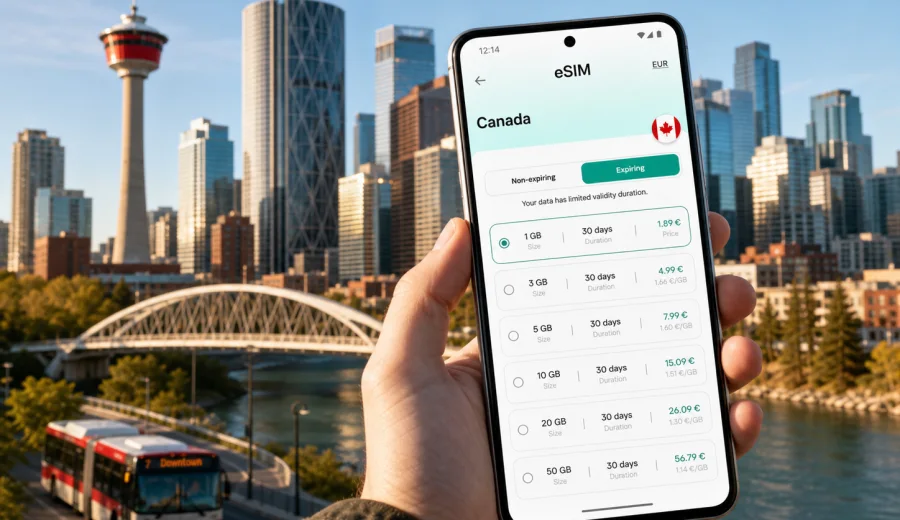
Calgary eSIM: mobile connection and internet for your trip
Calgary is a practical city to explore with mobile internet ready before you land. The airport is north of the center, the downtown grid is easy to understand, the CTrain connects many useful areas, and the Bow and Elbow rivers make navigation feel clear once you know the main landmarks. Still, a trip can become awkward if your phone is offline at the wrong moment: at arrivals, in a rideshare pickup zone, outside a hotel before check-in, or on the road toward Canmore and Banff.
An eSIM helps you prepare mobile data for Calgary without looking for a physical SIM card after a long flight. You can install a digital SIM on a compatible phone, choose a data package for Canada, and use maps, transit apps, messengers, hotel bookings, restaurant reservations, and work tools as soon as your plan is active. For many visitors, this is simpler than relying only on roaming or public Wi-Fi.
This guide is written for a city trip to Calgary: airport arrival, local transport, downtown movement, business days, Stampede visits, winter travel, hotel stays, stopovers, and day trips from the city. Canada matters because the eSIM plan is selected for the country, but the travel scenarios below stay focused on Calgary.
Why mobile internet matters in Calgary
Calgary is spread out. Downtown, the Beltline, Kensington, Inglewood, the airport, university areas, shopping districts, industrial business parks, and suburban hotels can sit far apart on the map. A route that looks short in a search result may involve a CTrain ride, a bus transfer, a walk across several long blocks, or a rideshare trip on a busy road.
Mobile data is useful from the first hour because it supports the small decisions that make the city easier:
- checking the route from Calgary International Airport to your hotel;
- confirming whether your accommodation is closer to a CTrain station, bus stop, or rideshare pickup point;
- using maps around downtown towers, the +15 walkway system, and river paths;
- opening digital tickets, booking references, and restaurant confirmations;
- messaging colleagues, hosts, drivers, or family without waiting for Wi-Fi;
- checking road conditions before a day trip toward the Rockies;
- translating short notices, menus, or transport information if needed.
Calgary also has strong seasonal contrasts. A warm summer evening on Stephen Avenue is a different travel situation from a winter morning when you are moving between a hotel, a conference venue, and a heated indoor walkway. Reliable mobile internet does not replace local awareness, but it helps you adapt quickly when weather, traffic, or timing changes.
Arrival at Calgary International Airport
Calgary International Airport, often shown as YYC, is a common first point where travelers need data. After landing, you may need to message your hotel, find the correct pickup area, check the route into downtown, or open a booking app. Airport Wi-Fi can help, but it is still worth having an eSIM prepared before you leave the terminal because the next steps often happen outside the most comfortable Wi-Fi zone.
A typical arrival sequence looks like this:
1. Land and turn off airplane mode.
2. Activate the eSIM according to your phone settings and selected plan conditions.
3. Confirm that mobile data is assigned to the travel eSIM.
4. Open your map app and check the current route to your hotel.
5. Keep your primary SIM available for calls or SMS if you still need it, while using the eSIM for data.
If your plan has a limited validity period, avoid activating it too early unless you are ready for the validity window to begin. The exact timing depends on the plan terms, so check them before departure. This is especially important if you are crossing time zones, arriving late, or connecting through another Canadian city before Calgary.
For a short stopover, mobile data can be just as important as for a full trip. Even if you only have several hours, you may want to check whether leaving the airport is realistic, follow traffic times, or coordinate with someone meeting you. If the stopover is too short to go downtown, data still helps with gate changes, ride status, hotel shuttles, and messaging.
Getting around the city with an eSIM
Calgary is not a city where every visitor can rely on walking. Downtown is walkable, but many trips extend to areas such as Kensington, Inglewood, 17th Avenue, Stampede Park, the University of Calgary, the airport corridor, or suburban business zones. An eSIM gives you mobile data for the route planning layer: maps, transit information, rideshare apps, and location sharing.
The CTrain is especially relevant for visitors because it serves central areas and key corridors. Buses fill the gaps, while taxis and rideshares are useful for airport trips, late arrivals, luggage, winter weather, and destinations away from rail lines. If you plan to rent a car, mobile data becomes useful for navigation, parking, fuel stops, and checking road conditions before leaving the city.
Use this simple decision table when planning your Calgary movement:
| Situation | Useful option | Why mobile data helps |
|---|---|---|
| Airport to downtown hotel | Taxi, rideshare, shuttle, or transit route | Compare time, pickup point, and traffic before leaving arrivals |
| Downtown meetings | Walking, +15 walkways, CTrain, short rideshare | Find building entrances and indoor connections |
| Stampede Park visit | CTrain or rideshare | Check crowd timing, station route, and return options |
| Dinner in Beltline or Kensington | Walk, CTrain plus walk, rideshare | Navigate between neighborhoods and share your location |
| Day trip to Canmore or Banff | Rental car, coach, tour pickup | Follow road updates, pickup points, and offline backup maps |
| Winter evening arrival | Taxi or rideshare | Avoid long outdoor waits and confirm your destination quickly |
Mobile internet also helps when you change plans. Calgary weather can shift, a meeting can run late, or a restaurant may be farther from the hotel than expected. With an eSIM, you can adjust the route without hunting for Wi-Fi in a lobby or cafe.
Calgary neighborhoods where data is especially useful
Downtown Calgary is built around office towers, hotels, shopping, transit stations, and river access. The grid helps, but the experience changes at street level because some buildings connect through indoor walkways while others require outdoor navigation. Mobile maps help you understand whether the entrance you need is on the street, through a lobby, or connected to another building.
The Beltline and 17th Avenue are common for dining, nightlife, and apartment-style stays. Data is useful for checking restaurant hours, making reservations, finding a ride back, and walking confidently between busy and quieter blocks.
Kensington is a compact area across the Bow River with cafes, shops, and access to river paths. It is easy to enjoy on foot, but mobile data helps you decide whether to walk from downtown, take transit, or use a short ride depending on weather and time.
Inglewood is popular for food, independent shops, music venues, and river access. It can feel close to downtown on the map, but routes vary by starting point. Mobile navigation helps you choose a practical path instead of relying on a rough sense of direction.
East Village and the riverfront are good for walking, hotels, cultural stops, and relaxed routes near the Bow River. Data is useful for switching between walking directions, transit, and rideshare pickup points.
Stampede Park and the surrounding area become especially busy during major events. When crowds are large, mobile data helps with meeting points, digital tickets, transit status, and rideshare coordination. It is better to decide a return plan before the event ends, because many people may be trying to move at the same time.
How much data to plan for Calgary
Your ideal eSIM data amount depends on your trip style. Calgary visitors often use data for maps, messaging, transit checks, restaurant searches, photo sharing, and work communication. Heavy video streaming, cloud backups, and hotspot use can consume much more data than city navigation.
Here is a practical way to estimate your needs:
| Trip type | Typical data behavior | Planning note |
|---|---|---|
| 1-2 day stopover | Maps, messaging, transport, light browsing | A smaller package may be enough if you avoid video streaming |
| 3-5 day city break | Daily maps, restaurant searches, tickets, social apps | Choose enough data for repeated navigation and photo sharing |
| Business trip | Email, maps, messaging, documents, video calls on Wi-Fi when possible | Keep mobile data as a backup between offices, hotels, and venues |
| Stampede or event trip | Navigation, tickets, group messages, rideshare, media uploads | Add a buffer for crowds, photos, and route changes |
| Calgary plus Rockies | Maps, road checks, bookings, messages, offline maps | Use offline downloads, but keep mobile data for live updates |
Before you travel, reduce avoidable data use. Download offline maps for Calgary and any mountain routes, save hotel addresses, pause automatic cloud photo uploads, and set streaming apps to Wi-Fi only. This keeps your eSIM data for moments when mobile internet matters most.
Choosing an eSIM plan for Canada before Calgary
For a city article, the relevant destination plan is the country that the city belongs to. Calgary is in Canada, so you should choose a Canada eSIM plan rather than looking for a separate Calgary-only plan. This is useful if you land in Calgary, connect through another Canadian airport, or continue to other places in Alberta.
When comparing options, focus on:
- data allowance: enough for maps, messaging, tickets, browsing, and work tools;
- validity period: aligned with your real travel dates, including arrival and departure days;
- destination coverage: Canada for Calgary and onward Canadian routes;
- phone compatibility: your device must support eSIM and be free to use another mobile plan;
- activation instructions: make sure you understand when to install and when to activate.
If you want to prepare before departure, you can use Kaspersky eSIM Store to choose an eSIM plan for your trip to Calgary and Canada. The site and app help you select a suitable eSIM tariff for mobile internet in an international trip, review the conditions, and activate it on a compatible device.
Do not choose only by the largest data number. A short business trip may need a smaller package with a validity period that matches your schedule, while a family trip with navigation, photo sharing, and day trips may need more data. If you are staying in hotels with reliable Wi-Fi and using mobile data mainly outside, your needs are different from a traveler who plans to hotspot a laptop frequently.
Installing and activating eSIM for Calgary
The safest preparation is to install the eSIM while you still have a stable connection, then activate it according to the plan instructions. Some travelers install before departure and switch data lines after landing. Others wait until they arrive. The right timing depends on the plan validity rules, your phone settings, and your route.
A simple setup checklist:
1. Confirm that your phone supports eSIM and is not locked to one carrier.
2. Choose the Canada plan that matches your Calgary dates.
3. Install the eSIM using the provided QR code or manual details.
4. Keep your primary SIM active if you need calls or SMS on your usual number.
5. After arrival, set mobile data to the eSIM line.
6. Turn on data roaming for the eSIM if the instructions require it.
7. Test maps, messaging, and browsing before leaving the airport or hotel.
If you need detailed setup steps, use the Kaspersky eSIM Store Android installation guide or iOS installation guide. Before buying, also check your device to confirm eSIM support.
An eSIM plan for mobile internet usually does not include a regular local phone number, voice calls, or SMS unless the selected plan conditions say otherwise. For calls and messages, many travelers use internet-based apps. Keep this in mind if your hotel, car rental company, or business contact expects a traditional phone call.
Practical Calgary travel scenarios
For a first evening in Calgary, the most common task is reaching the hotel without friction. Mobile data helps you compare transit and rideshare times, check the address, and message the property if you arrive late. If your hotel is downtown, the difference between two entrances or pickup points can matter in winter or with luggage.
For a business day, your phone often becomes the control panel for the schedule. You may move from a downtown hotel to an office tower, then to a meeting in the Beltline, then to dinner near Stephen Avenue. Mobile internet helps with calendar updates, map directions, document access, and quick messages. If you depend on video calls, use hotel or office Wi-Fi when possible and keep eSIM data as a backup between locations.
For a Stampede visit, plan for crowds. Save your tickets, check transit routes, agree on a meeting point with your group, and keep enough battery for the return trip. Mobile data helps you change pickup spots if streets are crowded or if your group leaves at different times.
For a winter trip, data helps reduce time outdoors. You can check walking distance, transit wait times, rideshare arrival, and building entrances before stepping outside. Downtown's indoor walkway system can be useful, but navigation sometimes requires knowing the exact building connection, not just the street address.
For a day trip from Calgary to Canmore, Banff, or other Alberta destinations, prepare offline maps and keep a mobile data buffer for live information. Road, weather, and timing decisions can change quickly. Do not rely only on mobile signal in all mountain areas; download what you need before leaving the city and treat live data as a useful tool, not the only plan.
Data-saving habits that work well in Calgary
You can make a moderate eSIM package last longer by changing a few settings before the trip. These habits are especially useful if you are in Calgary for several days and plan to use maps often.
- Download offline maps for Calgary, the airport area, downtown, and any planned road trips.
- Save hotel, venue, and restaurant addresses in your map app.
- Turn off automatic app updates on mobile data.
- Pause cloud photo and video backups until Wi-Fi is available.
- Use Wi-Fi for video calls when you are at the hotel, office, or apartment.
- Keep transport, airline, hotel, and event apps logged in before departure.
- Take screenshots of booking references in case signal is weak at a busy venue.
These steps do not remove the need for mobile internet. They simply reserve data for real travel tasks: finding your way, communicating, confirming details, and solving small problems while moving through the city.
Quick answers for Calgary eSIM travelers
Do I need a Calgary-specific eSIM?
No. For Calgary, choose an eSIM plan for Canada. That also helps if you connect through another Canadian city or continue elsewhere in the country.
Can I use public Wi-Fi instead?
Public Wi-Fi can be useful in airports, hotels, cafes, and venues, but it is not always available when you need maps, rideshare pickup, transit information, or urgent messages outdoors.
Will an eSIM give me a Canadian phone number?
Usually no. Travel eSIM plans for mobile internet typically provide data. Voice calls and SMS are not included unless the selected plan states otherwise.
Should I install the eSIM before flying to Calgary?
It is often convenient to install it before departure while you have stable Wi-Fi. Check the plan rules so you understand when validity begins and when to activate mobile data.
Is eSIM useful for a short Calgary stopover?
Yes, if you need maps, messaging, ride coordination, or hotel shuttle information. For a very short airport-only stop, your data needs may be small, but having mobile internet ready can still reduce friction.
What should I check before purchase?
Check phone compatibility, carrier lock status, data allowance, validity period, destination, activation timing, and whether data roaming needs to be enabled for the eSIM line.
Final checklist before you go
Use this checklist the day before your Calgary trip:
- Canada eSIM plan selected for the full travel period.
- Phone compatibility confirmed.
- Installation instructions saved.
- Hotel address, airport route, and key venues saved offline.
- Primary SIM settings reviewed if you need calls or SMS.
- Battery pack packed for long event days or mountain trips.
- Cloud backups and automatic updates limited to Wi-Fi.
- First route from YYC to your accommodation checked.
Calgary is easier when your phone is ready for the practical parts of travel: arrival, navigation, transit, weather changes, business timing, and trips beyond the city. Before you fly, use Kaspersky eSIM Store to prepare an eSIM plan for mobile internet in Canada and check the setup steps for your device. Then you can land in Calgary with the main connection task already planned.