
Travel connectivity guide
Cali eSIM: mobile internet and connection guide
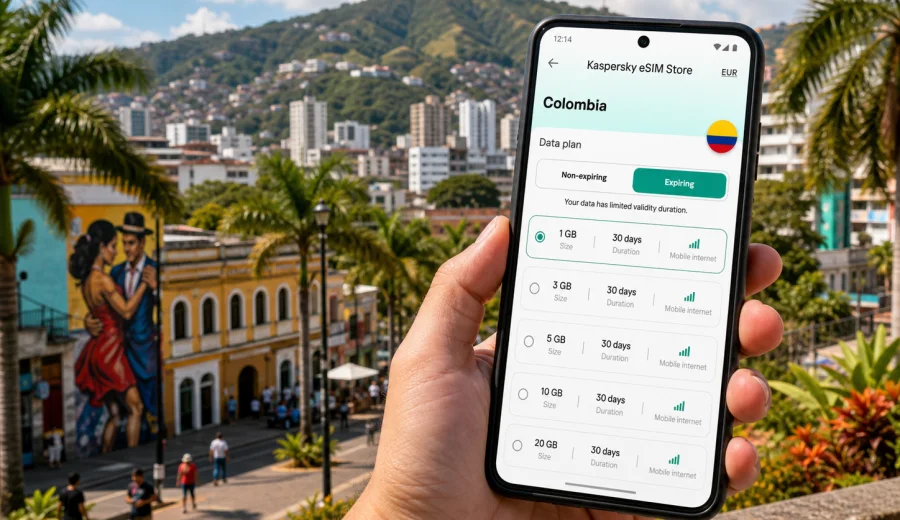
Cali eSIM guide: mobile connection and internet for your trip
Cali is a city where mobile internet quickly becomes part of the travel plan. You may need a map as soon as you leave Alfonso Bonilla Aragon International Airport, a messaging app to coordinate a pickup, a ride-hailing app for a late arrival, or cloud access for a business meeting near Granada or Ciudad Jardin. An eSIM can help you prepare that connection before you start looking for a local SIM counter.
This guide focuses on Cali, not on Colombia in general. It is for travelers who want mobile data for airport arrival, local movement, hotels, work trips, stopovers, and day trips from the city.
Why eSIM matters in Cali
Cali is spread across flat urban areas, river corridors, hillside viewpoints, residential zones, shopping districts, and business neighborhoods. The distance between your hotel, a meeting, a restaurant reservation, and a salsa venue can be short on the map but still hard to manage without live navigation.
An eSIM lets you use a compatible phone for mobile internet without inserting a physical SIM card. Instead of waiting until you find a kiosk, you can prepare a data plan before departure or shortly after arrival.
Typical Cali use cases include:
- checking airport pickup details after landing;
- opening maps for the route from Palmira to Cali;
- using ride-hailing or taxi apps in the evening;
- confirming hotel check-in times;
- translating menus, signs, and messages;
- sharing your live location with colleagues or family;
- managing reservations in San Antonio, Granada, El Penon, or Ciudad Jardin;
- keeping work apps online during a short business visit.
The main value is control. You choose a data plan for the destination, see the traffic allowance and validity period, install the eSIM on a compatible device, and use mobile data when your itinerary requires it.
Arrival at Cali airport
Most international and many domestic travelers arrive through Alfonso Bonilla Aragon International Airport, located outside Cali near Palmira. The drive into the city can take time depending on traffic, your hotel district, and the hour of arrival. That first transfer is one of the clearest moments when mobile internet helps.
With mobile data ready, you can:
- message your driver or hotel before leaving the terminal;
- compare route times into north, west, or south Cali;
- keep your booking confirmation available;
- check whether your meeting address is in Cali, Palmira, or Yumbo;
- let someone know when you have left the airport.
If you arrive late, the benefit is even clearer. You may not want to spend extra time searching for a SIM card, asking about plan conditions, or trying to connect to a crowded public network. An eSIM does not remove the need to check your device and plan conditions, but it can reduce the number of things you must solve at the airport.
Getting around the city
Cali has several travel patterns. A visitor might stay near Granada, spend an afternoon in San Antonio, go south toward Ciudad Jardin, meet contacts around Chipichape, or cross the city for events and nightlife. Mobile data supports these movements because useful information changes during the day.
For navigation, you may need:
- turn-by-turn walking routes in historic streets;
- live traffic before crossing the city;
- ride pickup points that are easier to share by map pin;
- public transport information where available;
- hotel and restaurant addresses saved in cloud apps;
- route checks before returning at night.
For communication, many travel eSIM data plans focus on mobile internet and do not include a standard local phone number, voice calls, or SMS unless a specific plan states otherwise. If voice or SMS is important, check the plan details before you choose it.
Neighborhood scenarios
Different parts of Cali create different data needs. Use this table to estimate where mobile internet will matter most.
| Cali scenario | Why mobile internet helps | Data use to expect |
|---|---|---|
| Airport transfer | Pickup messages, maps, hotel address, traffic | Light to moderate |
| San Antonio | Walking routes, cafes, photos, reservations | Moderate |
| Granada and El Penon | Restaurants, business meetings, ride apps | Moderate |
| Ciudad Jardin | Longer rides, shopping, universities, work stops | Moderate |
| Chipichape area | Shopping, meetings, local movement | Light to moderate |
| Cristo Rey or hillside viewpoints | Maps, photo sharing, return transport | Moderate |
| Day trip from Cali | Longer navigation, messages, cloud access | Moderate to heavy |
The right plan depends less on the city name alone and more on your habits. Maps and messages use less data than video uploads, cloud work, or long calls while moving between appointments.
How much data to plan for
There is no single perfect data amount for every visitor to Cali. A weekend stopover, a five-day work trip, and a longer route through Colombia need different planning.
Use this practical estimate:
| Trip style | Typical mobile data pattern | What to check |
|---|---|---|
| 1-2 day stopover | Maps, messaging, ride apps, hotel details | Short validity and small data allowance |
| 3-5 day city trip | Daily navigation, bookings, photo uploads | Medium data allowance |
| Business trip | Email, documents, calendar, messaging, hotspot use if allowed | Validity, data size, hotspot terms |
| Cali plus nearby towns | Maps outside the city, longer route checks, more messaging | Country coverage and validity |
| Heavy content use | Video, large uploads, frequent social posting | Larger data allowance or top-up options |
Before choosing, look at data volume, validity period, and destination coverage. If your route stays in Colombia, a Colombia plan is usually the relevant starting point.
Business trips to Cali
Cali is an important city for commerce, education, health services, logistics, and regional business in southwestern Colombia. If you are visiting for meetings, conferences, supplier visits, or project work, mobile internet supports the basic rhythm of the day.
Business travelers often need data for:
- calendar changes between meetings;
- ride coordination with local contacts;
- messaging groups with colleagues;
- document review from cloud storage;
- two-factor authentication prompts;
- translation during quick conversations.
For work trips, check whether your selected eSIM plan allows tethering or hotspot use if you expect to connect a laptop. Also check when the validity period starts and whether the amount of data fits the number of meeting days.
Short stopovers and first-day planning
Cali can be a destination on its own or a stop before continuing to other parts of Valle del Cauca, the Pacific region, Popayan, or the Coffee Region. If you only have a short stay, your priority is usually reliable preparation for the first hours.
A good first-day mobile checklist looks like this:
1. Save your hotel address before departure.
2. Install the eSIM while you still have stable Wi-Fi.
3. Keep the QR code or installation details accessible.
4. Confirm that your phone supports eSIM and is not locked to another carrier.
5. After arrival, set the eSIM as the mobile data line if needed.
6. Keep your primary SIM active only if you need incoming calls or bank SMS.
This setup helps you avoid comparing unfamiliar mobile offers in the arrivals area while tired or carrying luggage.
Choosing an eSIM plan for Cali
For a city article, the correct product path is still country-based: Cali belongs to Colombia, so the relevant destination page is Colombia. In Kaspersky eSIM Store, you can choose a data plan for your trip to Cali based on the country, data amount, and validity period that match your itinerary.
When comparing plans, focus on practical questions:
- Is the destination Colombia, or do you need a wider regional route?
- How many days will you use mobile data?
- Will you mostly use maps and messaging, or also video and cloud files?
- Do you need hotspot use for a laptop or tablet?
- Does the plan clearly show its data allowance and validity?
- When does the validity period begin?
- What happens if you use all the data before the trip ends?
Kaspersky eSIM Store is an app and website where you can choose, arrange, and activate an eSIM with a suitable data plan for mobile internet during an international trip. It is not a mobile network operator, and plan conditions depend on the selected option.
Installing eSIM before departure or after arrival
The calmest option is to prepare your eSIM before you fly, while you still have a stable home or hotel Wi-Fi connection. You can install the eSIM profile in advance, then activate or use it according to the plan instructions when you reach the destination.
General steps:
1. Check that your device supports eSIM.
2. Choose the destination and plan.
3. Complete the purchase flow.
4. Open the installation details in your profile, app, or confirmation email.
5. Add the eSIM to your phone.
6. Set it as the mobile data line when you are ready to use it.
7. Enable data roaming for the eSIM if the plan instructions require it.
For device-specific setup, follow the Android installation guide or the iOS installation guide. The exact screens can vary by phone model, operating system version, and carrier settings.
Do not delete an installed eSIM profile unless you are sure you no longer need it. Some profiles cannot be transferred or reinstalled after removal, depending on the plan conditions.
Check device compatibility
Before you buy a plan for Cali, confirm that your phone or tablet supports eSIM and is not locked to a carrier that blocks other mobile profiles. This step matters more than the destination itself: an eSIM plan can only work on a compatible, unlocked device.
Use the compatibility check before purchase: Check your device.
Also check that you have a stable internet connection during installation, know which line handles mobile data after arrival, and understand whether data roaming must be enabled for the eSIM.
If you rely on bank SMS, airline messages, or calls to your usual number, keep your primary SIM settings in mind. An eSIM data plan for travel can support internet apps, but it may not replace your regular number for all services.
Local trips from Cali
Many visitors use Cali as a base for nearby trips. Depending on your schedule, you might go to Buga, Palmira, Jamundi, Pance, nature stops, or onward routes toward Popayan and the Coffee Region. For these trips, think beyond the hotel lobby.
Before leaving the city for the day:
- download key map areas for offline backup;
- keep your eSIM data plan active for live route checks;
- save accommodation and transport contacts;
- confirm whether your plan covers the route country or region;
- monitor data use if you upload many photos or videos.
An eSIM is especially helpful when the day includes several transfers. You can message a driver, check an updated route, or look up an address without first searching for Wi-Fi. Coverage and speed still depend on local network conditions, so keep important addresses saved offline.
Practical data-saving tips
To make a travel data plan last longer in Cali, adjust your phone before the trip.
Use this checklist:
- download offline maps for Cali and nearby routes;
- turn off automatic cloud photo uploads on mobile data;
- update apps before you leave home;
- restrict background data for streaming and social apps;
- use hotel Wi-Fi for large downloads when it is stable;
- lower video quality in streaming apps;
- monitor mobile data use in phone settings;
- keep essential documents available offline.
These small settings can make a modest plan work well for maps, messaging, booking apps, and everyday travel tasks while you move between the airport, hotels, meetings, and evening plans.
FAQ
Can I use eSIM as soon as I land in Cali?
You can use it after the eSIM is installed, the plan is active according to its terms, and your phone is set to use it for mobile data. Setup can take a few minutes and depends on your device and local network conditions.
Does an eSIM plan include a Colombian phone number?
Many travel eSIM data plans are for mobile internet only. They may not include a standard phone number, voice calls, or SMS unless the selected plan says so.
Should I install the eSIM before flying?
Installing before departure is often easier because you can use stable Wi-Fi and avoid doing setup in the airport. Check the plan instructions so you understand when validity starts and when mobile data begins to be used.
Is eSIM useful for a business trip to Cali?
Yes. It can be useful for maps, ride apps, work messaging, email, calendar updates, and backup access when venue Wi-Fi is inconvenient.
What if I travel from Cali to another Colombian city?
Choose a plan whose destination and coverage match the route. For a Colombia trip, the Colombia destination page is the natural starting point. If you continue outside Colombia, compare regional or global options where available.
Prepare mobile internet for Cali
Cali is easier to manage when your phone is ready for the first transfer, the next address, and the changes that happen during a real trip. Before you leave, check eSIM compatibility, choose a plan with the right data amount and validity, and install it while you have stable Wi-Fi.
Kaspersky eSIM Store helps you prepare an eSIM data plan for international travel through its app and website. If Cali is your destination, review the Colombia options and choose a plan for your trip before arrival, so mobile internet is one less thing to solve after landing.