
Travel connectivity guide
Camana Bay eSIM for Mobile Internet
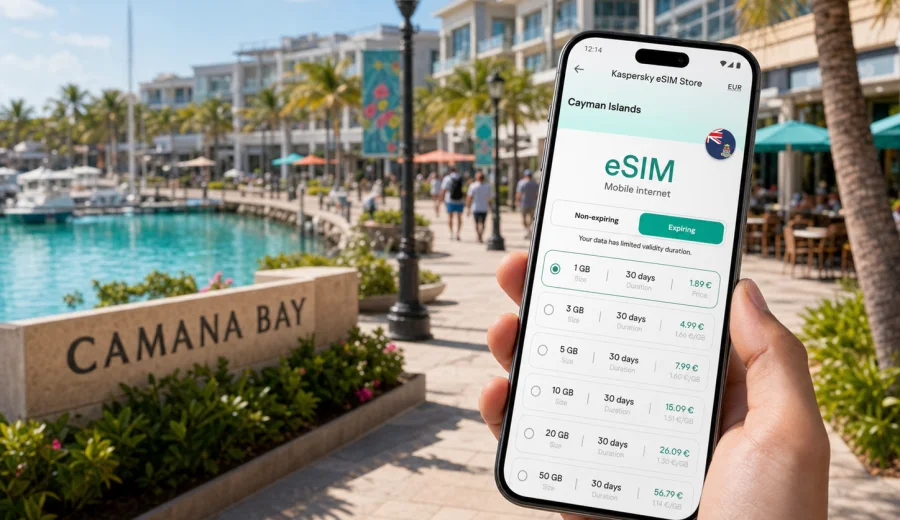
Camana Bay eSIM: mobile connection and internet for your trip
Camana Bay is one of the easiest places in Grand Cayman to enjoy with reliable mobile internet: it is compact, walkable, close to Seven Mile Beach, and full of restaurants, offices, shops, marina views, taxis, and trip points. That convenience also makes your phone important. You may use it to check a dinner reservation, call a ride, follow a walking route from the beach, message a colleague, compare opening hours, or share your location with family.
An eSIM can make this part of the trip simpler. Instead of looking for a physical SIM card after arrival or relying only on hotel Wi-Fi, you can prepare a mobile data plan on a compatible device and use mobile internet when you are away from your room, office, or cafe table. For Camana Bay, that matters because many useful moments happen in between places: crossing from the Crescent to the marina, heading to a restaurant after sunset, checking a map before a boat transfer, or confirming a pickup point near the main roads.
This guide focuses on practical travel scenarios in Camana Bay, not on the Cayman Islands in general. You will find advice for arrival, local movement, business stays, beach-and-town days, stopovers, and choosing the right amount of data.
Why mobile internet matters in Camana Bay
Camana Bay is designed as a mixed-use town center. You can walk between restaurants, shops, offices, waterfront areas, cinema, fitness studios, and nearby accommodations, but a smooth trip still depends on real-time information. Weather can affect outdoor plans, restaurant availability can shift, and taxi pickup points may be easier to confirm by message.
Mobile internet is useful in Camana Bay for everyday travel tasks:
- using maps between Camana Bay, Seven Mile Beach, and nearby hotels;
- checking restaurant times, menus, and reservation updates;
- messaging a taxi driver or local contact;
- opening travel documents, booking confirmations, and calendar invites;
- using mobile banking or payment confirmations when needed;
- translating short phrases, addresses, and service messages;
- checking weather before a waterfront walk or boat-related plan;
- sharing photos and location updates without waiting for Wi-Fi.
Public Wi-Fi can be helpful in hotels, restaurants, and offices, but it is not the same as having data whenever you step outside. With an eSIM, the main advantage is continuity while you move through the town center, leave for the beach, or head to another part of Grand Cayman.
Arrival: when to set up eSIM for Camana Bay
Most visitors reach Camana Bay after landing at Owen Roberts International Airport in George Town, then taking a taxi, rental car, shuttle, or hotel-arranged transfer. The journey is not complicated, but the first hour often includes several phone-dependent tasks: checking the address, messaging your host or hotel, confirming pickup details, and opening a map while the driver heads toward the Seven Mile Beach corridor.
The best approach is to prepare your eSIM before you need it. You can install the eSIM profile while you still have a stable Wi-Fi connection, then activate or start using the plan according to the conditions of the selected tariff. Exact activation behavior depends on the plan, so read the terms before travel.
A simple arrival checklist:
- before departure, check that your phone supports eSIM and is not locked to one operator;
- choose a data allowance based on your trip length and expected map, messaging, and video use;
- install the eSIM profile while connected to trusted Wi-Fi;
- keep your primary SIM active if you need your regular number for calls or bank messages;
- after landing, check which SIM is set for mobile data;
- enable data roaming for the eSIM if the plan instructions require it;
- test maps and messaging before leaving the airport area.
If you are arriving late, this preparation is especially useful. Camana Bay is easy to navigate, but after dark you may not want to compare options or troubleshoot settings while luggage and transport are waiting.
Camana Bay travel scenarios where eSIM helps
Different visitors use Camana Bay in different ways. Some stay nearby and treat it as a base for dinners and errands. Others come for business meetings, family evenings, shopping, or a convenient stop between Seven Mile Beach and George Town. eSIM is most useful when you think in scenarios rather than only in gigabytes.
| Trip scenario in Camana Bay | Mobile internet task | Practical data note |
|---|---|---|
| Short restaurant visit | Maps, reservation messages, ride pickup | Light data use unless you stream video |
| Beach plus town day | Navigation, weather, photos, messaging | Moderate use, especially with image sharing |
| Business stay | Email, calls through apps, files, calendar | Choose more data if hotspot use is expected |
| Family trip | Group chats, maps, activity planning | Data use grows when several people rely on one phone |
| Stopover or cruise-style visit | Directions, timing, transport updates | A smaller plan may be enough for one day |
| Longer Grand Cayman base | Daily maps, bookings, work, social apps | Pick a plan with enough validity and allowance |
The practical point is not to choose the largest plan automatically. Think about what the phone will do away from Wi-Fi. If you mainly need maps, messaging, and reservation checks, your data needs are modest. If you plan video calls, cloud backups, hotspot use, or heavy social posting, choose a larger package.
Getting around Camana Bay with mobile data
Camana Bay is walkable, but your route can still vary depending on heat, rain, evening plans, and where you start. Visitors often move between the town center, Seven Mile Beach, nearby hotels, West Bay Road, George Town, and marina or boat-related meeting points. Mobile internet helps you decide whether to walk, take a taxi, wait for a shuttle, or combine errands in one route.
Useful phone tasks while moving around:
1. Open an offline map before the trip, then use mobile data for live search and updated routes.
2. Save your hotel, office, restaurant, and pickup point as favorites.
3. Keep your ride or taxi details in a screenshot in case signal is temporarily weak indoors.
4. Use messaging rather than voice calls if your eSIM plan is data-only.
5. Check the exact entrance or meeting point; Camana Bay has multiple pedestrian approaches.
If you rent a car, mobile internet can also help with parking, route changes, and finding the way back from beach areas. If you do not rent a car, data becomes even more important because pickup coordination usually happens through messaging, maps, or a call over an internet app.
If your route includes Camana Bay, George Town, Seven Mile Beach, West Bay, and airport transfers, it is practical to prepare an eSIM data plan for the Cayman Islands before you travel and then use it as part of your Camana Bay arrival and local movement plan.
Hotels, apartments, and work trips near Camana Bay
Camana Bay is close to many accommodations around Seven Mile Beach and is convenient for travelers who want restaurants, shopping, and business services nearby. Hotel Wi-Fi is useful in the room, but it does not cover every movement in your day. If you step out for breakfast, walk to a meeting, work from a cafe, or join colleagues for dinner, mobile data fills the gap.
For business travelers, the most important point is predictability. You may need enough data for:
- calendar updates and meeting links;
- email attachments;
- messaging with local hosts or colleagues;
- route planning between offices, restaurants, and hotels;
- authentication prompts from work services;
- app-based calls when Wi-Fi is unstable or unavailable.
Before using hotspot mode for a laptop, check the terms of the selected plan and your device settings. Some plans and networks may handle tethering differently. Also remember that video calls and large file uploads can consume data quickly, especially if your apps sync in the background.
Before you choose an eSIM plan
eSIM is convenient, but it still has device and plan conditions. Before you arrange mobile internet for Camana Bay, check your device to confirm that it supports eSIM and is not restricted by an operator lock. This is worth doing before you travel, because resolving device restrictions is easier at home than during an arrival transfer or right before a meeting.
Also check these details in the plan terms:
- destination coverage for the Cayman Islands;
- data allowance and validity period;
- when validity starts;
- whether data roaming must be enabled for the eSIM;
- whether voice calls and SMS are included or not;
- whether hotspot use is allowed or suitable for your needs;
- refund and support conditions if installation has not gone as expected.
Many travel eSIM plans focus on mobile data. They may not include a local phone number, traditional voice calls, or SMS unless the plan says so. For most Camana Bay travel tasks, mobile data is enough because maps, messaging apps, email, and booking tools all work through internet access.
Choosing data for a Camana Bay trip
For a short Camana Bay visit, a smaller data package may be enough if you use Wi-Fi at your hotel and only need mobile internet outdoors. For a business trip, family stay, or longer Grand Cayman itinerary, it is better to allow extra room for navigation, messaging, uploads, and unexpected work tasks.
Use this practical estimate:
- 1 GB can be enough for light maps, messaging, and essential browsing over a short visit;
- 3 GB to 5 GB suits many travelers who use maps daily, browse restaurants, and share some photos;
- 10 GB or more is better for longer stays, video calls, hotspot use, frequent uploads, or heavier social apps;
- plan validity should cover the whole stay, not only the first days in Camana Bay.
If your itinerary includes Camana Bay, George Town, Seven Mile Beach, West Bay, and boat or beach excursions, choose a plan for the country rather than trying to solve the trip one neighborhood at a time. This keeps the setup aligned with the whole destination while the article focus stays on Camana Bay.
How to install eSIM before going to Camana Bay
The exact steps can vary by device model and operating system, but the overall process is usually straightforward: choose a plan, install the eSIM profile, set it for mobile data, and check the activation instructions. If you want device-specific guidance, use the Android installation guide or the iOS installation guide before departure.
A practical setup sequence:
1. Connect to reliable Wi-Fi.
2. Choose the Cayman Islands as your destination and select a plan with suitable data and validity.
3. Install the eSIM profile using the provided instructions or QR-code flow.
4. Name the eSIM clearly, for example "Travel data" or "Cayman data".
5. Keep your regular SIM for calls if you need your usual number.
6. Set the eSIM as the mobile data line when you are ready to use it.
7. Turn on data roaming for the eSIM if the instructions require it.
8. Open maps, messaging, and a browser to confirm that mobile data works.
Do not delete the eSIM profile after installation unless support instructions tell you to do so. In many cases an eSIM profile cannot simply be moved to another phone after activation.
Quick recommendations for Camana Bay travelers
For most visitors, the best mobile setup is simple:
- install eSIM before departure or while connected to trusted Wi-Fi;
- keep your regular SIM available if you need your usual number;
- use eSIM for mobile data in Camana Bay and around Grand Cayman;
- use Wi-Fi for heavy downloads, long video calls, and large photo backups;
- check device compatibility before choosing a plan;
- pick data allowance based on real tasks, not only trip length.
If you are traveling mainly for restaurants, beach time, and local movement, moderate data is usually enough. If you are traveling for work or plan to use hotspot mode, choose more data and monitor usage from the first day.
FAQ: eSIM and mobile internet in Camana Bay
Can I use eSIM for phone calls in Camana Bay?
Many travel eSIM plans are data-focused and may not include a traditional phone number, voice calls, or SMS unless stated in the plan terms. You can usually use internet-based calling and messaging apps over mobile data.
How much data do I need for Camana Bay?
Light users may only need data for maps, messages, and browsing. Business travelers, remote workers, and people who upload many photos or use hotspot mode should choose a larger plan.
Is Camana Bay the same as buying a country plan?
For mobile data planning, you normally choose the destination country rather than a neighborhood. Camana Bay is the city focus of your itinerary, while the eSIM plan should match the Cayman Islands coverage and terms.
Prepare mobile internet before your Camana Bay trip
Camana Bay is easy to enjoy when your phone is ready for the small decisions that happen throughout the day: where to walk, when to leave, how to reach a driver, whether a restaurant time changed, and how to stay in touch after sunset. An eSIM gives you a practical way to prepare mobile internet for those moments before you arrive.
Kaspersky eSIM Store helps you choose, arrange, and activate an eSIM with a suitable data plan for an international trip. Before traveling, check your device, review the plan allowance and validity, install the eSIM on Wi-Fi, and keep the instructions available. When your route includes Camana Bay and the rest of Grand Cayman, you can choose an eSIM plan for your Cayman Islands trip and arrive with mobile internet already planned.