
Travel connectivity guide
Cambodia eSIM: mobile internet for travel
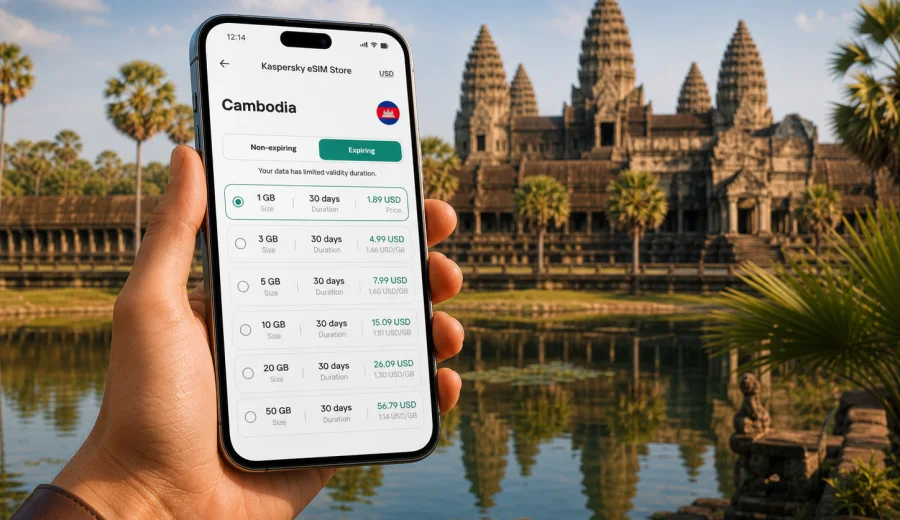
Cambodia eSIM: mobile connection and internet for your trip
Cambodia is a country where mobile internet quickly becomes part of the trip itself. You may need maps after landing in Phnom Penh, a ride-hailing app on the way from the airport, hotel messages in Siem Reap, translation at a local market, or photos backed up after a long day around Angkor. An eSIM can help you prepare that connection before you start looking for a local SIM card shop or relying on hotel Wi-Fi.
For travelers, an eSIM is a digital SIM profile that can be installed on a compatible smartphone or tablet. It lets you use a mobile data plan for the destination without inserting a physical SIM card. In Cambodia, this is useful because travel often combines city transfers, temple routes, islands, river towns, and countryside stops where you do not want every online task to depend on the next cafe network.
This guide explains how to plan mobile connection and internet in Cambodia with eSIM: when it is useful, how much data to consider, what to check before purchase, and how to install and activate the profile through Kaspersky eSIM Store.
Why use an eSIM in Cambodia
An eSIM is most helpful when you want to reduce friction at the beginning of the trip. Instead of searching for a physical SIM card after a flight, you can prepare a data plan in advance and keep your primary SIM in the phone for banking messages or calls from home.
Typical Cambodia travel scenarios where mobile data matters:
- arrival at Phnom Penh International Airport or Siem Reap Angkor International Airport;
- navigation between hotels, bus stations, ferry points, and temples;
- messenger calls with family, guides, hosts, or drivers;
- QR tickets, booking confirmations, and online check-in;
- translation, currency conversion, and restaurant search;
- route planning for Angkor, Kampot, Kep, Battambang, Koh Rong, or border crossings;
- sharing a hotspot with a laptop when allowed by the selected plan and device settings.
An eSIM does not replace every travel communication need. Most travel eSIM data plans are designed for mobile internet. They usually do not include a local phone number, regular voice calls, or SMS unless the selected plan clearly says otherwise. For calls and messages, many travelers use internet-based apps.
Cambodia travel routes and data needs
Your data use depends less on the country name and more on how you travel. A short city break in Phnom Penh, a temple-focused trip to Siem Reap, and a remote-work stay in Kampot can require very different data volumes.
| Trip style | Common online tasks | Practical data approach |
|---|---|---|
| Weekend or short stopover | maps, taxis, hotel messages, tickets | choose a modest data allowance and monitor use daily |
| One week in Phnom Penh and Siem Reap | navigation, translation, social apps, photo sharing | choose more data if you use maps and video calls often |
| Temple routes around Angkor | maps, guide apps, messaging, photos | download offline maps first, keep mobile data for live tasks |
| Islands and coastal travel | transport updates, hotel chat, weather, payments | keep backup data for transfers and low-Wi-Fi moments |
| Work trip | email, messengers, documents, video meetings | choose a larger allowance and avoid heavy updates on mobile data |
If you travel through several Southeast Asian countries, check whether a country-specific plan for Cambodia is enough or whether a regional option is more convenient for the full route. Always read the destinations, data volume, validity period, and activation rules before you pay.
What eSIM does well for a Cambodia trip
The main advantage is preparation. You can select a plan before departure, install the eSIM while you still have stable Wi-Fi, and be ready to switch mobile data to the eSIM profile when the plan can be activated.
Useful benefits include:
- no need to swap your physical SIM card;
- less dependence on public Wi-Fi in airports, cafes, hotels, and bus stations;
- visible plan conditions before purchase, including data volume and validity;
- a cleaner setup for dual-SIM travel, with your home number kept on the device;
- easier planning for people who arrive late, travel with children, or move between cities quickly.
There are also limits to understand. Coverage, speed, and availability depend on local networks and the selected plan. Remote areas, islands, thick temple walls, weather, congestion, and device settings can affect performance. A careful setup is better than assuming any mobile option will behave the same in every place.
How to estimate data for Cambodia
There is no single correct data amount for every traveler. Start with your habits, then adjust for the trip length and how much Wi-Fi you expect to use.
As a rough planning method:
- light use means maps, messengers, tickets, email, and occasional browsing;
- medium use adds social media, photo sharing, cloud documents, and regular translation;
- heavy use includes video calls, hotspot use, streaming, large uploads, and frequent cloud backups.
Before departure, reduce unnecessary traffic:
1. Download offline maps for Phnom Penh, Siem Reap, and your planned regions.
2. Save hotel addresses, booking PDFs, and transport tickets offline.
3. Turn off automatic app updates on mobile data.
4. Disable automatic cloud photo backup until you are on trusted Wi-Fi.
5. Set messaging apps to download large media only on Wi-Fi.
6. Check whether your phone shows per-SIM data usage.
These small steps make a moderate data plan more predictable and help you keep mobile internet for tasks that matter during the trip.
Choosing an eSIM plan for Cambodia
When comparing options, focus on the conditions that affect your real route. The country name is only the first filter.
Check these points before selecting a plan:
- Destination: the plan should include Cambodia for the places you will visit.
- Data volume: choose enough for navigation, messages, and your expected online habits.
- Validity period: match the plan duration to your trip dates, with a buffer if possible.
- Activation rules: understand when the validity period starts and whether it starts after installation, first network connection, or another trigger.
- Hotspot: if you need tethering, confirm that it is allowed by the selected plan and supported by your device.
- Top-up options: check whether you can add data or need to choose a new plan.
- Device support: your phone or tablet must support eSIM and should not be locked to one carrier.
For a simple route, a Cambodia plan can be the cleanest choice. For a multi-country itinerary, such as Thailand, Cambodia, Vietnam, or Laos in one trip, compare the country plan with regional options and decide which one better matches your borders and dates.
A practical setup before departure
A good eSIM setup starts while you still have reliable Wi-Fi. This is especially useful if your first hours in Cambodia include immigration, baggage, taxi booking, and hotel check-in.
Preparation checklist:
- confirm that your device supports eSIM;
- check that your phone is not carrier-locked;
- update your operating system if needed;
- choose a plan for Cambodia or for your wider route;
- install the eSIM profile using Wi-Fi;
- label the profile clearly, for example "Cambodia data";
- keep your primary SIM available for calls or verification messages if you need it;
- read the selected plan conditions before activating mobile data.
Kaspersky eSIM Store is an app and website where you can choose, arrange, and activate an eSIM with a suitable data plan for mobile internet in an international trip. If you are planning Cambodia now, you can view mobile internet options for Cambodia and compare the available data amounts and validity periods before you travel.
How to install and activate an eSIM
The exact steps vary by device, but the overall process is similar: choose the destination, complete the order, install the eSIM profile, then select it for mobile data when you are ready to use it.
General sequence:
1. Open Kaspersky eSIM Store on the website or in the app.
2. Select Cambodia or the region that matches your route.
3. Review the data amount, validity period, destination coverage, and other plan conditions.
4. Complete the order.
5. Install the eSIM profile on your compatible device.
6. Select the eSIM profile for mobile data when the plan should be used.
7. Turn on data roaming for the eSIM if the instructions for your device or plan require it.
8. Check that mobile data works before you leave the airport or hotel Wi-Fi area.
For device-specific setup, use the Android installation guide or the iOS installation guide. Follow the instructions carefully and avoid deleting the eSIM profile unless you are sure the selected plan conditions allow reinstallation.
Device compatibility: check before you buy
Not every phone supports eSIM, and not every eSIM-capable phone can use every profile in the same way. Before choosing a plan, check your device and make sure it is not locked to one carrier.
Compatibility checks are especially important if:
- the phone was bought through a carrier contract;
- the device model differs by country or region;
- you use an older smartphone;
- you have never installed an eSIM before;
- you plan to keep your home SIM active at the same time;
- you need hotspot support for a laptop or another phone.
Also check your device settings before arrival. Some phones require you to select which SIM profile handles mobile data, which one handles calls, and whether data switching is allowed. Clear labels help: keep your home SIM named after your usual carrier and name the travel profile "Cambodia eSIM" or similar.
Cambodia-specific usage tips
Cambodia travel can be smooth if you prepare for the moments when mobile data matters most.
For arrival:
- keep the QR code or installation details accessible in case you need to review them;
- connect to airport Wi-Fi only if you still need to finish setup;
- switch mobile data to the eSIM profile when activation is appropriate;
- test a map search and a messenger message before leaving the terminal.
For Angkor and Siem Reap:
- download offline maps because temple areas can have changing signal quality;
- save your hotel location and driver contact;
- keep battery power for navigation and ticket checks;
- use mobile data for live search, not for large photo uploads.
For Phnom Penh:
- mobile data helps with ride apps, restaurant search, payments, and messaging;
- traffic can change plans quickly, so keep maps and hotel contacts available;
- if you use a hotspot for work, monitor data use after each session.
For islands and coastal routes:
- expect more variation in signal conditions than in central city areas;
- save ferry, bus, and hotel information offline;
- do not leave critical video uploads for mobile data unless you have enough allowance.
eSIM, roaming, local SIM, and Wi-Fi: what to compare
Different connection methods suit different travelers. The best choice is the one that fits your device, budget, route, and tolerance for setup time.
| Option | When it can work well | What to consider |
|---|---|---|
| Travel eSIM | You want data ready without a physical SIM card | requires eSIM-compatible, unlocked device |
| Home roaming | You need your usual number and simple billing | pricing and data limits can vary widely |
| Local physical SIM | You are staying longer and do not mind local setup | may require time, documents, or a store visit |
| Public Wi-Fi | You need occasional access at hotels or cafes | availability and security are not always predictable |
Many travelers combine options. For example, you can keep your home SIM available for calls and verification messages, use an eSIM for mobile data, and save hotel Wi-Fi for large downloads. This setup gives flexibility without making one connection method carry every task.
Common mistakes to avoid
The most common eSIM problems come from rushing the setup or skipping plan details.
Avoid these mistakes:
- buying before checking eSIM support on the device;
- installing the profile on the wrong phone;
- deleting the eSIM profile after activation;
- assuming the plan includes calls or SMS without reading the terms;
- using mobile data for automatic cloud backups;
- forgetting to switch mobile data from the home SIM to the eSIM;
- ignoring the validity period and activation trigger;
- relying only on public Wi-Fi for first-arrival tasks.
If mobile data does not start immediately, check the basics first: the correct SIM profile is selected for data, data roaming is enabled if required, airplane mode is off, and the device has been restarted if the instructions recommend it. If questions remain, contact support with your order details and device model.
Quick recommendations for Cambodia
Use this short list when you are close to departure:
- For a short trip, choose a plan that covers maps, messages, tickets, and transport apps.
- For one to two weeks, allow extra data for photos, translation, and frequent route changes.
- For remote work, choose a larger allowance and keep video calls on stable Wi-Fi when possible.
- For Angkor, islands, and countryside routes, download offline essentials before leaving the hotel.
- For dual-SIM use, keep your primary SIM for calls if you need it and assign mobile data to the eSIM profile.
- Before purchase, check device compatibility and carrier lock status.
One useful rule: reserve mobile data for moments when you are moving, making decisions, or confirming travel details. Use trusted Wi-Fi for heavy downloads, system updates, and cloud backups.
FAQ: eSIM for Cambodia
Can I use an eSIM for mobile internet in Cambodia?
Yes, if your device supports eSIM, is not carrier-locked, and the selected plan includes Cambodia. Read the plan conditions before purchase, including data volume, validity period, and activation rules.
Does an eSIM include a Cambodian phone number?
Usually, travel eSIM data plans focus on mobile internet and do not include a regular phone number, voice calls, or SMS unless the selected plan says so. You can use internet-based calling and messaging apps over mobile data.
Should I install the eSIM before flying?
Installing the eSIM while you still have stable Wi-Fi is often convenient. Activation rules differ by plan, so check when the validity period begins before you switch mobile data to the eSIM profile.
Can I keep my regular SIM active?
On many dual-SIM phones, yes. You can keep your home SIM for calls or verification messages and use the eSIM profile for mobile data. Device settings and carrier restrictions can vary, so check your phone before departure.
What if I travel from Cambodia to another country?
Check the destination list in your plan. A Cambodia-specific option is suitable for Cambodia, while a regional plan may be better if your route includes several countries. Do not assume that one country plan works across borders.
Can I share the connection by hotspot?
It depends on the selected plan and your device. If hotspot use is important for a laptop, tablet, or travel companion, check the plan conditions before purchase.
What should I do if the eSIM does not connect?
Confirm that the eSIM profile is installed, selected for mobile data, and allowed to use data roaming if required. Restart the device if needed, check the setup instructions, and contact support if the issue continues.
Prepare your Cambodia internet before you travel
Mobile connection in Cambodia is easier when you plan it before the first taxi ride, temple route, or hotel check-in. Check your device, choose a data amount that matches your route, install the eSIM on stable Wi-Fi, and keep the plan conditions where you can review them.
When you are ready to prepare mobile internet for the trip, open Kaspersky eSIM Store and choose an eSIM plan for Cambodia. Select the option that fits your travel dates and data needs, install it on a compatible device, and use the eSIM profile for mobile data during your Cambodia journey.