
Travel connectivity guide
eSIM for Cameroon: mobile internet guide
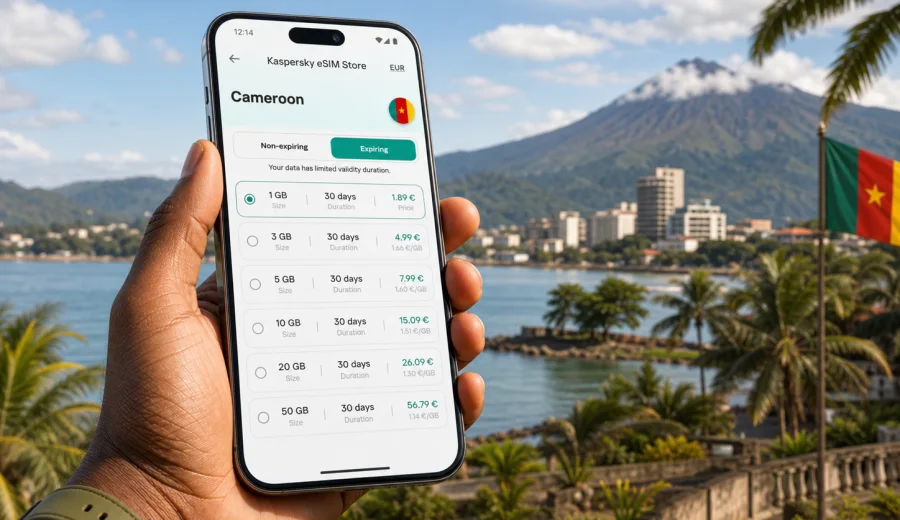
eSIM for Cameroon: mobile connection and internet for your trip
Cameroon is a practical destination for travelers who need to stay organized across regions, transport stages, and working conditions. A trip can include Douala and Yaounde, the road toward Limbe and Mount Cameroon, business meetings, family visits, field work, conferences, or onward routes through Central and West Africa. In all these cases, mobile connection and internet access help you confirm transfers, use maps, contact accommodation, check banking notifications, translate messages, and stay available when plans change.
An eSIM is one of the most convenient ways to prepare mobile internet for Cameroon before you travel. It is a digital SIM profile installed on a compatible smartphone or tablet, so you do not need to search for a physical SIM card immediately after arrival. Instead, you choose a suitable data plan, install the eSIM on your device, and activate it according to the plan conditions.
This guide explains how to think about eSIM use in Cameroon: when it helps, what to check before purchase, how much data you may need, how to install it, and how to avoid common mistakes.
Why mobile internet matters in Cameroon
Cameroon combines large cities, coastal areas, mountain routes, forest regions, business districts, universities, ports, and cross-border transport corridors. Your internet needs may change during the same trip. In Douala, you may rely on ride-hailing, maps, restaurant searches, and messaging. In Yaounde, you may need access for meetings, navigation, and documents. Around Limbe, Buea, Kribi, or rural routes, you may use mobile data more carefully because travel days can be longer and Wi-Fi may be less predictable.
Mobile internet is useful in Cameroon for everyday travel tasks:
- navigation between airports, hotels, offices, and bus stations;
- messenger calls when regular roaming calls are expensive;
- translation in hotels, shops, transport, and meetings;
- online banking confirmations and travel alerts;
- checking opening hours, routes, and weather;
- sharing location with colleagues, family, or a driver;
- keeping documents, booking references, and maps accessible.
Public Wi-Fi can help in hotels, offices, cafes, and airports, but it is not a complete travel plan. It may require registration, slow down at busy times, or disconnect when you move. A prepared eSIM gives you a separate mobile data option between fixed Wi-Fi points.
What an eSIM changes compared with a physical SIM
With a physical SIM, you usually need to find a shop, check local registration rules, compare offers, handle language differences, and swap cards in your phone. That can be fine for a long stay, but it is not always convenient when you arrive late or use your primary SIM for banking and work messages.
With an eSIM, the setup happens digitally on a compatible device. You keep your physical SIM in the phone if you need it for calls, SMS, or authentication, and use the eSIM mainly for mobile data.
| Travel situation | Why an eSIM can help |
|---|---|
| Short business trip | Prepare data before arrival and avoid spending time looking for a SIM shop. |
| Multi-city route | Keep the same data setup while moving between Douala, Yaounde, Buea, Limbe, or Kribi. |
| Family travel | Install data on the main navigation phone before the trip starts. |
| Remote work day | Use mobile data as a backup when hotel Wi-Fi is not enough. |
| Transit through the region | Choose a plan that matches the actual destination and validity period. |
An eSIM for Cameroon normally focuses on mobile data. It may not include a local phone number, voice calls, or SMS unless this is clearly stated in the selected plan conditions. For calls and messages, you can usually use internet-based apps over mobile data.
Check device compatibility first
Before choosing any eSIM plan, confirm that your device supports eSIM and is not locked to one mobile operator. This step matters more than the destination itself: if the phone cannot install an eSIM profile, the plan will not work on that device.
Use this short checklist before purchase:
- your smartphone or tablet supports eSIM;
- the device is not carrier-locked;
- the operating system is up to date enough for eSIM setup;
- you have access to Wi-Fi during installation if the process requires it;
- you know which SIM line should be used for mobile data after activation;
- you understand whether the eSIM can be reinstalled if the device is changed.
If you are unsure, check your device before you choose a plan. This is especially important for older phones, regional device models, company-managed devices, and phones bought through a mobile operator contract.
How much data to choose for Cameroon
The right data amount depends on your habits, not only on the number of days. A person who checks email, maps, and messengers may use much less data than someone who watches videos, backs up photos, or joins video calls from mobile internet.
For planning, divide activities into light, regular, and heavy usage.
| Usage type | Typical actions | Practical planning note |
|---|---|---|
| Light | Messaging, maps, email headers, occasional searches | Suitable for short trips if you avoid video and cloud sync. |
| Regular | Navigation, social apps, document access, messenger calls | A balanced option for most city and business travel. |
| Heavy | Video calls, large uploads, streaming, hotspot use | Choose more data and monitor usage daily. |
Cloud backup, automatic app updates, video autoplay, and high-resolution media sharing can use more traffic than expected. Before leaving for Cameroon, disable unnecessary mobile-data background activity.
A practical data checklist before departure
Prepare your phone while you still have stable home Wi-Fi.
1. Download offline maps for Douala, Yaounde, Limbe, Buea, Kribi, and any route you plan to use.
2. Save hotel addresses, meeting locations, booking references, and emergency contacts offline.
3. Update messaging, banking, airline, and map apps before the trip.
4. Turn off automatic cloud backup over mobile data.
5. Disable video autoplay in social apps.
6. Decide whether your primary SIM or eSIM should handle mobile data.
7. Keep the eSIM installation details available until setup is complete.
This preparation is useful even if you expect good Wi-Fi at your hotel. Travel days are often when you need connection most: airport pickup, route changes, delayed luggage, or a driver who needs your exact location.
When to install and activate your eSIM
Installation and activation are related but not always the same thing. Installation adds the eSIM profile to your device. Activation starts the plan according to the selected tariff rules. Some plans begin when installed, while others begin when they connect in the destination. Always read the plan conditions before you proceed.
For Cameroon, a careful approach is:
- choose the plan before departure;
- install the eSIM while you have reliable Wi-Fi, if the plan allows early installation;
- keep mobile data on your primary SIM until you are ready to switch;
- after arrival, select the eSIM line for mobile data;
- enable data roaming for the eSIM if the instructions or plan conditions require it;
- test maps, messaging, and browser access before leaving the airport or hotel.
For detailed setup, use the Android installation guide or the iOS installation guide. Follow the steps for your device type and avoid deleting the eSIM profile unless you are sure the plan conditions allow reinstallation.
Where eSIM is useful during a Cameroon trip
Cameroon travel often includes several connection scenarios. In cities, mobile data helps with daily coordination. On longer routes, it becomes a planning tool. In business settings, it is a backup for documents, calendar changes, and messaging.
Common scenarios include:
- arriving at Douala International Airport and contacting a driver or hotel;
- moving between Douala and Yaounde by road or rail and checking route updates;
- visiting Buea or Mount Cameroon and keeping maps available;
- spending time around Limbe or Kribi and using mobile data away from hotel Wi-Fi;
- coordinating meetings in business districts where you need calendar and email access;
- using messenger calls instead of standard international voice calls;
- managing travel documents and payments without relying only on public Wi-Fi.
If your route includes several countries, check whether a country-specific plan or a regional plan is more appropriate. The best choice depends on destinations, travel dates, and expected data use.
Choosing an eSIM plan for Cameroon
When comparing plans, do not focus only on data amount. Look at validity period, destination, price, data volume, activation logic, and whether top-up options are available. A plan with more data is not always better if its validity period does not match your trip.
Kaspersky eSIM Store is an app and website where you can quickly choose, arrange, and activate an eSIM with a suitable data plan for mobile internet during an international trip. For Cameroon, you can choose an eSIM data plan for your Cameroon trip after checking your device compatibility and expected data usage.
Use these questions before selecting a plan:
- How many days will you actually need mobile data in Cameroon?
- Will you stay mostly in cities or travel between regions?
- Do you need data only for maps and messages, or also for work calls?
- Will you share hotspot with a laptop or another traveler?
- Do you need a plan that can be topped up later?
- Does your phone allow both your primary SIM and eSIM to stay active?
For most travelers, a practical method is to choose a plan that matches the trip length and then reduce unnecessary background usage.
eSIM, roaming, and local SIM: how to compare them
There is no single best option for every traveler. Standard roaming, a local physical SIM, and an eSIM each solve a different problem.
| Option | Strength | Limitation to consider |
|---|---|---|
| Standard roaming | Uses your existing mobile account and number | Costs and conditions can vary significantly by operator and plan. |
| Local physical SIM | Can be useful for longer stays or local calls | Requires time, a shop, and possible registration steps. |
| eSIM data plan | Can be prepared digitally and used without swapping cards | Requires a compatible, unlocked device and usually focuses on data. |
For a short or medium-length trip to Cameroon, eSIM is often attractive because it reduces setup friction. For a long stay with local calling needs, you may still compare local options. For business travelers who must keep their home SIM active, eSIM can be a practical data line while the primary SIM remains available.
How to control data usage in Cameroon
Data control is mostly about habits. The same plan can last several days or run down quickly depending on settings.
Use these practical controls:
- set mobile data warnings on your phone;
- restrict background data for cloud storage and video apps;
- download large files only on trusted Wi-Fi;
- reduce video quality in streaming and meeting apps;
- use offline maps when moving between cities;
- close hotspot when you are not actively using it;
- check data usage by app every day or two.
If you plan to work from Cameroon, test important apps early. Email, messaging, maps, cloud documents, authentication apps, and calendar tools should be checked before a meeting day.
Troubleshooting: what to check if mobile data does not work
Most setup issues are caused by settings, timing, or device compatibility. Work through the basics calmly before changing several things at once.
Checklist:
- confirm that the eSIM profile is installed;
- check that the eSIM line is turned on;
- select the eSIM as the line for mobile data;
- enable data roaming for the eSIM if required;
- restart the phone after changing network settings;
- check whether the plan validity has started;
- verify that you are in the destination covered by the plan;
- make sure airplane mode is off;
- review APN or configuration instructions if provided.
Do not delete the eSIM profile as a first troubleshooting step. Deleting it can make recovery harder if the plan cannot be reinstalled. If basic checks do not solve the problem, use the support path available through the site or app and provide the device model, operating system version, destination, and what you have already tried.
Useful planning examples
- Three-day business visit to Douala: plan for maps, messenger calls, email, documents, and transport coordination.
- One-week route through Douala, Yaounde, and Limbe: choose validity that covers every travel day, not only flight dates.
- Family trip: decide which phone will handle navigation, bookings, and emergency coordination.
- Remote-work day: test video calls, cloud documents, and authentication apps before a meeting.
Quick answers about eSIM in Cameroon
Can I use eSIM for regular phone calls in Cameroon?
Most travel eSIM plans are designed for mobile data. Standard voice calls and SMS are not included unless the selected plan explicitly says so.
Should I install the eSIM before I fly?
Often it is convenient to install it before departure while you have stable Wi-Fi, but you should read the activation rules of the selected plan. Some plans start at installation, while others start when connected in the destination.
Do I need to remove my physical SIM?
Usually no. Many compatible phones let you keep your physical SIM active and use the eSIM for mobile data.
Will an eSIM remove the need for Wi-Fi?
No. Wi-Fi is still useful for large downloads, cloud backups, and long video calls. eSIM gives you mobile data when Wi-Fi is unavailable or inconvenient.
Can I use hotspot with an eSIM?
It depends on the device and selected plan conditions. If hotspot matters, check this before choosing a plan.
What should I do before buying?
Check device compatibility, confirm that your phone is unlocked, compare data volume and validity, and make sure the destination is Cameroon.
Final preparation checklist
Before you leave, make sure you have:
- confirmed eSIM compatibility and operator-unlocked status;
- selected a plan that matches Cameroon and your travel dates;
- saved installation instructions for your device;
- downloaded offline maps and key travel documents;
- disabled unnecessary mobile-data background usage;
- checked how to switch mobile data between SIM lines;
- kept your primary SIM available if you need bank or work verification codes.
This preparation turns mobile internet into a predictable part of your travel setup: device, data amount, activation timing, and settings.
Prepare mobile internet for Cameroon
If Cameroon is on your route, set up mobile data before the trip becomes busy. Check your phone, compare data volume and validity, and choose a plan that fits airport arrival, city navigation, meetings, family coordination, or regional routes.
Kaspersky eSIM Store helps you prepare an eSIM for international travel through an app and website where you can choose, arrange, and activate a suitable data plan. You can prepare an eSIM data plan for Cameroon before departure and keep your mobile internet setup clear from the first day of the trip.