Travel connectivity guide
Camp Bay eSIM: Mobile Internet in Gibraltar
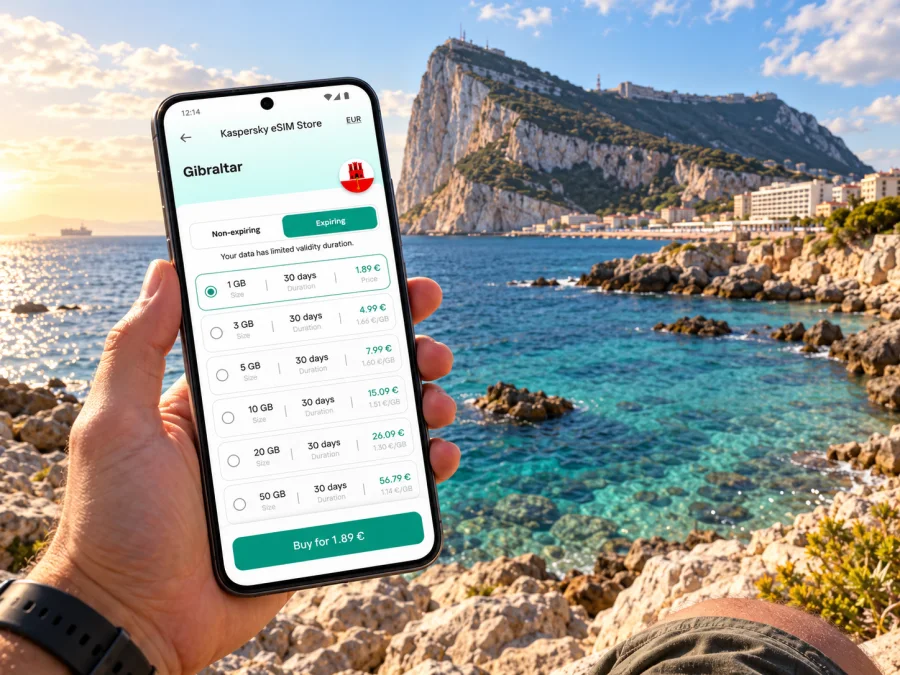
Camp Bay eSIM: mobile connection and internet for a Gibraltar coastal visit
Camp Bay is a compact seaside stop on Gibraltar’s western shore, where a beach break can sit alongside a day exploring the Rock, the city centre or the border area. Mobile data is useful here for checking a route, coordinating a meeting point, finding current beach information and arranging the next leg of a trip. The practical detail is that Camp Bay is in Gibraltar, while nearby Spain is a separate destination for mobile service and border procedures. A phone may see networks from more than one market around the peninsula, so a signal bar alone does not confirm which network or tariff is in use.
This guide is for visitors planning time at Camp Bay and moving around Gibraltar. It explains how to prepare an eSIM, keep maps and travel details accessible, and make sensible checks if the trip also crosses into Spain. Coverage, speed and availability depend on the local network, location, phone and selected plan.
First, place Camp Bay on your itinerary
Camp Bay is a beach area rather than a separate city. It lies on Gibraltar’s western coast below the Rock, south of the more central waterfront and west of the main built-up streets. The setting feels different from the compact commercial centre: the visit is about the shore, the sea and nearby coastal scenery, with the Rock forming a dramatic backdrop. It is easy to combine the beach with other Gibraltar stops, but do not assume that every short-looking route is comfortable on foot. The terrain, heat, luggage and mobility needs can all change the calculation.
Gibraltar is a British Overseas Territory at the southern end of the Iberian Peninsula and shares a land border with Spain. That geographic fact matters to your phone: a trip to the Rock, the town and Camp Bay remains a Gibraltar visit, while crossing into Spain changes the country-market question. A regional or multi-destination eSIM may cover both, but only if its current destination list and terms say so. Do not infer cross-border inclusion from proximity.
A useful day plan usually has three anchors:
- Arrival point: Gibraltar International Airport, the land crossing, or a hotel in town.
- Main walking area: the centre, waterfront, or the route toward Camp Bay.
- Return point: accommodation, a restaurant reservation, transport connection, or the airport.
Save these places before leaving Wi-Fi. A pinned map and offline hotel address help if signal or battery runs low.
What to plan before you leave
Camp Bay is small enough that a visitor may think connectivity needs little thought. In practice, the phone can be doing several jobs at once: maps, messages, a ticket or booking, photos, translation and transport coordination. A few minutes of preparation reduce the chance of depending on one live connection for everything.
| Before the trip | Why it helps around Camp Bay |
|---|---|
| Save the beach and accommodation pins | Lets you orient yourself if map data is slow or temporarily unavailable. |
| Check the selected plan’s destination list | Confirms whether it is for Gibraltar alone or includes Spain as well. |
| Confirm the phone is eSIM-compatible and unlocked | An eSIM profile cannot be installed on an incompatible or restricted device. |
| Keep the home SIM active if you need its number | A data-only travel eSIM may not include ordinary calls or SMS. |
| Download key documents and tickets | Immigration, check-in and booking details should not rely on mobile data. |
| Carry a charger or power bank | Navigation, camera use and hotspot sharing can use battery quickly. |
If Camp Bay is the main purpose of your visit, check beach conditions and facilities close to the date. Opening arrangements can vary by season and may change after maintenance, storms or public-safety notices. Gibraltar’s authorities have previously announced seasonal lifeguard and beach-attendant schedules, accessible equipment at Camp Bay and maintenance affecting the pools. They also issued a 2026 advisory asking bathers to avoid discoloured or unusual-smelling water while a suspected sea-sparkle bloom was investigated. These notices are time-specific, not a permanent description of the beach. Verify current conditions locally before swimming.
Arriving in Gibraltar and getting oriented
Gibraltar International Airport is close to the centre, but arrival procedures and the route onward are distinct from what you may be used to at another European airport. The airport’s current passenger information says travellers arriving at Joshua Hassan Gibraltar International Airport pass Gibraltar and Schengen immigration controls under the arrangements implemented in July 2026. Requirements depend on nationality, residence status and the documents you carry; check the current official entry guidance for your own case before travelling. Do not use an eSIM plan or a phone’s network list as a substitute for checking entry rules.
After formalities, mobile data can help you contact your host, confirm a pickup point and follow a route into town. Save the accommodation address and booking details offline in case your flight changes or a page will not load.
At the land crossing, the travel pattern can be different. Visitors may arrive on foot or by road from La Línea de la Concepción in Spain. Be aware of the border and the network market shown on your phone: phones can connect to an available network based on signal and device settings, and a nearby Spanish network is not proof that a Gibraltar plan includes Spanish data. Before using maps intensively or turning on a hotspot, check the active data line and the plan’s destination terms.
A simple arrival checklist
- Confirm the phone has charged and the travel eSIM profile is installed or ready to install.
- Keep the booking address and first route saved offline.
- Check the phone’s selected data line before enabling mobile data.
- Turn off automatic data switching if you want to avoid an unintended connection through your home SIM; the exact setting name differs by device.
- After connecting, check the network name and the plan’s usage display rather than relying only on the signal icon.
- If service does not appear, use Wi-Fi first to review the installation steps and plan instructions; avoid deleting an eSIM profile unless support or the instructions tell you to do so.
Moving between the centre and Camp Bay
The centre, marina and south-western coastal areas form a compact itinerary, but compact does not mean every route is flat, shaded or equally convenient. Use a current map to compare walking with a taxi or other available transport, particularly if you have beach gear, children, reduced mobility or a tight schedule. Check route conditions and pickup instructions rather than assuming a vehicle can stop exactly at the beach entrance.
On the way, maps are especially useful for distinguishing a direct route from one that is easier on foot. Downloading an offline map does not provide live traffic or rerouting, but it gives you a fallback for basic orientation. Save a few precise points rather than typing a vague destination while moving: your hotel entrance, Camp Bay, a meeting place and a return point. If the phone’s map app supports offline areas, download the relevant section before leaving Wi-Fi and verify that it is available offline.
At Camp Bay, mobile reception can vary with exact position, the handset and the serving network. The Rock, buildings, terrain, crowd levels and radio conditions can all affect performance. There is no reliable reason to promise one speed or a continuous signal at every spot on the shoreline. If a page will not load, step to a more open location, pause background downloads, or use information already saved. For a time-sensitive pickup, agree a clear meeting point in advance and send it before separating from your group.
Protect your phone from sand, salt water and direct sun. If you plan to take photos and navigate later, close power-hungry apps and keep battery in reserve for the return journey.
Choosing an eSIM for Camp Bay and the wider trip
An eSIM can be useful when you want mobile data without changing the physical SIM in your phone. Kaspersky eSIM Store is an app and website where you can choose, arrange and activate an eSIM with a suitable travel data plan. The network and coverage depend on the plan and the local network it uses; the Store is not a mobile operator. Read the destination, data allowance, validity period, activation conditions and any restrictions before you decide.
For a visit confined to Camp Bay and Gibraltar, start by selecting Gibraltar as the destination and checking the plan details. If your route includes La Línea, Málaga, Seville or another place in Spain, confirm that the same plan explicitly includes Spain or choose a plan that lists every destination you need. A plan titled for Gibraltar should not be assumed to include Spain, and a Spain plan should not be assumed to include Gibraltar. Nearby geography does not make mobile markets interchangeable.
Explore current eSIM options for a trip to Gibraltar and compare the destination and conditions shown at the time you plan to travel. The available offers can change, so use the live plan details rather than a saved price or an old screenshot. This country page is for checking current Gibraltar options; it does not represent a specific tariff for Camp Bay or make a coverage promise for one beach.
Pick a plan around your actual use
Estimate how you will use data instead of choosing a package solely because the number looks large. A short visit using messages, maps and occasional searches is different from a week of video calls, frequent photo uploads or tethering a laptop. Media auto-play, cloud backup and operating-system updates can consume data without an obvious action.
- Light use: maps, messaging and occasional web searches. Save directions and documents in advance, then compare the modest data options shown for Gibraltar.
- Regular travel use: frequent navigation, browsing, ride coordination and social updates. Allow a margin for unexpected route changes and check how long the package remains valid.
- Work or hotspot use: video meetings, large uploads or sharing data with another device. Review hotspot terms and your expected consumption carefully; confirm the phone supports tethering and do not assume the plan has unlimited data.
Actual consumption varies by app settings, video quality and background sync. Check when a plan’s validity begins; installation and first use may be different activation triggers.
Check compatibility before purchase
Not every phone supports eSIM, and support can vary by exact model, country variant and carrier lock. Check the manufacturer’s specification for your precise device version, confirm that it is not network-locked, and use the device compatibility checker before choosing a plan. A model name alone may not identify every regional version, so preserve the exact variant information when checking.
Also check whether you can keep your home SIM available for calls or SMS while assigning mobile data to the travel eSIM. The travel plan may be data-only; ordinary cellular calls and text messages may continue to use your home provider and its charges. Internet-based calls and messages may work through apps when data is available, but they still need a connection and access to the relevant account.
Install and activate before the beach day
Where possible, install the eSIM while you have stable Wi-Fi and time to follow the on-screen prompts. Keep your account details and installation email accessible. Do not remove the profile after installation just because you are troubleshooting: some eSIM profiles cannot simply be downloaded again or transferred to a different phone. Follow the plan’s own activation instructions and confirm whether activation should happen before departure or only when you reach the destination.
For step-by-step help, use the Android eSIM installation instructions or the iOS eSIM installation instructions. Menu names differ between manufacturers and operating-system versions, so follow the flow that matches your device. These general checks help you understand the setup:
- Connect to Wi-Fi and open the purchase confirmation or app profile.
- Add the eSIM using the provided installation flow or QR code, as directed for your phone.
- Label the line clearly, for example “Travel data,” so you can identify it beside your home SIM.
- Choose the travel eSIM as the mobile-data line when the plan is ready to be used.
- Enable data roaming for that eSIM only if its instructions require it. On some plans this setting is needed for the selected travel service; confirm the terms and make sure your home SIM is not selected for data.
- After arrival, check that the eSIM is active, the correct line is selected and the plan shows data use or a connection.
Installation is not the same as a guarantee of immediate service. A profile can be present while the device is still waiting to register on an eligible network. If the connection does not start, check airplane mode, the selected data line, the plan’s activation conditions and the network selection instructions. Restarting the phone may help in some cases. If the issue persists, use the provider’s support route while connected to Wi-Fi and keep the order details available.
Gibraltar, Spain and the network boundary
Camp Bay is within Gibraltar. It is not in Spain, despite being close to the Spanish border and to destinations across the bay or peninsula. The distinction matters in two ways: border formalities are governed by current entry arrangements, and mobile data eligibility follows the selected plan’s listed destination markets. Neither your location on a map nor a displayed carrier name alone settles both questions.
If you will cross the border, check three separate things before leaving:
- Travel permission: confirm the entry conditions that apply to your passport and residence status.
- Plan scope: verify that the eSIM covers Gibraltar, Spain, or both, according to your route.
- Data line: confirm which SIM is selected for mobile data and whether automatic switching is enabled.
A handset may prefer a stronger available network, and network selection can change as you move. If the connection drops or the data line appears to roam unexpectedly, pause high-volume use and inspect the device settings and plan information. Manual network selection may be available on some devices, but the appropriate network depends on the plan; use the plan’s instructions instead of choosing a carrier at random. Do not interpret a successful connection in one location as proof that the same plan will work on the other side of a border.
For a longer itinerary across the region, compare a Gibraltar-only option with any regional plan whose destination list expressly includes each stop. Check fair-use rules, speed limits, validity and the included data before buying. A regional label can cover several destinations, but the actual list is what matters.
If data does not work
Check that the travel eSIM is switched on, selected for mobile data, active for Gibraltar and has remaining data. Enable data roaming for that eSIM only if its instructions require it. Then toggle airplane mode briefly or restart the phone if appropriate. If service remains unavailable, compare the plan’s destination and network instructions, use Wi-Fi to contact support with your order reference, and keep the eSIM profile installed unless support tells you otherwise. A failed connection at one spot may reflect local reception or registration rather than a device fault.
Frequently asked questions
Is Camp Bay a city in Gibraltar?
No. Camp Bay is a coastal beach area in Gibraltar, not a separate city or sovereign destination. For travel planning and mobile data, select Gibraltar unless the plan uses another explicit regional destination that lists Gibraltar.
Will one eSIM work at Camp Bay and in Spain?
Only if the selected plan’s current destination terms include both Gibraltar and Spain. Check the country list before purchase and monitor which data line is active as you travel. A plan for one market should not be presumed to include the neighbouring one.
Can I rely on mobile coverage everywhere around Camp Bay?
No universal coverage or speed can be guaranteed. Reception depends on the local network, exact position, surroundings, device and plan. Save essential information offline and check your connection before relying on it for a time-critical task.
What should I do if swimming conditions have changed?
Check current local notices on the day. Seasonal schedules, maintenance and water-quality advisories can change. If authorities advise avoiding the water, follow that guidance; do not rely on a cached page or an older travel post.
Prepare your mobile connection for Camp Bay
A little preparation makes it easier to use maps, messages and travel details during a coastal visit, while offline copies provide a fallback if reception changes. Check your device and the exact destination list, then compare the current conditions for Gibraltar in Kaspersky eSIM Store. The app and website help you choose, arrange and activate a travel eSIM plan; the local network, coverage and service depend on the plan and its network terms.
Choose an eSIM plan for your Gibraltar trip after checking its included data, validity, activation timing and destination coverage. If Spain is also on your itinerary, confirm that Spain is listed before you travel.


