
Travel connectivity guide
Canada eSIM: mobile internet for travel
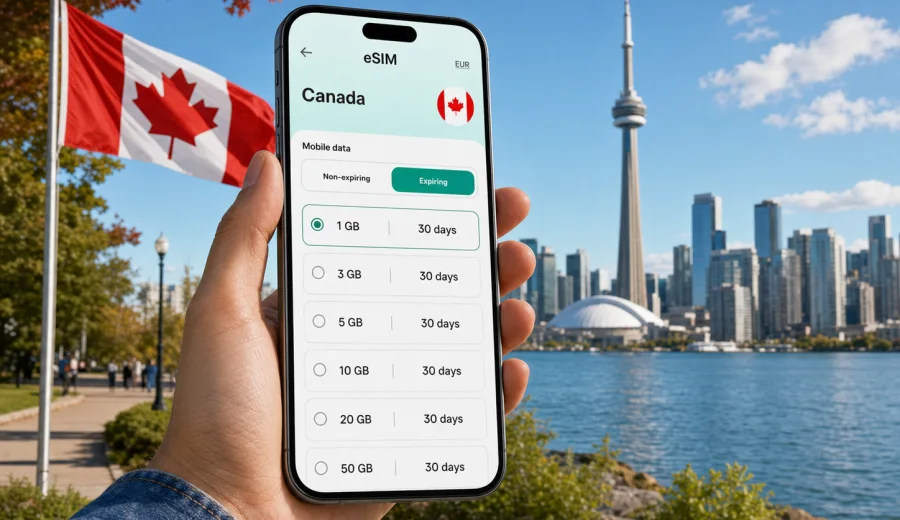
eSIM in Canada: mobile connection and internet for your trip
Canada is an easy country to underestimate from a connectivity point of view. The booking may look simple: fly into Toronto, Vancouver, Montreal, Calgary, Ottawa, or Halifax, then move between hotels, airports, national parks, train stations, car rentals, and city neighborhoods. In practice, the distances are large, the routes can change quickly, and a stable mobile internet plan matters from the first day of the trip.
An eSIM helps you prepare mobile data before you rely on airport Wi-Fi, roaming settings, or a local SIM shop. Instead of inserting a plastic SIM card, you install a digital SIM profile on a compatible phone or tablet and choose it for mobile data while you travel. For Canada, that can be useful for navigation, ride-hailing, hotel check-in, maps, translation, messaging, restaurant bookings, and work tasks on the move.
Kaspersky eSIM Store is an app and website where you can quickly choose, arrange, and activate an eSIM with a suitable mobile internet plan for an international trip. It is not a mobile network operator and does not replace your home carrier. It helps you prepare a data plan for the destination, see the plan conditions, and manage the setup from your device.
Why mobile internet in Canada needs planning
Canada is not just one city break destination. A traveler may spend one day in downtown Toronto, another by Niagara Falls, then continue to Montreal by train or fly to Calgary for the Rockies. In each case, mobile data has a different role.
You may need internet for:
- airport transfers after landing;
- navigation between cities and suburbs;
- weather checks before outdoor routes;
- hotel and apartment access codes;
- mobile payments and banking confirmations;
- messaging with hosts, colleagues, or family;
- maps when driving outside the city center;
- booking ferries, trains, buses, or car-sharing services;
- checking opening hours for museums, parks, and restaurants.
Public Wi-Fi can help in hotels, airports, cafes, and some public spaces, but it is not a complete travel connectivity plan. It may require registration, may be slow at busy times, and is rarely available exactly when you need directions on a street, at a parking lot, or between transit stops. Standard roaming can be convenient, but prices and daily fees depend on your home carrier. A prepaid eSIM plan gives you another option: choose a data package before the trip and use it when the conditions fit your route.
How eSIM works for Canada
An eSIM is a digital profile installed on a compatible device. After installation, your device can use that profile for mobile data in the destination. Your physical SIM can usually remain in the phone, so you can keep your main number available for calls or messages if your home carrier settings allow it. The eSIM plan is mainly for internet access unless the specific conditions say otherwise.
For most trips to Canada, the practical setup looks like this:
1. Check that your phone supports eSIM and is not locked to one carrier.
2. Choose Canada as the destination.
3. Select a data amount and validity period that match your trip.
4. Install the eSIM profile using the instructions.
5. Turn on the eSIM for mobile data when you are ready to use it.
6. Monitor data use and top up or choose another plan if your trip requires more traffic.
Before choosing a plan, check your device. This step is important because eSIM support depends on the exact model, region, and carrier lock status. A phone model name alone is not always enough; two versions of the same device family can have different eSIM support.
What kind of Canada trip are you planning?
The right mobile data plan depends less on the country name and more on your behavior. A weekend in Montreal is not the same as a three-week route across British Columbia, Alberta, and Ontario. Use the trip type first, then decide how much data you need.
| Trip scenario | Typical internet use | What to consider |
|---|---|---|
| Short city break | Maps, rides, messaging, tickets | A smaller data package may be enough if hotel Wi-Fi is reliable |
| Business trip | Email, calendars, calls through apps, hotspot | Choose more data if you work away from hotel Wi-Fi |
| Road trip | Navigation, weather, route changes, bookings | Offline maps help, but mobile data is still useful for live updates |
| Family vacation | Multiple devices, photos, streaming, bookings | One device may need more data if it shares a hotspot |
| Long stay | Daily maps, messaging, browsing, work tasks | Validity period matters as much as gigabytes |
The safest approach is to estimate your daily habits honestly. Navigation and messaging use much less data than video calls, cloud backups, social media uploads, or streaming. If you plan to upload many photos, use video meetings, or share mobile data with a laptop, choose a larger package or be ready to manage traffic carefully.
Where eSIM is useful across Canada
In major cities, travelers often use mobile internet for small, frequent decisions: which subway exit to take, whether a restaurant has available tables, how to find a ride pickup zone, or where to download a museum ticket. Toronto, Vancouver, Montreal, Calgary, Ottawa, Quebec City, Edmonton, Winnipeg, and Halifax all create that same pattern: the trip is smoother when your phone is online before you start searching for Wi-Fi.
In airports, eSIM can reduce friction after arrival. Toronto Pearson, Vancouver International, Montreal-Trudeau, Calgary International, and Ottawa International are all places where a traveler may need a map, ride app, hotel address, or message thread immediately. Installing the eSIM before departure can make the arrival routine calmer, because the profile is already on the device and you only need to activate the right mobile data settings when appropriate.
On intercity routes, mobile data is useful for schedule changes, accommodation messages, and weather. Canada has long distances, and travel time can be affected by traffic, snow, rain, ferry schedules, or road conditions. Your connection quality will still depend on the selected plan, local network conditions, terrain, device, and location, but having a prepared data option is better than solving the problem after you are already moving.
Choosing a Canada eSIM data package
The best plan is not automatically the largest one. It is the one that matches your route, trip length, and habits. Start with four questions:
- How many days will you be in Canada?
- Will you rely mostly on hotel and office Wi-Fi, or on mobile data?
- Will you use video calls, streaming, or hotspot mode?
- Will you leave big cities for national parks, ski areas, islands, or long drives?
For light use, mobile data is mostly maps, messengers, booking apps, and occasional browsing. For medium use, add frequent photo uploads, social media, cloud documents, and app-based calls. Heavy use includes laptop hotspot, long video calls, streaming, large file transfers, and automatic cloud backup.
If you want to prepare the mobile internet part of your trip before departure, you can choose an eSIM plan for Canada and compare available data amounts and validity periods. Review the plan details before payment, including destination, traffic volume, validity, and any activation conditions.
Practical data-saving habits
Good data habits can make a smaller package last longer. They are especially useful in Canada because travel days can be long and the phone may work harder with maps, camera uploads, and background app refresh.
Use this checklist before departure:
- download offline maps for cities and driving routes;
- save hotel addresses and reservation numbers offline;
- update apps before leaving home Wi-Fi;
- turn off automatic cloud backup on mobile data;
- restrict video autoplay in social and news apps;
- download playlists, podcasts, and documents in advance;
- keep your home SIM active only for the services you need;
- check which line is selected for mobile data after landing.
During the trip, review data use in your phone settings. If one app is consuming much more data than expected, limit background activity or use it only on trusted Wi-Fi. Video is usually the fastest way to spend a data package. Maps, messaging, email, and basic browsing are much easier to manage.
Installation and activation: what to do before you fly
It is usually better to install the eSIM while you still have stable Wi-Fi at home, in the office, or at the hotel before departure. Installation and activation are related, but they are not always the same moment. Some plans begin counting validity only after the eSIM connects in the destination; others may have different conditions. Read the plan details before you activate mobile data.
For setup guidance, use the Android installation instructions or the iOS installation instructions, depending on your device. The exact menu names can differ by phone model and operating system version, so follow the instructions carefully and keep a stable internet connection during installation.
A practical setup sequence:
1. Install the eSIM profile on Wi-Fi.
2. Give the eSIM a clear label, such as Canada data.
3. Keep your primary SIM available for your usual number if needed.
4. Select the eSIM for mobile data when you are ready to use it.
5. Enable data roaming for the eSIM if the instructions or device settings require it.
6. Test basic internet access after arrival.
Do not delete the eSIM profile unless you are sure you no longer need it. Some eSIM profiles cannot be reinstalled or moved to another device after activation. If something does not work as expected, check the device settings first and contact support through the available product channels instead of removing the profile immediately.
Canada travel situations where eSIM helps
Arrival day. You land, leave the aircraft, and need a hotel address, ride pickup point, transit route, or message from the host. A prepared eSIM can make this first hour less dependent on airport Wi-Fi.
City navigation. In Toronto, Montreal, Vancouver, and other large cities, mobile data supports maps, transit apps, restaurant bookings, mobile tickets, and quick changes of plan.
Business travel. Email, calendar updates, chat apps, and occasional tethering can be important between meetings. If you expect laptop hotspot use, choose a data package with enough room.
Outdoor plans. For routes near Banff, Jasper, Whistler, coastal areas, lakes, or national parks, download offline materials in advance. Mobile internet can help with weather and logistics, but terrain and location can affect connection quality.
Cross-border routes. Some travelers combine Canada with the United States. Check whether your chosen plan is for Canada only, a regional option, or another destination type. Do not assume that a country plan automatically covers another country.
eSIM, roaming, and local SIM: a practical comparison
| Option | Strengths | Limits |
|---|---|---|
| eSIM data plan | Can be prepared before the trip, no plastic SIM, clear package conditions | Requires compatible unlocked device; usually mobile data only |
| Standard roaming | Uses your existing SIM and number | Pricing and daily fees depend on home carrier terms |
| Local physical SIM | Can suit longer stays in some cases | Requires finding a store, checking conditions, and changing SIM cards |
| Public Wi-Fi | Useful in hotels, offices, cafes, airports | Not always available, can be slow, and may not help while moving |
Many travelers use more than one option. For example, keep the home SIM for important messages, use hotel Wi-Fi for large downloads, and use eSIM for daily mobile data outside. The important part is to decide before the trip, not after the first navigation problem.
Common mistakes to avoid
- Buying a plan before checking eSIM compatibility and carrier lock status.
- Installing the eSIM on a device you do not plan to take on the trip.
- Assuming the eSIM includes a local phone number, calls, or SMS.
- Turning on the wrong SIM for mobile data after arrival.
- Letting photo backup, video autoplay, or system updates use mobile data.
- Waiting until the airport queue to install the eSIM for the first time.
- Deleting the eSIM profile while troubleshooting.
The most common issue is not the eSIM itself, but the surrounding settings: which line is active for data, whether roaming data is enabled for that eSIM when required, whether the device is compatible, and whether the selected plan is still valid.
Quick answers about eSIM for Canada
Can I use eSIM in Canada for regular calls and SMS?
Most travel eSIM plans are focused on mobile data. Calls and SMS are not included unless the specific plan conditions say so. For voice and messages, many travelers use internet-based apps.
Should I install the eSIM before I arrive?
Yes, if the plan conditions allow it. Installing on reliable Wi-Fi before travel helps you avoid setup pressure at the airport. Activate mobile data according to the instructions and plan terms.
Will my main SIM still work?
On many dual-SIM devices, your main SIM can stay active while the eSIM is selected for mobile data. Check your phone settings and home carrier terms, especially for roaming charges.
Does eSIM guarantee the same connection everywhere in Canada?
No. Connection quality depends on the chosen plan, local network conditions, terrain, device, buildings, and location. Canada has large urban areas and remote regions, so plan your route realistically.
How much data do I need?
For light maps and messaging, a smaller package may work. For video calls, social media uploads, hotspot mode, or long trips, choose more data and monitor usage.
Final preparation checklist
Before you leave for Canada, make sure you have:
- a compatible, unlocked eSIM device;
- the eSIM installed on the device you will use;
- instructions saved or bookmarked;
- offline maps for key routes;
- app updates completed on Wi-Fi;
- mobile data settings checked;
- a clear understanding of the plan validity and traffic amount;
- a backup option for important messages or calls.
Canada rewards travelers who prepare the practical details early. Distances are large, arrival days can be busy, and mobile internet often becomes the quiet tool behind every smooth route change, booking update, and map search.
To prepare your phone before the trip, select an eSIM plan for Canada in Kaspersky eSIM Store, check the available data packages and validity periods, then install the eSIM on a compatible device before you need mobile internet on the road.