
Travel connectivity guide
Canberra eSIM: Mobile Internet for Your Trip
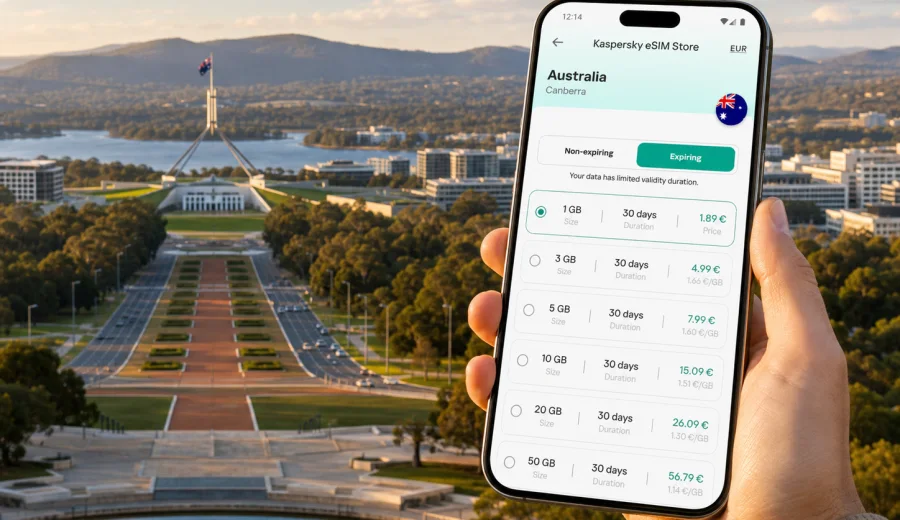
Canberra eSIM guide: mobile connection and internet for your trip
Canberra is a practical city, but it rewards travellers who arrive prepared. The airport is close to the centre, the main sights are spread around Lake Burley Griffin, and many business, diplomatic, university, museum, and government visits involve moving between districts rather than staying in one compact old town. A stable mobile connection and mobile internet make that first day much easier: you can open a rideshare app at Canberra Airport, check bus and light rail routes, confirm a hotel address in Braddon or Barton, and keep maps ready when you cross from the Parliamentary Triangle to Civic.
An eSIM is useful in Canberra because it lets you prepare mobile data before you travel, without depending on a physical SIM counter after arrival. With a compatible phone, you can install a digital SIM profile, select a data package for Australia, and use mobile internet for navigation, messaging, bookings, and work tasks during the trip. It is not a replacement for every mobile service: most travel eSIM tariffs focus on data, and voice calls or SMS are included only if the specific tariff says so. For many visitors, that is enough because calls, confirmations, and team chats usually happen through internet apps.
Why mobile internet matters in Canberra
Canberra looks simple on a map: a planned capital, wide avenues, clear districts, and major landmarks around the lake. In practice, visitors often underestimate the distances. Parliament House, the National Gallery, the Australian War Memorial, the Australian National University, Kingston Foreshore, Manuka, Braddon, and the airport are all easy to reach, but they are not all within a short walk of each other.
Mobile internet helps with the everyday details that shape the trip:
- checking public transport options before you leave the hotel;
- comparing walking, bus, light rail, taxi, and rideshare times;
- using maps around large parklands and government precincts;
- receiving hotel, event, or meeting updates;
- sharing documents and directions during a business visit;
- checking opening hours for museums, galleries, restaurants, and attractions;
- using translation, messaging, banking, and authentication apps.
Canberra is also a city where plans can change during the day. A meeting may move from Barton to Civic, a gallery visit may run longer than expected, or a lake walk may turn into dinner in Kingston. With mobile data available on your phone, you can adapt without searching for Wi-Fi each time.
Arrival at Canberra Airport
Canberra Airport is compact compared with the airports in Sydney or Melbourne, but it is still the point where many travellers need data immediately. You may need to message your hotel, open a ride-hailing app, check a meeting location, or see whether a bus connection suits your arrival time. If your eSIM is installed before the flight, the first task after landing is usually to choose the correct line for mobile data and check that data roaming is enabled for the eSIM if the tariff requires it.
Useful arrival checks include the final hotel route, live transport options, rideshare availability, late check-in messages, calendar locations, and any pickup instructions. Short-stay travellers can also decide quickly whether there is enough time for the lake, Civic, or a museum before returning to the airport.
If you are connecting through another Australian city before reaching Canberra, install the eSIM before departure and activate it according to the tariff instructions. Some travellers prefer to complete installation at home while connected to a stable Wi-Fi network, then switch mobile data to the eSIM after arrival in Australia. That approach reduces the number of tasks you need to handle at the airport.
Moving around the city with an eSIM
Canberra travel is less about one crowded centre and more about moving between zones. Civic is convenient for restaurants, hotels, shops, and the Australian National University. The Parliamentary Triangle brings together Parliament House, Old Parliament House, national museums, galleries, and wide ceremonial avenues. Braddon is popular for cafes and evening plans. Kingston and Manuka suit dining, lakeside walks, and a quieter hotel base. Belconnen, Woden, Gungahlin, and Tuggeranong may appear in university, family, or work itineraries.
Mobile internet is especially useful when you cross between these areas:
1. Open the route before leaving the hotel.
2. Check whether walking is realistic or whether a bus, light rail, taxi, or rideshare is better.
3. Save the destination address in your calendar or map app.
4. Keep your hotel address offline as a backup.
5. Watch battery level during long museum days or lake walks.
Canberra's public transport network is workable for visitors, but some routes involve timing and transfers. The light rail is useful between Gungahlin and the city, while buses connect many other districts. Mobile data lets you check the next departure instead of planning the whole day around a printed timetable.
Different Canberra areas create different data habits. Civic and Braddon usually mean restaurant bookings, walking routes, payments, and messages. Barton, Parkes, and the Parliamentary Triangle often mean calendar access, tickets, documents, and navigation between large public buildings. Kingston, Manuka, Belconnen, Bruce, and Gungahlin may add lakeside plans, university visits, sport, family errands, or light rail checks. This is why a Canberra eSIM choice should follow the real itinerary, not only the number of travel days.
How much data do you need in Canberra?
The right data allowance depends on habits, not just the city. Canberra does not require unusual apps, but the distances and itinerary style can lead to frequent map use. If you use hotel Wi-Fi for large downloads and streaming, mobile data can be reserved for movement, messaging, and essential work.
Use this practical estimate:
| Trip type | Typical length | Suggested data approach |
|---|---|---|
| Stopover or one-night visit | 1-2 days | Small package for maps, messaging, bookings, and rideshare |
| Museum and city weekend | 2-4 days | Moderate package for maps, photos, tickets, and restaurant searches |
| Business trip | 3-7 days | Larger allowance if you use email, cloud files, video calls, and tethering |
| Family visit or university trip | 5-10 days | Moderate to larger allowance depending on shared planning and media use |
| Canberra plus regional trips | 7+ days | Larger package or top-up option for longer routes and navigation |
To keep usage under control, download offline maps before you travel, update apps on Wi-Fi, disable automatic cloud photo uploads on mobile data, and avoid long video streams away from your hotel. For navigation, messaging, booking confirmations, and transport checks, even a modest data package can go a long way if you manage background activity.
Choosing an eSIM tariff for Australia
For a Canberra city article, the correct destination is Australia because Canberra is the capital of Australia. In Kaspersky eSIM Store, the practical workflow is to choose the destination, compare available eSIM tariff conditions, check the data volume and validity period, then install and activate the eSIM on a compatible device. Before you decide, match the tariff to your actual Canberra plan: airport arrival, hotel location, meeting schedule, museum days, and any side trips.
If you want to prepare before departure, you can choose an eSIM tariff for your Canberra trip and review the available Australia options in advance. Check the validity period, included data, price, and activation details before you complete the order. Conditions can differ by tariff, so read the details rather than assuming every option behaves the same way.
Good selection questions: will you stay only in Canberra or continue to Sydney, Melbourne, regional New South Wales, or another Australian destination? Do you need data mostly for maps and messaging, or also for work files, video calls, and hotspot use? How many days will you be away from hotel Wi-Fi? Does your phone support eSIM and allow another mobile line? The best choice is the tariff that fits the real rhythm of the trip, with enough data, enough validity, and conditions you understand before you arrive.
Device compatibility before you travel
Not every phone, tablet, or laptop can use an eSIM. Some devices have eSIM hardware but are locked to one operator. Some regional models differ from the same model name sold elsewhere. Before you pay for a tariff, check the device itself, the operating system settings, and any operator restrictions.
Start with three checks:
1. Confirm that your exact device model supports eSIM.
2. Confirm that the device is not locked to one mobile operator.
3. Confirm that you can access the internet during installation, usually through Wi-Fi.
You can also use the internal compatibility check: check your device. This matters because an eSIM profile is tied to the device installation flow. If the phone is not compatible, the tariff will not solve the connection problem after you land in Canberra.
Installing and activating the eSIM
Installation is easier before the trip on stable Wi-Fi. Activation timing can depend on the tariff conditions, so read the instructions shown for your selected option.
Basic preparation steps:
1. Choose the Australia tariff that fits your Canberra itinerary.
2. Confirm device compatibility and operator unlock status.
3. Install the eSIM profile on Wi-Fi and label it clearly, for example "Australia data".
4. After arrival, select the eSIM for mobile data and follow the activation guidance.
5. Test maps, messaging, and browser access before leaving the airport or hotel.
For device-specific setup, use the official guides: instructions for Android and instructions for iOS. Menu names can vary by device and operating system version.
Business trips to Canberra
Canberra is a frequent destination for government, policy, education, defence, research, and consulting work. Business travellers may move between Civic, Barton, Parkes, and Braddon in one day, so mobile data is useful for calendar changes, secure links, authentication apps, documents, rideshare, and venue directions. If you expect hotspot use, choose more data: laptop sync and video calls can consume it quickly.
Hotels, apartments, and Wi-Fi habits
Most visitors use hotel Wi-Fi for heavy downloads, updates, cloud backup, and streaming, then use eSIM data for airport transfers, walking routes, tickets, rideshare, messaging, and payment authentication. Save key addresses offline and take screenshots of booking confirmations because indoor signal can vary in large museums, offices, and public buildings.
Stopovers and short stays
A short Canberra stay can still involve a surprising amount of movement. With only a few hours or one night, mobile internet helps you decide whether to go to the lake, visit the Australian War Memorial, see Parliament House, or stay near Civic for a meal. Keep the setup simple: install the eSIM before departure, save the airport route, and avoid heavy uploads until you are back on Wi-Fi.
If Canberra is part of a longer Australia itinerary, choose a tariff that covers the whole route. Road trips toward Sydney, regional New South Wales, wine areas, historic towns, or the Snowy Mountains can increase map use. Download offline maps and keep bookings saved locally.
Practical checklist before departure
Use this checklist a day or two before your flight:
- Confirm your arrival airport and hotel district.
- Check whether your phone supports eSIM and is unlocked.
- Choose an Australia eSIM tariff with enough data and validity.
- Install the eSIM profile on Wi-Fi if the instructions allow it.
- Save hotel, meeting, airport, and day-trip addresses offline.
- Turn off automatic app updates on mobile data.
- Keep your primary SIM active if you need calls or SMS.
- Pack a charger or battery pack for long navigation days.
This preparation prevents common problems: buying before checking support, installing on the wrong phone, forgetting to switch mobile data to the eSIM, assuming calls and SMS are included, or leaving cloud backup on mobile data.
FAQ: eSIM and mobile internet in Canberra
Does an eSIM include a phone number?
Many travel eSIM tariffs focus on mobile data and do not include a standard phone number, voice calls, or SMS unless the details state otherwise. Internet-based calls and messages can work through data apps.
What if I am also visiting Sydney or Melbourne?
Choose an Australia tariff that covers your full route and validity period. Do not base the decision only on the Canberra part if the trip continues elsewhere.
Choose your Canberra eSIM setup before you travel
Canberra is easier when your phone is ready before you leave the airport. With an eSIM on a compatible device, you can use mobile internet for maps, transport, hotel messages, meeting updates, tickets, and day-trip planning. Kaspersky eSIM Store helps you choose, install, and activate an eSIM tariff for mobile data abroad.
Before departure, check your device, choose a data allowance that fits your itinerary, install the eSIM on Wi-Fi, and keep the setup instructions handy. If Canberra is part of a wider Australia route, allow for the whole journey rather than only the capital. When you are ready, prepare an eSIM tariff for your trip to Canberra and arrive with mobile internet already planned.