Travel connectivity guide
Cane Garden Bay eSIM: Mobile Internet Guide
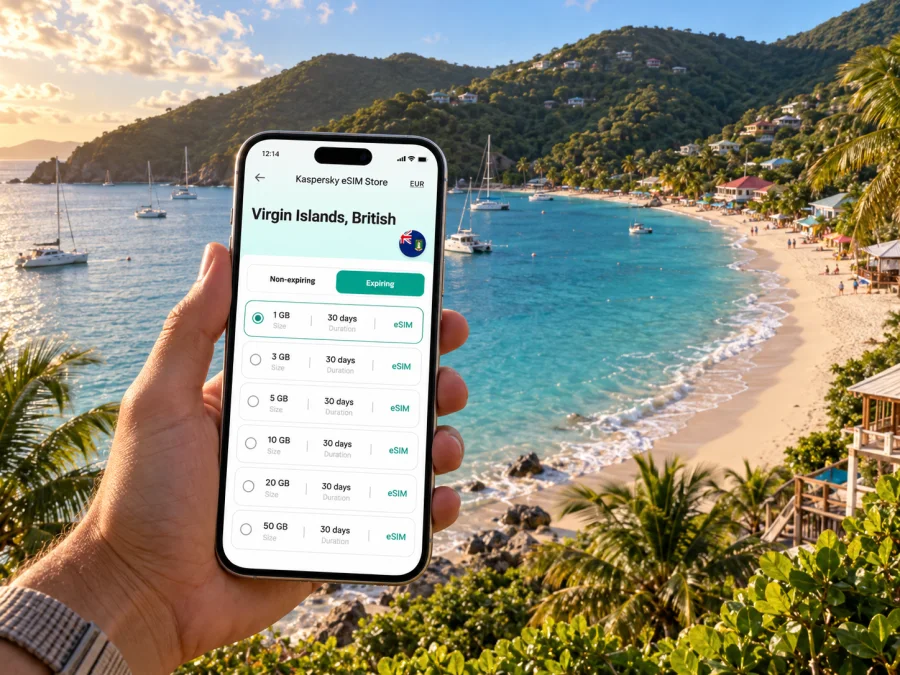
Cane Garden Bay eSIM: Mobile Connection and Internet for Your Visit
Cane Garden Bay is a beach community on Tortola’s northwestern coast, where the shoreline, hillside roads and spread-out places to stay shape how a visitor gets around. A mobile data connection can help you coordinate a transfer, check directions, message your host and keep practical travel details close at hand. Preparing an eSIM before you arrive gives you one less setup task to handle while finding your way from the airport, ferry dock or Road Town to the bay.
This guide focuses on using mobile internet around Cane Garden Bay: what to prepare before travelling, how to navigate the island’s changing terrain, which details to confirm with accommodation and drivers, and how to plan onward trips. It is not a promise of service at every beach, road or building. Availability and performance depend on the selected plan, its local network partner, your device and conditions where you are.
Why mobile data helps in Cane Garden Bay
Cane Garden Bay is not laid out like a dense city centre with a grid of short blocks. The beach sits in a coastal curve, while the land rises quickly behind it. Accommodation, restaurants and other stops can be separated by slopes and winding roads. That changes the kind of information you may need: a saved pin for a villa entrance, a clear pickup point, a route back to your lodging after dark, or a message confirming a change of plans.
The bay is also a natural point for beach time and sailing activity. Visitors may spend part of a day by the water, then move to another part of Tortola, meet a boat or return to Road Town. A phone with mobile data can keep maps, booking details and messages available during those transitions, subject to your plan and signal. For calls to accommodation or a driver, confirm in advance which calling method they use; an eSIM intended for mobile data does not automatically include a local phone number or conventional calls and SMS.
Think of the connection as a practical travel tool rather than the trip itself. Download maps and key documents before setting out, carry your accommodation address offline, and use mobile data when you need current directions or to contact someone. This combination is more dependable than assuming you will have a usable connection at every point along a route.
Before you leave: prepare the essentials
A few minutes of preparation can prevent small arrival problems from becoming stressful. Cane Garden Bay’s hillside setting makes it especially useful to have a precise destination pin and the name of the accommodation, not just the words “Cane Garden Bay.” A property may be above the main beachfront or approached by a separate road, so ask your host which entrance and pickup location to use.
Use this short checklist before departure:
- Save your lodging’s full name, address or directions, host contact details and arrival instructions.
- Ask your host or transfer provider where they expect to meet you and how they will identify one another.
- Download an offline map of Tortola and mark the airport or ferry arrival point, Road Town, your accommodation and any planned meeting place.
- Keep ferry, flight, boat-trip and accommodation confirmations available offline as well as in your email.
- Check whether your phone supports eSIM and is unlocked for use with another mobile plan. Check your device before choosing a plan.
- Review the plan’s destination, data allowance, validity period, activation instructions and any fair-use or network conditions before purchase.
- Bring a charger or power bank; navigation, photos and messaging can use battery quickly during a full day out.
Maps are useful for orientation, but they do not replace local directions. A route line may not tell you which gate to use, whether a steep lane is suitable for your vehicle, or where a driver can safely stop. Share the map pin with your host and ask them to confirm that it marks the correct entrance. If a driver gives you a landmark or a different meeting point, save that too.
Set expectations for mobile internet
An eSIM plan is a way to add a mobile data profile to a compatible device. Before you travel, check which destinations the plan covers and the conditions shown at checkout. The plan details are the right place to confirm the included data and validity; do not choose based only on a headline or assume that one package suits every itinerary.
Actual access can vary as you move around Tortola. A beach, a hillside property, a vehicle route and an indoor room are different settings, and a phone may behave differently in each. Network availability can also depend on the partner network and local conditions. Keep important directions and confirmations available offline, and treat live maps or messaging as helpful when they work rather than as the only way to find your accommodation.
Kaspersky eSIM Store is an app and website where you can choose, purchase and activate an eSIM with a suitable plan for mobile internet on an international trip. You can review eSIM plan options for the Virgin Islands, British and compare the plan details with the length and style of your stay in Cane Garden Bay.
Getting from your arrival point to the bay
Most itineraries begin at a transport hub elsewhere on Tortola or nearby Beef Island, rather than at Cane Garden Bay itself. Your route may involve a flight, a ferry, a taxi or a prearranged transfer, depending on how you reach the Virgin Islands, British. Check the exact arrival point on your booking and confirm the next leg before you set off. A plan that looks simple on a map can involve a handoff between air, sea and road transport.
For a road transfer, send the driver or host the exact accommodation pin and ask them to confirm the pickup point. Do not rely on a generic beach pin if your lodging is uphill or outside the main beachfront. If you are arriving after a long journey, it can help to have the destination written down as well as saved on your phone, in case the battery is low or data is temporarily unavailable.
Road Town is the main town and a common point for errands, ferry connections and appointments on Tortola. Cane Garden Bay lies on the island’s northwestern side, so a journey between the two means crossing a section of the island rather than walking between adjacent neighbourhoods. Before booking a same-day connection, allow time for the transfer and confirm timing with the transport provider. Schedules, road conditions and waiting times can change, and map estimates should not be treated as a guarantee.
A useful arrival sequence is:
- Confirm whether you land at the airport, arrive by ferry, or meet a boat elsewhere.
- Check the driver’s name, vehicle or meeting instructions directly with the provider or your accommodation.
- Share your destination pin and get confirmation that it points to the right entrance.
- Keep your next booking or connection time visible, with a buffer for the road transfer.
- Once you reach the bay, save the location of your lodging and the agreed pickup point for the return trip.
If your transfer is arranged by your accommodation, clarify whether the driver will wait if an inbound leg is delayed and how to notify them. When several guests are travelling together, agree on one meeting point and one person to contact the driver. Mobile messaging can make coordination easier, but the transport plan should still be clear before everyone separates at a busy arrival area.
Moving around Cane Garden Bay and Tortola
Plan journeys between named places. “The beach” may be enough for a swim, but not necessarily for a pickup or reservation. Save your lodging entrance, restaurant, marina or meeting point separately, and check where the return journey begins.
Tortola’s road network follows hilly terrain. A short map distance may take longer than expected, so confirm the route and parking with your host or driver. Agree on the fare and return arrangements before a taxi ride, and ask how to request the next pickup. A map can guide you, but it cannot confirm private access, parking availability or whether a vehicle can wait safely.
| Situation | Save on your phone | Confirm in person |
|---|---|---|
| Arrival transfer | Destination pin and booking | Exact pickup point and driver |
| Hillside accommodation | Offline map and address | Entrance, gate and road access |
| Beach outing | Return pin and contact details | Pickup location and time |
| Trip to Road Town | Stops and onward booking | Transfer timing and connection |
Charge your phone before a long outing and keep it protected from sand, splashes and direct heat. Save a screenshot of your return instructions, and note your property name or a nearby landmark. Those details help if you need to conserve battery or mobile data.
Choosing an eSIM plan for this kind of stay
Choose a data allowance around your own habits and trip length. Maps and messaging use data differently from video calls, streaming or automatic photo uploads. Check how many days you need, whether your accommodation offers Wi-Fi, and when the plan’s validity begins. Read the destination, allowance, validity and activation conditions shown for the plan; do not assume every package suits every itinerary.
Before selecting a plan, ask yourself:
- How many days will you spend in Cane Garden Bay and elsewhere in the Virgin Islands, British?
- Will mobile data be mostly for maps and messages, or also for frequent photos and video?
- Will you need data while travelling between the bay, Road Town and a boat departure point?
- Can you pause background photo uploads and download large files over Wi-Fi?
There is no universal data allowance for a visit. Recent usage on your phone is a useful starting point. Increase your estimate if you regularly use video or upload photos, and reduce background use if you want to conserve data. A travel plan is not a prediction of speed or coverage: check its terms and keep essential directions and confirmations saved offline.
| Travel pattern | Main data needs | Preparation |
|---|---|---|
| Short beach stay | Maps, messages, reservations | Save the lodging pin and booking details |
| Several days in the bay | Directions, coordination, photos | Estimate daily use and pause automatic uploads |
| Work between outings | Scheduling, messages, selected calls | Confirm property Wi-Fi and call requirements |
| Multi-stop itinerary | Transport and activity details | Save each dock and leave time between legs |
Install and activate before you need it
If your device is eSIM-compatible and unlocked, review the instructions for your operating system before travelling: Android installation instructions and iOS installation instructions. Follow the steps for your device and the plan you selected; menu names can vary by model and software version.
- Choose a plan for the Virgin Islands, British, and check its allowance, validity and activation terms.
- Install the eSIM over a stable internet connection, following the plan instructions.
- Label the new line so you can distinguish it from your usual SIM.
- Review mobile-data settings before departure and follow the plan’s directions on when to enable the line.
- Keep your usual SIM settings if you still need that number for calls or messages.
Installation and activation may be separate steps, and the timing depends on the plan. Read its directions rather than assuming when data use begins. Keep the confirmation and instructions available after landing.
FAQ: mobile connection in Cane Garden Bay
Can I rely on mobile maps around the bay?
Use maps for orientation and save an offline map, but confirm the final approach with your host or driver. A route line may not identify a private entrance, suitable stopping place or current road condition.
Will an eSIM work everywhere on Tortola?
Do not assume service at every beach, road or building. Access depends on the plan, its local network partner, your device and local conditions. Keep essential travel details available offline.
Can I call my hotel or driver with a travel eSIM?
A plan focused on mobile data does not necessarily include a local number, voice calls or SMS. Confirm how your accommodation and transport provider prefer to communicate. Internet messaging apps may work when both parties have data access.
How much data should I choose?
Estimate from your recent phone use and the activities planned. Maps and messaging differ from video calls, streaming and automatic photo uploads. Compare your estimate with the allowance and validity listed for the plan.
A calm connection plan for the bay
For Cane Garden Bay, prepare an unlocked compatible phone, check the plan terms, save key travel details offline and confirm pickup instructions for the hillside roads. Use mobile data for navigation and coordination when available, with offline details as a fallback.
Before you go, compare the options and choose an eSIM plan for your trip to the Virgin Islands, British through Kaspersky eSIM Store, the app and website for selecting, purchasing and activating an eSIM plan for mobile internet abroad. Review the plan details, prepare your device and save your Cane Garden Bay directions so you can focus on the visit once you arrive.


