Travel connectivity guide
Carmelo eSIM: Mobile Internet in Uruguay
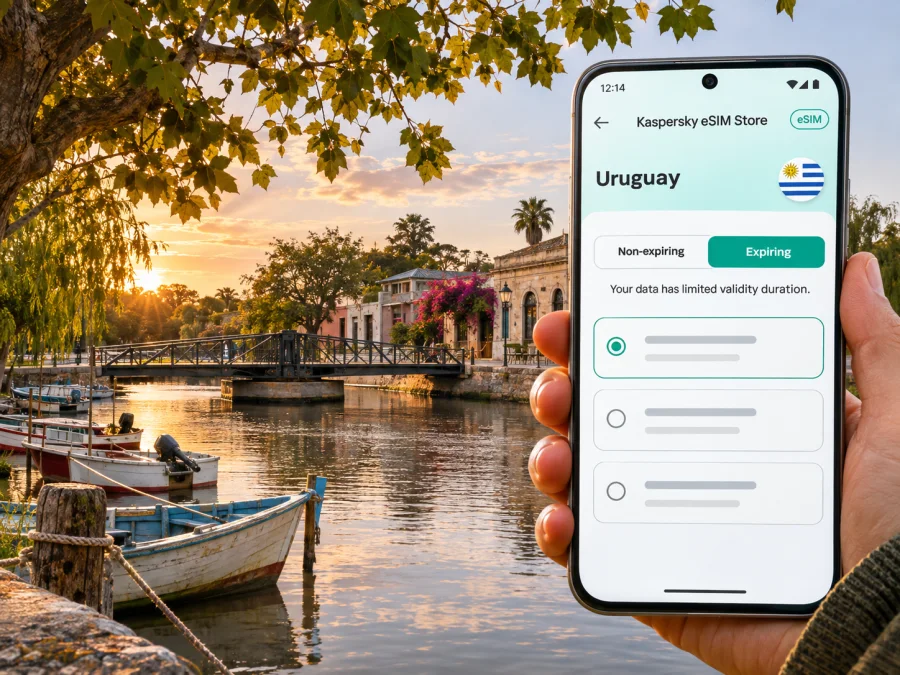
Carmelo eSIM: mobile connection and internet for a riverfront trip
Carmelo is a small city in Uruguay’s Colonia Department, on Arroyo de las Vacas near the Río de la Plata. Its pace is different from that of Montevideo: visitors come for the river, the yacht harbour, the historic rotating bridge, nearby vineyards and a relaxed base for exploring western Colonia. A reliable mobile connection helps with the practical details—confirming a room, checking a ferry or road journey, finding a winery entrance, sharing a location and keeping plans together when you leave the centre.
An eSIM can be a convenient way to prepare mobile internet for Uruguay without swapping the physical SIM in your phone. Before choosing one, check the device, the route and the terms of the specific data plan. Coverage, speed and availability depend on the local network used by the plan and conditions where you are; no city guide can promise a signal in every building, along every rural road or on the water.
What to expect from Carmelo
Carmelo is a destination for a slower itinerary. Uruguay’s Ministry of Tourism describes it as west of Colonia del Sacramento on Route 21 and highlights the rotating bridge over Arroyo de las Vacas, beaches, yacht moorings and nearby wineries. The surrounding area also includes the Jesuit ruins known as Calera de las Huérfanas and Estancia Narbona. Save these names and locations before setting out.
Plan around confirmed opening hours and transport. A winery or rural heritage site may require advance coordination and can be easier to reach with an arranged transfer or car. Download addresses and booking details while you have a dependable connection, and confirm any time-sensitive arrangement directly with the provider. Keep the key details offline in case reception varies indoors or outside town.
Getting into town and planning the first hour
There are several ways to arrive, and the right one depends on where your trip begins. The road approach from Colonia del Sacramento follows Route 21. Carmelo also has a commercial port on Arroyo de las Vacas. Uruguay’s National Ports Administration describes its passenger terminal as connecting Carmelo and Tigre in Argentina. A crossing is a cross-border journey, so schedules, ticket availability and immigration requirements need to be checked with the carrier and relevant authorities before travel. Do not assume the service operates daily or that a timetable seen earlier is still current.
Carmelo has an international aerodrome listed in Uruguay’s current aeronautical information, located northwest of the city. That designation does not by itself mean there are scheduled commercial passenger flights that suit your itinerary. Confirm the flight, arrival procedure and transfer with the operator before treating it as a way into town. For many visitors, road travel from elsewhere in Uruguay or the passenger connection from Argentina will be the more relevant options, but availability can change.
On arrival, avoid making the first five minutes depend on a single live map. Save your accommodation’s exact address, contact number and check-in instructions in advance. If you are arriving by boat, keep the port address and the name of your next transfer accessible. If you are driving, download the route before leaving the main highway and check whether your accommodation offers parking. Ask your host about the best entrance or landmark: street names and property entrances can be easier to identify with a local reference than with a map pin alone.
A simple arrival checklist:
- Keep your first-night address and booking confirmation in an offline note or screenshot.
- Confirm the pickup point, fare and payment method with your driver or accommodation.
- If arriving by river, verify the current departure and arrival times with the carrier, and allow for border formalities.
- Check that your phone can connect to mobile data after landing or disembarking; do not rely on public Wi-Fi for time-sensitive messages.
- Keep your home SIM available for calls or verification codes if you still need it, while checking roaming charges with your home provider.
Moving around Carmelo
The centre, riverfront, port and rotating bridge shape many short visits. For a walking day, orient yourself around Arroyo de las Vacas, save the route to the bridge or waterfront and keep your attention on traffic rather than navigating continuously on-screen.
Vineyards, beaches and heritage sites outside the centre need more preparation. Check the distance, road conditions and return transport; arrange a driver or rental vehicle where appropriate. Do not assume a ride or continuous mobile coverage will be available beyond the built-up area. Ask a winery or tour operator for its meeting point and whether it requires a reservation.
| Plan | What to prepare | Where mobile internet helps |
|---|---|---|
| A few hours in the centre | Save the bridge, waterfront and accommodation on a map | Walking directions, messages and finding an open place to eat |
| A winery visit | Confirm a booking, transport and return time | Checking the meeting point and contacting the host |
| A day trip outside town | Agree on the vehicle, route and return plan | Navigation updates and communicating if plans change |
| A boat or port connection | Recheck the operator’s timetable and terminal details | Ticket messages and meeting your transfer |
| A work call from a hotel | Confirm Wi-Fi and have mobile data as a backup | Messaging and light online work if the local signal supports it |
A phone’s map is not a substitute for checking practical details with the place you are visiting. Some attractions are outside town and may have limited transport options or limited opening windows. Make the return journey part of the plan before you leave, particularly if you are travelling with children, have a fixed ferry departure or need to be back for a scheduled call.
Choose data for the way you travel
Think about what you will do online rather than choosing a plan only by the number of days. A short stay based mostly in Carmelo may need less data than a longer trip with frequent video calls, cloud backups or high-resolution video. Navigation, messaging, email, booking details and occasional searches usually use less data than streaming or uploading large files, but actual usage depends on your settings and habits.
Kaspersky eSIM Store is an app and website where you can choose, arrange and activate an eSIM with a suitable plan for mobile internet while travelling abroad. The Uruguay destination page can be used to check the options currently shown for that destination: review eSIM options for a trip to Uruguay. Treat the price, data allowance, validity period, supported network and activation conditions displayed for an individual plan as the terms to review before purchase. They can differ by plan and may change. A city name does not establish a separate Carmelo tariff or guarantee local network performance.
Before confirming a plan, compare these details:
- Coverage area. Check that the plan includes Uruguay, and see whether the published conditions identify any restrictions. A national label is not a promise of identical reception in every part of Carmelo or the surrounding countryside.
- Data allowance. Estimate messaging, maps, email and browsing separately from video, tethering and large uploads. Disable automatic photo backups over mobile data if you want to limit background use.
- Validity and activation. Read when the plan’s validity starts. Some plans start on installation, first connection or another defined event. Install at a time that follows the instructions and fits your travel dates.
- Network selection. Review any instructions about the supported local network and automatic or manual selection. If service does not start, follow the plan’s troubleshooting guidance before changing settings at random.
- Tethering and top-ups. If you plan to share data with a laptop or another traveller, check whether hotspot use and additional data are allowed under the plan.
- Calls and SMS. A travel data eSIM may provide internet without a conventional phone number, voice minutes or SMS. Check the specific plan. You can use internet-based calling and messaging apps when data is available, while emergency calling arrangements and your usual number remain separate considerations.
If you are arriving from Argentina by boat or continuing there after Carmelo, treat the border as a change of country for connectivity planning. Verify whether the plan you choose covers both Uruguay and Argentina; do not assume a Uruguay-only plan will continue working after crossing. The port operator’s timetable and border checks are separate from mobile service, so save tickets and travel instructions before departure.
Before you buy: device and eSIM checks
An eSIM plan can only be used if the specific phone or tablet supports eSIM and is not restricted by a carrier lock or other device limitation. Support varies by exact model, country or regional variant, and sometimes by the carrier that sold the device. A product family name alone is not enough to confirm compatibility. Check the device settings or manufacturer’s support information for the exact model number, and make sure you can access a stable internet connection during installation.
Check whether your device supports eSIM before you choose a plan. Also review whether your phone allows two active lines at once and how it labels each line. Keep your home number as the default for calls or messages if that is what you need, and set the travel eSIM as the mobile-data line only after reviewing your provider’s roaming conditions. Menu names differ between devices and software versions.
A quick pre-purchase checklist:
- The exact device variant supports eSIM in the country where it was sold.
- The device is unlocked for use with another provider’s eSIM.
- You know which line will handle mobile data and which line will handle calls or SMS.
- The plan covers the country or countries on your route and has enough validity for your dates.
- You have reviewed any activation, data roaming, network selection and hotspot instructions.
- You have a reliable connection available for installation and can keep the installation instructions open on another screen if needed.
Install and activate before the trip
Read the plan’s instructions from beginning to end before installation. The steps can differ between iOS and Android, device versions and plan types. In general, you add the eSIM through the phone’s mobile or cellular settings, either by scanning a QR code or using a manual activation method supplied for the plan. Do not delete an installed eSIM profile as a troubleshooting shortcut: some profiles cannot be installed again after removal. Keep any QR code or activation details private and accessible only to you.
Use the platform-specific guide for your phone: eSIM installation instructions for Android and eSIM installation instructions for iOS. If you install before departure, follow the plan’s stated activation rule; installing and beginning to use a plan may be different events. If you wait until you reach Uruguay, arrange an alternative way to get online long enough to complete setup, such as Wi-Fi you trust or another connection. Avoid relying on airport or port Wi-Fi for a time-critical process without a backup.
After installation, label the new line “Uruguay” or “Travel” so that it is easy to recognize. Keep data roaming disabled on your home line unless your provider’s conditions make it appropriate, and enable it for the travel line only if the eSIM instructions require it. Confirm which line is selected for mobile data. The exact settings depend on the phone and plan, so use the supplied instructions rather than copying a setting from a different device.
Use less data and keep a backup
Download an offline map and save hotel, winery, port and transport details in an offline note. Set photo backups and automatic updates to Wi-Fi only if your allowance is limited. Keep a charger available, and use accommodation Wi-Fi for large uploads only when it is suitable. For work, confirm the venue’s Wi-Fi arrangements before relying on it for a video call; for families, share the lodging address and agree on a meeting point in case a phone loses power or connection.
If the connection does not work
First confirm that the eSIM is enabled, selected for mobile data, and has started with data and validity remaining. Check its instructions for data roaming and network selection. If the phone shows signal but apps do not load, review the data line and any specified network settings. If there is no signal, move to an open area and check again; reception varies indoors and by location.
If the issue continues, contact the support channel associated with your purchase with your device model, location and troubleshooting steps. Do not share passwords or publish your QR code. Keep the lodging address and host contact offline, and do not rely on an internet app for urgent assistance.
Plan around your itinerary
- A quiet weekend by the river: save the hotel and port locations, use mobile data for messages and navigation, and download a map in advance.
- A winery day outside town: confirm the visit, transport and return; save the host’s address and contact details. Do not assume a ride will be available at a rural entrance.
- A crossing to or from Tigre: reconfirm the service with its operator, carry required travel documents, and keep tickets and onward transport details offline. Check that the eSIM plan covers both countries.
- A short business visit: ask about Wi-Fi at the hotel or meeting place, and keep the meeting address and call details available offline.
Frequently asked questions
Is Carmelo in Uruguay or Argentina?
Carmelo is a city in Uruguay’s Colonia Department. It has a passenger connection with Tigre in Argentina, which can make it part of a cross-border itinerary, but the city itself is in Uruguay.
Is there a separate eSIM plan for Carmelo?
The destination page is for Uruguay. Do not infer a distinct Carmelo plan from the city name. Review the current plan details for the country and check that the coverage and conditions fit your itinerary.
Will an eSIM work everywhere in Carmelo?
No provider can be assumed to deliver a signal in every location. Availability and speed vary with the underlying local network, indoor conditions, distance from populated areas and other factors. Check the plan terms and keep offline details for essential parts of your trip.
Can I use my normal number and a travel eSIM together?
Many phones support more than one line, but the exact options depend on the model and software. You may be able to keep your usual line for calls or messages and select the travel eSIM for data. Check whether your home provider charges roaming fees and verify the settings on your specific device.
Does a data eSIM include calls or text messages?
Not necessarily. Read the specific plan description. A data-only plan can support internet calling and messaging apps, but it does not automatically provide a local phone number, conventional voice service or SMS.
Should I install the eSIM before travelling?
Often it is convenient to install before departure, provided you follow the plan’s activation instructions and have a stable connection. Check when validity begins. If installation is postponed until arrival, make sure you have a dependable way to get online to complete it.
What should I do if I travel from Carmelo to Argentina?
Check whether the selected plan includes Argentina as well as Uruguay. Keep travel documents and ferry or boat information accessible offline, and confirm the latest crossing details directly with the operator.
Prepare your connection for Carmelo
A little preparation makes the first arrival easier: confirm how you are reaching Carmelo, save the addresses you will need, check your device’s eSIM support and review the plan’s coverage, data allowance and activation rules. Keep a map and important confirmations available offline, especially for winery visits, rural routes and the port.
When you are ready, use Kaspersky eSIM Store—the app and website for choosing, arranging and activating an eSIM for mobile internet abroad—to review the current options for your route. Explore eSIM options for Uruguay and select a plan only after checking its current terms, validity and country coverage. Install it according to the instructions for your device, then keep your offline backup ready for the quieter roads and riverfront moments around Carmelo.


