
Travel connectivity guide
Carnot eSIM: Mobile Internet for Your Trip
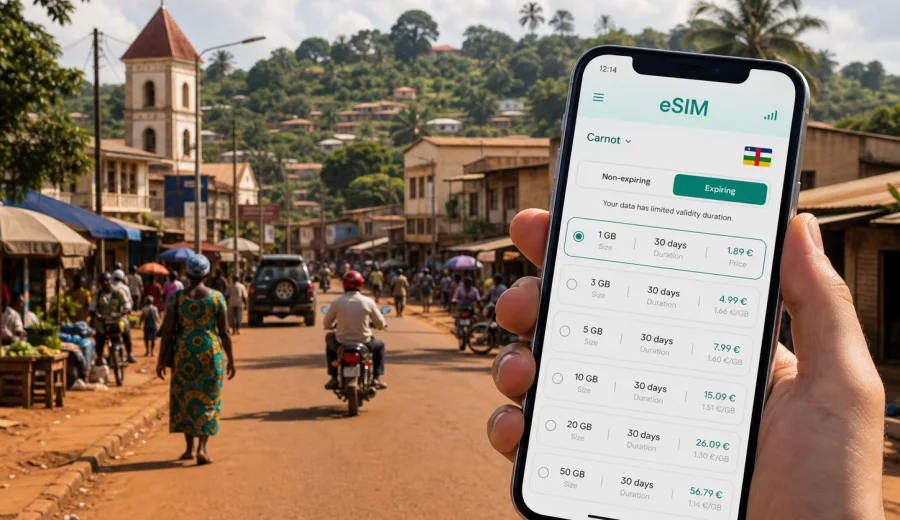
Carnot eSIM: mobile connection and internet for your trip
Carnot is the kind of destination where mobile internet matters before the trip feels complicated. The city sits in the western part of the Central African Republic, away from the habits of large airport cities and dense public Wi-Fi zones. If you are coming for field work, a business visit, a family trip, a regional stop, or a longer route through the country, your phone becomes part of the plan: maps, messages, hotel details, driver contacts, payment confirmations, translation, and updates from people waiting for you.
An eSIM helps you prepare that mobile data layer before you start moving around Carnot. Instead of relying only on roaming, searching for a local SIM after arrival, or waiting until a hotel connection is available, you can set up a digital SIM profile on a compatible phone and activate a suitable data plan for the trip. Kaspersky eSIM Store is an app and website where you can choose, arrange, and activate an eSIM with a mobile internet plan for international travel.
This guide focuses on Carnot itself: arrival routines, local movement, hotel stays, work days, routes from the city, and the practical moments when mobile connection can save time.
Why mobile internet is worth planning before Carnot
Travel in Carnot is usually more practical than spontaneous. You may need to confirm a pickup, send a location pin, check an address before leaving, or keep in touch with colleagues while moving between meetings. A working data connection can also reduce the number of decisions you need to make in the first hour after arrival.
Common mobile internet tasks in Carnot include:
| Situation | Why data helps |
|---|---|
| Arrival in the region | Contacting your driver, host, hotel, or local office before you leave the arrival point |
| First transfer into Carnot | Following a saved route, sharing your location, and checking messages if timing changes |
| Hotel check-in | Opening booking details, passport copies stored securely, email confirmations, or work chat |
| Local movement | Using maps, translation, and messenger calls instead of depending on fixed Wi-Fi |
| Business or field work | Sending documents, photos, coordinates, and short updates during the day |
| Trips from Carnot | Keeping route information and contacts available when plans change |
You should still download offline maps, save important addresses, and keep key phone numbers available without internet. An eSIM does not replace sensible trip preparation. It simply gives you another way to get mobile data when your device, selected plan, and local network conditions allow it.
How an eSIM fits a Carnot itinerary
An eSIM is a digital SIM profile installed on a compatible smartphone or tablet. For a trip to Carnot, it is mainly useful for mobile internet. In most travel data plans, it does not include a regular local phone number, traditional voice calls, or SMS unless the plan terms say otherwise. For calls and messages, travelers usually use internet-based apps.
That distinction matters in Carnot because many practical contacts may still prefer phone calls or simple messaging. Before you travel, check how your local contact expects to communicate. If they use messengers, a data plan may cover most daily needs. If they rely on calls or SMS, keep your primary SIM active for those services or agree on another method in advance.
The best setup for many visitors is:
- Keep your primary SIM available for banking messages, essential calls, and account verification.
- Use the eSIM for travel data where the selected plan is active.
- Save critical contacts offline in your phone.
- Download maps for Carnot and the wider route before you travel.
- Keep a charger or power bank ready, because navigation and hot weather can drain a phone faster than expected.
This approach gives you flexibility without assuming that one connection method will solve every situation.
Arrival and first connection steps
Your arrival route to Carnot may include Bangui, another regional point, or road travel arranged by an organization, host, or local partner. Whatever the route, the first connection tasks are usually similar.
Before departure:
1. Check that your device supports eSIM and is not locked to one operator.
2. Choose a data plan that covers the Central African Republic and fits your expected trip length.
3. Install the eSIM profile while you still have stable Wi-Fi.
4. Save the activation instructions and any QR code details where you can access them.
5. Download offline maps and key documents.
On arrival:
1. Turn on the eSIM line for mobile data when you are ready to use it.
2. Check whether data roaming needs to be enabled for the eSIM line.
3. Keep your primary SIM selected for calls if you still need your usual number.
4. Send a short message to your host, driver, or office to confirm you are connected.
5. Avoid large downloads until you know how much data your plan includes.
The point is not to rush. eSIM activation can take a few minutes, and settings may vary by device. Give yourself time to check the line before leaving a place where you have help, Wi-Fi, or a reliable contact nearby.
Moving around Carnot with mobile data
In a smaller city, mobile data is less about streaming and more about coordination. You may not need a heavy data plan every day, but you may need connection at exactly the right moment: while confirming a pickup, finding a hotel, sharing a route, or sending an update before heading out.
Useful habits for local movement:
- Save your hotel, meeting place, and return point in maps before you leave.
- Share your route or expected arrival time with a trusted contact.
- Keep screenshots of addresses and booking details.
- Use low-data map mode where possible.
- Close background app updates before long travel days.
- Keep messenger notifications on for essential contacts only.
If you move between neighborhoods, offices, markets, accommodation, and road departure points, mobile data helps you avoid repeated explanations and unnecessary stops. It also makes it easier to adapt when a meeting moves, a driver changes route, or a planned errand takes longer than expected.
Data needs by traveler type
Different visitors use internet in Carnot differently. A short stopover needs a different plan from a field assignment or a multi-week stay.
| Traveler profile | Likely data use | Practical plan logic |
|---|---|---|
| Short visitor | Maps, messages, hotel details, quick check-ins | Choose a modest plan with enough validity for arrival and departure days |
| Business traveler | Email, work chat, document previews, calendar changes | Pick more data than a basic messaging plan, especially if hotel Wi-Fi is uncertain |
| Field worker | Photos, location sharing, reports, daily coordination | Plan for regular uploads and offline backup |
| Family visitor | Messaging, calls through apps, photo sharing, navigation | Balance data volume with a validity period that covers the whole stay |
| Transit traveler | Arrival updates, route checks, messenger contact | Prioritize easy setup and enough data for the travel window |
For Carnot, it is better to think in practical tasks rather than only in gigabytes. Ask what you need to do on the phone each day. Sending messages and using maps may need little data. Video calls, cloud backups, automatic photo uploads, and app updates can use much more.
Choosing a data plan for Carnot
When you compare eSIM options for a Carnot trip, look at four things: destination coverage, data volume, validity, and activation rules. Do not choose only by the largest number of gigabytes. A plan that matches your dates and behavior is usually easier to manage.
Questions to ask before choosing:
- Does the plan cover the Central African Republic?
- How many days is the plan valid after activation?
- When does the validity period start?
- Is the data allowance enough for maps, messages, email, and occasional calls through apps?
- Can you top up or choose another plan if the trip extends?
- Does your phone support eSIM, and is it unlocked?
For a city trip to Carnot, you can use Kaspersky eSIM Store to prepare an eSIM plan for the Central African Republic before you travel. Choose by the country, check the plan conditions, and match the data volume and validity period to the way you expect to use mobile internet in Carnot.
Compatibility check before you pay
Not every phone supports eSIM. Some models support it only in certain regions, and some devices can be locked by an operator. Before you arrange a plan, check your device and confirm that it can install and activate an eSIM profile.
This check is especially important if:
- You bought the phone through a mobile operator.
- You use an older device.
- You travel with a work phone managed by an organization.
- You plan to install the eSIM shortly before departure.
- You need your physical SIM and eSIM active at the same time.
Also make sure you understand how your phone labels SIM lines. Give the travel eSIM a clear name such as "Travel data" or "CAR data." That makes it easier to select the correct line for mobile data and avoid using your primary roaming data by mistake.
How to install an eSIM for the trip
Install the eSIM while you have reliable Wi-Fi, preferably before the travel day. Do not wait until you are already on the road to Carnot unless you have no other option. The exact steps depend on your device, so use the correct guide for your operating system: Android installation instructions or iOS installation instructions.
A simple installation checklist:
1. Open the eSIM details from the app or website.
2. Follow the QR code or manual setup path shown for your device.
3. Add the eSIM profile, but do not start using data until the plan rules allow it and you are ready.
4. Name the line clearly.
5. Set your regular SIM for calls and messages if you still need it.
6. Set the eSIM as the mobile data line when you want to use travel data.
7. Turn on data roaming for the eSIM line if the instructions or device settings require it.
After setup, test only what you need. A short connection check is enough. Avoid system updates, cloud sync, and video apps until you are sure the plan is active and you want to spend data.
Hotels, work days, and road routes
Accommodation Wi-Fi can be useful, but it should not be the only connection method you plan around. In Carnot, Wi-Fi quality may vary by property, time of day, power conditions, and the number of people using the same connection. Use it for larger downloads when it is stable. Keep mobile data for the moments when you are away from the property: arrival messages, map checks, urgent work chat, driver coordination, and login verification.
For business travel or field work, prepare files before you leave your room. Download meeting documents, save map pins, keep contact names offline, and pause cloud photo backup on mobile data. During the day, short status updates are often more practical than large uploads. Compress images when full resolution is not needed, and avoid video calls unless the connection is clearly stable.
If Carnot is one stop on a longer route through the Central African Republic, choose a data plan that covers the whole travel window. Road movement can create several connection needs in one day: departure coordination, route checks, arrival updates, and follow-up messages. Save the next destination before leaving, send your expected arrival window to a trusted contact, and check messages during planned stops instead of constantly refreshing apps.
Managing data use in Carnot
The easiest way to run out of data is usually automatic behavior: app updates, cloud photo sync, video previews, background refresh, and high-resolution media in chat apps. Before the trip, disable automatic app updates on mobile data, pause cloud backup, set messengers to download media manually, and download offline maps for Carnot and your wider route.
Text messages use very little data. Maps use more if you have not saved them offline. Video calls, hotspot sharing, and cloud backup can use a large amount quickly. If your trip depends on work uploads or regular calls through apps, choose a plan that leaves a margin rather than one that only fits the best-case day.
eSIM, roaming, local SIM, and Wi-Fi
There is no single connection method for every Carnot trip. eSIM travel data can be prepared before arrival and installed without a physical SIM card, but it requires a compatible unlocked device and depends on the selected plan conditions. Standard roaming keeps your usual number active, but costs and limits depend on your home operator. A local physical SIM may be useful for a longer stay or local calling needs, but it takes time and a compatible SIM slot. Public or hotel Wi-Fi is helpful when stable, but it is not always available when you are moving.
Many travelers combine methods: a primary SIM for important calls and account messages, eSIM for travel data, and accommodation Wi-Fi for heavier tasks. This keeps the phone useful without assuming that one option will cover every moment.
A practical Carnot connection checklist
- Confirm your route into Carnot and the expected arrival time.
- Save hotel, office, host, and driver contacts offline.
- Download maps for Carnot and the surrounding route.
- Check that your phone supports eSIM and is unlocked.
- Choose a Central African Republic data plan with suitable validity.
- Install the eSIM while you have stable Wi-Fi.
- Label the travel line clearly in phone settings.
- Turn off automatic updates and cloud backup on mobile data.
- Pack a charger, cable, and power bank.
- On arrival, select the eSIM for mobile data when ready and send a short confirmation message to your main contact.
FAQ: eSIM and internet in Carnot
Is an eSIM useful for Carnot?
Yes, if your phone supports eSIM and you choose a plan that covers the Central African Republic. It is useful for maps, messages, email, and trip coordination in Carnot. It should be prepared with the same care as any other travel connection method.
Does an eSIM give me a local phone number?
Most travel eSIM data plans are focused on mobile internet. They usually do not include a regular phone number, calls, or SMS unless the specific plan terms say so. Use internet-based apps for calls and messages when data is available.
Should I install the eSIM before I arrive?
In most cases, yes. Install it before departure while you have reliable Wi-Fi, then activate or select it for mobile data according to the plan instructions. This reduces stress when you are already moving.
Can I use eSIM and my regular SIM together?
Many modern phones allow a physical SIM and an eSIM, or multiple eSIM profiles, but the exact behavior depends on the model. Check your device settings before the trip and decide which line handles calls, messages, and mobile data.
How much data do I need for Carnot?
For basic maps and messaging, a smaller plan may be enough. For work files, photo sharing, hotspot use, or frequent calls through apps, choose more data and monitor usage. Avoid automatic backups on mobile data.
What should I do if mobile data is not active immediately?
Check that the eSIM line is installed, selected for mobile data, and allowed to use data roaming if required. Restarting the phone can also help after setup. If the issue continues, use the support path shown in the app or website and keep Wi-Fi available if possible.
Prepare your Carnot eSIM before the trip
Carnot rewards practical preparation. Save your maps, confirm your contacts, check your device, and set up mobile data before the travel day. With Kaspersky eSIM Store, you can choose, arrange, and activate an eSIM with a suitable travel data plan through the app or website, then use it for the everyday online tasks that make a city trip easier.
Before you leave, choose an eSIM plan for your Carnot trip in the Central African Republic, install it on a compatible device, and keep your phone settings ready for arrival.