
Travel connectivity guide
Cartagena eSIM: Mobile Internet for Travel
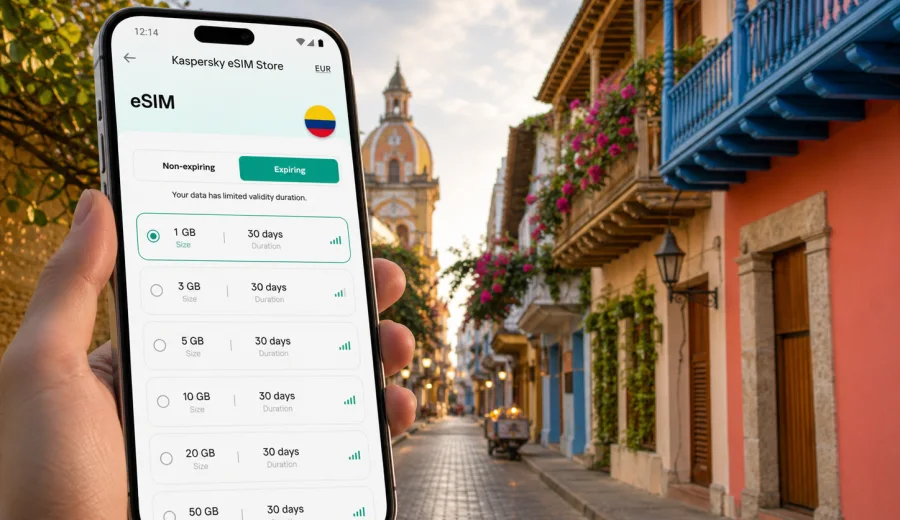
Cartagena eSIM: mobile connection and internet for your trip
Cartagena is a city where mobile internet starts to matter before you reach the hotel. You may need a ride from Rafael Nunez International Airport, a map for the Walled City, a message to your host in Getsemani, or a restaurant booking near Bocagrande. An eSIM helps you prepare mobile data for these first practical moments without looking for a physical SIM card after arrival.
For a Cartagena trip, the point is not only staying online. It is having enough data for navigation, transport apps, hotel check-in messages, business calls over internet apps, and day trips along the Caribbean coast. Kaspersky eSIM Store helps you choose, arrange, and activate an eSIM with a suitable data plan for mobile internet during an international trip, so you can plan the connection side before the city becomes busy.
Why eSIM is useful in Cartagena
Cartagena is compact in the historic center, but travel days often involve several different connectivity moments. The airport is close to the city, yet you still need directions, pickup details, or a ride app. The old streets are easy to enjoy on foot, but a reliable map helps when you move between San Diego, Centro, Getsemani, Manga, Castillogrande, and Bocagrande.
An eSIM can be useful when you want mobile data for:
- checking the route from the airport to your hotel;
- confirming a transfer or taxi pickup;
- using maps inside the Walled City and around Getsemani;
- messaging a hotel, apartment host, tour guide, or colleague;
- translating short messages or menus when needed;
- joining video calls over an internet app during a business trip;
- checking ferry, tour, or day-trip details before leaving the city;
- using mobile boarding passes and travel documents stored online.
Cartagena also has many moments when public Wi-Fi is not the most convenient option. Hotel Wi-Fi may be fine in the room but unavailable on the street. Cafe Wi-Fi may require a password or may be unstable at busy times. Mobile data through an eSIM can reduce your dependence on public Wi-Fi while you move between neighborhoods, beaches, restaurants, and meeting points.
Arrival: the first hour after landing
Most international visitors start with a short transfer from Rafael Nunez International Airport. The distance to the historic center and Bocagrande is not large, but the first hour can still be awkward if you have no mobile data. You may need to find your driver, confirm the address, check traffic, or message the hotel if your arrival time changes.
Before departure, install the eSIM profile while you still have a stable connection at home. Keep your main SIM active if you need it for banking messages, but set the eSIM as the mobile data line when you are ready to use data in Colombia. On some devices, data roaming must be enabled for the eSIM profile; this depends on the device and the selected plan conditions.
Quick arrival checklist:
1. Install the eSIM profile before the flight or while connected to trusted Wi-Fi.
2. Keep the QR code or activation details available offline.
3. Confirm which SIM line is used for mobile data.
4. Turn off data roaming on your home SIM if you want to avoid unwanted roaming charges.
5. After landing, allow a few minutes for the eSIM to register on a local network.
6. Open maps and your hotel address before leaving the terminal.
This setup is especially useful if you arrive late, travel with family, or have a tight schedule before a meeting or cruise departure.
Cartagena areas where mobile data helps most
The Walled City is walkable, but its streets can feel like a maze on the first day. Getsemani is close by and full of restaurants, bars, and small hotels. Bocagrande and Castillogrande are more spread out, with beach hotels, apartment towers, and waterfront routes. Manga is practical for some stays and transfers, while La Boquilla and the northern beach areas can require longer rides.
| Area | Typical travel situation | Why mobile internet helps |
|---|---|---|
| Walled City | Walking, dining, sightseeing, hotel check-in | Maps, reservations, messaging, translation |
| Getsemani | Evening plans, hostels, cafes, nightlife | Ride apps, location sharing, restaurant searches |
| Bocagrande | Beach hotels, shopping, longer walks | Navigation, delivery apps, ride pickup points |
| Manga | Transfers, marinas, local stays | Route checks and communication with drivers |
| La Boquilla | Beach trips and quieter hotels | Confirming transport and travel times |
| Rosario Islands departures | Tours and boat meeting points | Messages, tickets, weather checks, timing |
For a short city break, a modest data allowance may be enough if you mainly use maps and messages. For a longer stay, remote work, cloud documents, or frequent video calls, choose more data and check the plan validity period carefully.
How to estimate data for a Cartagena trip
Data use depends on your habits, not only the city. A traveler who uses offline maps and hotel Wi-Fi will need less data than someone who works from a laptop hotspot or uploads videos from the beach. The safest approach is to connect the plan to specific tasks.
Common data scenarios:
- Light use: maps, messages, ride apps, occasional searches, boarding passes.
- Medium use: frequent navigation, photo sharing, restaurant searches, short calls over internet apps.
- Heavy use: video calls, cloud files, social media uploads, tethering to a laptop.
- Family or group use: several people coordinating transport and plans, but not necessarily sharing one device.
If your trip is two or three days, plan validity may matter as much as gigabytes. If you stay a week or combine Cartagena with Bogota, Medellin, or Santa Marta, choose a plan that covers the whole route in Colombia and has enough validity for the entire stay.
Choosing an eSIM plan for Cartagena
For a city article, the correct plan target is the country where the city is located: Colombia. That is important because Cartagena-specific data plans are usually not separated by neighborhood or city. You should choose a Colombia plan or, if your route crosses more countries, a suitable regional option.
When comparing plans, look at:
- destination coverage: Colombia for a Cartagena-only or Colombia-only trip;
- data volume: enough for maps, messages, bookings, and any work needs;
- validity period: matching the full trip, including arrival and departure days;
- activation rules: when the plan starts and how the eSIM profile is installed;
- device compatibility: your phone or tablet must support eSIM;
- hotspot rules: important if you plan to use a laptop or share data.
After you have mapped your route and estimated data use, you can choose an eSIM plan for your Cartagena trip through the Colombia destination page. Review the plan details before payment so the data allowance, validity, and destination match your itinerary.
Installing eSIM before or during the trip
Installing eSIM is easiest when you are not rushed. Kaspersky eSIM Store helps you choose and arrange an eSIM plan, then the device installation flow depends on your phone model and operating system. Use a stable internet connection during installation, because the eSIM profile must be added to the device before it can be used for mobile data.
General steps:
1. Check that your device supports eSIM and is not locked to one operator.
2. Choose the destination and a data plan that fits the trip.
3. Complete the plan arrangement process.
4. Add the eSIM profile using the QR code or in-app instructions.
5. Name the line clearly, for example "Colombia data".
6. Select the eSIM as the line for mobile data when you are ready.
7. Test the setup carefully and keep your primary SIM settings under control.
For device-specific setup, use the Android instructions or the iOS instructions. If you are not sure whether your phone supports eSIM, Check your device before choosing a plan. Some models vary by region of sale, and carrier-locked devices may not allow another mobile profile.
Practical scenarios in Cartagena
A weekend in the historic center
For a two- or three-day stay in the Walled City, mobile data is mainly about low-friction movement. You may use it for walking directions, ride pickup locations, dinner reservations, museum hours, and messages with your hotel. Downloading offline maps before the trip can reduce data use, but live navigation is still helpful when streets are busy or when you change plans.
A beach hotel in Bocagrande
Bocagrande is convenient for hotels and beach access, but you may move frequently between the beach, the old town, restaurants, and shopping areas. Mobile internet helps you compare travel times, find pickup points, and share your live location with companions. If you plan to stream video at the hotel, use Wi-Fi when possible and save eSIM data for movement around the city.
A business trip
For work travel, reliability is about preparation. Install the eSIM before the flight, keep meeting addresses saved, and choose a data allowance that covers email, calendars, maps, and urgent calls over internet apps. If you plan to join video meetings from a taxi or cafe, allow more data than a tourist would need. Also check whether tethering is allowed by the selected plan before relying on a laptop hotspot.
A cruise stop or short layover
Cartagena is a common cruise and stopover city. If you only have a few hours, you do not want to spend that time looking for a SIM card. An eSIM installed in advance can be useful for maps, messaging, port pickup information, and quick searches. For this scenario, validity and simple activation matter more than a large data allowance.
Day trips from Cartagena
Trips to the Rosario Islands, Baru, Tierra Bomba, or beach areas north of the city can involve changing meeting points, early departures, and boat schedules. Mobile data is useful for confirming pickup times and receiving updates, but coverage and speed depend on local networks and conditions. Save essential tickets, addresses, and contact numbers offline before leaving the city.
eSIM, roaming, local SIM, and Wi-Fi: what changes in practice
There is no single best option for every traveler. The right choice depends on trip length, phone compatibility, budget, and how much control you want before arrival.
| Option | Best for | Trade-offs |
|---|---|---|
| eSIM data plan | Travelers who want to prepare mobile data before or soon after arrival | Requires an eSIM-compatible, unlocked device |
| Home roaming | Users who prefer their existing operator setup | Costs and data limits depend on your home operator |
| Local physical SIM | Long stays or users who need local voice/SMS options | Requires time, a store visit, and a physical SIM slot |
| Public Wi-Fi | Hotels, cafes, airports, and low-data users | Not always available while moving; quality varies |
For Cartagena, eSIM is often practical because many tasks happen between fixed Wi-Fi points: airport transfer, walking routes, rides, tickets, and messages. It does not usually include a local phone number, standard voice calls, or SMS unless the specific plan conditions say otherwise. For calls and messages, travelers often use internet-based apps over mobile data.
What to check before choosing a plan
Use this short checklist before payment:
- Device: your phone supports eSIM and is not carrier locked.
- Destination: the plan includes Colombia for a Cartagena trip.
- Validity: the plan covers all travel days, including arrival and departure.
- Data: the allowance matches maps, messages, calls, work, and sharing needs.
- Activation timing: you understand when the plan starts and when data begins to count.
- Hotspot use: you have checked the conditions if you need to share data.
- Main SIM settings: you know how to prevent unwanted roaming on your home SIM.
- Support path: you know where to look if installation or activation needs help.
Do not wait until you are in a taxi or standing outside a hotel with low battery to understand these settings. A few minutes of preparation before the flight can prevent most common travel-day problems.
Data-saving tips for Cartagena
You can make a moderate eSIM data plan last longer by separating essential mobile use from high-volume tasks.
- Download offline map areas before flying.
- Save hotel addresses, booking codes, and tour contacts offline.
- Use hotel Wi-Fi for large app updates, cloud backups, and video streaming.
- Turn off automatic photo and video uploads on mobile data.
- Keep ride apps, maps, messengers, and travel documents allowed on mobile data.
- Avoid using a laptop hotspot unless your plan has enough data.
- Check the phone data counter each day during a longer stay.
This approach keeps mobile data available for the moments when it matters most: finding a driver, checking a route, contacting a hotel, or changing plans while you are away from trusted Wi-Fi.
Common mistakes to avoid
The most common eSIM mistakes are simple and preventable.
First, do not assume that every phone supports eSIM. Some models and regional versions differ. Second, do not delete an eSIM profile unless you are sure it can be reinstalled under the plan conditions. Third, do not leave your home SIM as the active mobile data line if you are trying to avoid home roaming charges. Fourth, do not choose a plan only by data volume; validity and destination coverage are just as important.
Also avoid installing the eSIM for the first time when you are already under pressure. If your flight is boarding, your battery is low, or the airport Wi-Fi is unstable, it is better to have already completed the installation earlier.
FAQ
Is eSIM good for a Cartagena city trip?
Yes, eSIM can be practical for a Cartagena trip if your device supports it. It helps you prepare mobile data for maps, transport, hotel messages, restaurant bookings, and day-trip coordination without looking for a physical SIM card after arrival.
Should I choose a Cartagena plan or a Colombia plan?
For Cartagena, choose a plan that covers Colombia. City pages point to the country destination because the mobile data plan needs to match the country where you will use it.
Can I install eSIM before arriving in Colombia?
Usually yes, and it is often the calmer option. Install the eSIM profile while you have stable internet, then activate or select it for mobile data according to the instructions and the selected plan conditions.
Does eSIM include phone calls and SMS?
Not usually. eSIM plans for travel mobile data generally focus on internet access. Standard voice calls, SMS, or a local phone number are included only if the specific plan conditions say so. You can use messengers and calling apps over mobile data.
Will eSIM work outside Cartagena?
If the selected plan covers Colombia, it is intended for use in the covered destination, not only inside Cartagena. Actual service depends on local network conditions and the plan terms, so check the destination and conditions before travel.
Is public Wi-Fi enough in Cartagena?
It may be enough for some hotel and cafe use, but it is less convenient while moving. Mobile data is useful for airport transfer, walking routes, ride pickup points, tickets, and messages when you are away from a trusted Wi-Fi network.
Choose mobile internet for Cartagena before you travel
Cartagena is easier to navigate when your phone is ready before the first ride, first check-in, and first walk through the old city. An eSIM can help you keep maps, messages, bookings, and travel documents available while you move between the airport, the historic center, Bocagrande, Getsemani, and day-trip meeting points.
Before you go, check device compatibility, choose enough data for your route, read the validity and activation details, and keep your installation instructions available. When you are ready, you can choose a Colombia eSIM plan for your Cartagena trip and prepare mobile internet through Kaspersky eSIM Store before departure or shortly after arrival.