Travel connectivity guide
Cayenne eSIM for Mobile Internet | French Guiana
Cayenne eSIM: Mobile Connection and Internet for Your Visit
Cayenne is a small coastal capital with a distinctly tropical rhythm: you might arrive at Félix-Éboué Airport, check into a hotel in the city, then spend the day moving between the waterfront, central streets and nearby communes. Mobile data helps with maps, ride arrangements, opening hours, translation and checking onward travel. An eSIM can make that first connection easier to prepare, provided your phone supports it and the selected plan explicitly covers French Guiana.
French Guiana is an overseas department and region of France on the north-eastern coast of South America. It is not a sovereign country, and Cayenne is its administrative centre. For connectivity, though, the destination label matters: a plan labelled for metropolitan France should not be assumed to include French Guiana. Check that the offer names French Guiana, or lists it among the covered destinations, before you buy.
What mobile internet is useful for in Cayenne
Cayenne is a practical base for appointments, business, food and cultural visits, as well as for planning trips farther afield. A connection is useful in small, everyday moments: confirming a hotel address, checking a map before leaving the airport, translating a menu, sharing your location with a travel companion or messaging a driver if plans change.
A few common uses:
- Arrival: open your saved accommodation details, message your host and check the route from the airport.
- Getting around: use maps to orient yourself between the historic centre, the waterfront and neighbourhoods beyond it.
- Work: retrieve meeting details, use email and join calls when the connection and plan are suitable.
- Day trips: check transport information and coordinate a pickup before leaving the city.
- Practical errands: look up current business hours, confirm an appointment and use translation tools.
A data eSIM is generally for mobile internet. Do not assume it includes a local phone number, standard voice calls or SMS; check the selected plan’s terms. Keep your usual SIM active if you need its number for calls or verification messages, and use internet-based messaging where appropriate.
First arrival: from Félix-Éboué Airport to town
Cayenne is served by Félix-Éboué International Airport, outside the urban centre. When you land, you may need to coordinate ground transport, confirm where you are staying or let someone know you have arrived. Download your boarding documents, accommodation address and any essential instructions before the flight so they remain available if you are briefly offline.
The airport lists free Wi-Fi for up to one hour. That can help with a quick message or checking a detail inside the terminal, but it is a temporary connection rather than a plan for the rest of your visit. Do not rely on it for the drive into town, navigation after leaving the terminal or a connection that must remain available throughout the day.
Before travel, set up the basics:
- Save your hotel or rental address in your notes and map app.
- Download an offline map of Cayenne and any nearby places you expect to visit.
- Share your arrival time and pickup arrangement with your driver or host.
- Check whether your accommodation offers Wi-Fi and how to connect.
- Decide which SIM should handle mobile data when you reach French Guiana.
If you install an eSIM before departure, follow the instructions for your device and keep the QR code or activation details accessible on another screen or printed page. Avoid deleting an eSIM profile to troubleshoot unless the provider’s instructions tell you to do so: some profiles cannot simply be installed again after removal.
Choosing the right destination and plan
For Cayenne, the destination selection should reflect the place where you will use data: French Guiana. The territory’s location in South America and its constitutional relationship with France can make country pickers confusing. Use the exact coverage list and terms attached to the plan instead of relying on a familiar flag, a regional name or assumptions about French mobile roaming.
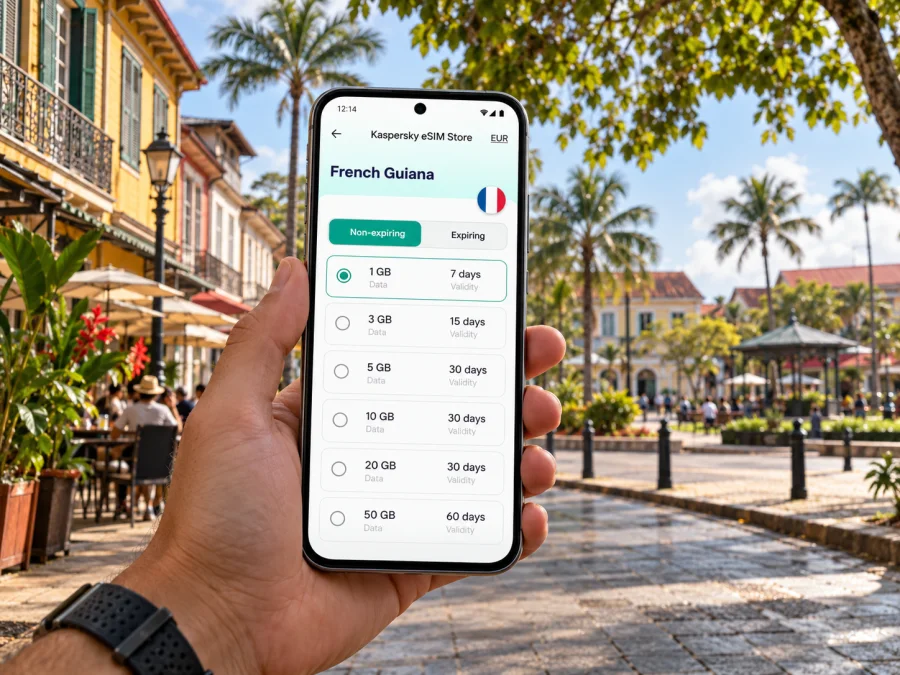
The French Guiana destination page in Kaspersky eSIM Store currently lists packages supplied by local telecommunications providers and identifies DIGICEL for the displayed French Guiana options. Prices, data allowances and validity can change, so review the live terms at the time of purchase. A regional plan may be useful for a longer South American route, but confirm that French Guiana is explicitly included and compare its allowance and validity with the local option.
Match the allowance to your itinerary
Think about what you will do rather than choosing only by trip length. Messaging and occasional maps usually use less data than frequent video calls, uploading large files or streaming. If your hotel has reliable Wi-Fi, you can reserve mobile data for directions and time outside. If you are working remotely or tethering another device, read the plan details carefully and allow for heavier use.
| Travel pattern | What to consider |
|---|---|
| Short city stop | A modest data allowance may be enough for maps, messages and essential lookups; check the validity period. |
| Several days in Cayenne | Estimate how often you will use navigation, translation, social apps and work tools away from Wi-Fi. |
| Remote work | Check the data allowance, tethering rules and whether your work apps can function on a mobile connection. Keep a backup connection plan. |
| Cayenne plus other destinations | Compare local and regional coverage lists. Confirm every destination on your route is named in the plan terms. |
| Long stay | Compare validity and available top-up or renewal conditions. Do not assume a plan can be extended or transferred. |
A regional label alone is not proof of coverage. On the checkout or plan details screen, confirm the exact destination list, package size, validity, activation conditions, whether data starts on installation or first network connection, and any restrictions on hotspot use. Save a copy of the terms with your travel details.
A useful starting point is to review eSIM options for French Guiana and compare the current destination, data amount, validity and conditions. This is the French Guiana destination page; it is not a city-specific Cayenne tariff. Your actual experience also depends on the local network, your device and where you travel.
Network expectations: check the place, not just the map
French Guiana’s geography is very different from metropolitan France. Cayenne is an urban coastal centre, while trips beyond the urban area can involve long distances and less continuous infrastructure. A coverage map or a successful connection in one neighbourhood cannot guarantee the same service inside every building or along every road.
The French telecom regulator Arcep publishes mobile service measurements for French Guiana separately from its metropolitan-France information. Its 2025 survey included measurements in Guyane and reported that mobile internet performance there was generally below the levels measured in the other surveyed French overseas territories. These results describe measurements across the territory and operators, not a guarantee about a particular Cayenne street, device or eSIM package. Treat them as a reason to keep key addresses and instructions offline and to avoid planning a critical task around a specific speed.
For a city visit, practical preparation matters more than a promise of a particular signal bar:
- Save maps and booking information before leaving Wi-Fi.
- Keep meeting addresses, phone numbers and pickup details in notes.
- Ask your accommodation which local connection options it has.
- If a call or upload is essential, identify a Wi-Fi backup and leave time for delays.
- Recheck your route before setting out, especially for a day trip beyond Cayenne.
Moving through the city and arranging onward travel
Use mobile maps as a guide, but check the precise address and transport arrangement before you set off. Search results can show a similarly named business or an entrance on a different street. For a meeting, confirm the building, landmark or reception point with your host. For a restaurant or cultural venue, check current hours on the day rather than assuming a listing is up to date.
Cayenne is also a base for travel elsewhere in French Guiana. The Territorial Collectivity lists intercity bus routes including Cayenne–Kourou, Cayenne–Saint-Laurent-du-Maroni and a route between Cayenne, Régina and Saint-Georges-de-l’Oyapock. Published schedules can change; confirm the current timetable, stops and ticket requirements before travelling. Mobile internet can help you check those details and coordinate with a transport provider, but have the departure information saved in case you lose service en route.
For a day out, prepare the return journey at the same time as the outbound one. Check where the vehicle departs, how payment works and what time you need to be back. Share the plan with someone in your party. Do not assume that every stop will have reliable mobile data or that an online map will load when you need it.
Device compatibility and regional variants
Before choosing an eSIM, confirm that your phone supports eSIM and is not locked by a carrier. Manufacturer names alone are not enough: support can differ by model number, country of sale and device variant. Some devices sold in particular markets use physical SIM only, even when a similar model sold elsewhere supports eSIM. Tablets, watches and phones may also have different eSIM capabilities.
Check whether your device supports eSIM before purchase. Then check the plan’s supported network and activation conditions. A compatible device is necessary, but it does not guarantee coverage in every location or compatibility with every provider’s profile.
Before departure, make sure you can:
- connect to Wi-Fi while installing the profile;
- open your phone’s cellular or mobile network settings;
- select the eSIM for mobile data after arrival;
- keep your primary line available for calls or messages if needed;
- identify which line is using data to avoid unintended roaming charges.
Menu labels differ by operating system and manufacturer. If the phone is company-managed, ask your administrator whether adding a travel eSIM is permitted. If you use two SIMs, label them clearly, for example “Home” and “Travel”, so it is easier to choose the correct line for data.
Install and activate before the trip
The simplest time to install an eSIM is usually when you have stable Wi-Fi and enough time to read each screen. Purchase and installation are separate from using the connection: follow the specific plan’s instructions to understand when validity begins. If the plan activates only after connecting to a supported network, you may be able to install it earlier and turn it on after arrival; confirm the exact terms before relying on that sequence.
- Check the plan and device. Confirm French Guiana is covered, the phone supports eSIM and the phone is unlocked.
- Keep the confirmation available. Save the QR code or manual activation details somewhere you can access during setup.
- Add the eSIM. Use your phone’s mobile network settings and follow the on-screen prompts.
- Label the new line. Choose a clear name such as “French Guiana” or “Travel”.
- Choose when to use it. If you do not want data use to begin before the trip, keep the travel line or data roaming disabled until the plan instructions say to enable it.
- At your destination, select the travel line for mobile data. Enable data roaming only if the plan instructions require it, and check that the home SIM is not selected for data.
- Test a simple task. Open a lightweight webpage or send a message before relying on the connection for navigation.
For device-specific steps, see the Android eSIM installation instructions or the iPhone eSIM installation instructions. Follow the instructions shown for your exact device and plan if they differ from general steps.
Manage data while exploring
Navigation apps can keep using data in the background, especially when they update maps or reload search results. Download offline maps on Wi-Fi, turn off automatic media downloads and postpone large backups until you have a stable Wi-Fi connection. If you are taking photos all day, check that cloud sync is not uploading every image over mobile data.
A simple daily routine helps avoid surprises:
- Check remaining data in the plan or app before a work session or day trip.
- Use Wi-Fi for software updates, large attachments and video uploads where practical.
- Turn off the travel line when you no longer need it, following the plan’s validity rules.
- Keep a power bank or charging option available if you rely on maps throughout the day.
- Save directions to the next stop before leaving a hotel or café.
If you share data with a laptop, remember that video meetings and cloud tools can consume much more data than basic browsing. Test tethering early, check the plan’s hotspot terms, and prepare a Wi-Fi alternative for important calls. A phone may show a mobile signal while indoor performance or data speed still varies; move to a suitable spot or use Wi-Fi if an application stalls.
Quick troubleshooting in Cayenne
If data does not work after arrival, work through these checks calmly:
- Confirm the eSIM line is enabled and selected for mobile data.
- Check that airplane mode is off and restart the phone if needed.
- Review whether data roaming is required by the plan; follow its instructions rather than changing settings at random.
- Check that the plan is active, has remaining data and has not passed its validity period.
- Move outdoors or to another location and allow the phone time to register on a supported network.
- If the issue continues, contact the plan provider through its support channel and keep the order details available.
Do not delete the eSIM profile as a first troubleshooting step. Removing it may make reinstallation impossible without a new activation code. If you still need your home line for calls or verification, check that it remains enabled while the travel eSIM is selected for data.
Common questions
Is Cayenne in France or South America?
Both descriptions need context. Cayenne is in French Guiana, an overseas department and region of France located in South America. For a mobile plan, select the destination named in the plan terms; do not infer coverage from a metropolitan-France label.
Will an eSIM for metropolitan France work in Cayenne?
Do not assume so. Coverage depends on the selected plan’s destination list and local network arrangements. Choose a plan that explicitly includes French Guiana, then confirm the current details before purchase.
Does an eSIM replace my normal phone number?
Usually, a travel data eSIM provides mobile data rather than a standard local number, calls and SMS. Check its terms. You can generally keep your usual SIM for calls or verification messages, but confirm your device settings and your home carrier’s roaming charges.
Can I install the eSIM before travelling?
Often, installation can be completed before departure over Wi-Fi, but the activation and validity rules depend on the plan. Read the instructions to see whether the data period starts at purchase, installation or first connection to a supported network.
Is mobile coverage guaranteed throughout French Guiana?
No. Coverage and performance vary by location, local network, building and device. Conditions in Cayenne do not predict service in more remote parts of the territory. Save essential travel information offline and check current coverage information for the places you plan to visit.
What should I do if I need internet immediately at the airport?
The airport lists free Wi-Fi for up to one hour. It may be enough to send a message or check your pickup, but prepare an eSIM or another connection option for use after you leave the terminal.
A calm connection plan for your stay
For Cayenne, the useful sequence is straightforward: identify French Guiana as the destination, check the device and plan conditions, install the eSIM while you have Wi-Fi, and keep your maps and key details available offline. Use mobile data for the tasks that help you move through the city, while treating coverage and speed as dependent on location and network conditions.
When you are ready to prepare, compare current eSIM options for French Guiana in Kaspersky eSIM Store. Choose an allowance and validity that fit your stay, verify French Guiana is covered, and follow the plan’s setup instructions on a compatible, unlocked device.


