
Travel connectivity guide
eSIM for Central African Republic: mobile internet
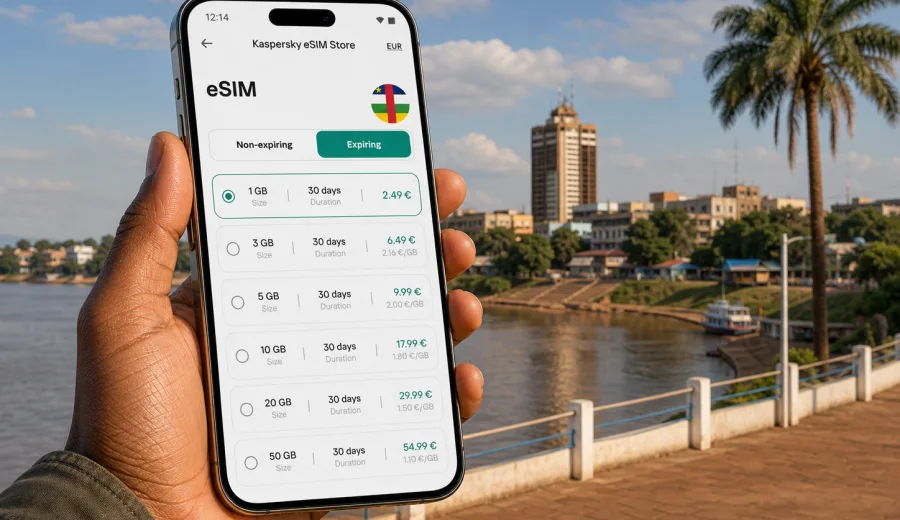
eSIM for Central African Republic: mobile connection and internet for your trip
Travelling to the Central African Republic requires a practical plan for mobile internet. Many trips start in Bangui, continue around business meetings, NGO work, family visits, field projects, or regional travel, and depend on maps, messaging, booking details, email, and translation tools. An eSIM helps you prepare mobile data before you start the journey, without looking for a physical SIM card immediately after arrival.
Kaspersky eSIM Store is an app and website where you can choose, arrange, and activate an eSIM with a suitable data plan for mobile internet during an international trip. It is useful when you want to see the plan conditions in advance: destination, data allowance, validity period, and price. It does not replace a local mobile operator, and the exact experience depends on the selected plan, your device, and local network conditions.
For the Central African Republic, that clarity matters. Travel may involve airport transfers, hotel check-ins, coordination with drivers or colleagues, and routes where public Wi-Fi is not always convenient. A prepared eSIM gives you a separate data profile on a compatible device, so you can keep your usual physical SIM for calls or messages while using the eSIM profile for mobile data when appropriate.
Why eSIM can be useful in the Central African Republic
An eSIM is a digital SIM profile built into compatible smartphones and tablets. Instead of inserting a plastic card, you add a mobile data profile through your device settings. For travel, the main benefit is preparation: you can choose a plan before departure, install the eSIM when you have a stable connection, and know which profile to select for mobile data.
In the Central African Republic, eSIM can be helpful for several everyday travel scenarios:
- arranging pickup after landing at Bangui M'Poko International Airport;
- opening hotel addresses, maps, and booking confirmations;
- messaging colleagues, hosts, guides, or family;
- using translation and currency tools;
- checking email and work documents during a business trip;
- sharing your location with trusted contacts when needed;
- keeping travel documents available in cloud storage.
The important point is control. You choose a plan by data volume and validity period, then use it for mobile internet. If you need traditional voice calls or SMS, check the conditions of the selected plan. eSIM data plans for travel are usually focused on internet access, and ordinary calls or texts are not included unless stated separately.
What to check before you choose a plan
Before arranging an eSIM for the Central African Republic, start with the device. Your phone or tablet must support eSIM, and it must not be locked to a carrier in a way that prevents adding another mobile profile. Some device models also vary by region of sale, so the model name alone is not always enough.
Check your device before you select a plan. This is especially important if you bought the phone through a carrier, imported it from another region, or have never used eSIM before.
Use this quick checklist:
| What to check | Why it matters |
|---|---|
| eSIM support | The device must be able to add a digital SIM profile. |
| Carrier lock status | A locked device may reject a travel eSIM profile. |
| Internet for installation | You need Wi-Fi or mobile data to install the eSIM profile. |
| Destination coverage in the plan | The selected plan must include the Central African Republic. |
| Validity period | The plan should match the length of your stay or route. |
| Data allowance | Choose enough GB for maps, messages, calls over apps, and work. |
| Start of validity | Check when the plan starts counting time or data usage. |
If you are travelling with a team, it is worth checking every device separately. One person may have a compatible phone while another uses a model that does not support eSIM or is carrier locked.
How much data you may need
There is no single correct data volume for every trip. A short visit to Bangui with hotel Wi-Fi at night needs less data than a longer project with regular document sharing and video calls. Think about the apps you will actually use, not only the number of travel days.
For light use, mobile data is mostly for maps, ride coordination, messaging, and occasional web searches. For moderate use, add email attachments, cloud files, social media, and regular voice calls through messenger apps. For heavy use, include video meetings, large file uploads, hotspot use, and frequent navigation.
| Travel pattern | Typical mobile data use | Practical plan logic |
|---|---|---|
| 2-4 days in Bangui | Messaging, maps, email, bookings | Choose a smaller data package if Wi-Fi is reliable at your base. |
| 1-2 weeks for work | Email, calls over apps, files, navigation | Choose more data and a validity period that covers the whole trip. |
| Field or regional travel | Maps, coordination, uploads, fewer Wi-Fi options | Prioritize a larger allowance and monitor usage closely. |
| Team travel | Several people coordinating separately | Each traveller should choose a plan for their own device and role. |
Video is usually the fastest way to spend data. Download offline maps, documents, and large media before the trip when possible. Keep automatic cloud backup and app updates off while using mobile data if you want the plan to last longer.
eSIM, roaming, local SIM, and public Wi-Fi
Travellers usually compare four options: standard roaming from their home operator, a local physical SIM card, public Wi-Fi, and travel eSIM. Each can make sense, but the trade-offs are different.
| Option | Good for | What to consider |
|---|---|---|
| Home roaming | Keeping your usual number active with minimal setup | Costs and data limits depend on your home operator. |
| Local physical SIM | Longer stays when you are ready to buy locally | You may need time, documents, cash, and a suitable sales point. |
| Public Wi-Fi | Large downloads at a hotel or office | Availability, speed, and security vary by location. |
| Travel eSIM | Preparing mobile internet before or soon after arrival | Requires a compatible unlocked device and a suitable data plan. |
An eSIM does not guarantee the same conditions in every location. Mobile data quality depends on local network availability, device settings, building conditions, weather, congestion, and the terms of the selected plan. That is why the best approach is practical: prepare eSIM for mobile internet, keep key documents offline, and avoid relying on a single connection method for critical tasks.
When to arrange your eSIM for the Central African Republic
The easiest time to prepare an eSIM is before departure, while you still have a stable internet connection and enough time to check settings. You can read the plan details calmly, install the profile, and keep it ready for use. Depending on the plan conditions, you may activate mobile data only when you need it or when you arrive.
If your trip is already underway, you can still arrange eSIM after arrival if you have Wi-Fi or another internet connection for installation. For example, you may use airport, hotel, office, or home Wi-Fi to add the eSIM profile, then select it for mobile data. Do not remove your usual SIM or turn off important lines until you understand which profile is handling data, calls, and messages.
For a smoother start, prepare this before travel:
- update your device operating system if needed;
- check eSIM compatibility and carrier lock status;
- save your booking details and address offline;
- download offline maps for Bangui and planned routes;
- turn off automatic video backup on mobile data;
- keep the eSIM installation email or profile instructions easy to find;
- decide whether your primary SIM or eSIM will handle mobile data.
After these checks, you can choose an eSIM plan for a trip to the Central African Republic through Kaspersky eSIM Store and review the available data allowances, validity periods, and conditions before you proceed.
How to install and activate eSIM
Installation is usually straightforward, but it is worth doing it slowly. You need a compatible unlocked device, an internet connection for setup, and the eSIM profile details from Kaspersky eSIM Store. After arranging the plan, the eSIM appears in your profile or instructions, and you can follow the steps on your device.
General installation flow:
1. Check that your smartphone or tablet supports eSIM.
2. Choose the Central African Republic as your destination and select a suitable data plan.
3. Open the eSIM installation details in your profile or email.
4. Add the eSIM profile through your device settings or by scanning the QR code.
5. Label the profile clearly, for example "Travel data".
6. Select the eSIM profile for mobile data when you are ready to use it.
7. If required by your device or plan, turn on data roaming for that eSIM profile.
8. Wait a few minutes for the device to connect to an available local network.
For detailed device steps, use the Android installation guide or the iOS installation guide. The exact wording in settings can vary by manufacturer, operating system version, and region, so follow the instruction that matches your device.
Do not delete the eSIM profile after installation unless you are sure you no longer need it. In many cases, an activated eSIM cannot simply be moved to another phone. If something does not connect, check the selected data line, data roaming setting for the eSIM, airplane mode, and the plan conditions before removing anything.
Practical internet scenarios in the Central African Republic
The Central African Republic is not a destination where travellers should leave mobile internet planning until the last minute. Travel may involve limited time at the airport, meetings across Bangui, coordination with local contacts, and periods when Wi-Fi is inconvenient or unavailable. eSIM helps create a cleaner setup because mobile data is separated into a travel profile.
Arrival and first transfer
Your first hour after landing is often when mobile data is most useful. You may need to message a driver, confirm a meeting point, open a map, or share your arrival status. If your eSIM is already installed, you can switch the data line after arrival, check that the device connects, and continue without searching immediately for a SIM card shop.
Business, NGO, and field work
For work trips, the main requirement is predictable access to email, messaging, document links, and coordination channels. A travel eSIM can support these tasks when local mobile data is available. For large uploads or video meetings, use trusted Wi-Fi when possible and keep mobile data for communication, navigation, and urgent tasks.
Family visits and personal travel
If you are visiting relatives or staying in several places, mobile internet helps with messages, shared locations, translation, and transport planning. You can keep your home SIM active for important calls while using eSIM for data, depending on your phone settings and the conditions from your home operator.
Regional routes
Some trips combine the Central African Republic with nearby countries or a wider African itinerary. If your route includes more than one destination, compare single-country, regional, and global options where available. The right choice depends on where you will spend most time, how many days you need data, and whether the plan conditions include every country on the route.
How to keep data use under control
A travel eSIM is easier to manage when you treat data as a limited resource. Even a generous allowance can disappear quickly if video backup, app updates, or streaming are active in the background.
Use these settings before you rely on the eSIM:
- disable automatic app updates on mobile data;
- pause cloud photo and video backup;
- download maps, documents, and language packs over Wi-Fi;
- reduce video call quality when the connection is limited;
- avoid using hotspot mode for laptops unless the plan allowance is large enough;
- check data usage in your phone settings every day;
- keep messaging apps from auto-downloading large media files.
If your device supports data warnings, set one below your plan allowance. For example, if you arrange a 5 GB plan, set an alert around 4 GB. This gives you time to adjust usage or consider a top-up if the plan conditions allow it.
Common mistakes to avoid
Most eSIM issues come from a small group of setup mistakes. They are usually avoidable if you check the device and plan before departure.
| Mistake | Better approach |
|---|---|
| Buying before checking device compatibility | Confirm eSIM support and carrier lock status first. |
| Installing with weak Wi-Fi | Add the eSIM profile on a stable connection. |
| Expecting ordinary calls and SMS | Check the plan conditions; travel eSIM is usually for data. |
| Leaving the wrong data line selected | Choose the eSIM profile for mobile data when you want to use it. |
| Deleting the profile during troubleshooting | Check settings and support options before removing the eSIM. |
| Letting apps update in the background | Restrict updates and backups on mobile data. |
If you are unsure which line is active, open your device's mobile data settings and check the selected profile. Give profiles clear names such as "Home SIM" and "Central Africa data" so you do not confuse them during the trip.
FAQ about eSIM in the Central African Republic
Can I use eSIM for mobile internet in the Central African Republic?
Yes, if a suitable plan is available for the destination and your device supports eSIM. Check the plan conditions before arranging it, including data allowance, validity period, and destination coverage.
Does eSIM include a phone number for calls and SMS?
Usually no. Travel eSIM plans are mainly for mobile data. Ordinary voice calls and SMS are not included unless the selected plan explicitly says so. You can use messaging and calling apps over the internet.
Should I install eSIM before departure or after arrival?
Install it before departure if possible, using a reliable internet connection. You can then select the eSIM for mobile data when you are ready, according to the plan conditions and your device settings.
Do I need to keep my physical SIM card?
In many cases, yes. You may want your usual SIM for your regular number, bank messages, or calls from home. The eSIM can handle mobile data while the physical SIM remains available, depending on your phone and operator settings.
What if the eSIM does not connect immediately?
Check that the eSIM profile is installed, selected for mobile data, and allowed to use data roaming if required. Restart the device, wait a few minutes, and review the plan conditions. If the issue remains, contact support instead of deleting the profile immediately.
Can I share eSIM data by hotspot?
It depends on the selected plan and your device settings. If hotspot is allowed, remember that laptops and other devices can use data quickly through updates, cloud sync, and video calls.
Is eSIM a replacement for all travel connectivity?
No. eSIM is a practical way to prepare mobile internet for a trip, but you should still keep essential information offline and have backup contact options for important travel moments.
Quick summary for travellers
eSIM for the Central African Republic is best understood as a prepared mobile data profile for a compatible device. It can help you stay online during arrival, transfers, work coordination, and daily travel tasks without relying only on public Wi-Fi or immediate access to a local SIM card.
Before arranging a plan, check three things: your device supports eSIM, the selected plan includes the Central African Republic, and the data allowance matches your trip. For installation, use stable internet, follow the Android or iOS instructions, and label the profile clearly. During the trip, manage background data and keep important documents available offline.
Choose an eSIM plan for your trip
If the Central African Republic is on your route, prepare mobile internet before you need it. Kaspersky eSIM Store helps you choose, arrange, and activate an eSIM with a suitable data plan for travel, so you can review the conditions in advance and set up your device calmly.
Choose an eSIM plan for the Central African Republic and check the available data options, validity periods, and setup steps before your journey.