Travel connectivity guide
Cetinje eSIM: Mobile Internet for Your Trip
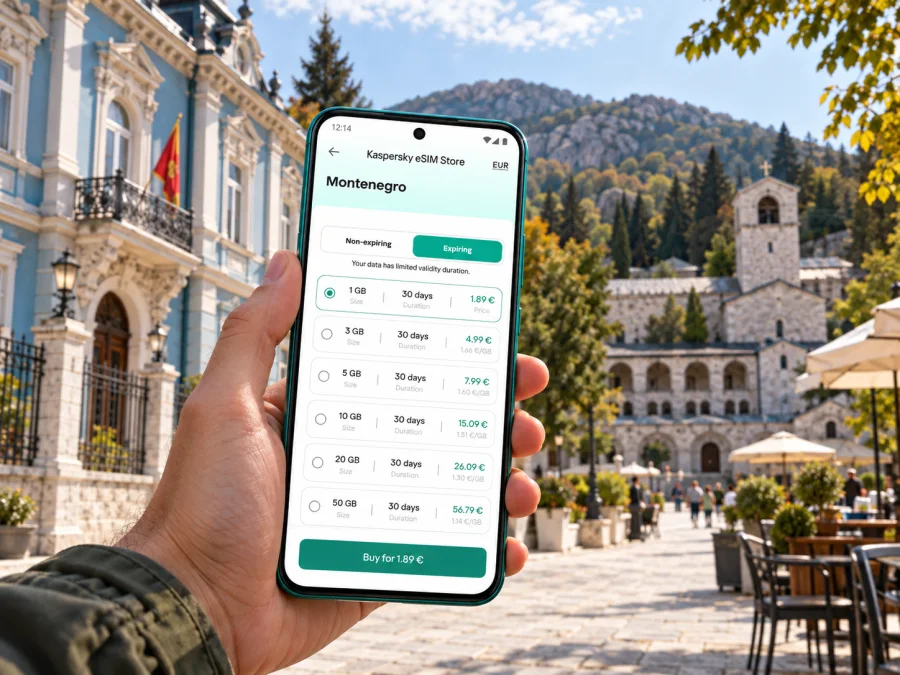
Cetinje eSIM: mobile connection and internet for your trip
Cetinje is a compact historic town in Montenegro’s inland highlands, known as the country’s Old Royal Capital. A mobile data connection can be useful from the moment you leave the airport: to confirm a transfer, check a map, message your host or look up museum opening information. An eSIM lets you prepare a digital SIM profile for travel without removing your home SIM, provided your phone supports eSIM and is not locked to a carrier.
Cetinje sits at about 672 metres above sea level, beneath the Lovćen massif. Its historic centre is easy to explore on foot, while airport transfers, day trips and mountain roads make mobile navigation useful beyond the central streets. Planning for those different parts of the journey helps you choose a travel data plan based on your itinerary rather than the city name alone.
When mobile data helps in Cetinje
The first useful moment may be before you reach town. Podgorica Airport is the closest airport listed for Cetinje by Airports of Montenegro; its published reference is 40 kilometres and about 40 minutes by road. These are planning figures, not a guarantee for your transfer: the actual journey depends on your pickup point, traffic, weather and road conditions. Tivat Airport is another possible arrival point, but the drive is longer. Confirm your route and transfer details before travelling, and keep the address of your accommodation available offline as a backup.
If you have mobile data ready, you can:
- message a driver or accommodation host when your arrival time changes;
- compare a map route with the directions provided by your hotel;
- check a reservation, ticket or museum information while walking around town;
- use a ride or taxi service where available, and confirm the destination before setting off;
- share your location with a travel companion or contact family through an online messaging app.
These are everyday uses rather than a promise of uninterrupted service in every building or on every road. Signal conditions depend on the network used by the selected plan, the device, terrain and local conditions. Download an offline map of Cetinje and the wider area before leaving a reliable Wi-Fi connection, especially if you intend to travel into the hills.
Getting around the historic centre
Cetinje’s character is closely tied to its former royal role. The former residences and public buildings, the Cetinje Monastery, Biljarda Palace and King Nikola’s Palace make a natural walking itinerary through the historic centre. Museums are another reason to leave time between stops: check current opening hours before you go, since schedules can vary by season or day. Save the names of places in both English and their local spelling when available; this can make searching for a building or confirming a pickup point easier.
The central area is small enough that a map often works best as a way to orient yourself between landmarks, not as a substitute for looking around. Use a clear meeting point such as the entrance to a museum, a square or your accommodation rather than relying on a dropped pin alone. If mobile data pauses, the saved map, written address and previously downloaded tickets still help you continue.
For a short city stay, think about your data needs in three groups:
| Use | What to plan for |
|---|---|
| Arrival and first transfer | A working map, booking details and a way to contact your driver or host |
| Walking around Cetinje | Search, directions, messages and checking visitor information |
| Day trips beyond town | Navigation for the outward and return journeys, plus offline map access |
The amount of data you need depends on how often you stream, upload photos, use video calls or share a connection with another device. Maps and text messages usually require less than high-resolution video. If you expect to work online or upload large files, account for that separately and check whether tethering is permitted by the selected plan.
Choose a plan for the whole Montenegro itinerary
A city article can help you plan the Cetinje part of a trip, but a travel eSIM plan is generally tied to a country, region or route rather than to a single town. Check that Montenegro is included in the plan’s destination list. If your itinerary continues through another country, verify that destination separately; a regional plan may suit a multi-country route, but its included locations and conditions must be checked before purchase.
Look at the details that affect how you will actually use the connection:
- Destination. Confirm that the plan applies in Montenegro, and in every other country you expect to visit.
- Data allowance. Estimate everyday use, then add extra capacity if you rely on video meetings, cloud backups or hotspot use.
- Validity. Compare the plan’s active period with your travel dates and the stated moment when validity begins.
- Network and speed terms. Read the plan details for network access, any speed limits and local conditions. A destination label does not guarantee a particular local operator or identical reception everywhere.
- Top-ups and tethering. Check whether you can add data later and whether sharing data with a laptop is allowed.
- Calls and messages. Many travel data plans are intended for mobile internet and may not include a regular local number, voice calls or SMS. Read the selected plan’s terms and keep your usual number available for services that depend on it.
Montenegro’s mobile market includes local operators such as Crnogorski Telekom, One Crna Gora and m:tel. Those names describe the local operator market; they do not mean every travel eSIM connects to all three. The network or roaming partner available to you depends on the specific plan and its arrangements. Kaspersky eSIM Store is an app and website where you can choose, purchase and activate an eSIM with a travel data plan; it is not a mobile network operator. Review the plan’s destination and network information before choosing.
When you are ready, choose an eSIM plan for travel in Montenegro and compare its destination, data allowance and validity with your itinerary. The destination is Montenegro, even when your main stop is Cetinje.
An eSIM plan for a city break, a work visit or a road trip
For a one-night stop: focus on arrival messages, maps, check-in details and a return journey. You may not need the same allowance as someone streaming video throughout a longer holiday. Still, verify the validity period: a short visit does not automatically mean a plan expires after one day.
For a museum-focused weekend: save the locations of the Cetinje Monastery, Biljarda and the museums you want to visit. Use mobile data for changing information and messages, and keep reservation details accessible offline. A downloaded map is useful if you prefer to put your phone away while walking.
For a work trip: check whether your accommodation has dependable Wi-Fi for large files or video meetings, and treat mobile data as the connection you can use while travelling around town. If you plan to tether a laptop, check the plan terms in advance. Keep work documents available offline in case your connection is unavailable at a particular moment.
For a wider day trip: the official Montenegro tourism information describes Cetinje as a starting point for Lovćen National Park and lists Ivanova Korita at about ten kilometres from town. The same tourism site identifies Lipska Cave as five kilometres from Cetinje. Distances do not describe road or walking time. Check current access, opening information and travel conditions before setting out; mountain routes can require more attention than a walk around the centre. Download maps and any tickets while online, and make sure your return route is clear before leaving.
Prepare the phone before you travel
Compatibility is determined by your exact device and variant, not just the model family name. Some phones sold in different countries have different SIM hardware or restrictions. Check the manufacturer’s support information for your model number, confirm that the device is unlocked, and verify that it can add an eSIM profile. Check your device’s eSIM compatibility before you choose a plan.
For example, manufacturers publish market-specific compatibility details; Apple’s current guidance explains that eSIM support differs for iPhones intended for mainland China. That is a device-market distinction, separate from Montenegro’s mobile operator market and separate again from a travel plan’s supported destinations. Do not assume that a model name alone settles compatibility. Check your phone’s model number in its settings and consult the device maker’s instructions for that exact variant.
Before departure, also check that:
- your phone can connect to Wi-Fi or another internet connection during installation;
- you can access the email address or account containing your eSIM details;
- your home SIM remains available for calls or verification messages if you need it;
- mobile data is assigned to the intended eSIM when you want to use the travel plan;
- data roaming is enabled for that eSIM only if the plan’s instructions require it;
- automatic app updates, photo backups and video autoplay will not use data unexpectedly.
Install and activate the eSIM
Follow the instructions supplied with your plan, because menu names and activation steps can vary by phone and provider. In general, complete setup while you have a stable internet connection, and avoid deleting a profile after installation unless the provider tells you to do so.
- Check the plan. Confirm the country, data allowance, validity, activation trigger and any roaming or tethering instructions.
- Connect to Wi-Fi. Keep a reliable internet connection available while adding the eSIM profile.
- Add the eSIM. Use the phone settings and scan the QR code or enter the activation details provided for your purchase.
- Label the line. Give it a clear name such as “Montenegro data” so you can identify it alongside your regular SIM.
- Choose data settings. Select the travel eSIM for mobile data when the plan should be used. Keep your home line’s settings as intended for calls and messages, and review roaming charges from your home operator.
- Activate at the right time. Some plans start validity on installation; others start when they first connect to a supported network. Follow the plan terms rather than assuming that all eSIMs start in the same way.
- Check the connection. After arrival, allow time for registration and confirm that the selected line and data settings match the plan instructions.
For step-by-step help, use the Android eSIM installation guide or the iOS eSIM installation guide. Menu labels can change between operating system versions, so follow the screens on your device.
Keep data use predictable in town and on the road
Maps, messaging and browsing can make a small allowance last longer than frequent video calls, high-resolution streaming or cloud uploads. You do not need to disable everything; choose what should sync over mobile data and what can wait for Wi-Fi.
A simple travel setup:
- Navigation: download the Cetinje area map and the maps for planned day trips in advance.
- Photos: pause automatic full-resolution backups over mobile data, then upload them later on Wi-Fi if that suits you.
- Video: lower streaming quality or save content before leaving your accommodation.
- Work: download files before a meeting and keep a backup copy of essential documents.
- Hotspot: connect a laptop only when you need it, and check that tethering is included in your plan.
- Updates: postpone large app and operating-system downloads until you have Wi-Fi.
If the data connection does not appear, first check that the eSIM is switched on and selected for mobile data. Confirm that airplane mode is off, restart the phone if appropriate, and review the plan’s activation and roaming instructions. A brief delay or a weak signal in one location does not by itself show that the profile is defective. If the issue continues, contact the seller or provider identified in your plan details and share the device model, location and exact error message.
Frequently asked questions
Is an eSIM for Cetinje a separate city plan?
Usually, you choose a plan for Montenegro or for a region that includes Montenegro, rather than a plan whose coverage is limited to Cetinje. Check the included destinations and network conditions in the plan details. The city name in your itinerary does not identify which local network a plan uses.
Will the same connection work throughout Cetinje and Lovćen?
No plan can promise identical reception in every street, building or mountain location. Reception depends on the plan’s local network partner, terrain, device and local conditions. Save maps in advance and check the route before leaving town.
Does a travel eSIM replace my usual phone number?
Not necessarily. Many travel eSIMs provide mobile data without a regular phone number, voice calls or SMS. Check the selected plan’s terms. You can often keep a home SIM active for calls or verification messages, but your home operator may charge for roaming.
Can I install the eSIM after reaching Cetinje?
You can follow the plan instructions after arrival if you have an internet connection, but installing it before departure can make setup easier. Check when validity starts so you do not activate the plan earlier than intended. Keep the QR code or activation details accessible on another screen or in a safe saved location.
What if my phone has two SIM options?
Many phones let you keep a physical SIM and an eSIM profile, but the number of stored profiles and which lines can be active at once depend on the device. Set the travel eSIM as the data line only when needed, and check the phone maker’s guidance for your exact model.
Do I need mobile data inside every museum or hotel?
No. You can use Wi-Fi where available and mobile data when you are out, checking directions or coordinating a pickup. Do not assume that every venue offers Wi-Fi or that its signal will reach every room; save essential booking and address details for offline access.
A simple Cetinje connectivity checklist
Before you leave:
- check that the device variant supports eSIM and is not carrier-locked;
- confirm that Montenegro is included in the plan, and review any network and validity terms;
- install the profile over a reliable connection if the instructions allow pre-installation;
- save your accommodation address, arrival details, offline map and day-trip route;
- decide which SIM should handle mobile data, calls and messages;
- check the transfer from your arrival airport and leave room for traffic or route changes.
Once in Cetinje, use data for the tasks that benefit from a live connection and keep an offline fallback for the rest. That approach works for a walking visit to the historic centre, a work appointment or a longer stay with excursions toward Lovćen.
Get ready for your trip
Kaspersky eSIM Store is an app and website that helps you choose, purchase and activate an eSIM with a suitable plan for mobile internet while travelling abroad. Review the destination, data allowance, validity and device compatibility before you proceed. When your itinerary is clear, compare eSIM plans for Montenegro, then install and activate the selected profile according to its instructions.


